1
3.2
Guitar Mode
21
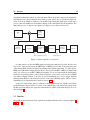
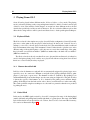
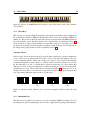
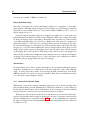
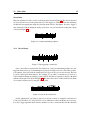
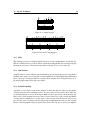
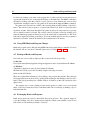
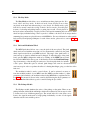
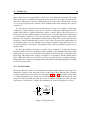
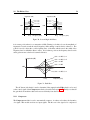
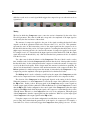
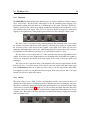
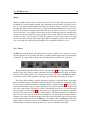
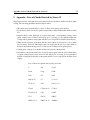
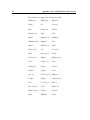
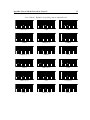
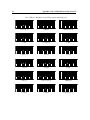
Figure 10: Sections of the MIDI keyboard as used by Strum GS in Guitar mode. The C with the
dot is middle C
3.2.1
Chord Keys
This section is associated with the fretting hand of the guitarist and includes notes ranging from
the second E below middle C (MIDI note number 40) to B one octaves above middle C (MIDI note
number 71). This section of the keyboard is where chords are played and it is the MIDI signal from
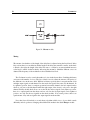
this section which is sent to the chord detection and voicing modules as explained in section 2.4.
Strum GS will try to detect a chord and find a corresponding voicing as soon as three or more key
are depressed on the keyboard. Note that the exact guitar voicing chosen by Strum GS depends on
the setting of the Voicing module as will be explained in section 3.4.
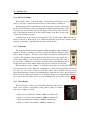
Automatic Chords
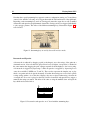
In Guitar mode, chords are always played by Strum GS when a single note or special configuration
of two or three notes are played in the Chord Keys section of the keyboard making it very easy
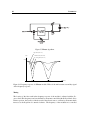
to create strumming patterns. When only a single note is played, a major chord is automatically
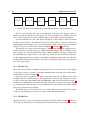
constructed using this note as the chord root. A minor chord is created by playing a root note and
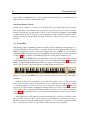
the first black key to its left. A seventh chord is played by depressing a root note and the first
white key to its left. A minor seventh chord is obtained by playing a root note and the first black
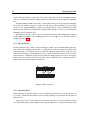
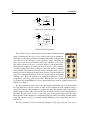
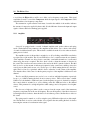
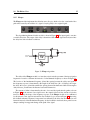
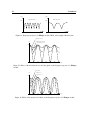
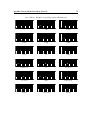
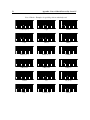
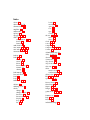
and white key to its left. These special rules are illustrated in Figure 11 with the key of C as an
example. Note that other two note intervals are ignored and a major chord is played using the first
note of the interval which was played as the root of the chord.
C
Cm
C7
Cm7
Figure 11: Automatic chords. The key of C is used as an example but all keys follow the same
rules.
3.2.2
Strumming Keys
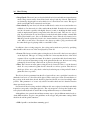
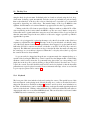
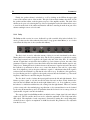
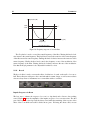
The twelve notes from the C note located one octave above middle C (MIDI note numbers 72 to 83)
are interpreted as special strumming keys and are used to trigger different picking hand techniques.