1
18
TESTING PROCEDURE
Cholestech LDX System User Manual
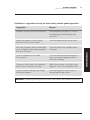
12. When the results are outside the measuring range
of the test, the screen will display:
[Test Name] > ###
or
[Test Name] < ###
TESTING PROCEDURE
13. If there is a problem with the test, a message will appear
on the screen. (See the Troubleshooting & Maintenance
section, pages 32–35, for further instructions.)
14. When the drawer opens, remove the cassette, and
put it in a biohazardous waste container. Leave the
Analyzer drawer empty when not in use.
15. Record the results on the appropriate form.
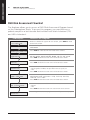
16. To run another test cassette, press RUN once.
Load cassette
and press RUN.
17. Repeat step 3, and steps 6 through 15.
IMPORTANT: If you do not want to run another test and the
drawer is open, press STOP to close the drawer.
18. Otherwise, after four minutes a beep will sound
and the screen will display:
System timeout
RUN to continue
IMPORTANT: If the RUN button is not pushed within 15
seconds, the drawer will close and the screen will go blank.
19. If necessary, press the DATA button to view the
results from the last cassette tested.
IMPORTANT: Pressing the RUN button will erase the
previous result.