1
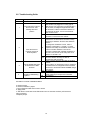
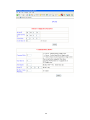
6.8 Troubleshooting Guide
No
Checkpoint
1
Is the LINK LED on and is
the ACTIVITY LED
flashing with short
pulses?
Solution
No
Yes
2
No
Does the Protocol
converter respond to
PING requests?
Yes
3
4
Can the default Web page
be accessed in a Web
browser?
Are the LINK LED and
ACTIVITY LED flashing
together?
No
Yes
Yes
No
No network connection is detected. The Ethernet
cable is either not plugged in or wrong type of
cable is used. For connection to a network with a
hub or switch, a straight through network cable
can be used. For direct connection between PC
and Protocol converter, a cross over Ethernet
cable must be used.
A network connection is detected; the Protocol
converter is connected to the network.
Either the PC or the Protocol converter is setup
with wrong IP address. Set PC-E with default IP
address.
To change the IP address of a PC, use the
Windows "control panel -> network -> TCP/IP
properties" and setup an IP address close to the
Protocol converter address. The Protocol
converter is shipped with a default IP address of
192.168.0.112, the PC can be setup with an IP
address of 192.168.0.113
The PC and Protocol converter are setup with a
correct IP address and they are able to
communicate with each other.
This is normally caused by the setup of the Web
browser.
In the "options" or "preferences" menu, check that
the Web browser is configured for direct network
connection or local area network and NOT using a
proxy server.
No problems.
Switch off the power to PC-E. Wait for some time
before switching on the power for next time.
No Problems
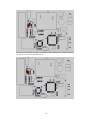
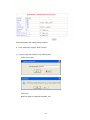
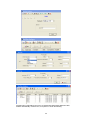
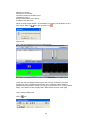
Procedure to set PC-E to default IP address
a. Remove power.
b. Remove "Default IP" jumper.
c. Plug in Ethernet cable and connect to switch.
d. Apply power.
e. After about 2 seconds the link LED should come on and must not flash. (LED closest to
green connector)
f. Replace jumper.
15