1
1456H002 Ed.01
Alarms
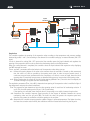
The alarms alert the user and stop regulation (closing the expansion valve) if determined values of pressure,
overheating or temperature are reached. These values are defined using the following parameters:
LSM: Lower overheating alarm
LPM: Lower pressure alarm in probe 2
FPM: Ice alarm in evaporator
HSM: Maximum overheating alarm
MPM: Maximum pressure alarm in probe 2
For every alarm 4 options must be configured:
Activation type
ŸDisabled: The alarm is not activated.
ŸAutomatic reset: The regulation restarts when the deactivation value of the alarm is reached.
ŸManual reset: In order for the regulation to restart, it is necessary to press the PRG button twice.
Turn-on value
If this value is reached, the regulation stops and the equipment displays a message on screen.
Turn-on delay time
Defines the delay time between when the turn-on value is reached and the alarm activates.
Deactivation value
Defines the value at which the alarm is no longer displayed and the machine returns to standard regulation (if
automatic reset has been set up).
Pressure Probe (S2)
The measuring range of the pressure probe set in the factory, on the probe model provided (AKO 15571), should
only be changed if a different probe is installed. It should only be configured by qualified staff.
PSH: Maximum range of pressure probe.
PSL: Lower range of pressure probe.
The PSO parameter allows you to vary the value read by the pressure probe (offset). It is used to compensate for
reading errors when the probe can not be positioned in the correct place.
Temperature probe (S1)
The TSO parameter allows you to vary the value read by the temperature probe (offset). It is used to compensate
for reading errors when the probe can not be positioned in the correct place.
If probe readings have continuous fluctuations, a reading delay may be set as a filter in order to
stabilise the reading. This delay is configured using the FT parameter and affects probes S1 and S2.
Expansion valve
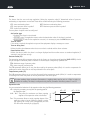
You can customise the behaviour of the expansion valve using the following parameters:
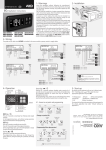
JCR: Using this parameter, you may limit the opening speed of
the expansion valve
COR: This parameter allows a certain opening degree of the
expansion valve to be set. While this option is active,
the opening will remain fixed (unregulated) and the
LED will remain manually lit up (page 6).
9
% opening
URH / URL: They allow the maximum and lower opening
degrees of the expansion valve to be limited.
JCR: OFF
JCR: 10.0%
100
0
10 sec.
t