1
UT3 Series
Changing the Battery
The unit comes with a built in Lithium battery with a 5 year life expectancy. The
steps below outline the process to change the battery inside the unit. Since only
the information saved to the registers/discretes available on a power cycle will
remain intact, please save pertinent information before attempting to change
the battery. Then remove power from the unit.
1. Open the back cover to access the battery.
2.
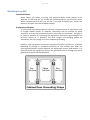
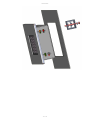
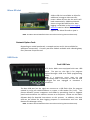
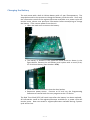
The battery is located in the upper-left hand corner as shown in the
figure below. Remove the old battery and replace with a new 1/2 AA,
3.6 V Lithium Battery (Part Number: UT-B).
3.
4.
Close rear cover and ensure that the door latches.
Reconnect power source. Connect to PC and run the Programming
Software to transfer back the user program to the UT3 Series.
The Real Time Clock (RTC) will need reset after the battery has been replaced.
All information saved to the registers/discretes available on a power cycle will
remain intact. Data not saved to registers/discretes available during a power
cycle will be lost.
30 / 34