1
controlCUE Controllers | Connecting
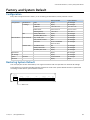
Connecting
CUEnet (LAN)
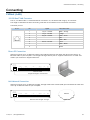
10/100 BaseT LAN Connector
The 10/100 BaseT LAN is a standard network connection 10/100 BaseT LAN using RJ-45 connector.
The length of the Ethernet cable connecting controller to the network must not exceed 100 meters.
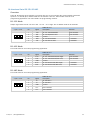
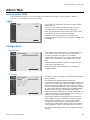
Connector pin out
RJ-45
Pin
Signal
1
TX_D1+ and PoE
White / Orange
2
TX_D1- and PoE
Orange
3
RX_D2+ and PoE
White / Green
4
Cat5 Cable Color
Blue
5
White / Blue
6
RX-D2- and PoE
Green
7
White / Brown
8
Brown
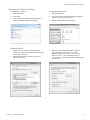
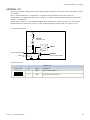
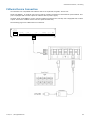
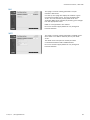
Direct PC Connection
Attach one end of an RJ-45 Ethernet cable to the CUEnet (LAN) port and attach the other end of the RJ-45
Ethernet cable to your computer. Use straight-through cable if your PC supports autosense or crossed-over
cable if your PC doesn’t support autosense.
CUEnet (LAN)
default IP address
192.168.1.127
F. D.
AUDIO LINE
IN
OUT
L G R
L G R
1
IR/SERIAL
2
3
4
SERIAL
1
S G S G S G S G
+ G 1
2
3
4
5
GENERAL I/O
1 2 3 4 G
2
1
2
3
4
5
S S S S G
1
RELAY
2
NC C NO NC C NO
PWR IN
24 VDC
+ G
Ethernet cable
straight-through or crossed-over
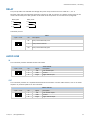
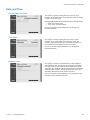
LAN Network Connection
Attach one end of an RJ-45 Ethernet straight-through cable to the CUEnet (LAN) port and attach the other end
of the RJ-45 Ethernet cable to your computer.
CUEnet (LAN)
default IP address
192.168.1.127
F. D.
AUDIO LINE
IN
OUT
L G R
L G R
1
IR/SERIAL
2
3
4
S G S G S G S G
SERIAL
1
+ G 1
2
3
4
5
GENERAL I/O
1 2 3 4 G
2
1
2
3
4
5
S S S S G
1
RELAY
2
NC C NO NC C NO
PWR IN
24 VDC
Network
+ G
Ethernet cable straight-through
© CUE, a.s. | All Rights Reserved.
10