1
Table of Contents
About this Book
Audience . . . . . . . . . . . . . . . . . . . . . . . . . . . . . . . . . . . . . . . . . . . . . . . . . . . . . . . . xi
Prerequisites . . . . . . . . . . . . . . . . . . . . . . . . . . . . . . . . . . . . . . . . . . . . . . . . . . . . . . xi
Organization. . . . . . . . . . . . . . . . . . . . . . . . . . . . . . . . . . . . . . . . . . . . . . . . . . . . . . xii
Conventions . . . . . . . . . . . . . . . . . . . . . . . . . . . . . . . . . . . . . . . . . . . . . . . . . . . . . xiii
Acronyms and Abbreviations. . . . . . . . . . . . . . . . . . . . . . . . . . . . . . . . . . . . . . . . xiii
Bibliography. . . . . . . . . . . . . . . . . . . . . . . . . . . . . . . . . . . . . . . . . . . . . . . . . . . . . xiv
Chapter 1
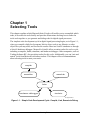
Selecting Tools
1.1
1.2
1.3
1.4
1.4.1
1.4.2
1.4.3
1.4.4
1.5
1.5.1
1.5.2
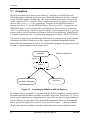
Compilers . . . . . . . . . . . . . . . . . . . . . . . . . . . . . . . . . . . . . . . . . . . . . . . . . . . . . . . 1-2
Assemblers . . . . . . . . . . . . . . . . . . . . . . . . . . . . . . . . . . . . . . . . . . . . . . . . . . . . . . 1-3
Linkers . . . . . . . . . . . . . . . . . . . . . . . . . . . . . . . . . . . . . . . . . . . . . . . . . . . . . . . . . 1-4
Simulators . . . . . . . . . . . . . . . . . . . . . . . . . . . . . . . . . . . . . . . . . . . . . . . . . . . . . . 1-6
Data Streams and the Simulator . . . . . . . . . . . . . . . . . . . . . . . . . . . . . . . . . . . 1-7
User Interfaces to the Simulator . . . . . . . . . . . . . . . . . . . . . . . . . . . . . . . . . . . 1-8
Debugging with the Simulator . . . . . . . . . . . . . . . . . . . . . . . . . . . . . . . . . . . . 1-9
Online Help for the Simulator . . . . . . . . . . . . . . . . . . . . . . . . . . . . . . . . . . . . 1-9
Hardware Debugger: ADS . . . . . . . . . . . . . . . . . . . . . . . . . . . . . . . . . . . . . . . . . 1-10
User Interfaces to the Debugger . . . . . . . . . . . . . . . . . . . . . . . . . . . . . . . . . . 1-12
Online Help for the Debugger . . . . . . . . . . . . . . . . . . . . . . . . . . . . . . . . . . . 1-12
Chapter 2
Testing Your Hardware Installation
2.1
2.1.1
2.1.2
2.1.3
2.2
2.3
2.4
Testing Your Installation of the Command Converter. . . . . . . . . . . . . . . . . . . . .
Testing through the Graphic User Interface . . . . . . . . . . . . . . . . . . . . . . . . . .
Testing through the Command-Line Interface . . . . . . . . . . . . . . . . . . . . . . . .
Understanding the Test Results . . . . . . . . . . . . . . . . . . . . . . . . . . . . . . . . . . .
Testing Your Installation of a Target Board . . . . . . . . . . . . . . . . . . . . . . . . . . . .
Testing a Low-Frequency Target Device. . . . . . . . . . . . . . . . . . . . . . . . . . . . . . .
Choosing a Connector for the EVM Power Supply . . . . . . . . . . . . . . . . . . . . . . .
Motorola
Table of Contents
2-3
2-3
2-4
2-4
2-5
2-5
2-6
iii