1
5
Services
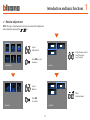
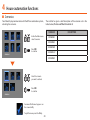
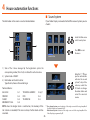
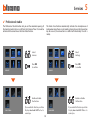
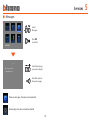
✔✔ Door state
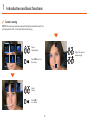
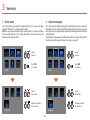
✔✔ Alarm messages
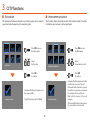
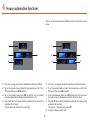
This function tells you about the door lock state. If it is open the “door
lock LED” flashes, if it is closed it remains OFF.
NOTE: it can only be activated if your system allows it (ask your installer
for more information); it can not be activated at the same time as the
Professional Studio function.
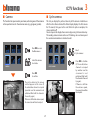
If it is activated the Video Display tells you if the antiintrusion system has
detected an alarm. The three LED flash alternately until a key is pressed
to display the message (if locally supplied the message will be displayed
automatically).
To cancel the message press the C key when the message is displayed. If
not the signal will appear the next time a key is pressed.
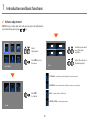
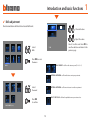
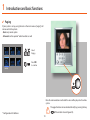
SERVICES
Select
Services
Select
Services
Press OK
to confirm
Press OK
to confirm
SERVICES
IMPOSTAZIONI
IMPOSTAZIONI
Select
Door state
Select
Alarm MSG
Enable or disable
the function
Enable or disable
the function
DOOR STATE
ALARM MSG
34