1
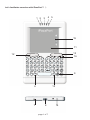
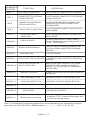
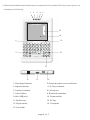
What is iPazzPort™ Ⅰ and what is it for? iPazzPort™ Ⅰis also known as Bluetooth Handheld Keyboard and Mouse Touchpad, it is the smallest wireless keyboard and mouse touchpad in the world for the moment, with built-in Bluetooth Device, iPazzPort™ I provides wireless short range communication with other Bluetooth device instead of pysical cable connection that traditionally link electronic devices. As a compromise of Bluetooth Technology, QWERTY keyboard, and mouse touchpad, iPazzPort™ Ⅰ provides a so much convenient and capable tool for: ■ The one who want to be apart from his computer yet must control it for his presentation, lecturing, teaching and training with large screen or projector. With iPazzPort™ Ⅰyou can go around and communicate with your people to make your presentation lively, and create a good atmosphere for your presentation. ■ The one who want to sit in his easy and comfortable chair to enjoy his Home Theater Personal Computer, or view internet content, IPTV, even chat with your family or friends via Skype, MSN …and so on. iPazzPort™ I provides a good solution of wireless operation for the computer, It is really a computer remote controller. What's in your Package? In the package with iPazzPort™ Ⅰ you will find a USB cable for charging the iPazzPort™ Ⅰand this manual. Features and specifications: Bluetooth remote controls of your computer with distance about 10M. Smart and portable size: 85mm x 135mm x 10mm Backlit keyboard for the convenient operation in darkened room Large PAD for hand writing. Bluetooth standard: Bluetooth V2.0; HID V1.0 QWERTY keyboard Weight: 60g Starting with iPazzPort™ Ⅰ: 1. Pairing and establishing connection. Let's take Microsoft Bluetooth Software as an example to describe Bluetooth Search,Pairing and Connection, other Bluetooth software please refer to its own user manual. 1.1 Turn on unit by moving the power switch to ON, (see arrow 14), wait about 2 seconds, backlit will light on and then go out then you will see LED3 flash, that means your unit is trying to build connection with other Bluetooth device. if you see LED3 flash one time and then go out, this is normal, you can push Bluetooth Reset Button indicated by arrow7 to re-build connection. 1, 2 Click “Start”, “Control Panel” (make sure you're in Classic View), and then double-click Bluetooth Devices. 1.3, Click “Add”. 1.4, In the Add Bluetooth Device Wizard, select the “My device is set up and ready to be found check box”, and then click “Next”. 1.5, After icon of “Bluetooth iPazzPort” appear, click “Bluetooth iPazzPort”, and then click “Next”. 1.6, When the wizard asks you which passkey you want to use, click “Choose a passkey for me”. Then click “Next”. page 3 of 7