1
E n g l i s h
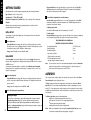
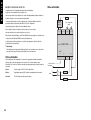
SP2 / SP3 OUTPUT AND LED STATUS IN ALARM CONDITION
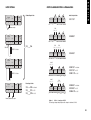
LINEAR INPUT
SP2 / SP3 ALARM ANNUNCIATOR
Set-up Procedure
If a Primary Alarm mode has been configured, when an alarm condition occurs the alarm
annunciator -AL- will be displayed alternating with the process variable. The alarm
together with the display, will be automatically reset as soon as the alarm condition has
been cleared.
The 4–20mA input model converts current into voltage using an internal resistor which
spreads the signal across the input range 10 to 50 mV. using multiplier of 2.5. When using a
transducer with an output less than 4–20mA, the input maximum and minimum mV values
can be calculated using the same multiplier.
The annunciator may be disabled by selecting no.AL: on, in Level 4.
Models with 0 to 5V input use an internal resistor to spread the signal across the input
range
0 to 50 mV using a divider of 100. Where a transducer provides a smaller
output, the input maximum and minimum values can be similarly calculated.
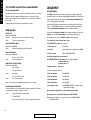
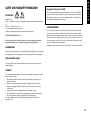
ERROR MESSAGES
Decide what scale minimum and maximum will be required, and whether the scale needs
inverting. (See Level A; Linear Input Scaling for list of settings and limits, page 10).
SENSOR FAULT
Display flashes: inPt: FAiL
Indicates:
sensor open or short circuit or linear input over-range.
Action:
Check sensor/wiring/connectors
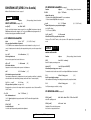
The example below shows how a 4–20mA linear Input should be configured.
# e.g. 4–20mA = 60 to 260 units where 4mA = 60 units
NON-VOLATILE MEMORY ERROR
Display flashes: dAtA : FAiL
Action:
De-power briefly. Replace unit if problem persists
Follow INITIAL SET-UP procedure (also see page 4).
MANUAL POWER ERROR
Display flashes: hAnd : FAiL
SP1 set to on–off in CYC.t
Action:
Select proportional mode
1. Select input sensor
Select inPt:Lin
2. Select unit
Select required unit, if not available Select unit:SEt
3. Select SP1 output
Select from: Rly, SSd or AnLG
Enter initial configuration into controller memory
DO NOT ENTER SETPOINT until Linear Input has been configured in Level A
See functions menu page 3
and functions list page 10.
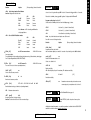
IMMEDIATE FAIL ON AUTOTUNE START
Display flashes: tunE : FAiL
Setpoint display 0
1. No setpoint entered.
Configure Linear Input
Enter level A
(Then using example given # above)
Action:
Enter setpoint
4. Enter scale maximum
Select An.hi:260
5. Enter scale minimum
Select An.Lo:60
Action:
2. SP1 set to ON/OFF in CyC.t
Select proportional mode
6. Enter input maximum
Select hi.in:50.0
Note: To reset and clear error press ▲▼ together briefly to cancel message.
7. Enter input minimum
Select Lo.in:10.0
FAIL LATER DURING AUTOTUNE CYCLE
The thermal characteristics of the load exceed the Autotune algorithm limits. The failure
point indicated by any display 0.0 in tech e.g. Ctb = 0.0
8. Enter display resolution
Select dECP:0000 (WARNING – otherwise settings
marked ✢ may be altered)
Action:
Enter Linear Input configuration into controller memory and enter setpoint.
1.
Change the conditions. eg. raise setpoint
Now configure Levels 1, 2 and 3 and if required proceed with AUTOTUNE.
2.
Try tunE : At.SP
3.
If the error message persists, call local CAL representative for advice.
Note: Any apparent calibration errors can be removed using the ZEro and SPAn
adjustments in Level 3.
6
✢
Will be affected by dECP settings in Level A