1
E n g l i s h
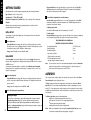
GETTING STARTED
After power-up the controller requires programming with the following information:
Press and hold ✱ and use the ▲ or ▼ buttons to select from the choices Rly, SSd or
AnLG depending on the model supplied. SP2 and SP3 outputs will be automatically
allocated. (See output options table on page 8).
Type of Sensor (See list of sensors p.22)
Operating unit °C °F bAr PSi Ph rh SEt
Allocation of Output Device to SP1/SP2 (Relay / SSd) or analogue. SP3 is always relay.
Setpoint
When the above information has been programmed into the controller it will be
operational with factory PID settings.
INITIAL SET-UP
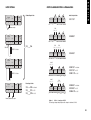
On power-up the controller will display the self test sequence followed by the initial
display inPt : nonE
4 To enter initial configuration into controller memory
Press and hold both ▲ and ▼ buttons for 3 seconds. The display will now read PArK
and measured variable (e.g. ambient temperature 23°). PArK is displayed because a
setpoint has not yet been entered.
To display setpoint units
Press and hold ✱ The displays will now read unit (eg. °C ) and 0
To enter setpoint
Press and hold ✱ and use ▲ button to increase or ▼ button to decrease the reading and
scroll to required setpoint value. (The digit roll-over rate increases with time).
THE CONTROLLER IS NOW OPERATIONAL
WITH THE FOLLOWING FACTORY SETTINGS
1 Select input sensor.
Press and hold ✱ and use the ▲ or ▼ buttons to scroll through the sensor selection
list until the correct sensor is displayed. Release the buttons. The display will now read
selected sensor type e.g. inPt : tCS (type S thermocouple).
Press ▲ once The display will now read unit : nonE
LINEAR INPUT
When Linear Input is selected, the display resolution of the setpoint and many other
functions will be changed from the setting previously made at di.SP in Level 2, to that set
at dECP in Level A.
It is therefore recommended that on completion of the Initial Set-up the Linear Input
settings in Level A be completed before moving on to configure Levels 1, 2 and 3. (see
Set-up Procedure page 6).
2 Select operating unit.
Press and hold ✱ and use the ▲ or ▼ buttons to scroll through the unit selection list
until the correct unit is displayed. Release the buttons. The display will read selected
unit e.g. unit : °C
Press ▲ once The display will now read SP1.d : nonE
3 Select SP1 (Main setpoint output device)
Analogue output
The allocation of the analogue output to SP1 automatically overrides the default
proportional cycle time setting of 20 seconds. Where the analogue output is
allocated to SP2, the default CyC.2 setting on/off must be manually changed in
Level 1 to a time proportioning setting to enable the analogue output to operate in
proportional control mode.
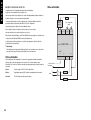
4
Proportional band/Gain
Integral time/Reset
Derivative time/Rate
10ºC/18ºF/100 units
5 mins
25 secs
Proportional cycle-time
(Typical setting for relay output)
DAC Derivative approach control
(Average setting for minimum overshoot)
20 secs
Note:
1.5
For more precise control or for non temperature applications where a Linear input
transducer is being used, the controller may need to be tuned to the process.
Please refer to the following section on AUTOTUNE.
AUTOTUNE
This is a single shot procedure to match the controller to the process. Select either Tune or
Tune at Setpoint from the criteria given below.
The Tune program should be used for applications other than those listed under Tune at
Setpoint below. The procedure will apply disturbances when the temperature or process
reaches 75% of the setpoint value, causing overshoot which is monitored in order to adjust
the DAC overshoot inhibit feature. Care should be taken to ensure that any overshoot is safe
for the process.
The Tune at Setpoint program is recommended when:
● The process is already at setpoint and control is poor
● The setpoint is less than 100°C in a temperature application
● Re-tuning after a large setpoint change
● Tuning multi-zone and/or heat-cool applications.
Notes:
DAC is not re-adjusted by Tune at setpoint. Proportional Cycle Time can be preselected before running the Autotune program. (see page 5).