1
4)
5)
6)
7)
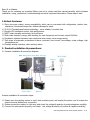
Select the machine working mode: for solar energy systems , select the PV priority, otherwise AC priority
Press the ON/OFF button to start, to ensure it can work normally and connect the mains.
Open the solar input switch for solar charging;
Connect the input terminals with the loads which are turn off, and then open them one by one.
2.2 Precautions
1) connect properly to the battery and solar panel, reversed or high voltage will cause serious damage.
2) be connected to ground securely
3) don’t load beyond the rated power. If connect the refrigerators, fans such inductive loads, the loading
capacity should not exceed the 30% of the rated power.
4) don’t install this products outdoors, avoid the electricity leakage caused by any water.
5) when the product work properly, the cabinet will have a certain degree of heat. It should be installed
at a distance over 50 cm far away the human venue area. To ensure adequate ventilation around, and
away from flammable materials
6)If the product malfunctions, disconnect the mains input immediately , and then shut down.
Disconnect the battery and solar panel switch, and take note of the failure and fault phenomena, etc,
contact your dealer promptly, and give the products to the professional personnel.
3. Working principle:
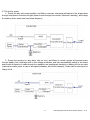
3.1 System circuit diagram
3.2 AC priority mode:
1) When AC power supply is normal: AC input will provide power to equipments through regulator after
removing the high frequency harmonic with filter. At this time, PV gives power to batteries only
through MPPT control system.
-4-
Solar Integrated Inverter Series 500VA~2500VA 13.11