1
TS-CV-DC Project Document No./ MP5 No
127.50/FCUL-00009
1.2 STARTING PROCEDURE
Before starting the cooling unit, the user must check:
•
the connections to the user pipes are tight (3 valves on the distribution lines serve
the three lines to the panels of the environmental chamber in bldg. 186)
•
the electrical power is on
•
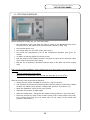
the cooling plant is in the “OFF” mode (PLC screen)
•
the correct set temperature is set on the Temperature regulator (see §5.2.1 for
details)
•
no alarms or warning appear on the PLC screen
•
that the pump inverter (Output pressure set-point) is turned on the minimum value
(turn counter clock wise until it stops)
•
that the dry air flushing is activated (manual valve on the back side of the cooling
rack)
N.B.: for the actual installation, some checks have to be done also on the environmental
chamber:
-
open the distribution circuit valves
-
open the dry air distribution into the cold box (flow rate of 5 to 10 m3/h)
After the checks, these steps shall be followed:
•
change the PLC status in STAND-BY (push the + sign on the PLC)
•
wait for about 20 minutes and check regularly that the pressure in the tank is stable
at about 700 mbara (check that the “storage tank pressure” is at about -0.3)
•
Open the distribution valves (if they were closed)
•
Wait until the pressure is stable again
•
Start the cooling plant : change the PLC status in RUN (push the + sign on the PLC)
•
Raise the pressure by mean of the inverter (knob of the “outlet pressure set-point”
to be turned clock wise) up to an outlet vale of 2 bar (check on the “outlet tank
pressure” manometer)
3/6