1
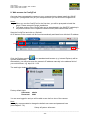
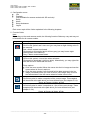
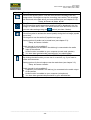
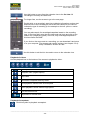
User manual SNC-311RINA, SNC-311RDIA, SNC-311RBIA SNC-311FEIF, SNC-311FBIF 4. Configuration menu: Live Playback (only available for camera models with SD card slot) Setup Alarm Setup Assistance Logout Each menu topic will be further explained in the following chapters. 5. Function fields: Note: Depending on the used camera model, the following function fields may vary and may not be available for all camera models. Symbol Description Relay output (not available for cameras SNC-311FBIF and SNC-311FEIF): Click on this symbol and it turns red (you may hear a slight clicking noise in the camera). Red = Alarm contact is activated. Click again on this symbol and it will turn grey (you may hear a slight clicking noise in the camera). Grey = Alarm contact deactivated. Digital zoom: Click on this symbol. It turns blue when activated. Click again to deactivate it (will turn white). Alternatively, you may right-click with the mouse to deactivate the zoom. Zoom options: Click the zoom symbol. Move the mouse into the live image and use the mouse wheel to zoom in and out. Click the zoom symbol. Left-click and hold to draw an area in the live image (red frame) which you wish to zoom. Use Drag & Drop to move the selected area. Use the mouse wheel to further zoom in/out. Snapshot: Click this symbol to make a snapshot of the current image. This snapshot will be stored at the path which you have defined here (see chapter 3.2.4): Setup Camera Video Path Triple snapshot: Click this symbol to make 3 snapshots at 1 fps of the current image. These snapshots will be stored at the path which you have defined here (see chapter 3.2.4): Setup Camera Video Path _________________________________________________________________________________ - 25 -