1
INSTALLATION
MOUNTING THE UNIT
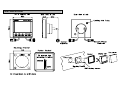
The display heads are supplied with a clip-in mounting
bracket which allows for easy installation, access from behind
is not necessary to secure the unit in place. However to
prevent theft and permanently fix the unit in position, locking
studs and thumb nuts are supplied.
Use the cutting template supplied to mark the centres of the
holes for the self-tapping screw, the fixing stud holes and the
mounting bracket.
SITING THE UNIT
All Network Instruments are designed for mounting on or
below deck. A mounting position should be selected where
they are:
• Easy to read by the helmsman
• On a smooth and flat surface
• At least 100mm (4") from a compass
• Accessible from behind for fitting locking studs if
required.
• The template allows 4mm (5/32") between adjacent units for
the suncover, increase this distance if required to maximum of
60mm (2 3/8") between units or 180mm (3 1/8") between
centres. For greater distances between units extension cables
are available.
• Use a 70mm (2 3/4") diameter hole-cutter for the mounting
bracket hole.
• Use a 2.9mm for the self-tapping screw holes.
• Use a 5mm (3/32") drill for the locking stud holes.
• Secure the mounting bracket to the bulkhead with the
self-tapping screws supplied
• Fit the rubber sealing gasket around the mounting bracket.
• Screw the locking studs into the back of the display head (if
required).
• Carefully pass the cable tails through the mounting bracket
hole, connect the cables to the main units.
• Clip the display head into the mounting bracket.
• Secure the instrument with the thumb nuts supplied.
13