1
Installing the Battery
5
Installing the Battery
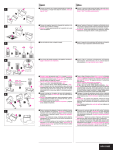
To install the battery:
1. Ensure that the FC-200 is turned off.
2. Using a Philips screwdriver, remove the two screws that retain the panel
bearing the ON/OFF switch and lay it aside.
3. Attach the battery connector to the battery taking care that the polarity is
correct. The connector fits the battery in one orientation only.
4. Slide the battery into the housing with the wires that exit the connector facing
the ON/OFF switch. Note that the battery can fit fully into the housing only if
the wires of the connector exit towards the switch.
5. Replace the panel, insert and tighten the retaining screws.
6
Using the FC-200 XGA EDID Copier to Read and Write the
EDID
Copying the EDID is a two step process consisting of:
1. Connecting the display device to the FC-200, reading the EDID, and
disconnecting the display.
2. Connecting the EDID receiver to the FC-200 and writing the EDID.
Figure 2: Reading and Writing the EDID
5