1
Grundeinstellung
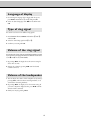
Language of display
1 For selecting the language of the display and the reports,
press MENU and numbers 1 and 1 and press OK.
2 Select the desired language with </> and confirm with
OK.
Type of ring signal
You can choose between ten different ring signals.
1 Enter function 44. Press MENU and numbers 4 and 4
and then OK.
2 Select the desired ring signal with 0 to 9.
3 Confirm your setting with OK.
Volume of the ring signal
You can adjust the volume of the ring signal if the fax machine is in standby mode or if it is just ringing. Please note that different volumes can be
set in S and M mode (see Fax switch).
1 By pressing </> the display shows the current setting for
about three seconds.
2 Change the volume by pressing </> until the desired
volume is achieved.
Volume of the loudspeaker
1 You can adjust the volume of the loudspeaker at any time by
pressing DIAL (without built-in answering machine) or l
(with built-in answering machine).
2 By pressing </> the display shows the current setting. If
you wish to adjust the displayed value, press </> until the
desired volume is achieved.
3 Finish your entry by pressing STOP.
15