1
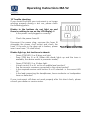
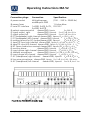
Operating Instructions MA 52 Press the STIM MODE key again to deactivate continuous presentation. 6.12 Interlock function Press the STIM MODE key longer than 2 seconds to activate the interlock function. The display shows the text Interlock. Interlock works only if both channels have the same kind of signal (Speech, tone or noise). In modes where no interlock is available the display shows No Interlock. Press the STIM MODE key longer than 2 seconds to deactivate the interlock function. 6.13 Talk over microphone Press one of the TALK OVER keys and . In the lower area of the display the volume level of the talk over microphone is shown. Adjust the talk forward volume with the left or right ↕ knob. Release the TALK OVER key or if you have finished talking to the patient. 6.14 Talkback microphone and Monitor volume control Press the right SIGNAL key longer than 2 seconds and the volume control bars for TB and monitor are shown. Adjust the monitor volume with the right knob ↕. Adjust the talkback microphone volume with the left knob . To store the actual settings press one of the STIM bars or ↔. 6.15 Speech audiometry To select speech audiometry switch both channels to TAPE/CD or MIC by using the SIGNAL selector keys and . In speech mode the display shows the percentage of correct repeated words. Below this percentage the number of correct and wrong receipted words is shown. To count the correct words press one of the frequency up keys or →. To count the wrong words press one of the frequency down keys or . To clear the counter press the FM key . 6.16 Speech calibration To calibrate the speech inputs Tape/CD or MIC select the signal you’d like to calibrate with the left SIGNAL selector key . Press the left SIGNAL key longer than 2 seconds. In the lower area of the display the text Calibration appears. Perform the reference signal with Tape, CD or microphone. Use the left knob for the left channel and the right knob ↕ for the right channel and adjust the levels until both VU-meters and show all yellow and one green light. If one or more red lights are on, reduce the level using the corresponding knobs or ↕. Store the calibration by pressing the STIM bar or ↔. Geba_MA52_e_13a.doc 31 851 408/2 11/11