1
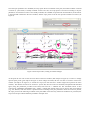
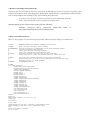
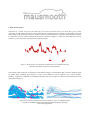
2. How does mausmooth work? 2.1. Script basics As the name suggests, mausmooth helps you obtain MAnually and AUtomatically SMOOTHed f0 contours. It goes through all sound files in a folder, visualizes the extracted f0 values, gives you the time to make manual corrections, and proceeds with smoothing and interpolation. Of course, you don’t have to provide manual corrections for all files every single time you run the script. Once provided by the user, manual corrections are stored in individual .pitch files (with the name of the corresponding sound file). mausmooth only asks for a manual verification when no such .pitch files are already provided. This means that you will only be asked once to verify each of your files. The script opens a form asking basically three things (see Figure 3): the path to both input and output files: the working DIRECTORY the plot parameters: the name of the output figure (FIGNAME), the vertical range of the plot ( PLOTMIN and PLOTMAX) and, crucially, which combination of RAW, MANUALly corrected and SMOOTHed contours should be plotted. For example, Figure 1 has been created by ticking both raw and smooth boxes, while Figure 2 has raw contours in the left panel and smoothed contours in the right one. The advanced user can further customize the plots (e.g. line thickness, speckles colour, box size) by modifying the script directly. the pitch extraction parameters, essentially the ones discussed in the Praat manual for the To Pitch (ac) command, with the addition of two values for smoothing ( SMOOTH1 and SMOOTH2), which will be discussed later. Figure 3. mausmooth input form.