1
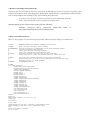
name$ = Get string: i
basename$ = name$ - ".wav"
Read from file: directory$+name$
# ELABORATION 1: EXTRACT
# original f0 track
To Pitch (ac): timestep, pitchmin, maxcandidates, "no", silenceThr,
...voicingThr, octave, octavejump, voiceunvoiced, pitchmax
# manual correction
#
determine if there is already a manually corrected .pitch file
exists = 0
selectObject: "Strings pitchlist"
npitch = Get number of strings
for k to npitch
pitchname$ = Get string: k
pitchbasename$ = pitchname$ - ".Pitch"
if pitchbasename$ = basename$
exists = 1
endif
endfor
#
if it exists then open, else provide manual correction and save
if exists = 1
Read from file: directory$+basename$+".Pitch"
elsif exists = 0
selectObject: "Sound "+basename$
View & Edit
selectObject: "Pitch "+basename$
Copy: basename$
View & Edit
pause Confirm
Save as text file: directory$+basename$+".Pitch"
endif
Rename: "manual"
# smooth track
Smooth: smooth1
Rename: "smooth"
Interpolate
Smooth: smooth2
Save as text file: directory$+basename$+".smooth"
Down to PitchTier
Save as headerless spreadsheet file: directory$+basename$+".hesp"
#
#
#
#
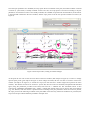
ELABORATION 2: PLOT
with any form-defined combination of
original in red, corrected in silver, smoothed in black.
Given the order of plotting, red "surfaces" as manually corrected points
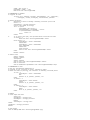
if raw = 1
selectObject: "Pitch "+basename$
Red
Speckle: 0, 0, plotmin, plotmax, "no"
endif
if manual = 1
selectObject: "Pitch manual"
Silver
Speckle: 0, 0, plotmin, plotmax, "no"
endif
if smooth = 1
selectObject: "Pitch smooth"
Black
Draw: 0, 0, plotmin, plotmax, "no"
endif
# OUTPUT
# close loops and clean
select all
minusObject: "Strings list"
minusObject: "Strings pitchlist"
Remove
selectObject: "Strings list"
endfor
plusObject: "Strings pitchlist"
Remove
# save output
Save as 600-dpi PNG file: directory$+figname$+".png"