1
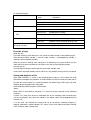
6). Indicator diagram
Indicator
State
Yellow
Blue
Indications
Constant On
Voice-activated standby
Slow flash
Voice-activated video working state
Quick flash
Low battery, no USB card or USB reading data
Constant On
Manual video standby state
Slow flash
Manual video working state
Constant On
Photographing standby
Red
One slow flash Take a photo and save it
Green
Constant On
Separate sound recording standby
Slow flash
Separate sound recording working state
Constant On
Charging ongoing
Out
charging completed
Light red indicator (Special for
charging indicator)
Function of keys
Mode key (M):
For mode switching, each brief press can switch to another mode as per following cycle:
Voice-activated video standby -> manual video standby -> photographing standby ->
separate sound recording standby
When the system is working, after a brief press on mode key, the system need to save the
video which has been recorded first and then enter into the corresponding mode.
Execute key (S):
For entering or exiting the working of the state under standby state
Under voice activated standby state or SD card is fully loaded, the key will fail to respond.
Saving and playback of file
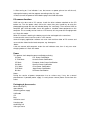
After video recording, as shown in the following figure, copy or cut the video with USB
data cable to computer for playback, or remove Micro SD card and read the video data in
the card with a card reader. It is recommended to use Media Player, KM Player and other
software player to playback the video data.
HK52 USB data cable computer USB interface
:Notes:
When HK52 is connected to computer, it is necessary to pay attention to the following
situations:
1.Under “On” state, there will be a removable disk on the computer after connecting the
unit to the computer, only when the indictor in the modes other than photographing red
indicator “on”.
2. At this time, red indicator of charging will be on constantly, indicating charging is
ongoing. Meanwhile, yellow indicator “on” shows U flash disk mode and yellow indicator
“flash” indicates data is being read.




![[ENG] – User Manual – Fun3](http://vs1.manualzilla.com/store/data/005923067_1-4196d0dc74f449cecdfaee0ba5cc5697-150x150.png)