1
3
SCAN OPERATION
■ Scan operation
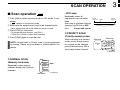
• VFO scan
q Push [V/M] to select memory mode or VFO mode, if necessary.
• “ MR ” appears on the memory mode.
w Make sure the squelch level is set to the threshold point.
• Set a squelch level (01 to 25) where the noise is muted.
Repeatedly scans all
frequencies over the entire
band.
Scan step is minimum channel
spacing. (eg 25 kHz or 8.33*
kHz)
*Except USA version
lowest
frequency
highest
frequency
Start
Scan
Jump
e Push [SCAN] to start scan.
• To change the scan direction, turn [DIAL].
• “SCAN (or P SCAN)“ flashes while scanning.
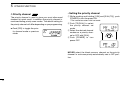
ï PRIORITY SCAN
•Priority memory scan
r Push [SCAN] again to stop the scan.
NOTE: Normal scan or Priority scan is pre-programmed
by cloning. Please ask your dealer or system operator for
details.
While scanning on a memory
mode, priority watch checks
for a signal on the selected
priority channel every 250 m
sec except lockout channel.
250 msec.
250 msec.
Priority
ch
SKIP
Mch 1
Mch 2*
Mch 3
Mch 20
*: Lockout ch
ï NORMAL SCAN
•Memory lock scan
Repeatedly scans memory
channels except skip (lockout)
channels.
Mch 1
Mch 2*
Mch 3
SKIP
Mch 20
250 msec.
*: Lockout ch
6