1
CONNECTING THE 4X1 DVI SWITCHER
How to Connect the 4x1 DVI Switcher
1
Connect up to four (4) computers to the DVI inputs on the back panel of the
Switcher using the included DVI cables.
2
Connect a DVI display to the DVI output on the back panel of the Switcher.
a
OPTIONAL: To use the RS-232 control, connect an RS-232 cable
between the Switcher and RS-232 host controller.
b
OPTIONAL: To extend the range of the IR control, connect an IR
Extender (Gefen part no. EXT-RMT-EXTIR) to the back of the Switcher.
3
Connect the included 5V locking power supply to the power receptacle on
the 4x1 DVI Switcher
4
Connect the AC power cord to an available electrical outlet.
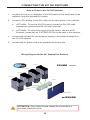
Wiring Diagram for the 4x1 DisplayPort Switcher
DVI CABLE
Computer
Computer
Computer
uter
e
Computer
Switcher
DVI MONITOR
EXT-DVI-441N
EX
XT
ATTENTION: This product should always be connected to a
grounded electrical socket.
12