1
The Unix Crash
Course
and menus of the regular desktop. There are, however, some tasks you can perform
only at the command line, although fewer with each release of Mac OS X.
For intermediate or advanced Mac fans with a little time and curiosity, however, the
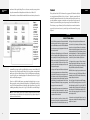
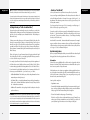
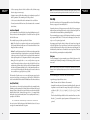
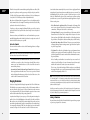
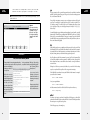
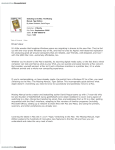
Figure 1:
Top: What most
people think of
when they think
“Macintosh”
is a graphical
user interface
(GUI)—one that
you control with
a mouse, using
icons and menus
to represent files
and commands.
Bottom: Terminal
offers a second
way to control
Mac OS X: a command line interface, which you
operate by typing
out programming
commands.
command line opens up a world of possibilities. It lets you access corners of Mac OS X
that you can’t get to from the regular desktop. It lets you perform certain tasks with
much greater speed and efficiency than you’d get by clicking buttons and dragging
icons. And it gives you a fascinating glimpse into the minds and moods of people
who live and breathe computers.
If you’ve ever dabbled in Excel macros, experimented with AppleScript, or set up a
Mac on a network, you already know the technical level of the material you’re about
to read. The Unix command line may be unfamiliar, but it doesn’t have to be especially
technical, particularly if you have some “recipes” to follow like the ones in this chapter.
Note: Unix is an entire operating system unto itself. This chapter is designed to help you find your footing
and decide whether or not you like the feel of Unix. If you get bit by the bug, Google can help you find
endless reams of additional Unix help.
2
mac os x: the missing manual
Terminal
Terminal
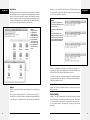
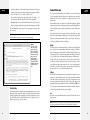
The keyhole into Mac OS X’s Unix innards is a program called Terminal, which sits
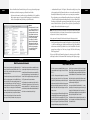
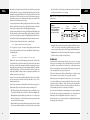
in your ApplicationsÆUtilities folder (see Figure 2). Terminal is named after the
terminals (computers that consist of only a monitor and keyboard) that used to tap
into the mainframe computers at universities and corporations. In the same way,
Terminal is just a window that passes along messages to and from the Mac’s brain.
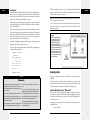
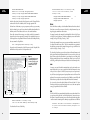
The first time you open Terminal, you’ll notice that there’s not much in its window
except the date, time and source of your last login, and the command line prompt
(Figure 2).
up to speed
Mac OS X’s Unix Roots
In 1969, Bell Labs programmer Ken Thompson found himself
with some spare time after his main project, an operating
system called Multics, was canceled. Bell Labs had withdrawn
from the expensive project, disappointed with the results
after four years of work.
But Thompson still thought the project—an OS that worked
well as a cooperative software-development environment—
was a promising idea. Eventually, he and colleague Dennis
Ritchie came up with the OS that would soon be called
Unix (a pun on Multics). Bell Labs saw the value of Unix,
agreed to support further development, and became the
first corporation to adopt it.
In the age when Thompson and Ritchie started their work
on Unix, most programmers wrote code that would work on
only one kind of computer (or even one computer model).
Unix, however, was one of the first portable operating systems; its programs could run on different kinds of computers
without having to be completely rewritten. That’s because
Thompson and Ritchie wrote Unix using a new programming
language of their own invention called C.
In a language like C, programmers need only write their code
once. After that, a software Cuisinart called a compiler can
convert the newly hatched software into the form a particular
computer model can understand.
Unix soon found its way into labs and, thanks to AT&T’s
low academic licensing fees, universities around the world.
Programmers all over the world added to the source code,
fixed bugs, and then passed those modifications around.
In the mid-1970s, the University of California at Berkeley
became the site of especially intense Unix development.
Students and faculty there improved the Unix kernel (the
central, essential part of the OS), added features, and wrote
new Unix applications. By 1977, they had enough additional
software to release their own version of Unix, the first of
several Berkeley Software Distribution (BSD) versions.
As it happened, the government’s Defense Advanced
Research Projects Agency (DARPA) was seeking a uniform,
portable OS to use for its growing wide-area network, originally called ARPAnet (and now called the Internet).
DARPA liked Unix and agreed to sponsor further research
at Berkeley. In January 1983, DARPA changed ARPAnet’s
networking protocol to TCP/IP—and the Internet was born,
running mostly on Unix machines.
Cut to 1985. Steve Jobs left Apple to start NeXT Computer,
whose NeXTSTEP operating system was based on BSD
Unix. When Apple bought NeXT in 1996, Jobs, NeXTSTEP
(eventually renamed OpenStep) and its Terminal program
came along with it. The Unix that beats within Mac OS X’s
heart is just the latest resting place for the OS that Jobs’s
team developed at NeXT.
So the next time you hear Apple talk about its “new” operating system, remember that its underlying technology is
actually over 40 years old.
bonus chapter: the unix crash course
3