1
XL Meter™ Pro
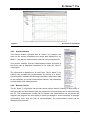
switch it on by pressing the On/Off button once for a couple of seconds. After switching on,
pressing the On/Off Button for a short period of time (less than 2 sec.) will result in toggling
the backlight or the brightness of the display (depending on the type of the display: LCD or
PLED). This means that the backlight/brightness will turn on or increase by pressing the
button once, and turn off or decrease by pressing it for the second time, turn on or increase
also for the third time, and so on. It is important to note that the LCD backlight should only be
used when it is necessary, as the power consumption is approximately tripled if the LCD
backlight is on, resulting in shorter battery lifetime. XL Meter™ can be switched off by
pressing the On/Off button for a longer period of time (more than 2 seconds). If this action is
successful you see a shutdown message on the screen before releasing the button.
4.2.4.2 Display Button (Green Button)
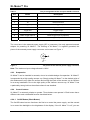
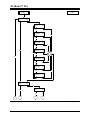
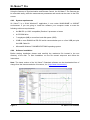
The results of all measurements can be displayed on the screen by pressing the green
button. From Calibration Mode you can enter Display Mode by pressing once either the
green or the red button.
In Display Mode you can switch from one measurement to another by pressing the display
button. You do not have to wait until all the results are displayed, but you can anytime
interrupt one display cycle and enter the display cycle of the next measurement.
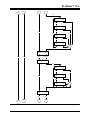
You can start a measurement (data acquisition) by pressing the red button. To stop data
acquisition press the display (green) button. The evaluation automatically (if such evaluation
was chosen) starts after the stoppage the measurement. Finishing the evaluation it enters
Display Mode again and the currently performed measurement results will be displayed.
4.2.4.3 Measurement Button (Red Button)
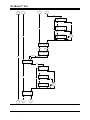
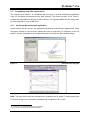
Starting a measurement (data acquisition) can be invoked by the measurement button. You
can also use the red button to enter Display Mode from Calibration Mode by pressing it once.
Measurement can only be started from Display Mode. Anytime the currently displayed
measurement will be overwritten by the new measurement. You do not have to wait until all
the results are displayed, but you can anytime interrupt one display cycle and start data
acquisition. Data acquisition can be stopped by the display (green) button.
Note: Before starting measuring, the XL Meter™ Pro Gamma will ask to overwrite the actual
measurement. If yes, then the measurement starts, if No, it returns to Display Mode. In this
way, you can avoid to overwrite a measurement accidentally.
4.2.5
Display
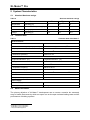
The display is a 2x16 character alphanumeric display; it features high contrast easy to read
characters and numbers. There are two kinds of displays depending on the technology:
Liquid Crystal Display (LCD) with switchable backlight and PLED with switchable brightness.
© Inventure Automotive Electronics R&D, Inc.
XLMPUSREN73 – page 7