1
BOLIDE: User manual
BOLIDE Interface
Last update: 28 Sep 2007
___________________________________________________________________________________________________________
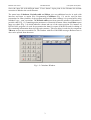
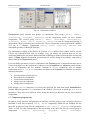
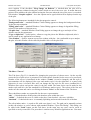
Fig. 1.6. Constructor windows.
Components panel includes two groups of components. First group (TForm, TPanel,
TRadioGroup, TGoupBox, TTabSheet) is the components which can have another
components. The second group (TLabel, TEdit, TCheckBox, TRadioButton,
TComboBox, TSurf, TGraf, TCounter, TBrowse) is used for editing and drawing of
information which is load and saved to text files. Those components are derived from the standard
VCL set of C++Builder. Components TSurf, TGraf, TCounter, TBrowse were
elaborated specially for BOLIDE interface.
For elaboration or editing of the interior do click the TForm button. New window will be created.
Choose any component and click on window. User can change the position and size of any
component holding the left mouse button and Ctrl or Shift keys on the keyboards while moving the
mouse. If Snap to grid is checked the position and size will be change in accordance with value of
editor window on Components panel.
User can change parameter of active component in the Property panel. Component becomes active
if one clicks mouse on the component or chooses it in the Inspector list. Inspector panel includes
the list of components and five buttons. Captions of TForm components, type of another
components and Row, Col or Tag properties are shown in the Inspector list. Buttons are used for
following functions:
•
•
•
•
•
save the interior of total project;
delete the active component;
restore deleted component;
change color of component;
change font of component.
Each window (TForm componet) is saved in the specified file with name mask bolideNN.dfm.
Number NN corresponds to Row parameter of the window. User needs to check the TForm.Row
parameters. They have to be different. After saving the interior on disk user can not restore deleted
components.
1.7. Component properties list
In order to clarify structure and principles of interface work the property "tag" in current version of
BOLIDE is used only to identify TSurf, TGraf components, which are not included into the
input file for physical code. For the components TForm, TPanel, TTabSheet the parameter
"Row" is used, its value corresponds to the line number in an input file. For the second group of
components - TLabel,
TRadioGroup,
TGoupBox,
TEdit,
TCheckBox,
6