1
PhoneMax ® Model TEL 030
Installation Guide & User Manual
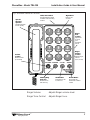
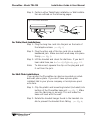
Fig. 6: Handset Hanger Adjustment
Handset Hanger
Lift up, rotate 180º, and release
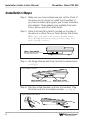
Step 3: Plug the short line cord into the jack on the top of
the telephone and thread the line through the channel to the cavity on the back of the base unit.
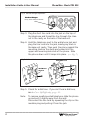
Step 4: Hold the telephone next to the wall-phone jack and
plug the line cord into the jack, leaving any slack in
the base unit cavity. Then push the phone against the
mounting studs so the studs are hooked into the
upper and lower keyhole slots of the phone. Slide
the phone down until it snaps into place. (see Fig. 7)
Fig. 7: Wall Installation
Short Wall Cord
Wall Mount
Bracket
Studded Wall
Phone Plate
Step 5: Check for a dial tone. If you can’t hear a dial tone,
see In Case Of Difficulty, page 12.
Note:
8
To remove a wall-mounted telephone, slide the phone
up and pull it slightly away from the wall.
Disconnect the line cord by squeezing the clip on the
modular plug and pulling it from the jack.
Williams
Sound ®
Helping People Hear