1
PhoneMax ® Model TEL 030
Installation Guide & User Manual
Bare Wall Installation
Even if you don’t have a studded wall phone plate, you can
still mount the PhoneMax on any wall surface within six feet
of a standard modular jack.To mount the phone farther from
the jack you’ll need a longer line cord or a telephone extension cord.
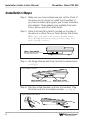
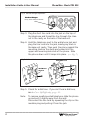
Step 1: Measure and mark the wall for mounting screws.
Mark two points 4.0 inches apart for upper and lower
mounting screws. The lower mark should be 48–52
inches from the floor. Use a level to make sure the
marks are aligned vertically.
Step 2: Install the mounting screws (not included).
Use wood screws for stud mounting, anchor screws
for hollow wall mounting. Drive the screws almost
completely in, leaving a 18⁄ (0.125) inch space between
the wall surface and the bottom of the screw head
(about the thickness of two stacked pennies).
Step 3: Rotate the handset hanger to prevent the handset
from falling. (see Fig. 6)
Step 4: Mount the Phonemax.
Hang the telephone on the mounting screws and
push down gently until it snaps into place
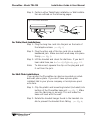
Step 5: Connect the line cord to the jack on the top of the
phone. Plug the other end of the line cord into a
modular wall jack.
Make sure it snaps firmly into place.
Step 6: Check for the dial tone.
If you can’t hear a dial tone, see In Case Of Difficulty,
page 12.
Note:
Williams
Sound ®
Helping People Hear
To disconnect the telephone, squeeze the clip on the
modular plug and pull it out of the jack.
9