1
Review
A Convenient Utility
—BAT2EXEC
Quick
Answer
The
JEFF NOREMAN
L
IKE most computer programmers and consultants, I
make extensive use of tricks and shortcuts to make
my life and the lives of clients easier. I recently
unearthed a convenient utility called Bat2Exec, which
might help you save time and make your daily tasks go
more smoothly.
Batch files to executables
Bat2Exec compiles batch files into executable programs.
The utility almost seems misnamed, as it does not create
.exe files. It creates .com files. The difference is that .exe
files can be of nearly any size, while .com files have a limit
of about 64K. If you’ve got batch files that won’t convert
to a .com file of less than 64K, then you’re probably
working with a huge, slow batch file right now, and
Bat2Exec won’t help you.
gets run on the computer. Many users know how to
change batch files, and might be tempted to remove a
time-consuming backup routine, for example. They can’t
do that if the program they run is compiled.
An even stronger advantage is the ability to change
the memory settings that your program lives in when it is
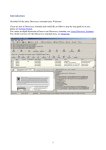
run. Here’s an example. Drag a shortcut of your
qastart.bat batch file to the desktop (which I typically call
qa-bat.bat). When you check the properties of that
shortcut (see Figure 1), you have several options, but not
the ability to change the memory space the program runs
in. Now see the options available from the compiled
version of your batch file (Figure 2). Memory settings,
which help many programs like Q&A run perfectly, are at
your disposal.
Using Bat2Exec
Got security?
Bat2Exec shines in two ways. First, it gives you security. It
lets you as a programmer take control over exactly what
Figure 1. Properties of a shortcut for a batch file in Windows
XP. Notice that there are no memory setting facilities.
8
To use Bat2Exec, first unzip the Bat2Exe.ZIP file (included
in this month’s download file). Place the files you just
expanded in the same directory as the batch file(s) you
wish to
compile.*
When you
run
Bat2Exec,
don’t forget
to use the
.bat
extension on
the batch file
you wish to
compile. Just
open a
command
line window,
run the
simple one
line
command. It
should
lookvery
similar to
this:
Figure 2. Properties of a shortcut to a .com file in Windows XP,
showing the Memory tab.
The Quick Answer
●
August 2002