1
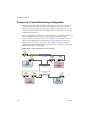
Workstation User’s Manual 6 Install the router software, either on the host computer or in the third virtual machine, depending on the approach you are using. 7 Configure networking in the first two virtual machines to use addresses on the appropriate host‐only network: 8 On Windows hosts, open a command prompt and run the ipconfig /all command to determine which IP addresses each host‐only network is using. On Linux hosts, open a terminal and run the ifconfig command to determine which IP addresses each host‐only network is using. Assign IP addresses by doing one of the following: If you are running the router on the host computer, assign default router addresses based on the addresses of the host‐only adapters on the host computer. In the first virtual machine’s networking configuration, the default router address should be the IP address for the host‐only adapter connected to VMnet1. In the second virtual machine’s networking configuration, the default router address should be the IP address for the host‐only adapter connected to VMnet2. If you are running the router software in a third virtual machine, set the default router addresses in the first two virtual machines based on the addresses that the third virtual machine uses. In the first virtual machine’s networking configuration, the default router address should be the IP address for the third virtual machine’s network adapter connected to VMnet1. In the second virtual machine’s networking configuration, the default router address should be the IP address for the third virtual machine’s network adapter connected to VMnet2. You can now ping the router machine from virtual machines 1 and 2. If the router software is set up correctly, you can communicate between the first and second virtual machines. Using Virtual Network Adapters in Promiscuous Mode on a Linux Host Workstation does not allow the virtual network adapter to go into promiscuous mode unless the user running Workstation has permission to make that setting. This restriction follows the standard Linux practice that only the root user can put a network interface into promiscuous mode. 298 VMware, Inc.