1
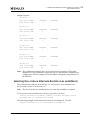
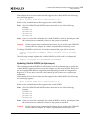
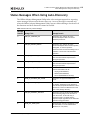
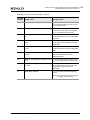
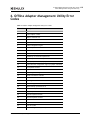
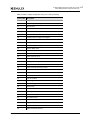
3. Online Adapter Management Utility Command Line Interface Force Firmware and Boot Code (/f or /ff /fb) iSCSI and NIC-only Adapter Summary <date><time> HBA=<model>, Port Type=<port_type>, MAC=<mac_address>, Update=Firmware, Image=<image>, New=<version>, Old=<version>, Status=<description> Return Code=<n> where <description> is Success or Error and <n> = 0 for completion with no errors and a non-zero error code for any error. Note: FCoE, iSCSI, and NIC-only adapters require a system reboot to activate new firmware. Note: If the preview switch is also used, the Status=<description> field is not displayed. Force Firmware and Boot Code (/f or /ff /fb) Usage: /f -or- /ff /fb The Force Firmware and Boot Code switch forces a firmware and boot code download to an adapter regardless of the current version on the adapter. When this switch is used, a Force Firmware and Boot Code operation is performed regardless of any additional switches given on the command line. Example usage: ./elxflash /f /auto – Forces a firmware and boot code download using auto-discovery. The fwmatrix.txt file is ignored. You must place the desired versions of firmware and boot code in their respective directories. If multiple versions of firmware or boot code are found for an adapter, the Adapter Management Utility uses the highest versions when performing the firmware and boot code downloads. ./elxflash /f – Forces a firmware and boot code download using the fwmatrix.txt file. For each installed and supported adapter, forces a download of firmware and boot code using the versions specified in the fwmatrix.txt file. LightPulse Adapter Download Summary <date><time> HBA=<model>, Port Type=<port_type>, WWN=<wwn>, Update=<Boot Code|Firmware>, Image=<image>, New=<version>, Old=<version>, Status=<description> Offline and Online Adapter Management Utilities Version 6.1 User Manual P008003-01A Rev. A 22