1
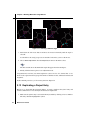
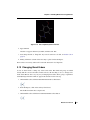
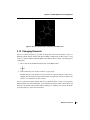
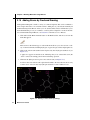
Maestro Tutorial
Maestro 9.0
Tutorial
Schrödinger Press
Maestro Tutorial Copyright © 2009 Schrödinger, LLC. All rights reserved.
While care has been taken in the preparation of this publication, Schrödinger
assumes no responsibility for errors or omissions, or for damages resulting from
the use of the information contained herein.
Canvas, CombiGlide, ConfGen, Epik, Glide, Impact, Jaguar, Liaison, LigPrep,
Maestro, Phase, Prime, PrimeX, QikProp, QikFit, QikSim, QSite, SiteMap, Strike, and
WaterMap are trademarks of Schrödinger, LLC. Schrödinger and MacroModel are
registered trademarks of Schrödinger, LLC. MCPRO is a trademark of William L.
Jorgensen. Desmond is a trademark of D. E. Shaw Research. Desmond is used with
the permission of D. E. Shaw Research. All rights reserved. This publication may
contain the trademarks of other companies.
Schrödinger software includes software and libraries provided by third parties. For
details of the copyrights, and terms and conditions associated with such included
third party software, see the Legal Notices for Third-Party Software in your product
installation at $SCHRODINGER/docs/html/third_party_legal.html (Linux OS) or
%SCHRODINGER%\docs\html\third_party_legal.html (Windows OS).
This publication may refer to other third party software not included in or with
Schrödinger software ("such other third party software"), and provide links to third
party Web sites ("linked sites"). References to such other third party software or
linked sites do not constitute an endorsement by Schrödinger, LLC. Use of such
other third party software and linked sites may be subject to third party license
agreements and fees. Schrödinger, LLC and its affiliates have no responsibility or
liability, directly or indirectly, for such other third party software and linked sites,
or for damage resulting from the use thereof. Any warranties that we make
regarding Schrödinger products and services do not apply to such other third party
software or linked sites, or to the interaction between, or interoperability of,
Schrödinger products and services and such other third party software.
Revision A, October 2009
Contents
Document Conventions ...................................................................................................... v
Chapter 1: About This Tutorial ....................................................................................... 1
Chapter 2: Starting Maestro and Viewing Molecules .................................... 3
2.1 Copying the Files You Need To Run this Tutorial ................................................ 3
2.2 Starting Maestro ........................................................................................................ 5
2.3 Features of the Maestro Main Window .................................................................. 5
2.4 Importing a Maestro File .......................................................................................... 8
2.5 Viewing a Structure in the Workspace ................................................................ 10
2.6 Including and Excluding Entries in the Project Table....................................... 12
2.7 Saving the Maestro Project.................................................................................... 14
Chapter 3: Building Molecules Using Maestro ................................................. 15
3.1 Opening the Build Panel ........................................................................................ 16
3.2 Clearing the Workspace and Building with Fragments .................................... 17
3.3 Adjusting Angles ..................................................................................................... 20
3.4 Deleting and Labeling Atoms and Adjusting Formal Charge ......................... 21
3.5 Saving Your Structure to the Project Table ........................................................ 22
3.6 Copying and Renaming a Project Entry .............................................................. 23
3.7 Deleting Bonds and Reattaching Fragments ..................................................... 24
3.8 Adding Hydrogen Atoms to a Structure.............................................................. 27
3.9 Substituting Functional Groups in Place Mode ................................................. 27
3.10 Replacing Functional Groups in Grow Mode ................................................... 28
3.11 Adjusting a Dihedral Angle ................................................................................. 29
3.12 Duplicating a Project Entry ................................................................................. 30
3.13 Changing Bond Orders ........................................................................................ 31
Maestro 9.0 Tutorial
iii
Contents
3.14 Changing Elements............................................................................................... 33
3.15 Adding Atoms by Freehand Drawing ............................................................... 34
3.16 Moving Atoms ........................................................................................................ 37
3.17 Cleaning Up Structures ........................................................................................ 39
3.18 Changing the Chirality ......................................................................................... 40
3.19 Exporting Structures to a File ............................................................................. 41
Chapter 4: Changing the Appearance of Structures .................................... 43
4.1 Getting Ready for the Exercises in this Chapter ............................................... 43
4.2 Displaying and Undisplaying Atoms ................................................................... 44
4.3 Changing the Atom Coloring Scheme ................................................................. 49
4.4 Changing the Appearance of Atoms and Bonds ............................................... 51
4.5 Displaying the Protein Backbone as a Ribbon .................................................. 53
4.6 Creating and Displaying a Molecular Surface.................................................... 55
Chapter 5: Measuring, Analyzing, and Superimposing Structures .... 59
5.1 Getting Ready for the Exercises in this Chapter ............................................... 59
5.2 Measuring Distances .............................................................................................. 60
5.3 Measuring Angles ................................................................................................... 62
5.4 Measuring Dihedrals ............................................................................................... 63
5.5 Superimposing Multiple Structures ..................................................................... 65
5.6 Displaying Hydrogen Bonds ................................................................................. 67
Chapter 6: Beyond the Basics ..................................................................................... 71
6.1 Advanced Maestro Features.................................................................................. 71
6.2 Programs Accessible from Maestro..................................................................... 72
Getting Help ............................................................................................................................. 75
iv
Maestro 9.0 Tutorial
Document Conventions
In addition to the use of italics for names of documents, the font conventions that are used in
this document are summarized in the table below.
Font
Example
Use
Sans serif
Project Table
Names of GUI features, such as panels, menus,
menu items, buttons, and labels
Monospace
$SCHRODINGER/maestro
File names, directory names, commands, environment variables, and screen output
Italic
filename
Text that the user must replace with a value
Sans serif
uppercase
CTRL+H
Keyboard keys
Links to other locations in the current document or to other PDF documents are colored like
this: Document Conventions.
In descriptions of command syntax, the following UNIX conventions are used: braces { }
enclose a choice of required items, square brackets [ ] enclose optional items, and the bar
symbol | separates items in a list from which one item must be chosen. Lines of command
syntax that wrap should be interpreted as a single command.
File name, path, and environment variable syntax is generally given with the UNIX conventions. To obtain the Windows conventions, replace the forward slash / with the backslash \ in
path or directory names, and replace the $ at the beginning of an environment variable with a
% at each end. For example, $SCHRODINGER/maestro becomes %SCHRODINGER%\maestro.
In this document, to type text means to type the required text in the specified location, and to
enter text means to type the required text, then press the ENTER key.
References to literature sources are given in square brackets, like this: [10].
Maestro 9.0 Tutorial
v
vi
Maestro 9.0 Tutorial
Maestro Tutorial
Chapter 1
Chapter 1:
About This Tutorial
This document is designed to show you how to use the basic capabilities of Maestro, in easy
steps. In the early parts of the book, we will explain everything in great detail—what to do with
the mouse, where to click, where buttons are, and so on—so you aren’t missing any part of the
procedure. At the same time, we’ll provide a more compact notation for explaining what to do.
Later in the book, we’ll use the compact notation, with references back to the explanation, and
still later, we’ll just use the compact notation. By that time, you’ll have learnt what it means
and how to perform the actions, and won’t need the detailed explanation. But it’ll always be
there to refer back to.
This tutorial is designed for you to work through from the beginning, but you can start at any of
the chapters if you so desire. However, the explanations in the later chapter are more compact,
so you might have to go back to the earlier chapters to find out how to perform an action.
If you are reading this book online, you may notice that there are words that are marked in an
indigo color, like this: Contents. These are links to other parts of the book. If you click on the
word in your PDF reader, it takes you to the other part of the book. To go back to the place you
came from, click the Back button in your PDF reader. Try it with the word Contents, above. It
will take you to the table of contents for this book.
There are also indigo-colored links to various sections of the Maestro User Manual. These
links are provided so you can read more about the feature you are working with, if you are
interested. Clicking on these links takes you to the section referred to. Try clicking the words
Maestro User Manual in the first sentence of this paragraph, then click the Back button.
Maestro 9.0 Tutorial
1
2
Maestro 9.0 Tutorial
Maestro Tutorial
Chapter 2
Chapter 2:
Starting Maestro and Viewing
Molecules
Maestro is a freely available, full-featured molecular visualization environment that also serves
as the interface to all of Schrödinger’s computational chemistry software. When coupled with
Schrödinger software such as Glide, Prime, or Phase, Maestro is a powerful tool for interpreting, managing, and sharing the results of computational experiments. As a standalone
program, Maestro is an easy-to-use tool for building, visualizing, and sharing 3-dimensional
chemical models. In this tutorial, you’ll learn how to perform these simple tasks using
Maestro’s intuitively designed interface. Working through the exercises in this chapter, you’ll
start Maestro, import structure files, and learn how to view them in the Maestro Workspace.
Maestro is designed to run on Linux and Windows machines, but can be displayed over a
network to many commonly used platforms. With a little effort, Windows users can also install
one of many Linux distributions on their PCs. Not only do these distributions include easy-tooperate graphical user interfaces, but they can be installed on a computer without removing the
Windows operating system.
2.1
Copying the Files You Need To Run this Tutorial
To perform the exercises in this tutorial, you’ll need to make sure that you have the structures
easily accessible. These structures can be copied from the Maestro tutorial subdirectory in the
installation to your own directory.
To copy the files under Windows:
1. Click Start, then click My Computer.
An explorer window opens.
2. Move to the Schrödinger software installation.
This installation is not in Programs and Settings, because the path to the software cannot
have spaces in it. It’s likely to be on your C drive, so start looking there if you don’t know
exactly where it is.
3. When you get to the installation, open the maestro-vversion folder.
Here, version is the 5-digit Maestro version number, for example, 75111. This folder
should contain a folder labeled tutorial.
Maestro 9.0 Tutorial
3
Chapter 2: Starting Maestro and Viewing Molecules
4. Open another explorer window and move to the place you want to keep the tutorial files.
For example, click Start, then click My Documents. You can create a folder to keep the
files in if you want to.
5. Drag the tutorial folder from the first window to the second.
To copy the files under UNIX:
1. Open a terminal window so that you have a command-line prompt.
The steps to open a terminal window vary slightly between operating systems, but it is
generally possible to right-click in your desktop and select an option like New Terminal
from the menu that appears.
2. Next, set the SCHRODINGER environment variable.
This environment variable contains the path to your installation of Maestro. How you set
the SCHRODINGER environment variable depends on the “shell” used in the terminal window. If you are using either the bash or ksh shell, enter the following command:
export SCHRODINGER=installation-directory
If you are using either the csh or the tcsh shell, enter the following command:
setenv SCHRODINGER installation-directory
In the commands above, installation-directory should be replaced with the path to the
directory where Maestro is installed. If you’re not sure which shell you’re using you can
type the command which $SHELL, which will return the location and name of the shell
that you’re using.
3. Change to a directory for which you have write permission.
cd my-directory
4. If you like, create a subdirectory for the tutorial, and change to that subdirectory.
mkdir -p my-subdirectory
cd my-subdirectory
5. Copy the tutorial files to your current working directory with the following command:
cp $SCHRODINGER/maestro-vversion/tutorial/*.* .
Here, version is the 5-digit Maestro version number, for example, 75111.
Many UNIX systems have a graphical file manager that operates much like a Windows system.
You can use this file manager to copy the files instead of typing the commands.
4
Maestro 9.0 Tutorial
Chapter 2: Starting Maestro and Viewing Molecules
2.2
Starting Maestro
After you’ve installed Maestro, starting the program is a simple matter.
To start Maestro under Windows:
• Simply double-click the Maestro icon on your desktop.
The Maestro interface should appear after a short delay.
To start Maestro under UNIX:
1. Make sure that you’ve set the SCHRODINGER environment variable and moved to the
directory you want to work in
If you haven’t done this, follow the instructions under To copy the files under UNIX: in
the previous section.
2. Start Maestro by entering the following command:
$SCHRODINGER/maestro &
The Maestro interface should appear after a short delay.
The “&” at the end of the line means that Maestro is run in the “background”, and you can
continue to use the terminal window. Without it, you would have to wait until Maestro
has finished running to type any other commands. (This has no effect on how well Maestro runs.)
Here, version is the 5-digit Maestro version number, for example 70113. From here on, the
terminal and the command line are no longer used—all tasks can be performed within the
Maestro interface.
2.3
Features of the Maestro Main Window
Once you’ve started Maestro, you’ll want to take note of various features in the Maestro main
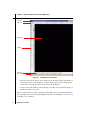
window, as shown in Figure 2.1.
• At the center of the interface is the Maestro Workspace, which remains empty until you
import structures, build molecules, or open a “project”.
• At the top of the Maestro interface is the Maestro menu bar, which gives you access to all
kinds of options, features, and programs.
• On the left-hand side of the interface is the main Maestro toolbar—all of the frequently
used Maestro tasks can be performed using the toolbar.
Maestro 9.0 Tutorial
5
Chapter 2: Starting Maestro and Viewing Molecules
Title bar
Menu bar
Workspace
Toolbar
Status bar
Auto-Help area
Figure 2.1. The Maestro main window.
• The status bar near the bottom of the window gives information about the number of
atoms and molecules in the Workspace, and also displays more specific structural information when you pause the pointer over an atom in the Workspace.
• At the bottom of the window is the Auto-Help area. This area automatically displays a
hint about the task you’re doing.
There are other features that can be added to the main window, that aren’t displayed by default.
You can display these features using the Display menu. For more information, see Section 2.2
of the Maestro User Manual.
6
Maestro 9.0 Tutorial
Chapter 2: Starting Maestro and Viewing Molecules
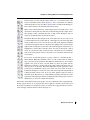
In this tutorial, you’ll be using the main toolbar a lot, so it’s useful to know a bit
about it beforehand. Notice that in Figure 2.1, most of the buttons are dimmed,
which means they can’t be used. That’s because there’s nothing in the Workspace.
The toolbar is shown to the left with all the buttons active.
Many of the toolbar buttons have a little triangle in the lower right corner—we’ll
discuss those shortly. The ones that don’t are buttons that perform a simple action,
like opening a panel or changing the view of what’s in the Workspace. All you
need to do is click the button to perform the action.
The buttons that have little triangles in the lower right corner are menu buttons. If
you click and hold on any of these buttons, a menu appears to the lower right. This
menu is called a button menu. You can choose an item on the menu by continuing
to hold the mouse button down, moving the mouse until the item you want is highlighted, then releasing the mouse button. The menu disappears and the item you
highlighted is selected. We’ll call this action “choosing an item from a button
menu”. It’s just like choosing an item from any other menu. If you accidentally
click on the wrong button, just move the pointer out of the menu and release the
mouse button.
If you chose an item that represents a group of atoms or a structural feature—
Atoms, Bonds, Molecules, Residues, and so on—the toolbar button is indented
after you release the mouse button. This indicates that the button’s action will be
applied to the group of atoms you pick. When you move the pointer into the
Workspace, it turns into a small square with a letter beside it. The letter tells you
what you chose on the menu. The button indentation and the appearance of the
pointer tells you that Maestro expects you to click on an atom (“pick” an atom) or
bond in the Workspace to select some atoms. The action represented by the button
is then performed on these atoms. To get out of this “picking” mode, just click on
the button again. The button is no longer indented, and the pointer has its normal
appearance in the Workspace. When you display the button menu again, you’ll see
that the item you chose has a black circle beside it.
Other items on the button menus can be groups of atoms to which the action is applied immediately, options that are set, or properties that can be applied to structures. Some items open
dialog boxes in which you can perform an action or select atoms to apply the button’s action to.
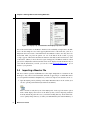
Some examples of button menus are shown in Figure 2.2.
Maestro 9.0 Tutorial
7
Chapter 2: Starting Maestro and Viewing Molecules
Figure 2.2. Display only selected atoms and Display only button menus.
One of the useful features of the Maestro interface is the availability of help features. In addition to the Auto-Help text area, in the upper right-hand corner of the menu bar, you’ll see a
Help menu that can be used to find information about Maestro features. You may have also
noticed that when you pause the pointer over one of the buttons in the toolbar, a pop-up
“tooltip” appears, with text that describes the function of the button. We’ll use this text to refer
to the buttons. (When you move the mouse again, it disappears.) All Maestro windows, called
panels, have a Help button at the bottom that can be used to display relevant information. If you
can’t find the information you need, you can also e-mail [email protected] to get an
answer to your questions.
2.4
Importing a Maestro File
The most common operation within Maestro is the simple manipulation of structures in the
Workspace—they can be rotated, translated, and made to appear larger or smaller. But before
you can experiment with these manipulations, you’ll need to import some structures. To do so:
1. Open the Import panel by clicking on the Import Structures button on the toolbar. (You
can also open the panel with the keyboard shortcut CTRL+I.)
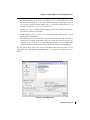
Take a moment to study the layout of the Import panel. At the top is the Look in option
menu, which displays the location of the directory that you’ll be importing structures
from. By default, the path is first set to your current working directory. To the left are buttons to quickly change directory to either your Home Directory, the Launch Directory, or
8
Maestro 9.0 Tutorial
Chapter 2: Starting Maestro and Viewing Molecules
the Working Directory. At the center of the Import panel is a list that displays all of the
files in the selected directory of the format selected in the Files of type option menu. If
you correctly copied the tutorial structure files to your current working directory, you
should see the file small_molecule.mae in the list.
Note that as you type a complete filename in the File name text box, Maestro offers selections and the option for auto-complete.
2. To import the file small_molecule.mae, either double-click on the file name, or click
the file name, and click Open.
The Import panel closes and a structure appears in the Workspace. Take a moment to
observe the color scheme used. Carbon atoms are colored gray, nitrogen atoms are colored blue, oxygen atoms are colored red, and hydrogen atoms are colored white. This
commonly used color scheme makes it easy to identify the elements in the Workspace.
If you’re curious about some of the options in the Import panel that weren’t used, you can
either click on the Help button in the Import panel, or see Section 3.1 of the Maestro User
Manual.
Figure 2.3. The Import panel.
Maestro 9.0 Tutorial
9
Chapter 2: Starting Maestro and Viewing Molecules
2.5
Viewing a Structure in the Workspace
After importing a molecule into Maestro, you’re ready to manipulate the structure in the Workspace. In this exercise, you’ll learn how to translate, rotate, and zoom in or out on a molecule,
You’ll also want to note that these manipulations require the use of a three-button mouse. If
you don’t have a three-button mouse (or a two-button mouse capable of three-button emulation), you may want to consider obtaining one.
But first, a word about the axis system used by Maestro. The x axis is the horizontal axis, and
the y axis is the vertical axis. The z axis is the axis coming out of the screen towards you (this
is the positive z direction).
Now, let’s try some manipulations. And, by the way, when you do these manipulations, you
aren’t really changing the position of the molecule. It’s as if you were operating a video
camera, and you are changing the camera angle to get a different view of the molecule.
Rotating the molecule:
• To rotate the molecule left or right (around the y axis), place the pointer anywhere in the
Workspace, hold down the middle mouse button, and move the mouse to the left or right.
The pointer changes to an arrow going around in a circle, with the letters xy above it, to
show that you are rotating around the x (horizontal) or y (vertical) axis.
• To rotate the molecule up or down, (around the x axis) repeat the above step, but move the
mouse up or down.
You can rotate in both directions simultaneously by moving the mouse diagonally. If you
want to make sure you rotate only in the x direction or the y direction, hold down the
SHIFT key along with the middle mouse button.
• To rotate the molecule in the plane of the screen (around the z axis), place the pointer anywhere in the Workspace, hold down the CTRL key and the middle mouse button, and
move the mouse to the left or right.
The pointer changes to an arrow going around in a circle, with the letter z above it, to
show that you are rotating around the z axis (the one perpendicular to the screen).
Translating the molecule:
• To translate the molecule in the Workspace (change its position in the Workspace), place
the pointer anywhere in the Workspace, hold down the right mouse button, and move the
mouse left, right, up, or down.
The pointer changes to a pair of double-headed arrows perpendicular to each other, to
show that you are translating the Workspace structure.
10
Maestro 9.0 Tutorial
Chapter 2: Starting Maestro and Viewing Molecules
Zooming in or out:
• To zoom in on the structure, place the pointer anywhere in the Workspace, hold down the
middle and right mouse buttons, and move the mouse to the right. If your mouse has a
scroll wheel for a middle button, you can also use it to zoom in and out.
The pointer changes to a magnifying glass, to indicate that you are zooming.
• To zoom out on the structure, repeat the above step, but move the mouse to the left
instead of to the right.
•
It’s also possible to automatically “fit” the structure to the Workspace, so that it fills the
screen. To do so, simply click the Fit to screen button on the toolbar.
Saving the view:
You can also save the orientation of the Workspace, and return to it later. Here’s an example.
1. First, click the Save view button on the toolbar.
2. Next, rotate the structure toward you by clicking on the Rotate around X axis by 90
degrees button.
3. Click Rotate around Y axis by 90 degrees button to rotate 90 degrees to the right.
4. Click on the Restore view button to return to the view that you saved in Step 1.
Congratulations, you’re now manipulating structures in the Workspace. Feel free to practise
these operations until you are familiar with them. You can always restore the original view of
the molecule by clicking the Reset Workspace button:
Maestro 9.0 Tutorial
11
Chapter 2: Starting Maestro and Viewing Molecules
2.6
Including and Excluding Entries in the Project Table
Now that you know how to manipulate structures in the Workspace, you’re ready to learn how
to include and exclude structures from the Workspace using Maestro’s Project Table. The
Project Table is where Maestro stores structures that you’ve imported. It can also be used to
manage the results of computations, and store structure-associated data. For now, though, we’ll
just use the Project Table to control which molecules are displayed in the Workspace. For more
information about the Project Table, see Chapter 8 of the Maestro User Manual.
1. Open the Import panel by clicking the Import structures button on the toolbar.
2. From the Files of type option menu, choose MDL SD.
This action causes all files in SD format (with the extension .sdf) to appear in the list.
There are many file formats used to store molecular structures, and Maestro can read
most of the common ones.
3. Double-click on multi-structure_file.sdf to import it.
4. Click the Open/Close Project table button on the toolbar to open the Project Table panel.
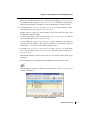
In the Project Table, you’ll notice that several “entries”, represented by various rows with
text in them, are highlighted in yellow. These highlighted entries are the structures that
you just imported. You’ll also notice a tan row with a “–” in the In column. This is the
label row for an entry group. When you imported the structures, they were added as a
group, named after the file they came from. You can open and close the group by clicking
its In column.
You can include the structures in the Workspace, or exclude them from the Workspace, by
clicking on the squares to the left of the title text (in the In column).There is no limit to
the number of entries that can be included in the Workspace. A filled square indicates that
the structure is currently included in the Workspace. By default, only the first new entry
(in this case sd_molecule_01) is included in the Workspace when you import multiple
structures.
5. Include sd_molecule_02 in the Workspace by clicking the square next to its title.
(Later on, we’ll just say “Include entry in the Workspace”.)
12
Maestro 9.0 Tutorial
Chapter 2: Starting Maestro and Viewing Molecules
When you click, the molecule that was originally in the Workspace, sd_molecule_01,
is excluded from the Workspace, and sd_molecule_02 is included in the Workspace.
This is the normal behavior: including one entry in the Workspace excludes all others.
6. To include both sd_molecule_02 and sd_molecule_03 in the Workspace, controlclick the square next to the entry for sd_molecule_03.
Holding down the control key when including an entry just affects that entry: other
included entries remain included.
7. To clear the Workspace, control-click the square next to sd_molecule_02, and then
control-click the square next to sd_molecule_03.
Control-clicking the square for an entry that is already included in the Workspace
excludes it from the Workspace. This only affects whether or not the structure appears in
the Workspace—no atoms are deleted when excluding an entry.
8. To include sd_molecule_01, sd_molecule_02, and sd_molecule_03 in the Workspace, click the square next to sd_molecule_01, then shift-click the square next to
sd_molecule_03.
Shift-clicking includes all entries between the two most recently clicked entries in the
Workspace.
9. Clear the Workspace by clicking the Clear Workspace button on the main toolbar.
This automatically excludes all entries from the Workspace. (Later on, we’ll just say
“Clear the Workspace”.)
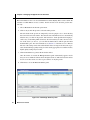
Figure 2.4. The Project Table panel.
Maestro 9.0 Tutorial
13
Chapter 2: Starting Maestro and Viewing Molecules
Figure 2.5. The Save As Project dialog box.
2.7
Saving the Maestro Project
Maestro “projects” are collections of structures and data that you can save in a designated location and then return to later on. Because structures that you work with in Maestro are copies
that are saved to disk in a designated directory, structural changes that you make in Maestro
will not affect the actual files that you imported. If you’ve saved your Maestro project, these
copies are saved in the project directory that you specified. Otherwise, the copies are saved in a
temporary directory. In this exercise, you’ll save your project so that you can return to it later.
1. Click the Save as button on the main toolbar.
The Save Project dialog box appears.
2. In the File name text box, type a name for your project, such as tutorial.
3. Click the Save button.
Changes you make in the project are automatically saved, so there’s no need to save the
project again later.
If you quit Maestro and want to re-open this project later, click the Open a project button
on the Maestro toolbar. This will open a file chooser so you can select a project.
14
Maestro 9.0 Tutorial
Maestro Tutorial
Chapter 3
Chapter 3:
Building Molecules Using Maestro
Once you’ve mastered the process of starting Maestro and importing structures, you’re ready to
begin building structures of your own. Maestro’s Build panel supports a wide variety of 3D
building operations that can be used to easily create any reasonably sized chemical structure
that you’re interested in. You can even build polypeptides and DNA sequences, although
experimentally resolved structures of proteins and other macromolecules are freely available
online at http://www.rcsb.org/. (For protein sequences without experimentally resolved structures, Schrödinger’s Prime program can be used to predict the naturally occurring low-energy
protein structure.)
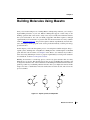
In this chapter, you’ll work through the process of creating three familiar analgesic drugs—
aspirin, tylenol, and ibuprofen—using Maestro’s Build panel. For a full description of the Build
panel and all its various features, see Chapter 4 of the Maestro User Manual. If you’d like to
learn about using Schrödinger software to prepare experimentally resolved protein structures
for calculations, see the Protein Preparation Guide.
Building 3D structures is a multi-step process, and for any given structure there are many
different ways to create it. This tutorial suggests just one way of building these structures, and
is designed to introduce most of the useful facets of the Build panel rather than demonstrate the
quickest possible way to build this particular molecule. After you complete the exercises in this
chapter, feel free to rebuild these molecules without the aid of the tutorial, and see how the
process can differ.
O
O
OH
OH
O
OH
O
N
O
Figure 3.1. Aspirin, tylenol, and ibuprofen.
Maestro 9.0 Tutorial
15
Chapter 3: Building Molecules Using Maestro
If you make an error while working through the exercises in this chapter, keep in mind that you
can always undo your last action by clicking on the Undo button in Maestro’s toolbar:
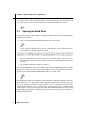
3.1
Opening the Build Panel
To begin the exercises in this chapter, we’ll display the Build toolbar, then open the Build panel
and survey its contents.
1. Click on the Show/Hide the Build toolbar button on the main toolbar.
A row of buttons is displayed across the top of the Workspace. Some of them have icons,
some of them have chemical structures on them.
The ones with chemical structures can be used to build molecules—but you can also
build molecules with a much larger variety of fragments in the Build panel, which we’ll
now open.
2. Choose Edit > Fragments from the main window.
You’ll see the Build Panel open—along with the main toolbar and the Build toolbar, it contains
all the tools you need to perform the structure-building exercises in this chapter. You can also
use the menu on the Show/Hide the Build toolbar button to open the panel.
The Build panel has three tabs, Fragments, Atom Properties, and Residue Properties. The Fragments tab allows you to simply build common, predefined substructures in the Workspace with
one click—anything from simple organic fragments to more complicated heterocycles. The
Atom Properties tab allows you to set element types, formal charges, and so on, although much
of this behavior can be performed using the toolbar. The Residue Properties tab can be useful
when building polypeptides or refining protein structures, but is generally not needed when
building small molecules.
16
Maestro 9.0 Tutorial
Chapter 3: Building Molecules Using Maestro
Phenyl
fragment
Acid
fragments
Figure 3.2. The Build panel.
3.2
Clearing the Workspace and Building with
Fragments
Now that you’ve opened the Build panel, you can begin building the structure using Maestro’s
fragment libraries. These pre-defined groups of substructures and functional groups can be
placed in the Workspace or attached to existing structures, eliminating the need to manually
add every individual atom in a structure.
1. Begin by clicking the Clear workspace button on the main toolbar.
This simply “excludes” any structures that may currently be in the Workspace—no atoms
or molecules in existing structures are deleted. This button is dimmed if there’s nothing in
the Workspace, so you don’t need to click it.
2. Click the Fragments tab to display a selection of fragment libraries.
Maestro 9.0 Tutorial
17
Chapter 3: Building Molecules Using Maestro
3. Choose Organic from the menu labeled Fragments.
4. Click on the phenyl fragment in the library in the center of the panel (see Figure 3.2).
5. To place the fragment, click near the center of the Workspace.
You’ll see the complete phenyl ring appear in “wire frame” representation. Carbon atoms
are colored gray, and hydrogen atoms are colored white.
Next, we’ll add an acid group to the ring. There are two acid fragments in the Organic
fragment library, one for adding at the C–H bond, and the other for adding at the O–H
bond. The bond that is replaced is indicated by a curved line.
6. Click on the carboxylic acid fragment whose C–H bond is divided by a curved line.
7. To place this fragment, click on any of the white hydrogen atoms in the Workspace.
When you move the pointer into the Workspace, it turns into a yellow square with an
“A|B” beside it. The square is the “target area”—when an atom is inside the square and
you click, that atom is selected for the operation you are doing.
Once you click, the hydrogen atom is replaced with a carboxylic acid group. Now you
have a benzoic acid molecule in the Workspace.
To complete the structure of aspirin, we need to add an acetate group. We can do this by
adding the other carboxylic acid group and a methyl group, in two steps.
8. Click on the other carboxylic acid fragment, whose O–H bond is divided by a curved line.
18
Maestro 9.0 Tutorial
Chapter 3: Building Molecules Using Maestro
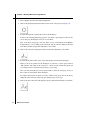
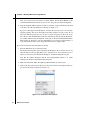
9. Click on the ring hydrogen atom nearest to the OH of
the acid group, as indicated in the figure to the right.
The acid is added to form an ester, but it is a formate
ester, not an acetate ester. The last step is to add a
methyl group in place of the formate hydrogen.
10. Click on the methyl fragment.
11. Now click on the hydrogen of the formate group,
as indicated in the figure to the right.
12. The formate group is converted into acetate. You
should now have a structure that looks like the one
in Figure 3.3, below.
Congratulations! You’ve just successfully built aspirin
(acetylsalicylic acid) in a few easy steps using Maestro’s
fragment library. In the following exercises, you’ll see
how to adjust the positions of the atoms in a molecule
and transform this structure into other molecules.
Figure 3.3. The completed aspirin structure.
Maestro 9.0 Tutorial
19
Chapter 3: Building Molecules Using Maestro
3.3
Adjusting Angles
Some of the angles in the structure you’ve just built don’t look quite right. In this exercise,
we’ll adjust the C–O–C angle of the ester to make the structure look a bit better.
1. Click and hold on the Adjust button on the main Maestro toolbar (not the Build toolbar),
and choose Angle from the menu that appears.
(If you don’t remember how to do this, see the explanation on page 7.)
Notice that the pointer changes to a yellow square with an “A” beside it, to indicate that
you are picking atoms, in this case to define the angle.
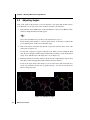
2. Click on the carbon atom in the ring, then the oxygen atom, then the carbon atom of the
carboxylate (see Figure 3.4).
At each click, a purple box appears around the atom. When you have clicked the third
atom, the boxes disappear and the angle is marked with a green line over the bonds and an
orange arrow, with the value of the angle next to it (see Figure 3.4).
3. Hold down the left mouse button and move the mouse left or right until the angle is about
120° (this is called “dragging horizontally with the left mouse button”).
You’ll see the angle and its value change as you move the mouse. The atoms that move
are the ones attached to the last atom you picked in Step 2. You can also use the mouse
wheel to change the angle.
Figure 3.4. Selecting an angle.
20
Maestro 9.0 Tutorial
Chapter 3: Building Molecules Using Maestro
4. Click and hold on the Adjust button on the main toolbar, and choose Delete Adjustments
from the button’s menu.
The lines and the arrow that marked the angles disappear from the Workspace.
5. Finally, click the Adjust button (click and release immediately, not click and hold) to
leave adjustment mode.
3.4
Deleting and Labeling Atoms and Adjusting Formal
Charge
Acetylsalicylic acid is partially ionized in solution. In this exercise, you’ll delete the acidic
hydrogen, label atoms with structural information, and adjust the formal charge of an atom.
1. Choose Atoms from the Delete button menu on the main toolbar.
(If you don’t remember how to do this, see the explanation on page 7.)
When you move the pointer into the Workspace, it turns into a square with an “A” beside
it, to show that you are picking atoms, which will be deleted.
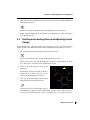
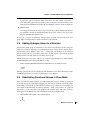
2. Click on the acidic hydrogen atom in the
Workspace.
The hydrogen atom is removed. If you make a
mistake when you delete an atom, you can
always click the Undo button to restore it.
3. Next, choose Formal charge from the Label
atoms button menu on the main toolbar.
You’ll notice that no new information appears
in the Workspace—that’s because the formal charge of all the atoms is still zero. The oxygen atom of the acidic group needs to have a formal charge of –1 for a carboxylate anion.
Maestro 9.0 Tutorial
21
Chapter 3: Building Molecules Using Maestro
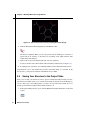
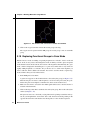
Figure 3.5. The ionized aspirin structure showing the formal charge.
4. Click the Decrement formal charge button on the Build toolbar.
The button is indented. When you move the pointer into the Workspace, it turns into a
square with an “A” beside it, to show that you are picking atoms, which will have their
formal charge decremented.
5. Click on the oxygen atom that the hydrogen atom was attached to.
You’ll see that the atom is then labeled with formal charge information (see Figure 3.5).
6. To undisplay the atom labels, choose Delete Labels from the Label atoms button menu.
Congratulations, you’ve just adjusted the geometry and formal charge of a structure. In the
next exercise, you’ll place the structure in the Maestro Project Table.
3.5
Saving Your Structure to the Project Table
Once you’ve created your structure, it’s time to place it in the Project Table. Placing your structure in the Project Table allows you to include and exclude the structure from the Workspace,
save it to disk, copy it, and add properties to it. First, we’ll open the Project Table (if it’s not
already open from the last chapter), then add the structure to it.
1. If the Project Table panel isn’t open, click the Open/Close project table button on the main
toolbar.
22
Maestro 9.0 Tutorial
Chapter 3: Building Molecules Using Maestro
Figure 3.6. The Create Entry from Workspace dialog box.
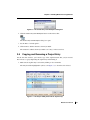
2. Click the Create entry from Workspace button on the main toolbar.
The Create entry from Workspace dialog box opens.
3. Set the Title to “ionized aspirin”.
4. Click Create to add the structure to the Project Table.
The structure is added to the Project Table as an “entry” in the second row.
3.6
Copying and Renaming a Project Entry
For the next few exercises, you’ll need a copy of the aspirin structure that you just created.
We’ll create a copy by duplicating the aspirin entry and renaming it.
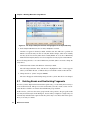
1. Make sure the aspirin entry is selected by clicking on its row number.
The entry should be highlighted in yellow, as in Figure 3.7, to show that it is selected.
Figure 3.7. The Project Table panel with the aspirin entry.
Maestro 9.0 Tutorial
23
Chapter 3: Building Molecules Using Maestro
Figure 3.8. The Project Table panel with the title highlighted in the duplicated entry.
2. In the Project Table menu bar, choose Entry > Duplicate > In Place.
Another row appears in the Project Table, with the same title. This isn’t a problem for
Maestro, because the entry also has an “entry ID” which is unique, and is used to identify
the entry. (It also has an entry name that is normally hidden. To see it, choose Show Entry
Name from the Property menu.) You can also duplicate an entry in place with CTRL+D.
Now we’ll change the title, so we can tell which entry is which. (There’s no need to change the
entry name.)
3. Click in the Title column of the third row of the Project Table.
The cell background turns white, and the text is highlighted in blue. A cursor appears
where you clicked in the text, to indicate that you can edit the contents of the table cell.
4. Change the title to “tylenol” and press ENTER.
The cursor disappears and the background goes back to yellow. The title is now changed.
3.7
Deleting Bonds and Reattaching Fragments
Now that you have duplicated and renamed the aspirin entry, you can modify the new entry to
create another molecule. This process can be useful when you want to make a series of molecules that have a similar core structure but with different groups attached.
In this exercise, you’ll move the acetate group from the ortho position to the para position. The
new entry should already be in the Workspace, because when you duplicate a single entry, it is
automatically included. If the square beside the tylenol entry is not filled, click in the square.
Now you’re ready to continue.
24
Maestro 9.0 Tutorial
Chapter 3: Building Molecules Using Maestro
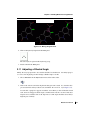
Step 2
Step 9
Step 6
Figure 3.9. Detaching, moving and reattaching the acetate fragment.
1. Choose Bonds from the Delete button menu on the main toolbar.
(If you don’t remember how to do this, see the explanation on page 7.) When you move
the pointer into the Workspace, it turns into a square with an “B” beside it, to show that
you are picking bonds, which will be deleted.
2. Click on the bond between the ring and the acetate oxygen (see Figure 3.9).
The bond disappears, and there are two fragments in the Workspace.
3. Click the Delete toolbar button again to exit Delete mode.
Next, we want to move the acetate fragment. Normally, when you move something in the
Workspace, everything moves. To move this fragment and leave everything else where it is, we
must perform a “local transformation”.
4. Choose Molecules from the Local transformation button menu on the main toolbar.
Note that the button is indented, to show that we are doing a local transformation.
5. Click an atom in the acetate fragment.
This selects the acetate molecule for a local transformation. You can now move the fragment without moving the rest of the structure. It’s marked in yellow with a magenta circle
with crossed lines in it. This circle marks the center around which you can rotate the fragMaestro 9.0 Tutorial
25
Chapter 3: Building Molecules Using Maestro
ment, if you want. If you don’t want to see these markers, deselect Show Markers on the
Local transformation button menu. For now we are only going to translate the fragment.
6. Drag the fragment with the right mouse button so that the oxygen atom that was attached
to the ring is near the para hydrogen of the ring (see Figure 3.9).
If you see a menu appear in the Workspace, it means that you were a bit too slow in dragging the fragment. Just release the right mouse button and press it again to drag. If you
pressed it while the pointer was over an atom, a yellow dot appears on the atom. To get
rid of the dot, click the Workspace selection toolbar button, then click in the Workspace;
if you didn’t finish moving the fragment, click again on the Local transformation button.
These menus are shortcuts to various commands that you can apply to the Workspace or
to the selected atoms. We won’t be using them, but feel free to explore them.
Now we’ll reconnect the acetate fragment to the ring.
7. From the Edit menu, choose Connect & Fuse.
The Connect & Fuse panel opens, docked into the Workspace. If you want to move it out,
click the button at the top right that has two rectangles in it. You can then move it to
where you want it. To put it back in the Workspace, click the docking button again.
Note that the markers disappear and the Local transformation button is no longer
indented—the mode has been turned off by this panel.
8. Make sure that Pick to define atom pairs and Show markers are both selected.
9. Click on the ring carbon atom in the para (or 4) position, then on the singly-bonded oxygen atom of the acetate fragment (see Figure 3.9).
Figure 3.10. The Connect & Fuse panel.
26
Maestro 9.0 Tutorial
Chapter 3: Building Molecules Using Maestro
A purple box appears around the carbon atom on the first click. On the second click, a
green dotted line appears between the two atoms (see Figure 3.9). In the Connect or fuse
atoms list in the Connect & Fuse panel, the atom numbers of the two atoms are displayed.
10. Click Connect.
A bond appears between the acetate oxygen and the ring carbon, and the hydrogen that
was attached to the ring is deleted. The methyl group of the acetate is very close to the
ring. We will adjust the structure later.
If you want to connect two molecules with more than one bond, you can select more atom
pairs. When you click Connect, a bond is created for each atom pair.
3.8
Adding Hydrogen Atoms to a Structure
Now that the acetate group is joined back on, we need to add a hydrogen atom to the place
where it was removed. Although you can add hydrogen atoms one-by-one to a structure, this is
unnecessarily tedious. Maestro allows you to automatically add hydrogen atoms wherever
they’re needed with just a few clicks of the mouse. In this exercise, we’ll add the missing
hydrogen atom to the ring, where we cut off the acetate group.
Missing hydrogen atoms can be added to any structure in the Workspace by double-clicking
the Add hydrogens button on the main Maestro toolbar.
• Double-click the Add hydrogens button to build the necessary hydrogen atoms.
The ring carbon atom now has a hydrogen atom attached to it. For more information on the
Add Hydrogens feature, see Section 4.9 of the Maestro User Manual.
3.9
Substituting Functional Groups in Place Mode
When you built the aspirin structure, you added functional groups by clicking on hydrogen
atoms. The new group replaced the hydrogen atom. You can also substitute functional groups
in the middle of a molecule, provided they have similar sorts of connections. For example, you
can convert a hydrocarbon into an ether by replacing a –CH2– group with an –O– group. In
this exercise, you’ll convert the acetate group into an acetamide group. This time, you’ll use
the fragment on the Build toolbar. These fragments can be placed in Place mode.
1. On the Build toolbar, click on the amine fragment.
Maestro 9.0 Tutorial
27
Chapter 3: Building Molecules Using Maestro
Figure 3.11. The structure after conversion of acetate to acetamide.
2. Click on the oxygen atom that connects the acetate group to the ring.
The oxygen atom is replaced with an NH group: the acetate group is now an acetamide
group.
3.10 Replacing Functional Groups in Grow Mode
Maestro has two modes for adding or replacing fragments in a molecule, “Place” mode and
“Grow” mode. So far, you have been using Place mode, in which you click to place a fragment
in the desired location. In Grow mode, the location of the fragment is determined by the “grow
bond”, which is displayed in the Workspace as a green arrow. This mode is very useful for
rapidly adding fragments to a molecule. All you need to do is to click on the fragment you
want to add next, and it’s added to the structure. You can also use Grow mode to replace fragments, which is what you’ll do in this exercise.
1. In the Build panel, select Grow.
A green arrow appears on the C–H bond next to the carboxylate group (see Figure 3.12).
This isn’t the place we want to add a fragment, so we’ll move the grow bond. (It’s possible that the green arrow might be somewhere else, but it doesn’t matter if it is.)
2. Make sure that Pick is selected in the Define grow bond section, and that Atoms is
selected on the Pick menu.
3. Click on the ring carbon that’s attached to the carboxylate group, then on the carboxylate
carbon (see Figure 3.12).
The green arrow moves to the bond you just picked, and is pointing towards the carboxylate. If you had picked the atoms in the other order, the bond would be pointing in the
opposite direction. The atom that the arrow head points to is the one that is replaced.
28
Maestro 9.0 Tutorial
Chapter 3: Building Molecules Using Maestro
Figure 3.12. Moving the grow bond.
4. Click on the hydroxyl fragment in the Build panel.
The carboxylate is replaced with a hydroxyl group.
5. Deselect Grow in the Build panel.
3.11 Adjusting a Dihedral Angle
Finally, the acetyl group needs to be rotated around the C–N bond because the methyl group is
too close to the ring hydrogen. We’ll change a dihedral angle to do this.
1. Choose Dihedral from the Adjust button menu on the main toolbar.
2. Click on the carbon atom in the ring that the nitrogen atom is attached to, then the nitrogen atom, then the carbonyl carbon atom, and finally, the oxygen atom (see Figure 3.13).
At each click, a purple box appears around the atom. When you have clicked the fourth
atom, the boxes disappear and the angle is marked with a red line over the bonds and a
turquoise arrow, with the value of the angle next to it. The angle should be about 180° (it
might be plus or minus).
Maestro 9.0 Tutorial
29
Chapter 3: Building Molecules Using Maestro
Figure 3.13. Selecting a dihedral angle.
3. Hold down the left mouse button and move the mouse horizontally until the angle is
about 0°.
You should see the acetyl group rotate around the C–N bond as you move the mouse.
4. Choose Delete Adjustments from the Adjust button menu on the main toolbar.
The lines and the arrow that marked the angles disappear from the Workspace.
5. Finally, click the button again to leave adjustment mode.
Congratulations! You have just turned aspirin into tylenol. You’ve also learned how to use
Grow mode, replace functional groups in both Grow and Place modes, and detach and reattach
fragments.
In the remaining exercises, you’ll convert tylenol into ibuprofen.
3.12 Duplicating a Project Entry
Before we go ahead with the structural changes, we need to duplicate the tylenol entry and
rename it. This time we’ll use the keyboard shortcut for duplication.
1. Make sure the tylenol entry is selected in the Project Table by clicking on its row number.
The entry should be highlighted in yellow.
30
Maestro 9.0 Tutorial
Chapter 3: Building Molecules Using Maestro
Figure 3.14. The completed tylenol structure.
2. Type CTRL+D.
Another row appears in the Project Table, with the same Title.
3. Now change the title to “ibuprofen”. If you aren’t sure how to do this, see Section 3.6 on
page 23.
4. Finally, click the In column of the new entry to place it in the Workspace.
We now have a new entry, and we will convert the structure in it to ibuprofen.
3.13 Changing Bond Orders
So far, we haven’t had to change any of the bond orders. The functional groups we added
already had the correct bond orders. In this exercise, the first thing to do is to change some
bond orders. Maestro has a very easy way of changing bond orders. We’re going to experiment
with adjusting bond orders while we prepare the structure for the next step.
1. On the Build toolbar, click the Decrement bond order toolbar button.
2. In the Workspace, click on the carbonyl C=O bond.
The double bond turns into a single bond.
3. On the Build toolbar, click the Increment bond order toolbar button.
Maestro 9.0 Tutorial
31
Chapter 3: Building Molecules Using Maestro
Figure 3.15. The incremented C–N bond showing the valence violation.
4. In the Workspace, click on the C–N bond between the carbonyl carbon and the nitrogen.
You’ll see the bond order increase, and the number of hydrogen atoms is automatically
adjusted.
5. Click again on the carbon-nitrogen bond.
The bond is now a triple bond, but the bonds to the other atoms aren’t changed. Maestro
lets you violate the valences of atoms when adjusting bonds, because it’s sometimes more
convenient to increase the bond order of one bond before decreasing the bond order of
other bonds. Before you finish changing bond orders, don’t forget to make sure that the
valences are correct. Now we’ll set the bond orders the way they need to be.
6. On the Build toolbar, click the Decrement bond order toolbar button.
7. In the Workspace, click twice on the carbon-nitrogen bond.
The triple bond turns back into a single bond. The hydrogen atoms aren’t added back
again, so the nitrogen is missing a hydrogen atom. We’ll add hydrogens later, when we
have finished changing the rest of the structure.
32
Maestro 9.0 Tutorial
Chapter 3: Building Molecules Using Maestro
Figure 3.16. The structure after conversion of N and O to C.
3.14 Changing Elements
Once you’ve built a molecule, it’s possible to change the atoms in the molecule to atoms of a
different element without deleting and then rebuilding a substructure. In this exercise, you’ll
see how to change elements using the Build toolbar. This is the next step in converting tylenol
to ibuprofen.
1. Choose C from the Set element button menu on the Build toolbar.
2. Click on the nitrogen atom, then on the two oxygen atoms.
The blue nitrogen atom and the red oxygen atoms are replaced with gray carbon atoms,
changing the side chains into hydrocarbon chains. No hydrogen atoms were added to the
carbons—we’ll add these in a later exercise.
For less commonly modeled elements that aren’t available from the toolbar, you can open the
Atom Properties tab in the Build panel, choose Element from the Property option menu, and
then select an element in the periodic table by clicking on it. Clicking on an atom in the Workspace then changes it to the selected element.
Maestro 9.0 Tutorial
33
Chapter 3: Building Molecules Using Maestro
3.15 Adding Atoms by Freehand Drawing
Although the Build panel contains a variety of common fragments that can be combined to
form complex molecules, it is sometimes useful to build parts of your structure manually. In
freehand drawing mode, Maestro allows you to do just that. This exercise will introduce you to
the freehand drawing tool as you continue to convert tylenol to ibuprofen. For more information on freehand drawing in Maestro, see Section 4.4 of the Maestro User Manual.
1. Click and hold the Draw structures button on the Build toolbar, and choose C from the
menu that appears.
This action sets the element type to carbon. The menu allows you to choose from a variety of common elements, including hydrogen, oxygen, nitrogen, sulfur, and phosphorous.
2. Click on the carbon atom attached to the ring that only has a hydrogen attached to it (see
Figure 3.17).
A purple box appears around the atom, indicating that you’ve selected this atom (the
“active” atom) as the starting point for the next drawing operation.
3. Click near the hydrogen atom to place a new carbon atom (see Figure 3.17).
You’ll see that a new carbon atom is placed and bonded to the first carbon atom. It’s only
a carbon atom—it doesn’t have any hydrogens attached to it. We’ll add those later.
Step 2
Step 4
Step 3
Figure 3.17. Adding a carbon atom by drawing.
34
Maestro 9.0 Tutorial
Chapter 3: Building Molecules Using Maestro
4. Click again on the new carbon atom.
The purple box disappears, to show that you’ve finished drawing at this location.
We need to add a carboxylic acid group to the carbon atom. We could do this with the fragments, but this time we’ll do it by drawing.
5. Click on the same carbon atom as you clicked on in Step 2 (see Figure 3.18).
The purple box around the atom reappears.
6. Click near this carbon atom, but away from the carbon and hydrogen atoms (see
Figure 3.18).
Another new carbon atom is placed and bonded to the first carbon atom.
Now, we’ll change the element we’re drawing with to oxygen, so we can draw the acid group.
7. Choose O from the Draw structures button menu on the Build toolbar.
Notice that the purple box disappeared from around the carbon atom when you changed
elements. This indicates that drawing is no longer active, and you have to pick an atom to
start drawing again.
Step 5
Step 8
Step 6
Step 10
Step 9
Figure 3.18. Completing the carboxylate group by drawing.
Maestro 9.0 Tutorial
35
Chapter 3: Building Molecules Using Maestro
8. Click on the carbon atom you just placed, then click near the active carbon atom (see
Figure 3.18).
A red oxygen atom appears, bonded to the carbon atom, but the bond is only a single
bond. We could use the toolbar buttons to increment the bond, but this time we’ll draw in
the second bond.
9. Click back on the carbon atom that’s bonded to the oxygen (see Figure 3.18).
The bond changes from a single bond to a double bond, and the carbon atom becomes the
active atom. Notice that, even though we are drawing with oxygen, the carbon atom
didn’t turn into an oxygen atom. If you click on an atom that’s already there, it doesn’t
change to a different element. That’s very useful for drawing in bonds—you don’t have to
worry about which element you have selected.
10. Click again near the active carbon atom, away from the other atoms (see Figure 3.18).
Another oxygen atom is placed. New atoms are always atoms of the selected element; old
atoms keep their elemental identity.
You can also join one atom to another in Draw mode. We’ll do this, and then undo the operation.
11. Click on the carbon atom you placed first.
A bond is created, to form a 4-membered ring.
12. Click the Undo button on the main toolbar.
The bond disappears, and the purple cube is now on the oxygen atom.
13. Click the active oxygen atom to finish drawing.
Finally, we need to add hydrogen atoms. We could draw in the hydrogen atoms on this structure (and feel free to do so if you like), but as we saw in Section 3.8, Maestro provides a convenient way of automatically adding hydrogen atoms wherever they’re needed.
14. Double-click the Add hydrogens button to add the necessary hydrogen atoms.
Hydrogen atoms are added to all the carbon atoms that are missing them, and to the singly bonded oxygen in the carboxylate group.
36
Maestro 9.0 Tutorial
Chapter 3: Building Molecules Using Maestro
Step 4
Step 2
Figure 3.19. The hydrogen and carbon atoms to move.
3.16 Moving Atoms
When you’ve been drawing atoms, it’s usually the case that they aren’t in the optimum location—the bond lengths and angles can be far from what they are in the real structure. Also,
when you are drawing atoms, they are always placed in the same plane. If you want to place
atoms in a different plane, you can rotate the structure and start placing them again, but if they
are already in place, you might want to move them. The Build panel provides a tool for moving
atoms that have already been placed.
In this exercise, you’ll move some of the atoms so that they are in a more realistic location. In
the next exercise, you’ll use another tool to get much better structures.
First, let’s move one of the CH hydrogens out of the plane.
1. Choose –Z from the Move button menu on the Build toolbar.
2. Click on the CH hydrogen atom in the –CH(CH3)COOH group (see Figure 3.19).
Although it looks like nothing happened, the hydrogen moved 0.5 Å away from you (in
the −z direction) each click. You can rotate the structure to see what happened. Click the
Reset Workspace button when you have finished looking at the rotated structure.
Next, we’ll move one of the methyl group out of the plane.
Maestro 9.0 Tutorial
37
Chapter 3: Building Molecules Using Maestro
3. Choose +Z from the Move button menu on the Build toolbar.
4. Click twice on the methyl carbon atom in the –CH(CH3)COOH group.
5. Now rotate the structure (middle mouse button) to see what happened.
Notice that the methyl hydrogens moved with the carbon atoms. Groups that are attached
to an atom move with the atom.
6. Click the Reset Workspace button after you have looked at the rotated structure.
Finally, we’ll move one of the CH hydrogen atoms in plane.
7. Choose XY from the Move button menu on the Build toolbar.
8. Click on the CH hydrogen atom in the –CH2CH(CH3)2 group (see Figure 3.20).
A purple cube appears around the atom, to show that it has been selected for movement in
the xy plane.
9. Click somewhere between the two methyl groups.
The hydrogen atom moves to the new location.
Figure 3.20. Moving the CH hydrogen in the xy plane.
38
Maestro 9.0 Tutorial
Chapter 3: Building Molecules Using Maestro
Moving atoms with these tools is useful when you are drawing a structure, so that you get
approximately the right geometry, but it doesn’t give structures that are close to the “real”
structure. In the next exercise, you’ll see how to improve the structure.
3.17 Cleaning Up Structures
Maestro’s fragment libraries allow you to build molecules out of fragments with optimized
geometries, and the structures you create usually have reasonable geometries. When you have
been using Draw mode, the structures usually need cleaning up. The Build panel allows you to
“clean up” the structure using the UFF (universal force field) minimizer.
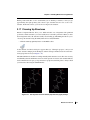
• Click the Clean up geometry button on the Build toolbar.
As the structure is refined, a dialog box appears that says “Cleanup in progress”, and you can
see the structure changing in the Workspace. When cleanup is finished, notice how the functional groups have moved (see Figure 3.21).
The UFF minimizer is suitable for refining manually built structures, but it offers less accuracy
and flexibility than the minimizers and force fields present in software such as MacroModel,
and it sometimes doesn’t give good geometries for groups that should be planar. Always check
your structures after using the UFF minimizer.
Figure 3.21. The ibuprofen structure before (left) and after (right) cleanup.
Maestro 9.0 Tutorial
39
Chapter 3: Building Molecules Using Maestro
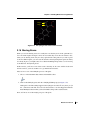
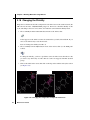
3.18 Changing the Chirality
Ibuprofen is a chiral molecule. The configuration at the chiral atom of the actual molecule (the
CH carbon atom in the –CH(CH3)COOH group) is S. We need to check the chirality of this
atom, and change it if it isn’t correct. First, we’ll label the atoms with their chirality labels.
1. Choose Chirality from the Label atoms button menu on the main toolbar.
A label appears on the chiral atom. For the structure that you built, it should be R. If you
can’t see the label clearly, rotate the molecule.
Now we’ll change the chirality from R to S.
2. Choose Chirality from the Adjust button menu on the main toolbar (not the Build panel
toolbar).
To change the chirality, you have to pick three atoms: the chiral atom, then the two that
you want to stay where they are. The other two atoms are swapped, with their attached
groups.
3. Click on the chiral carbon atom, then click on the ring carbon and the carboxylate carbon
(see Figure 3.22).
Figure 3.22. Changing the configuration of ibuprofen from R to S.
40
Maestro 9.0 Tutorial
Chapter 3: Building Molecules Using Maestro
Figure 3.23. The Project Table panel with the three entries selected.
On the first and second clicks, a purple cube appears around the picked atoms. On the
third click, the groups are moved, and the chirality label changes from R to S.
Congratulations! You have completed the transformation of aspirin to tylenol to ibuprofen, and
have learnt how to use most of the tools in the Build panel. In the next few chapters, you’ll see
how to use some of the other capabilities of Maestro.
3.19 Exporting Structures to a File
Now that you’ve created these three molecules, you can share them by exporting them to a disk
file. SD format is used by a number of other programs, so we’ll export them in this format.
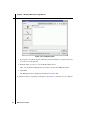
1. In the Project Table, click the aspirin entry, then shift-click the ibuprofen entry.
The three structures should be highlighted in yellow, which means they are selected.
2. In the Project Table panel, click the Export Structures button on the toolbar to open the
Export panel.
You can also open this panel by choosing Table > Export > Structures in the Project Table
panel or by choosing Project > Export Structures in the main window.
Notice that the Files of type option menu setting is By Extension. This means that Maestro
will use the extension of the file name (the part after the dot) to determine what kind of
file to write. It can recognize many of the common formats. If you want to be sure that it’s
the right type, you can always make a choice from this option menu.
Maestro 9.0 Tutorial
41
Chapter 3: Building Molecules Using Maestro
Figure 3.24. The Export panel.
3. If you want to save the file in place other than your tutorial directory, navigate to the place
you want to save the structure.
4. Enter the name analgesics.sdf in the File name text box.
The .sdf extension tells Maestro that you want to save the file in MDL SD format.
5. Click Save.
The Export panel closes and the file should now be saved to disk.
To learn more about to exporting your structures, see Section 3.2 of the Maestro User Manual.
42
Maestro 9.0 Tutorial
Maestro Tutorial
Chapter 4
Chapter 4:
Changing the Appearance of Structures
Now that you know how to import and build structures using Maestro, you’re ready to change
the way structures appear in the Workspace. Using Maestro’s visualization tools, you can color
atoms, change the three-dimensional representation of atoms and bonds, and view molecular
surfaces. This section of the tutorial will demonstrate how to make such changes, allowing you
to draw attention to important structural features and create presentation-quality graphics.
4.1
Getting Ready for the Exercises in this Chapter
To perform the exercises in this chapter, you’ll need to import the structure file
visualization_exercises.mae. This file includes a protein-ligand complex originally
taken from the PDB (Protein Data Bank) and “prepared” using Schrödinger’s Protein Preparation Guide.1 This protein-ligand complex contains a protein structure, a ligand, and several
active site water molecules. If you haven’t already copied this file from the installation subdirectory maestro-vversion/tutorial, copy it now from this directory to your working directory.
To import the file into Maestro:
1. Click the Import structures toolbar button to open the Import panel.
2. Ensure that the file format is set to Maestro.
3. Select the file visualization_exercises.mae from the Files list.
4. Click Open to import the multi-structure Maestro file.
You’re now ready to begin the exercises in this chapter.
1.
PDB structures are experimental protein structures. The data in these structures can be incomplete: missing
hydrogen atoms, formal charges, and so on. The protein preparation process ensures that all atoms are present
and have the correct charges and bonding patterns, and can also do other tasks to “clean up” the structures.
Maestro 9.0 Tutorial
43
Chapter 4: Changing the Appearance of Structures
4.2
Displaying and Undisplaying Atoms
One of the most common changes you might want to make to the molecular representation is to
display or undisplay structural features. In order to draw attention to certain parts of a molecular structure, it is often helpful to display only a portion of the entire structure. Rather than
doing so by deleting other parts of the structure, this can be done using Maestro’s “undisplay”
and “display” tools. These tools allow you to make visible parts of the structure invisible, and
to make invisible parts of the structure visible again.
The Maestro toolbar includes several buttons for displaying and undisplaying atoms, shown
below. This section of the tutorial will demonstrate how to use these tools. You will use them
again in a later part of this chapter.
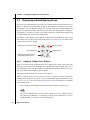
Display only selected atoms button
Also display button
Display only button
Undisplay button
Display atoms within N Å of currently displayed atoms button
4.2.1
Using the “Display Only” Buttons
There are two buttons in the toolbar that allow you to display only a subset of the atoms in the
Workspace. These buttons are the Display only selected atoms button, which allows you to
select individual groups of atoms for display, and the Display only button, which allows you to
choose predefined structural feature types for display.
This exercise demonstrates how to use these toolbar buttons.
When you imported the file in the previous exercise, it should have been automatically
included in the Workspace. If it wasn’t, open the Project Table panel and include the entry
Protein-ligand complex. See Section 2.6 on page 12 for more information on including
and excluding entries.
1. Choose Atoms from the Display only selected atoms menu button (see Figure 4.1).
(If you don’t remember how to do this, see the explanation on page 7.) When you move
the pointer into the Workspace, you should see a yellow square with the letter “A” next to
it, indicating that you can select atoms in the Workspace.
44
Maestro 9.0 Tutorial
Chapter 4: Changing the Appearance of Structures
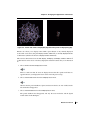
Figure 4.1. Display only selected atoms and Display only button menus.
2. Hold down the left mouse button, drag the pointer over any set of atoms in the Workspace
(creating a dotted yellow box), and let go of the left mouse button.
The atoms that were not within the yellow box are undisplayed—only the atoms that you
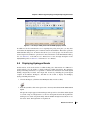
selected remain visible.
3. Choose All from the Display only button menu (see Figure 4.1).
All atoms in the Workspace are displayed again.
Figure 4.2. Atoms selected for display (left) and the result (right).
Maestro 9.0 Tutorial
45
Chapter 4: Changing the Appearance of Structures
Figure 4.3. Residue displayed (left) and protein backbone displayed (right).
4. Choose Residues from the Display only selected atoms button menu.
In a protein, a “residue” typically refers to a single amino acid subunit, a ligand, a water
molecule, or a cofactor. When you move the pointer into the Workspace, you should see a
yellow square with the letter “R” next to it, indicating that you can select residues in the
Workspace.
5. Click on any one atom in the Workspace.
Maestro displays only the residue that contains the atom you clicked on. All other atoms
are undisplayed.
6. Choose Protein Backbone from the Display only button menu.
Now only the protein backbone is visible, and all other atoms are invisible.
7. Choose All from the Display only button menu, to redisplay all atoms.
The toolbar buttons behave similarly when other modes are selected from the button menus.
For example, if you choose Molecules from the Display only selected atoms button menu, you
can click on any molecule in the Workspace, and all other molecules will be undisplayed.
4.2.2
Using the Other Display Buttons
In the previous section we saw how to display only a certain set of atoms in a single operation.
However, Maestro also allows you to display subsets of invisible atoms without undisplaying
any currently visible atoms, and to selectively undisplay a subset of currently visible atoms.
These actions can be performed using the Also display and Undisplay toolbar buttons.
46
Maestro 9.0 Tutorial
Chapter 4: Changing the Appearance of Structures
Figure 4.4. Protein side chains undisplayed (left) and entire protein undisplayed (right).
Maestro also allows you to display atoms within a given distance of any currently displayed
atoms. This can be done using the Display residues within N Å of currently displayed atoms
toolbar button (which we’ll shorten to Display residues within N Å).
This exercise demonstrates how the Also display, Undisplay, and Display residues within N Å
toolbar buttons can be used to selectively display the structural features that you are interested
in.
1. Choose All from the Also display button menu.
This is to make sure that all atoms are displayed. Note that this operation will have no
apparent effect if you displayed all atoms at the end of the previous step.
2. Choose Protein Side Chains from the Undisplay button menu.
Observe that the protein backbone, ligand, and water molecules are now visible, but the
side chains have disappeared.
3. Choose Protein Backbone from the Undisplay button menu.
The protein backbone has disappeared, and only the water molecules and the ligand
remain visible in the Workspace.
Maestro 9.0 Tutorial
47
Chapter 4: Changing the Appearance of Structures
Figure 4.5. Ligand only (left) and ligand with residues within 4Å (right).
4. Choose Waters from the Undisplay button menu, to undisplay the water molecules.
Only the ligand remains visible in the Workspace.
Now that the ligand is the only molecule displayed in the Workspace, we can use the Display
residues within N angstroms toolbar button to display the active site features.
5. Choose +4 Å from the Display residues within N Å button menu
Residues that have any atoms within 4 Å of the currently displayed ligand are now visible. These residues are all part of the active site, and include some water molecules.
6. To display the remaining water molecules without undisplaying any of the currently visible atoms, choose Waters from the Also display button menu.
Observe that the ligand, active site residues, and waters are all visible. If you want to
enlarge the view of the structure, click the Fit to screen button.
7. To display the protein backbone without undisplaying any of the currently visible atoms,
choose Protein Backbone from the Also display button menu.
Observe that the protein backbone, ligand, active site residues, and water molecules are
all visible. To view the entire structure, click the Fit to screen button again.
48
Maestro 9.0 Tutorial
Chapter 4: Changing the Appearance of Structures
Now that you know how to operate the various tools that control atom visibility, you can apply
the same basic steps when working with structures of your own. Keep in mind that there may
be more than one way to display or undisplay any given set of atoms—feel free to use whatever
method works best for you. We’ll be using many of these controls again in a later exercise.
You may have noticed that most of the menus for the toolbar buttons described in the above
exercises all had an option called Select. When you choose this option, Maestro opens the
Atom Selection dialog box. This tool allows you to select combinations of atoms that are a bit
more complicated than those in the tutorial examples. To learn more about the Atom Selection
dialog box, see Section 5.3 of the Maestro User Manual.
4.3
Changing the Atom Coloring Scheme
When working in a three-dimensional modeling environment, you can use color to show information about a structure. In most cases, Maestro uses an element-based coloring scheme by
default. In this exercise, we’ll use atom coloring schemes to visualize information about our
protein structure. Take a moment to look over the protein structure in the Workspace. Right
now, the color scheme represents various elements in the Workspace, but it can also tell you
about calculated and experimental structural properties.
1. Choose Atom Partial Charge from the Color Scheme button menu.
The atoms are colored by their partial charge. The correspondence of the colors to the
partial charges is shown in the table below. The partial charge is an estimate of the “real”
charge on an atom, as opposed to the “formal” charge, which is always an integer and is
derived from valency rules. These partial charges came from a MacroModel calculation.
Color
Charge Range
blue
≥ +0.25
aquamarine
+0.15 to +0.25
green
+0.05 to +0.15
white
−0.05 to +0.05
yellow
−0.15 to −0.05
orange
−0.25 to -0.15
red
≤ −0.25
Maestro 9.0 Tutorial
49
Chapter 4: Changing the Appearance of Structures
Another property that can be visualized using color is the “B factor” that was experimentally
determined when the protein structure was resolved. The B factor is a measure of how mobile a
particular region of a protein is. Side chains and loops, for example, tend to have higher B
factors while the relatively rigid helix and sheet regions of the protein backbone tend to have
lower B factors.
2. To view the B factors, choose Atom PDB B
Factor (Temperature Factor) from the Color
Scheme button menu.
The color scheme used by Maestro ranges
from blue for low values through white at
values in the mid 30s, to red for high values,
above about 60.
Color schemes can be useful for identifying parts
of the displayed structure. In a big molecule like
this protein-ligand complex, it’s hard to tell
what’s the protein, what’s the ligand, and what’s
something else. Each of these pieces is usually a
separate molecule, so you can color them by
molecule number to tell which is which.
3. Choose Molecule Number from the Color
Scheme button menu.
4. To return to the element-based coloring
scheme, choose Element from the Color
Scheme button menu.
Using the Atom Coloring panel,
apply custom color schemes to
more information on using the
panel, see Section 6.1 of the
Manual.
50
Maestro 9.0 Tutorial
it’s possible to
structures. For
Atom Coloring
Maestro User
Chapter 4: Changing the Appearance of Structures
4.4
Changing the Appearance of Atoms and Bonds
Prior to this section, the tutorial operations were all performed using a simple “wire frame”
representation for molecular structures. In this section, you’ll learn how to represent atoms and
bonds as spheres and tubes. Not only can you make it easier to view the structure by changing
the way that atoms and bonds appear, but you can also use various representation modes to
differentiate substructures in the Maestro Workspace.
The Maestro toolbar includes several buttons used to control the representation of atoms and
bonds in the Workspace. Structures can be represented as wires, space-filling CPK atoms, balls
and sticks, or tubes.
Draw bonds in wire button
Draw atoms in CPK button
Draw atoms in Ball & Stick button
Draw bonds in tube button
To begin this exercise, you will need to ensure that you can see the ligand and the water molecules clearly. Follow the instructions below to set up the Workspace for this exercise.
1. Zoom in on the ligand until it occupies a large part of the Workspace. (Drag horizontally
with the middle and right mouse buttons.)
2. Right-click on an atom in the middle of the ligand, to center the ligand in the Workspace.
Now we’ll start changing the representation. First, we’ll display the structure in Ball & Stick
representation instead of wire frame, and then convert the protein back to wire frame.
3. Double-click the Draw atoms in Ball & Stick button menu (page 52, upper left).
Double-clicking applies the action of the button to all atoms in the Workspace. You can
use a double-click for all four representation buttons.
4. Choose Molecule from the Draw bonds in wire button menu, and click on a protein atom.
Observe that both the protein backbone and active site residues are displayed as wires,
but the ligand and the water molecule remain unchanged (page 52, upper right). The
ligand and water molecules are now much easier to distinguish from the protein.
Next, we’ll change the representation of the ligand and the residues in the active site.
5. To represent the ligand using space-filling CPK atoms, choose Molecules from the Draw
atoms in CPK button menu, and click on any atom in the ligand (page 52, lower left).
6. To represent active site residues as tubes, choose Residues from the Draw bonds in tube
button menu, and click on an atom in each active site residue (page 52, lower right).
Maestro 9.0 Tutorial
51
Chapter 4: Changing the Appearance of Structures
52
Maestro 9.0 Tutorial
Chapter 4: Changing the Appearance of Structures
Beyond the options in the Maestro toolbar, it is also possible to customize settings such as the
width of tubes, the size of spheres, and so on. For more information on changing these settings,
refer to Section 6.2 of the Maestro User Manual. In addition, the Workspace Style toolbar can
be used to automatically apply molecular representations or styles to the Workspace (see
Section 6.5 of the Maestro User Manual).
4.5
Displaying the Protein Backbone as a Ribbon
In addition to representing atoms and bonds using 3D features, Maestro can also represent
protein backbones using three-dimensional “ribbons”. Ribbons can be turned on or off using
the Show, hide, or color ribbons button on the Maestro toolbar:
In this exercise, you’ll represent the protein backbone using a ribbon.
1. Click the Fit to screen toolbar button, so you can see all of the protein.
2. From the Show, hide, or color ribbons button menu, choose Show Ribbons for All Residues.
The protein is now represented by ribbons that trace the protein backbone instead of
atoms, but the ligand and the water molecules remain in their previous representation.
3. Choose Display Atoms from the Show, hide, or color ribbons button menu.
The protein atoms reappear, with the ribbons displayed as well. Observe that the ribbon
follows the protein backbone.
4. Choose Delete Ribbons from the Show, hide, or color ribbons button menu.
The ribbons disappear, leaving the atoms on display.
The default coloring scheme for ribbons is to color according to residue position. As you
follow the ribbon along, you’ll see the colors progress through the spectrum as the residue
number increases. The menu on the ribbons button includes alternate coloring schemes that
you can select.
Once you have experience with Maestro’s ribbon rendering options, you may wish to further
customize the look and feel of protein ribbons. For more information on doing so, see
Section 6.2.4 of the Maestro User Manual.
Maestro 9.0 Tutorial
53
Chapter 4: Changing the Appearance of Structures
Color schemes
for ribbons
Figure 4.6. Show, hide, or color ribbons button menu.
Figure 4.7. Ribbon representation of protein with atoms (right) and without (left).
54
Maestro 9.0 Tutorial
Chapter 4: Changing the Appearance of Structures
4.6
Creating and Displaying a Molecular Surface
In addition to custom rendering for higher-level structural features like protein backbones,
Maestro can also represent the “surfaces” that are created by groups of molecules. Surfaces can
represent the volume of a molecule as approximated by van der Waals radii. Surfaces can also
display properties such as the electron density created by programs like Jaguar. In this
example, we’ll create and visualize a “molecular surface,” which is a smooth, contiguous
surface that represents the solvent-accessible area presented by a structure. We’ll use the
protein from the previous exercise, so leave the structure in the Workspace.
1. Choose Display > Surface > Molecular Surface in the main window.
The Molecular Surface panel opens, docked into the Workspace.
2. Delete the text in the Name text box at the top of the panel and type Tutorial
Surface.
This text box contains the text Molecular Surface by default.
Figure 4.8. The Molecular Surface panel.
Maestro 9.0 Tutorial
55
Chapter 4: Changing the Appearance of Structures
Below the Name text box is an area titled Atoms for surface display. This is used to define the
structure for which Maestro creates a surface. For this exercise we’ll select the protein structure only:
3. Choose Molecules from the Pick option menu.
4. Click on any atom in the protein to select the entire protein.
The wire bonds in the protein are temporarily colored a purple color, to show that they
have been selected for the surface. Note that the text in the ASL text box is automatically
filled in once you click on the protein. ASL stands for “Atom Specification Language”,
and is a way of describing which atoms have been selected. If you want to be more selective in the atoms you choose, you can click the Select button, which opens the Atom
Selection dialog box. For more information, see Section 5.3 of the Maestro User Manual.
The rest of the settings can be left at their default values. For large molecules such as proteins, the default image quality setting of Low is usually appropriate. For small molecules,
higher quality settings may be useful.
5. Click Create Surface to generate the molecular surface.
Once the surface is created, the Manage Surfaces panel automatically appears. Notice
that you can see inside the surface where the ligand atoms are. This is because the surface
doesn’t cover these atoms: we chose to put a surface on only the protein.
6. Click Close to close the Molecular Surface panel.
Figure 4.9. The Manage Surfaces panel.
56
Maestro 9.0 Tutorial
Chapter 4: Changing the Appearance of Structures
Figure 4.10. Molecular surface, green at 100% transparency (left) and light blue at 50%
transparency (right).
Next, we’ll experiment with the color and transparency of this surface. These properties can be
changed in the Display Options dialog box.
7. Click the Display Options button near the bottom of the Manage Surfaces panel.
The Surface Display Options dialog box opens.
8. Use the Transparency slider to set the transparency to 50 (fifty percent transparent).
9. Select Light Blue from the Color option menu.
10. Click OK to accept and view the changes (see Figure 4.10).
The dialog box closes and the changes are applied. If you want to experiment more with
the display options, click Apply instead. The dialog box remains open, and you can make
whatever other changes you would like to make.
11. Once you’ve viewed the surface, control-click the square in the leftmost column of the
Manage Surfaces panel to undisplay the surface.
12. Close the Manage Surfaces panel by clicking the Close button.
Maestro 9.0 Tutorial
57
Chapter 4: Changing the Appearance of Structures
Figure 4.11. The Surface Display Options dialog box.
Maestro is also capable of generating several other surface types. The interfaces used to create
these surfaces are generally similar to the Molecular Surfaces panel, and all settings for the
generated surfaces are controlled via the Manage Surfaces panel. For more information on
creating and viewing surfaces using Maestro, see Chapter 11 of the Maestro User Manual.
58
Maestro 9.0 Tutorial
Maestro Tutorial
Chapter 5
Chapter 5:
Measuring, Analyzing, and
Superimposing Structures
Once you’re satisfied with the way that your structures appear in the Workspace, you can go on
to examine the structures and their properties. For example, you can examine the geometric
differences between two conformations of a molecule by superimposing them, or you can have
Maestro display the hydrogen-bonding interactions between a ligand and a receptor. In this
chapter, we’ll start with basic operations like measuring distances and angles before
performing more complicated structural analyses.
For more information on the full extent of Maestro’s analysis capabilities, see Chapter 9 of the
Maestro User Manual.
5.1
Getting Ready for the Exercises in this Chapter
To perform the exercises in this chapter, you’ll need to import the structure file
analysis_exercises.mae. This is a multi-structure file that includes several small molecules, a set of conformations created by MacroModel, and a ligand that has been docked to a
protein structure using Glide. If you haven’t already copied this file from $SCHRODINGER/
maestro-vversion/tutorial, copy it now from this directory to your working directory.
To import the file into Maestro:
1. Click the Import structures toolbar button to open the Import panel.
2. Ensure that the file format is set to Maestro.
3. Select the file analysis_exercises.mae from the list.
4. Click Open to import the multi-structure Maestro file.
5. If the Project Table panel isn’t open, open it by clicking the Open/Close Project Table
toolbar button.
Maestro 9.0 Tutorial
59
Chapter 5: Measuring, Analyzing, and Superimposing Structures
Figure 5.1. The Project Table panel with the new entries.
In the Project Table panel, you’ll notice that several new rows have been added. These rows
represent new entries in the Project Table. Some of these entries contain only one molecule,
while other entries contain multiple molecules.
The Project Table has an easy-to-use set of controls that allow you to record structure-related
properties, present the results of calculations, and include and exclude entries in the Workspace. You’ve already done some of these operations in earlier chapters of this tutorial. The
exercises in this chapter will walk you through any necessary Project Table manipulations, but
for more information on the Project Table, see Chapter 8 of the Maestro User Manual.
We’ll be using the Project Table quite a bit in these exercises, so we’re going to leave it open. If
it gets in the way, you can move it, or you can close it and re-open it when you need to use it
again. To close the Project Table panel, click the Open/Close Project Table button in the toolbar
(it should be indented), or click the Close button in the bottom right-hand corner of the Project
Table panel.
You’re now ready to begin the exercises in this chapter.
5.2
Measuring Distances
One simple analysis task is to determine the distance between two atoms. These can be any
two atoms, bonded or non-bonded. In this example, we’ll use the Measure distances, angles,
dihedrals or coupling button on Maestro’s toolbar to determine bonded and non-bonded interatomic distances on a structure that has been optimized using Jaguar.
To begin, we’ll make sure that the appropriate Project Table entry is included in the Workspace.
60
Maestro 9.0 Tutorial
Chapter 5: Measuring, Analyzing, and Superimposing Structures
1. In the Project Table, find the entry named Small Molecule 01.
2. Click the square in the In column for the entry to ensure that this entry is included in the
Workspace and all others are excluded.
3. Choose Distance from the Measure distances, angles, dihedrals or coupling button menu
on the main toolbar.
(If you don’t remember how to do this or are starting with this chapter, see the explanation of how to use button menus on page 7.)
4. Click on any atom in the Workspace.
A purple cube appears over the atom, to indicate that you have selected it as the starting
point for your measurement.
5. Click on an atom that is bonded to the atom you’ve just selected.
A dashed marker appears between the atoms, and the interatomic distance (measured in
angstroms) is displayed over the marker. If you rotate the molecule in the Workspace (by
holding down the middle mouse button and moving the mouse), you’ll see that the measurement marker moves with the structure.
Next, we’ll measure a distance between two non-bonded atoms. Because the measurements
tool is still active (the Measure distances, angles, dihedrals or coupling button is indented to
show this), with Distance selected, you don’t need to repeat the process of selecting Distance
from the toolbar button menu.
6. Click on the same atom that you clicked on in Step 4.
Figure 5.2. Distance measurements.
Maestro 9.0 Tutorial
61
Chapter 5: Measuring, Analyzing, and Superimposing Structures
Note that the purple box appears again, indicating that you’ve selected this atom as the
starting point for your measurement.
7. Now click on any atom in the Workspace that’s not bonded to the atom that you clicked
on in the previous step.
You’ll see that a new distance marker appears between the two atoms that you just clicked
on. You may also have noticed that the width of the original measurement marker
decreased when you made the new measurement. This is because the wide dashed lines
simply indicate that this is the most recently measured distance.
Finally, after measuring the distances, we can remove the markers from the Workspace.
8. Choose Delete Measurements from the Measure distances, angles, dihedrals or coupling
button menu.
The structure remains in the Workspace unchanged, and the distance markers disappear.
5.3
Measuring Angles
Another easily performed analysis task is angle measurement. In this example, we’ll use the
structure from the previous exercise to see that angles can be measured in much the same way
that distances can be measured.
1. Choose Angle from the Measure distances, angles, dihedrals or coupling button menu.
2. Click the oxygen of the carbonyl near the middle of the molecule.
You’ll notice that a purple cube appears to indicate that you’ve selected an atom to begin
an angle measurement.
3. Click the carbonyl carbon atom.
You’ll see a second purple cube appear, indicating that you’ve selected the clicked atom
to be part of your angle measurement. This second atom clicked will always be the vertex
of the angle that is measured.
4. Finally, click on a carbon atom that is bonded to the atom you picked in the last step.
After you click on the third atom, the purple cubes vanish, and a green angle marker
appears.
62
Maestro 9.0 Tutorial
Chapter 5: Measuring, Analyzing, and Superimposing Structures
Figure 5.3. Measuring an angle.
If you like, you can define several other angle measurements on the structure. Just like
distance measurements, multiple angle measurements can appear in the Workspace at any
given time, and you can measure angles between non-bonded atoms.
5. Finally, delete the angle markers from the Workspace by choosing Delete Measurements
from the Measure distances, angles, dihedrals or coupling button menu.
The angle markers disappear, and the structure remains unchanged in the Workspace.
5.4
Measuring Dihedrals
Once you know how to measure distances and angles, it’s a simple matter to measure a dihedral angle, the torsion defined by any four atoms. For this example, we’ll measure the dihedral
angles in two different conformations of n-propanol. We’ll begin this exercise by placing one
of the n-propanol structures in the Workspace.
1. Locate the entry n-propanol anti in the Project Table.
2. Include the n-propanol anti entry in the Workspace and exclude all other entries, by clicking the square to the left of the title.
3. Choose Dihedral from the Measure distances, angles, dihedrals or coupling button menu.
4. Locate the terminal methyl group in the molecule and click on the carbon atom in that
group.
A purple cube appears, indicating that you’ve selected this atom to be used as part of the
dihedral measurement.
Maestro 9.0 Tutorial
63
Chapter 5: Measuring, Analyzing, and Superimposing Structures
Figure 5.4. Measuring a dihedral angle.
5. Next, click on the carbon atom that is bonded to the one you clicked on in the previous
step.
After doing so, another purple cube appears.
6. Click on the one remaining carbon atom in the structure.
A third purple cube appears.
7. Finally, click on the red oxygen atom.
A marker is superimposed over the structure, and the measurement (180°) is displayed
over the marker. (It might be -180° instead of 180°.)
After measuring the dihedral angle of the “anti” conformation, we’ll include the “staggered”
conformation in the Workspace and measure the corresponding dihedral angle.
8. Locate the entry n-propanol staggered in the Project Table.
9. Control-click (click while holding down the CTRL key) the square next to the entry name
to include this entry in the Workspace.
You’ll notice that control-clicking makes the “staggered” entry appear in the Workspace
next to the “anti” entry rather than replacing it. This is because control-clicking has no
effect on the inclusion of other entries: it only affects the entry you are working with.
Because the measurement tool is still active (indicated by the indented appearance of the
Measure distances, angles, dihedrals or coupling button in the toolbar), with Dihedral
selected, you don’t need to click the button again to measure another dihedral angle.
To measure the dihedral, you click on four atoms, just as for the “anti” conformation.
10. Click the carbon atom in the terminal methyl group of the entry that you just added to in
the Workspace, then on the carbon atom that’s bonded to it, then on the remaining carbon
atom, and finally on the oxygen atom.
64
Maestro 9.0 Tutorial
Chapter 5: Measuring, Analyzing, and Superimposing Structures
A purple cube appears for each of the first three atoms. When you click on the fourth
atom, the purple cubes vanish, and a dihedral marker appears. The dihedral measurement
(–63.9°) is visible near the marker.
11. After you’ve examined both dihedral measurements, delete the dihedral markers from the
Workspace by choosing Delete Measurements from the Measure distances, angles, dihedrals or coupling button menu.
As you saw, it’s possible to view measurements on multiple Project Table entries at the same
time. You can display as many different measurements at the same time as you like, and
include angle and distance measurements along with dihedral measurements. For more
measurement options within Maestro choose Tools > Measurements from the main window.
5.5
Superimposing Multiple Structures
Since we’ve already placed multiple conformations of a molecule in the Workspace, we’re
ready to superimpose the two structures. Maestro’s Superposition panel allows you to easily
align two or more structures and calculate the root-mean-square deviation (RMSD) between
atom pairs. This can be useful when examining the results of MacroModel conformation
searches, comparing computational results to experimentally determined structures, or any
other time you might want to gauge geometric differences between multiple structures. In this
exercise, we’ll open the Superposition panel and then go on to align the conformations used in
the previous exercise.
1. If the two Project Table entries used in the previous exercise are not present in the Workspace, locate the entries in the project table, click on the square for n-propanol staggered,
and then control-click on the square for n-propanol anti.
2. Open the Superposition panel by choosing Tools > Superposition from the main window.
When the Superposition panel appears (docked in the Workspace), you’ll see that it has a
number of tabs that have controls for defining molecules and substructures that you can
align. We’ll use the ASL tab in this example.
3. Select the Create property option.
4. Click on the ASL tab.
5. Click All to perform the RMSD calculation for all atoms.
You’ll notice that one of the conformations is aligned on top of the other, and the RMSD
value is again printed in the table at the bottom of the panel.
If you scroll the Project Table to the right, you’ll see that a property has been added that
contains the RMSD value for the staggered conformation.
Maestro 9.0 Tutorial
65
Chapter 5: Measuring, Analyzing, and Superimposing Structures
Figure 5.5. The Superposition panel.
Maestro can also calculate a root-mean-square deviation (RMSD) for structures without
aligning them. This capability is useful when you want to compare two structures in the
context of another structure, such as two ligands docked to a receptor. To calculate the RMSD
without aligning the structures, select the Calculate ‘in place’ (no transformation) option.
Figure 5.6. The superimposed propanol conformers.
66
Maestro 9.0 Tutorial
Chapter 5: Measuring, Analyzing, and Superimposing Structures
Figure 5.7. The Project Table panel with the RMSD property added.
In addition to the abovementioned tools for superimposing using atom pairs, you may have
noticed that the Superposition panel contained a button labeled Select. This button opens the
Atom Selection dialog box, an interface that allows you to select groups of atoms that can be
used as input for most Maestro operations. For more information on the Atom Selection dialog
box, see Section 5.3 of the Maestro User Manual. For a more thorough description of the
Superposition panel, see Section 9.3 of the Maestro User Manual.
5.6
Displaying Hydrogen Bonds
In this exercise, we’ll use the results of a Glide docking job to demonstrate one of Maestro’s
useful analysis tools, the ability to display hydrogen bonding interactions. By displaying
hydrogen bonding interactions, it’s possible to visualize the interactions that make ligand
binding energetically favorable. We’ll begin this exercise by including the protein-ligand
complex in the Maestro Workspace, and then use the toolbar to display and undisplay
hydrogen bonding interactions.
1. Clear the Workspace. (Click the Clear Workspace button on the toolbar.)
2. In the Project Table, click on the square next to the entry named Protein with Glide-docked
ligand.
The protein complex appears in the Workspace. The protein is colored blue and the ligand
is colored orange. You might want to zoom in on the ligand and center the ligand in the
Workspace. To do this, drag horizontally with the middle and right mouse buttons or use
the mouse wheel, then right-click on a ligand atom.
Maestro 9.0 Tutorial
67
Chapter 5: Measuring, Analyzing, and Superimposing Structures
Figure 5.8. Protein-ligand complex showing hydrogen bonds between the ligand and the
protein (left) and internal protein hydrogen bonds (right).
3. To display hydrogen-bonding interactions between the ligand and the receptor, choose
Inter H-bonds from the Display H-bonds button menu.
4. Click on any atom in the ligand (colored orange), to display intermolecular hydrogen
bonds between that molecule and all other molecules in the Workspace.
You’ll see that hydrogen-bonding interactions are marked with dashed yellow lines.
5. To display intramolecular hydrogen bonding interactions, choose Intra H-bonds from the
Display H-bonds button menu.
6. Click on any atom in the protein structure (colored blue) to visualize intramolecular
hydrogen bonds.
You’ll see many dashed yellow markers appear—among these are the hydrogen-bonding
interactions that form helices and sheets, resulting in the overall structure of the protein.
68
Maestro 9.0 Tutorial
Chapter 5: Measuring, Analyzing, and Superimposing Structures
7. Undisplay the hydrogen bonds by choosing Delete H-bonds from the Display H-bonds
button menu.
8. Finally, close the Project Table by clicking on the Open/Close Project Table button in the
toolbar (it should be indented), or by clicking the Close button in the bottom right-hand
corner of the Project Table panel.
Congratulations, you’ve just completed a quick survey of Maestro’s analysis capabilities. In
addition to the analysis tasks covered in this chapter, Maestro can also display intermolecular
steric contacts, add H-bond counts to the project table, and align protein structures. For more
information on Maestro’s analysis tasks, see Chapter 9 of the Maestro User Manual.
In the next chapter, you’ll see an overview of some of Maestro’s more advanced visualization
and analysis capabilities, and a brief description of other Schrödinger products.
Maestro 9.0 Tutorial
69
70
Maestro 9.0 Tutorial
Maestro Tutorial
Chapter 6
Chapter 6:
Beyond the Basics
6.1
Advanced Maestro Features
Beyond the Maestro operations surveyed in the previous chapters, there are other advanced
tasks that Maestro can perform. This section offers an overview of a few such tasks, explaining
when they might come in handy and where to go for more information.
• Plotting Data: Using Maestro’s plotting tools, it’s possible to examine relationships
between structure-related data that’s saved in the Project Table. For more information on
Maestro’s plotting tools, see Chapter 10 of the Maestro User Manual. For more advanced
statistical analysis, the program Strike is integrated into Maestro—see the Strike User
Manual for details.
• Viewing vibration animations: Both Jaguar and MacroModel allow chemists to visualize vibrational modes using Maestro. For more information on calculations, see
Section 3.11 of the Jaguar User Manual. For information on viewing MacroModel vibration animations, see Section 18.4 of the MacroModel User Manual.
• Viewing electronic structure: Beyond the molecular structure representations described
in this tutorial, Maestro also allows chemists to view the electronic structure of a molecule, as determined by Jaguar, using surfaces. For more information on viewing electronic structure information, see Section 3.12 of the Jaguar User Manual and
Section 11.3 of the Maestro User Manual.
• Visualizing active site properties: In addition to the shape-based volumetric surfaces
that Maestro can calculate, Maestro can also map regions of space that correspond to
active site properties such as hydrophobicity. For more information on mapping active
sites with Maestro, see Section 11.2 of the Maestro User Manual.
• Command Scripting: You can automate repetitive tasks using Maestro’s command
scripting tools. Because all actions in the Maestro interface are automatically logged by
the Command Script Editor, there’s no need to learn the actual commands themselves—
just perform the desired actions using the Maestro interface, and save the command log
for future use. For more information, see Section 13.3 of the Maestro User Manual.
• Python Scripting: Maestro’s support for Python scripting gives users even more power
than command scripting. Using Python, it’s possible to connect discrete steps in the
research pipeline and to create new interfaces that are suited to your exact needs. For
Maestro 9.0 Tutorial
71
Chapter 6: Beyond the Basics
more information on Python scripting with Maestro, see Section 13.2 of the Maestro
User Manual.
6.2
Programs Accessible from Maestro
As described in the introduction to the first chapter, Maestro is more than a molecular visualization environment—it’s also the interface to all of Schrödinger’s chemical simulation software. The interfaces to these products, available from the Applications menu on the main
Maestro toolbar, include:
• CombiGlide: CombiGlide is a structure-based virtual screening program for the design
of optimal, focused combinatorial libraries. CombiGlide significantly accelerates lead
discovery, and streamlines lead optimization efforts.
• Desmond: Desmond’s unsurpassed speed and accuracy make possible longer time-scale
simulations of events of great biological and pharmaceutical importance. Seamlessly
integrated with Maestro, Desmond provides a comprehensive set of analysis tools.
• Epik: Combining the proven reliability of Hammett and Taft methods with powerful tautomerization tools, Epik is a capable tool for adjusting ligand protonation states.
• Glide: Designed to offer the full of range of performance from extremely high throughput to extremely high accuracy, Glide is Schrödinger’s ligand docking program. Through
the Maestro interface, it’s possible to screen millions of compounds against a target
receptor, and retrieve and evaluate likely hits.
• Jaguar: Emphasizing speed and accuracy, Jaguar is Schrödinger’s widely used software
for ab initio quantum mechanical (QM) calculations. The Maestro interface to Jaguar
allows users to easily set up calculations based on the desired task and level of theory.
• Liaison: The Maestro interface for Liaison facilitates the setup and applications of linear
interaction (LIA) calculations to predict the binding energies of lead candidates.
• MacroModel: A general purpose molecular modeling (MM) program, MacroModel is
equipped with a full range of proven computational methodologies. Using the Maestro
interface, it’s possible to set up and run anything from simple molecular minimizations to
active site conformational searches.
• MCPRO+: MCPRO+ is a highly configurable, general purpose Monte Carlo simulation
package for biomolecules with an easy-to-use interface to accommodate both novice and
advanced users. Relative binding affinities for protein-ligand complexes can be predicted
via multiple approaches.
72
Maestro 9.0 Tutorial
Chapter 6: Beyond the Basics
• Phase: Phase is Schrödinger’s full-featured tool for ligand-based drug design, and
includes a step-by-step wizard-like interface that intuitively guides researchers through
the process of creating a pharmacophore model, creating a 3D database, and screening
databases for matches to the pharmacophore model.
• Prime: An accurate program for protein structure prediction, Prime boasts an intuitive,
easily mastered step-by-step Maestro interface that leads researchers from sequence data
to finished protein models.
• PrimeX: PrimeX uses the OPLS-AA force field along with state-of-the-art technologies
to refine protein crystal structures for computational drug discovery.
• QikProp: The Maestro QikProp panel allows researchers to perform extremely rapid
ADME property predictions, for hundreds of thousands of compounds per hour.
• QSite: Using the Maestro interface for QSite, researchers can easily set up and interpret
the results of QM/MM calculations, where reactive centers are modeled using Jaguar’s
accurate ab initio methodologies.
• SiteMap: SiteMap characterizes the regions near a protein binding site so that researchers can identify sites that are likely to be good targets for potential new drugs.
• Strike: Strike is closely integrated within Maestro, and affords researchers a chemically
aware package of statistics tools, facilitating QSAR and statistical modeling.
Maestro 9.0 Tutorial
73
74
Maestro 9.0 Tutorial
Maestro Tutorial
Getting Help
Schrödinger software is distributed with documentation in PDF format. If the documentation is
not installed in $SCHRODINGER/docs on a computer that you have access to, you should install
it or ask your system administrator to install it.
For help installing and setting up licenses for Schrödinger software and installing documentation, see the Installation Guide. For information on running jobs, see the Job Control Guide.
Maestro has automatic, context-sensitive help (Auto-Help and Balloon Help, or tooltips), and
an online help system. To get help, follow the steps below.
• Check the Auto-Help text box, which is located at the foot of the main window. If help is
available for the task you are performing, it is automatically displayed there. Auto-Help
contains a single line of information. For more detailed information, use the online help.
• If you want information about a GUI element, such as a button or option, there may be
Balloon Help for the item. Pause the cursor over the element. If the Balloon Help does
not appear, check that Show Balloon Help is selected in the Maestro menu of the main
window. If there is Balloon Help for the element, it appears within a few seconds.
• For information about a panel or the tab that is displayed in a panel, click the Help button
in the panel, or press F1. The help topic is displayed in your browser.
• For other information in the online help, open the default help topic by choosing Online
Help from the Help menu on the main menu bar or by pressing CTRL+H. This topic is displayed in your browser. You can navigate to topics in the navigation bar.
The Help menu also provides access to the manuals (including a full text search), the FAQ
pages, the New Features pages, and several other topics.
If you do not find the information you need in the Maestro help system, check the following
sources:
•
•
•
•
Maestro User Manual, for detailed information on using Maestro
Maestro Command Reference Manual, for information on Maestro commands
Maestro Overview, for an overview of the main features of Maestro
Maestro Frequently Asked Questions pages, at
https://www.schrodinger.com/Maestro_FAQ.html
• Known Issues pages, available on the Support Center.
Maestro 9.0 Tutorial
75
Getting Help
The manuals are also available in PDF format from the Schrödinger Support Center. Local
copies of the FAQs and Known Issues pages can be viewed by opening the file
Suite_2009_Index.html, which is in the docs directory of the software installation, and
following the links to the relevant index pages.
Information on available scripts can be found on the Script Center. Information on available
software updates can be obtained by choosing Check for Updates from the Maestro menu.
If you have questions that are not answered from any of the above sources, contact Schrödinger
using the information below.
E-mail:
USPS:
Phone:
Fax:
WWW:
FTP:
[email protected]
Schrödinger, 101 SW Main Street, Suite 1300, Portland, OR 97204
(503) 299-1150
(503) 299-4532
http://www.schrodinger.com
ftp://ftp.schrodinger.com
Generally, e-mail correspondence is best because you can send machine output, if necessary.
When sending e-mail messages, please include the following information:
•
•
•
•
•
•
•
•
All relevant user input and machine output
Maestro purchaser (company, research institution, or individual)
Primary Maestro user
Computer platform type
Operating system with version number
Maestro version number
Maestro version number
mmshare version number
On UNIX you can obtain the machine and system information listed above by entering the
following command at a shell prompt:
$SCHRODINGER/utilities/postmortem
This command generates a file named username-host-schrodinger.tar.gz, which you
should send to [email protected]. If you have a job that failed, enter the following
command:
$SCHRODINGER/utilities/postmortem jobid
where jobid is the job ID of the failed job, which you can find in the Monitor panel. This
command archives job information as well as the machine and system information, and
includes input and output files (but not structure files). If you have sensitive data in the job
76
Maestro 9.0 Tutorial
Getting Help
launch directory, you should move those files to another location first. The archive is named
jobid-archive.tar.gz, and should be sent to [email protected] instead.
If Maestro fails, an error report that contains the relevant information is written to the current
working directory. The report is named maestro_error.txt, and should be sent to
[email protected]. A message giving the location of this file is written to the terminal
window.
More information on the postmortem command can be found in Appendix A of the Job
Control Guide.
On Windows, machine and system information is stored on your desktop in the file
schrodinger_machid.txt. If you have installed software versions for more than one
release, there will be multiple copies of this file, named schrodinger_machid-N.txt,
where N is a number. In this case you should check that you send the correct version of the file
(which will usually be the latest version).
If Maestro fails to start, send email to [email protected] describing the circumstances,
and attach the file maestro_error.txt. If Maestro fails after startup, attach this file and the
file maestro.EXE.dmp. These files can be found in the following directory:
%LOCALAPPDATA%\Schrodinger\appcrash
On Windows XP and Windows 2000, %LOCALAPPDATA% is not set by default, but should
correspond to %USERPROFILE%\Local Settings\Application Data.
Maestro 9.0 Tutorial
77
78
Maestro 9.0 Tutorial
120 West 45th Street, 17th Floor
101 SW Main Street, Suite 1300
8910 University Center Lane, Suite 270
New York, NY 10036
Portland, OR 97204
San Diego, CA 92122
Zeppelinstraße 13
Dynamostraße 13
Quatro House, Frimley Road
81669 München, Germany
68165 Mannheim, Germany
Camberley GU16 7ER, United Kingdom
SCHRÖDINGER
®