1
19
Chapter 4: Using Your Output Module
Configuring Each Output
Channel
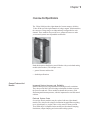
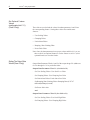
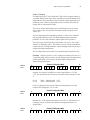
Class 3 Only - After installing your module, you must configure each
channel by setting bit values in each configuration word. Input words 8
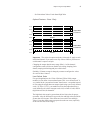
through 15 of the input image file (addresses O:e.8 and O:e.15) configure
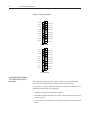
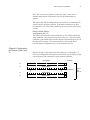
channels 0–7 respectively. Refer to Figure 4 for specific addressing.
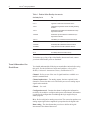
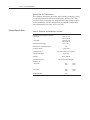
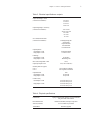
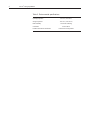
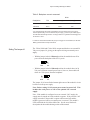
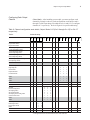
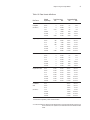
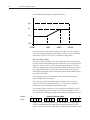
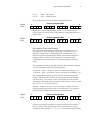
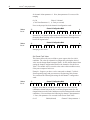
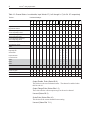
Table 9. Channel configuration word details, Output Words 8-15 (O:e.8 through O:e.15) for Ch. 0-7
respectively
To select…
Use these bit settings...
15 14 13 12 11 10 9
8
7
6
5
4
Output channel disable
Output channel enable
±10 Vdc output range (-NO8v)
0-21 mA output Range (-NO8i)
1–5 Vdc output range (-NO8v)
4-20mA output range(-NO8i)
0–5 Vdc output range (-NO8v only)
0-20mA output range (-NO8i)
0–10 Vdc output range (-NO8v only)
N/A output range (-NO8i)
invalid
2
1
0
0
1
0
1746-NO4 compatible format
Engineering units
Scaled for PID
Proportional counts
User-defined scale
Invalid
Invalid
Invalid
Clear Parameter*
Set Parameter*
No Action
Set User Scaling Values
Set Clamping Values
Set Limit Alarm Values
Set Ramping / Rate Limiting Values
Set Preset Fault Values
Invalid
Invalid
Reset Output on Fault
Hold Output on Fault
Preset Output on Fault
Invalid
Latch Alarms
Reset Latched Alarms
3
0
0
0
0
1
1
1
1
0
0
1
1
0
0
1
1
0
1
0
1
0
1
0
1
1
1
0
0
0
0
1
1
1
1
0
0
1
1
0
0
1
1
0
0
1
1
0
1
0
1
0
1
0
1
0
1
0
1
1
1
*A configuration error will occur if these bits are set to 1 at the same time.
0
0
0
1
1
0
1
1