1
DYNASIM© - USER MANUAL: 7-056 v. 3.2
DYNAFLOW, INC.
Here, the first line is the total number of regimes the ship has, and it is
followed by data pairs that specify “Engine regime” and “Ship speed”.
2. Ship turning radius performance data file: This file is named in the
format of “performance_rdd_SHIPNAME.pef” where SHIPNAME
should be the same as the ship model name. For an example, if
“Mariner” ship is selected, the ship turning radius performance data
file should be named as “performance_rdd_Mariner.pef” to be used by
DYNASIM©. The file provides the information of ship turning
characteristics for a given rudder angle. A sample
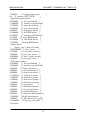
“performance_rdd_Mariner.pef” file is shown below:
19
-40
-35
…
430.431
454.798
402.315
432.329
29.17
25.27
0
0
204.039
195.616
22.142
20.98875
The first line is the total number of data sets included in the file, each
data set is ordered as “θ, alat, dfwd, mlat, mlat_var, mfwd, mfwd_var”. The
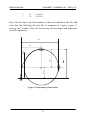
definitions of alat, dfwd, mlat, and mfwd are shown in Fig. 19. θ is the
rudder angle, and mlat_var and mfwd_var are the average variances of
mlat and mfwd among different engine regimes. All units are meter
except the rudder angle θ which is in degrees.
3. Ship turning rate performance data file: This file is named in the
format of “performance_trt_SHIPNAME.pef” where SHIPNAME
should be the same as the ship model name. For an example, if
“Mariner” ship is selected, the ship turning radius performance data
file should be named as “performance_trt_Mariner.pef” to be used by
DYNASIM©. The file provides the information of ship turning rate at a
given engine regime and rudder angle for steady ship turning. A
sample “performance_trt_Mariner.pef” file should look like below:
105
5
-40
-0.257167
20