1
VB 2.0 User Manual
Page 1 of 101
Executive summary
This manual provides instructions on how to use VocBench version 2.0 (VB 2.0) − a web-based
vocabulary management tool providing full multilingual support and enabling a formalized
workflow.
It covers editorial operations typically performed by VB Editors, Validators and Publishers. It also
covers functionalities for Administrators, but only limited to the management of projects (i.e. not
including global system configuration/administration).
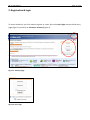
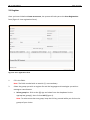
The manual first explains how to create a user account (Sec. 2. Registration & login), specify your
user and interface settings (Sec. 4. Administration and 5. Preferences) and interpret the user
interface (Sec. 3. User interface). This is followed by sections on how to search VB (Sec. 6. Search)
and on the various roles a user may play in the workflow (Sec.7. Editorial workflow). Subsequently
each module is covered in a separate section in the following order: Recent changes, Concepts,
Relationships, Schemes, Validation, Load data, Export module, Statistics and SPARQL.