1
HYDRA ETHERX Card User Manual
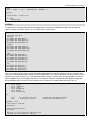
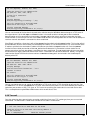
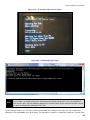
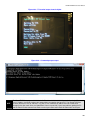
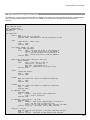
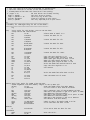
term.out($02)
term.pstring(string("HydraEtherX TCP Client Test",13,13))
term.out($01)
term.pstring(string("Waiting for Eth",13))
'Wait for awhile for the ethernet to come up.
waitcnt(cnt + $17d78400)
'Indicate that we are done waiting.
term.pstring(string("Done waiting",13,13))
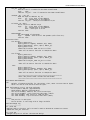
'Fill out the arrays needed for initialization.
'Destination IP is IP we are sending to
dip[0] := 192
dip[1] := 168
dip[2] := 1
dip[3] := 2
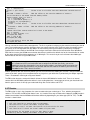
'Fill out the rest of the arrays needed for initialization.
'W5100 IP address.
ip[0] := 192
ip[1] := 168
ip[2] := 1
ip[3] := 100
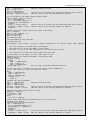
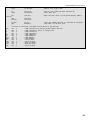
'Gateway.
gateway[0]
gateway[1]
gateway[2]
gateway[3]
'Subnet.
subnet[0]
subnet[1]
subnet[2]
subnet[3]
'W5100
mac[0]
mac[1]
mac[2]
mac[3]
mac[4]
mac[5]
:=
:=
:=
:=
:=
:=
:=
:=
192
168
1
1
255
255
255
0
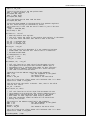
MAC address.
:= $00
:= $70
:= $6e
:= $69
:= $73
:= $0a
'Initialize the W5100.
eth.init(@gateway, @subnet, @ip, @mac)
Notice that the gateway, subnet, ip, and mac arrays are byte arrays and to pass the address of the pointer to the init
function you use the @ symbol. This example would set your IP to address 192.168.1.100, your gateway to 192.168.1.1,
your subnet to 255.255.255.0 and your MAC address would be 00.70.6e.73.0a. Technically you should apply to IEEE to
get your own MAC address and if you intend to produce a commercial product based on the W5100 you should do so. But
in reality, for educational purposes, all you need to so is be sure that the MAC address isn’t the same as any other
Ethernet device in your local network.
Again, as you see here you should call the init function after the start function and before you call the open function
which we will discuss next.
6.3.4 Open and Close
The next two functions we will discuss are the open and close functions. Socket programming has been around for a very
long time as an attempt to standardize network interfaces. The W5100 loosely models the socket programming scheme.
The W5100 supports up to four independent sockets at a time. The EtherX driver only supports one socket at a time but
there is nothing stopping you from modifying the driver to support all four. Sockets need to be “opened” in the W5100 and
that is why we have the open function call. To open a socket on the W5100 we need to tell it whether the socket is a UDP
socket or a TCP socket, what the source and destination ports are, and the destination IP address. Actually, if you setup
the W5100 to be a TCP server then the destination IP address is not known at the time when you open the socket so that
value can be anything as it will be ignored. The open function is shown below:
34