1
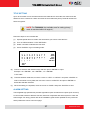
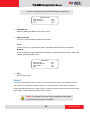
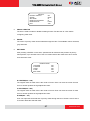
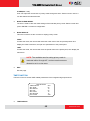
TCM-6630 Hardware User’s Manual EXIT Exit the AUTOPAN setup menu. CRUISE A Cruise is a route of manual operations that can be stored and recalled to execute repeatedly. It can be formed of pan, tilt position. CRUISE RECORD START RECORD END RUN CRUISE EXIT ENTER ENTER ENTER YES RECORD START Follow the description to record the CRUISE path. 1. Rotate the speed dome camera to a desired view area. The percentage of the memory buffer will be displayed on the screen. NOTE: Beware of the memory size when building the cruise path. After the percentage of the buffer becomes 100%, the path will not be recorded. RECORD END The cursor will be moved RECORD END while building the cruise line; when the setting is completed, press <ENTER> to save the path. RUN CRUISE After the setting is completed, select this item to manually execute the Cruise function. EXIT Exit the CRUISE setup menu. IR FUNCTION (Removable IR Cut) With the IR cut filter, the speed dome can still catch clear image at night time or very dark light condition. During day time, the IR cut filter will be on to block the infrared light for clear image; during night time, the IR cut filter will be removed to catch infrared light to view images in black and white. Users are able to view color images when the IR function activated. 44 www.acti.com