1
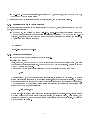
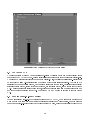
Figure 1: Main Window of the Simulator
Starting a Simulation
To start just rush right into simulating things, the new user can simply hit the "Start" button,
select the "Start w/out recovery le" option, and any of the recovery methods. This causes the
simulator to begin a simulation consisting of the four nodes shown on the console, running a default
static, complex task. The user may use the Schedule, Task Allocation, and Performance buttons to
view the corresponding windows, and watch the simulation progress. A detailed description of other
buttons/commands follows.
2.3 The Console GUI
A Description of the Console and its features and functions is given below. The menu of Main Console
Window is divided into ve subsections: Operation, Conguration, Task Generator, Fault Generator and
Information.
2.3.1 Operation
There are four buttons in the Operation subsection.
4