1
MEKATRONIX™
Gainesville, Florida
TJ PRO USERS MANUAL
08/24/99
www.mekatronix.com Tech Questions: [email protected]
3.5 Switches
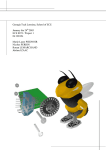
TJ PRO™ control switches on the top plate near the back provide easy access. The layout of the
switches can be determined from Figure 2.
The red RESET button resets the MC68HC11E2 microcomputer. The ON/OFF switch provides
power. The visible red led adjacent to the ON/OFF switch lights when the switch is moved to the
ON position.
In DOWN-LOAD mode the DOWN-LOAD/RUN mode switch permits the user to download programs
using PCBUG11. In RUN mode, a press of the reset button will invoke the start-up program the
user has loaded into TJ PRO™.
3.6 Batteries
TJ PRO™ requires a minimum of six AA Nickel-Cadmium rechargeable batteries. Only use
nickel-cadmium AA batteries. Alkalines, for example. will produce too much
voltage and may damage the electronics.
The battery pack is located in front of the rear caster on the underneath side of the robot.
TJ PRO™ can run autonomously on a smooth tile floor for about 1.5 to 2 hours on a fully
charged battery pack. This time depends critically upon how frequently the motors change speed
and the running time of the motors.
NiCad batteries sustain useful power until just before they become fully discharged. So, if you
see TJ PRO™ really slowing down, it is time to recharge!
3.7 Recharger
The charging technique is known as a trickle charge. This means that a small current is
constantly applied to the batteries. Because this is a low level current the robot can be left
charging indefinitely. While the robot is not moving around plug it into the charger. This will
keep the batteries charged. Be sure to use only a Mekatronix approved AC adapter.
TJ PRO™’s charger must be at 12 volts and be able to supply 200-500 milliamps. Lower
voltages will not charge the batteries and higher voltages my damage the electronics. The charger
plugs into the receptacle mounted on the left bridge support.
Recommendation: During program development and high usage times, keep TJ PRO™
connected to the charger whenever possible. This will insure fresh batteries during
experimentation.
Caution: If the output DC voltage of the AC adapter exceeds 12 volts, the charging resistors will
act like a fuse and burn out. The smoke and smell are unpleasant, so be careful.
15