1
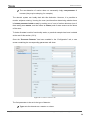
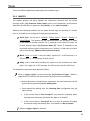
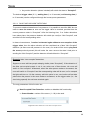
Motion Detector There are different parameters depending on the detector type. 3.3.1 MASTER The master detector will bring together the information received from the slaves (through object “[Ix] Presence: Slave Input”) and its own detections, and therefore determine whether there is presence (“Occupied”) or not (“Not Occupied”). Whether the transitions between the two states should imply the sending of a certain value to the KNX bus is configured through these parameters: Send Type: can be set to “Nothing”, “Binary Value”, “Scene”, “Scaling” or “HVAC Mode”. The options and the parameterisation are analogous to those in the detection function (section 3.2.1), although in this case the values will be sent through object “[Ix] Presence State (Z)”, where “Z” depends on the send type selected (unless it has been set to “Scenes”; in that case, the value will be sent through “[Motion Sensor] Scene Output”). Mode: “once” or “cyclic”. If set to the latter, a period (of 1 to 255 seconds, 1 to 255 minutes, or 1 to 24 hours) must be set too. Delay: time to wait before sending the object once the transition has taken place. The range is 0 to 255 seconds, 0 to 255 minutes and 0 to 255 hours. The detection of presence takes place as follows: When a trigger signal is received through “[Ix] Presence Trigger” (which is supposed to be linked to the door-closed events from the door sensors): Motion detections (including those reported by the slave detectors) will be ignored during a parameterisable waiting time. Once elapsed the waiting time, the listening time (configurable too) will start counting. • If the current state is “Not occupied”, any detection (including those reported from the slaves) will switch the state to “Occupied”. • If the current state is “Occupied” but no motion is detected (including the slaves) during the listening time, it will switch to “Not occupied”. While no trigger signal is received: http://www.zennio.com Technical Support: http://zennioenglish.zendesk.com 25