1
BIOPAC FOTS100 User Manual
1.2
Sensor connection
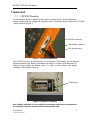
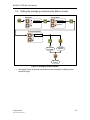
The FOTS100 is compatible with all TSD180 series Opsens’ GaAs-type of sensors or
transducers for measuring temperature namely the OTG-M series. The fiber-optic connector
provided with the OTG-M sensors is a ST-type connector. Remove the protective cap of the
ST mating and engage the sensor connector with the orientation key properly oriented
(Figure 3). It is a good practice to clean the sensor connector prior to connect it to the
signal conditioner. See the TSD180/TSd181 Fiber-Optic Cleaning Guide for further information on
how to clean fiber-optic connectors.
NOTE: always replace the protective dust cap on the mating when there is no
sensor connected. Always replace the protective dust cap on the sensor fiberoptic connector when not in used
Sensor ST-type fiberoptic connector
ST Mating
Figure 3: Fiber-optic sensor connection
1.3 FOTS100 output readings
Once the fiber-optic sensor is connected, the FOTS100 is ready to measure temperature.
The display shows the temperature measurements with a refreshing rate of three
readings per second. The measurement readings are also available at the analog
output and at the RS-232 port. The refreshing rate of these outputs is equal to the
sampling rate of the conditioner, which is 50 measurements per second.
© Opsens Inc.
IMP0014 PICPW-UM REV2.0
6