1
TV user guide
TV like you’ve never seen before
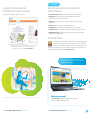
Now you can watch TV in more places
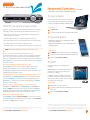
Take the AT&T U-verse experience with you on your computer, smartphone,
or tablet with an extensive library of On Demand programs.
On your computer
> Choose from over 225,000 TV shows, movies, and
sports content on your computer at no extra charge
> View your TV listings and manage your DVR online2
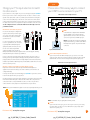
One DVR, one experience, any receiver
Record up to four shows at once and record and play back shows in any room from a
single DVR.* Your AT&T U-verse HD-ready receiver with Total Home DVR®1 lets you:
> Record up to four shows at once on a single DVR and record and play back your
shows from any room in your home
> Schedule, update, or delete your recordings from any room in your home
> Pause your recorded show in one room and pick it up where you left off in another
> Pause and rewind live TV or recorded shows from any receiver
> Set Parental Controls for U-verse Movies, Pay Per View, and live or recorded shows
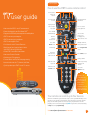
NoTe: BlUe CAPiTAl leTTers refer to buttons on the remote control.
To get started:
1 Visit uverse.com
2 Log on with your AT&T master ID (email address) and password
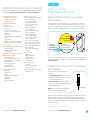
On your smartphone
> Browse the TV guide on the go and manage your DVR
schedule and recordings
> Watch hit TV shows and movies at no extra charge with a
qualifying TV plan3
To get started:
Pause, fast-forward, and rewind live TV from any receiver
1 Text moBile to 3421 to download the app to your smartphone
Your Total Home DVR stores up to 60 minutes of the live TV channel you’re watching,
on up to four of your receiver-connected TVs at the same time! (When you change
channels, your DVR will begin storing the new program instead.) You can rewind live TV
by pressing reW. You can also freeze live TV for up to 60 minutes by pressing PAUse
(press PlAy to restart).
2 Log on with your AT&T master ID (email address) and password
record the program you’re watching from any receiver
Press reCorD on your remote control to begin recording the program you’re
watching. The Record light on your receiver remains lit until recording stops
automatically at the program’s scheduled end time. You can also press sToP to end
recording at any time; press oK to confirm.
schedule program or series recordings from the guide from any receiver
Press gUiDe, then use UP/DoWN ArroWs to scroll to the program you want to
record. Press reCorD once to record a single show (one red dot appears); press
reCorD twice to record the whole series (three red dots appear); press reCorD
three times to cancel recording.
search for a show or series you want to record from any receiver
Press meNU, select live TV, and use the DoWN ArroW to select search. Press
oK. Choose options to narrow your search, or type the show title (use ArroWs
to highlight a letter, then press oK to select it). Highlight the show you want when it
appears, and press iNfo to record a single episode or the whole series.
3 Learn more at att.com/uversemobile
On iPad®
Get the newest AT&T U-verse viewing experience
using iPad.
ON THE GO: Browse the TV guide, manage your DVR,
and watch from a library of movies and TV shows
based on your TV package.
AT HOME: Do everything listed above and use iPad
as a remote control. Get info and photos about your
favorite TV shows while you watch. (AT&T U-verse High
Speed Internet Account required).
To get started:
1 Download the U-verse app from iTunes
2 Log on with your AT&T master ID (email address) and password to link to
your account
3 Learn more at att.com/uversefortablet
Watch your recordings from any receiver
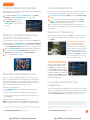
Press reCorDeD TV and select Browse recordings to see a list of your recorded
SD or HD programs and series. Highlight a show and press oK to see a Program info
screen, then select Play to watch the program.
*DVR not included with U100 or U-basic packages. Models may vary. 1 Total Home DVR functionality is available on up to
eight TVs and requires a receiver for each additional TV at $7/mo. Pricing subject to change.
2 AT&T U-verse TV and High Speed Internet account required for DVR-related functions. 3 Access to select content requires
compatible device, qualifying U-verse TV plan, and Wi-Fi connection and/or cellular data connection. Available content may
vary by device and/or U-verse TV plan and is subject to change. Data charges may apply. Apple, the Apple logo and iPad are
trademarks of the Apple Inc., registered in the U.S. and other countries. App Store is a service mark of Apple Inc.
Visit att.com/uverse/newcustomer to learn more.
Visit att.com/uverse/newcustomer to learn more.
pg_6_UVE384_PS_Starter_Guide_Round 6
pg_7_UVE384_PS_Starter_Guide_Round 6
7