1
User manual revision 5
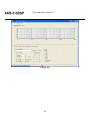
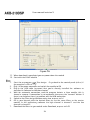
Figure
r 16
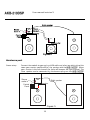
11. When download is completed you can power down the module
12. Start with the SLAVE module
Slave
S lave
1.
2.
3.
4.
5.
6.
7.
Start the pc program,
filter design. Or go back to the control panel (ctrl+c) if
the program is still running
Plug in the power connector and switch the module to ON
Plug in the USB cable (assumed that you’ve already installed the software as
described in Software Installation chapter)
Wait for automatic connection, now the program detects a slave module, this is
shown in a popup. If connection is not automatic then press the “connect” button. If
there is no response there is a problem with the USB connection
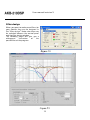
Switch to the Filter design Window under view, or press ctrl+f
Fill in your biquads with the desired filters or use the same filters as the master
module. In this preliminary software the high channel is channel 1 and the low
channel is channel 2
Download the filters to you module under Download, or press ctrl+F9
24