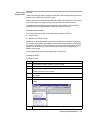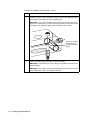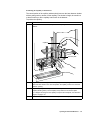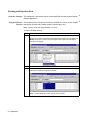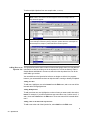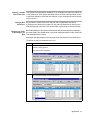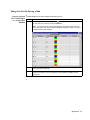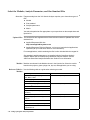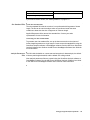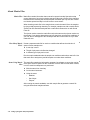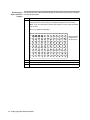
1
DRAFT June 21, 2001 10:06 am Liane, 310UG_NT_Title.fm ABI PRISM® 310 Genetic Analyzer User Guide © Copyright 2001,2010 Applied Biosystems All rights reserved For Research Use Only. Not for use in diagnostic procedures. Information in this document is subject to change without notice. Applied Biosystems assumes no responsibility for any errors that may appear in this document. This document is believed to be complete and accurate at the time of publication. In no event shall Applied Biosystems be liable for incidental, special, multiple, or consequential damages in connection with or arising from the use of this document. This instrument, Serial No. ____________________, is Authorized for use in DNA sequencing and fragment analysis. This authorization is included in the purchase price of this instrument and corresponds to the up-front fee component of a license under process claims of U.S. patents and under all process claims for DNA sequence and fragment analysis of U.S. patents now or hereafter owned or licensable by Applied Biosystems for which an Authorization is required, and under corresponding process claims in foreign counterparts of the foregoing for which an Authorization is required. The running royalty component of licenses may be purchased from Applied Biosystems or obtained by using Authorized reagents purchased from Authorized suppliers in accordance with the label rights accompanying such reagents. Purchase of this instrument does not itself convey to the purchaser a complete license or right to perform the above processes. This instrument is also licensed under U.S. patents and apparatus and system claims in foreign counterparts thereof. No rights are granted expressly, by implication or by estoppel under composition claims or under other process or system claims owned or licensable by Applied Biosystems. For more information regarding licenses, please contact the Director of Licensing at Applied Biosystems, 850 Lincoln Centre Drive, Foster City, California 94404. ABI PRISM and the ABI PRISM design, AMPFLSTR, Applied Biosystems, GeneMapper, GeneScan, Genotyper, MicroAmp, PROCISE, QuantiBlot, SeqScape, Sequence Navigator, and StockMarks are registered trademarks of Applied Biosystems or its subsidiaries in the U.S. and certain other countries. ABI, AFPL, BigDye, CATALYST, FAM, GeneAssist, HEX, Hi-Di, JOE, LIZ, NED, PET, POP-4, POP-6, ROX, TAMRA, TET, and VIC are trademarks of Applied Biosystems or its subsidiaries in the U.S. and certain other countries. AmpliTaq, AmpliTaq Gold, GeneAmp and TaqMan are registered trademarks of Roche Molecular Systems, Inc. All other trademarks are the sole property of their respective owners. Applied Biosystems is committed to providing the world’s leading technology and information for life scientists. Printed in the USA, 06/2010 Part Number 4317588 Rev. B Contents 1 About This Guide Introduction . . . . . . . . . . . . . . . . . . . . . . . . . . . . . . . . . . . . . . . . . . . . . . . . . . . . . . . . . . . . . . . . 1-1 In This Chapter . . . . . . . . . . . . . . . . . . . . . . . . . . . . . . . . . . . . . . . . . . . . . . . . . . . . . . . . 1-1 About This Guide . . . . . . . . . . . . . . . . . . . . . . . . . . . . . . . . . . . . . . . . . . . . . . . . . . . . . . . . . . . . 1-2 Overview of Contents . . . . . . . . . . . . . . . . . . . . . . . . . . . . . . . . . . . . . . . . . . . . . . . . . . . 1-2 About the Quick Reference Card. . . . . . . . . . . . . . . . . . . . . . . . . . . . . . . . . . . . . . . . . . . 1-3 Related Documents . . . . . . . . . . . . . . . . . . . . . . . . . . . . . . . . . . . . . . . . . . . . . . . . . . . . . 1-3 Safety . . . . . . . . . . . . . . . . . . . . . . . . . . . . . . . . . . . . . . . . . . . . . . . . . . . . . . . . . . . . . . . . . . . . . 1-4 Documentation User Attention Words . . . . . . . . . . . . . . . . . . . . . . . . . . . . . . . . . . . . . . . 1-4 Chemical Hazard Warning. . . . . . . . . . . . . . . . . . . . . . . . . . . . . . . . . . . . . . . . . . . . . . . . 1-4 Chemical Waste Hazard Warning . . . . . . . . . . . . . . . . . . . . . . . . . . . . . . . . . . . . . . . . . . 1-5 Site Preparation and Safety Guide. . . . . . . . . . . . . . . . . . . . . . . . . . . . . . . . . . . . . . . . . . 1-5 About MSDSs . . . . . . . . . . . . . . . . . . . . . . . . . . . . . . . . . . . . . . . . . . . . . . . . . . . . . . . . . 1-5 Ordering MSDSs . . . . . . . . . . . . . . . . . . . . . . . . . . . . . . . . . . . . . . . . . . . . . . . . . . . . . . . 1-6 Instrument Safety Labels . . . . . . . . . . . . . . . . . . . . . . . . . . . . . . . . . . . . . . . . . . . . . . . . . 1-6 About Waste Profiles . . . . . . . . . . . . . . . . . . . . . . . . . . . . . . . . . . . . . . . . . . . . . . . . . . . . 1-7 About Waste Disposal . . . . . . . . . . . . . . . . . . . . . . . . . . . . . . . . . . . . . . . . . . . . . . . . . . . 1-7 Before Operating the Instrument . . . . . . . . . . . . . . . . . . . . . . . . . . . . . . . . . . . . . . . . . . . 1-7 Safe and Efficient Computer Use. . . . . . . . . . . . . . . . . . . . . . . . . . . . . . . . . . . . . . . . . . . 1-7 Technical Support . . . . . . . . . . . . . . . . . . . . . . . . . . . . . . . . . . . . . . . . . . . . . . . . . . . . . . . . . . . . 1-9 Contacting Technical Support . . . . . . . . . . . . . . . . . . . . . . . . . . . . . . . . . . . . . . . . . . . . . 1-9 To Contact Technical Support by E-Mail . . . . . . . . . . . . . . . . . . . . . . . . . . . . . . . . . . . . 1-9 To Contact Technical Support by Telephone or Fax (North America) . . . . . . . . . . . . . . 1-9 To Contact Technical Support by Telephone or Fax (Outside North America). . . . . . . 1-11 To Reach Technical Support Through the Applied Biosystems Web Site . . . . . . . . . . . 1-12 To Obtain Technical Documents . . . . . . . . . . . . . . . . . . . . . . . . . . . . . . . . . . . . . . . . . . 1-12 To Obtain Customer Training Information . . . . . . . . . . . . . . . . . . . . . . . . . . . . . . . . . . 1-13 2 Overview of the 310 Genetic Analyzer Introduction . . . . . . . . . . . . . . . . . . . . . . . . . . . . . . . . . . . . . . . . . . . . . . . . . . . . . . . . . . . . . . . . 2-1 In This Chapter . . . . . . . . . . . . . . . . . . . . . . . . . . . . . . . . . . . . . . . . . . . . . . . . . . . . . . . . 2-1 About This Chapter . . . . . . . . . . . . . . . . . . . . . . . . . . . . . . . . . . . . . . . . . . . . . . . . . . . . . 2-2 For More Information . . . . . . . . . . . . . . . . . . . . . . . . . . . . . . . . . . . . . . . . . . . . . . . . . . . 2-2 Section: Description of the Instrument . . . . . . . . . . . . . . . . . . . . . . . . . . . . . . . . . . . 2-3 In This Section . . . . . . . . . . . . . . . . . . . . . . . . . . . . . . . . . . . . . . . . . . . . . . . . . . . . . . . . . 2-3 Front of the Instrument. . . . . . . . . . . . . . . . . . . . . . . . . . . . . . . . . . . . . . . . . . . . . . . . . . . . . . . . 2-4 Diagram . . . . . . . . . . . . . . . . . . . . . . . . . . . . . . . . . . . . . . . . . . . . . . . . . . . . . . . . . . . . . . 2-4 iii Doors. . . . . . . . . . . . . . . . . . . . . . . . . . . . . . . . . . . . . . . . . . . . . . . . . . . . . . . . . . . . . . . . 2-4 Status Indicators . . . . . . . . . . . . . . . . . . . . . . . . . . . . . . . . . . . . . . . . . . . . . . . . . . . . . . . 2-4 Back of the Instrument. . . . . . . . . . . . . . . . . . . . . . . . . . . . . . . . . . . . . . . . . . . . . . . . . . . . . . . . 2-5 Diagram. . . . . . . . . . . . . . . . . . . . . . . . . . . . . . . . . . . . . . . . . . . . . . . . . . . . . . . . . . . . . . 2-5 Service LEDs . . . . . . . . . . . . . . . . . . . . . . . . . . . . . . . . . . . . . . . . . . . . . . . . . . . . . . . . . 2-5 Serial Connections . . . . . . . . . . . . . . . . . . . . . . . . . . . . . . . . . . . . . . . . . . . . . . . . . . . . . 2-6 Reset Button . . . . . . . . . . . . . . . . . . . . . . . . . . . . . . . . . . . . . . . . . . . . . . . . . . . . . . . . . . 2-6 On/Off Switch . . . . . . . . . . . . . . . . . . . . . . . . . . . . . . . . . . . . . . . . . . . . . . . . . . . . . . . . . 2-6 Power Cord Receptacle. . . . . . . . . . . . . . . . . . . . . . . . . . . . . . . . . . . . . . . . . . . . . . . . . . 2-6 Behind the Doors of the Instrument. . . . . . . . . . . . . . . . . . . . . . . . . . . . . . . . . . . . . . . . . . . . . . 2-7 Overview. . . . . . . . . . . . . . . . . . . . . . . . . . . . . . . . . . . . . . . . . . . . . . . . . . . . . . . . . . . . . 2-7 Diagram. . . . . . . . . . . . . . . . . . . . . . . . . . . . . . . . . . . . . . . . . . . . . . . . . . . . . . . . . . . . . . 2-7 Gel Block Region . . . . . . . . . . . . . . . . . . . . . . . . . . . . . . . . . . . . . . . . . . . . . . . . . . . . . . 2-8 Detection Region . . . . . . . . . . . . . . . . . . . . . . . . . . . . . . . . . . . . . . . . . . . . . . . . . . . . . 2-10 Autosampler Region . . . . . . . . . . . . . . . . . . . . . . . . . . . . . . . . . . . . . . . . . . . . . . . . . . . 2-11 Section: Description of the Computer and Software . . . . . . . . . . . . . . . . . . . . . . . 2-13 In This Section . . . . . . . . . . . . . . . . . . . . . . . . . . . . . . . . . . . . . . . . . . . . . . . . . . . . . . . 2-13 Computer . . . . . . . . . . . . . . . . . . . . . . . . . . . . . . . . . . . . . . . . . . . . . . . . . . . . . . . . . . . . . . . . . 2-14 Overview. . . . . . . . . . . . . . . . . . . . . . . . . . . . . . . . . . . . . . . . . . . . . . . . . . . . . . . . . . . . 2-14 System Requirements . . . . . . . . . . . . . . . . . . . . . . . . . . . . . . . . . . . . . . . . . . . . . . . . . . RAM Requirements . . . . . . . . . . . . . . . . . . . . . . . . . . . . . . . . . . . . . . . . . . . . . . . . . . . Software . . . . . . . . . . . . . . . . . . . . . . . . . . . . . . . . . . . . . . . . . . . . . . . . . . . . . . . . . . . . . . . . . . Overview. . . . . . . . . . . . . . . . . . . . . . . . . . . . . . . . . . . . . . . . . . . . . . . . . . . . . . . . . . . . Software for Data Collection . . . . . . . . . . . . . . . . . . . . . . . . . . . . . . . . . . . . . . . . . . . . Software for Data Analysis . . . . . . . . . . . . . . . . . . . . . . . . . . . . . . . . . . . . . . . . . . . . . . Other Software . . . . . . . . . . . . . . . . . . . . . . . . . . . . . . . . . . . . . . . . . . . . . . . . . . . . . . . 2-14 2-14 2-15 2-15 2-15 2-16 2-16 Section: Theory of Operation . . . . . . . . . . . . . . . . . . . . . . . . . . . . . . . . . . . . . . . . . 2-17 In This Section . . . . . . . . . . . . . . . . . . . . . . . . . . . . . . . . . . . . . . . . . . . . . . . . . . . . . . . What the 310 Genetic Analyzer Does . . . . . . . . . . . . . . . . . . . . . . . . . . . . . . . . . . . . . . . . . . . DNA Sequencing . . . . . . . . . . . . . . . . . . . . . . . . . . . . . . . . . . . . . . . . . . . . . . . . . . . . . Fragment Analysis . . . . . . . . . . . . . . . . . . . . . . . . . . . . . . . . . . . . . . . . . . . . . . . . . . . . Principles of Operation . . . . . . . . . . . . . . . . . . . . . . . . . . . . . . . . . . . . . . . . . . . . . . . . . . . . . . Sample Labeling . . . . . . . . . . . . . . . . . . . . . . . . . . . . . . . . . . . . . . . . . . . . . . . . . . . . . . Automated Sample Handling . . . . . . . . . . . . . . . . . . . . . . . . . . . . . . . . . . . . . . . . . . . . Electrokinetic Sample Injection . . . . . . . . . . . . . . . . . . . . . . . . . . . . . . . . . . . . . . . . . . Electrophoresis . . . . . . . . . . . . . . . . . . . . . . . . . . . . . . . . . . . . . . . . . . . . . . . . . . . . . . . Sample Fluorescence . . . . . . . . . . . . . . . . . . . . . . . . . . . . . . . . . . . . . . . . . . . . . . . . . . Detection . . . . . . . . . . . . . . . . . . . . . . . . . . . . . . . . . . . . . . . . . . . . . . . . . . . . . . . . . . . . Data Collection . . . . . . . . . . . . . . . . . . . . . . . . . . . . . . . . . . . . . . . . . . . . . . . . . . . . . . . Virtual Filters and Dye Sets . . . . . . . . . . . . . . . . . . . . . . . . . . . . . . . . . . . . . . . . . . . . . Matrix Files. . . . . . . . . . . . . . . . . . . . . . . . . . . . . . . . . . . . . . . . . . . . . . . . . . . . . . . . . . Compatibility of Dyes and Virtual Filters. . . . . . . . . . . . . . . . . . . . . . . . . . . . . . . . . . . Color Display of Data . . . . . . . . . . . . . . . . . . . . . . . . . . . . . . . . . . . . . . . . . . . . . . . . . . iv 2-17 2-18 2-18 2-18 2-19 2-19 2-19 2-19 2-19 2-19 2-20 2-20 2-20 2-20 2-20 2-21 Virtual Filters and Associated Applications. . . . . . . . . . . . . . . . . . . . . . . . . . . . . . . . . . 2-21 Color Guide for DNA Sequencing Applications . . . . . . . . . . . . . . . . . . . . . . . . . . . . . . 2-21 Color Guide for Fragment Analysis Applications . . . . . . . . . . . . . . . . . . . . . . . . . . . . . 2-22 3 Operating the Instrument Hardware Introduction . . . . . . . . . . . . . . . . . . . . . . . . . . . . . . . . . . . . . . . . . . . . . . . . . . . . . . . . . . . . . . . . 3-1 In This Chapter . . . . . . . . . . . . . . . . . . . . . . . . . . . . . . . . . . . . . . . . . . . . . . . . . . . . . . . . 3-1 Preparing the 310 Genetic Analyzer for a Run. . . . . . . . . . . . . . . . . . . . . . . . . . . . . . . . . . . . . . 3-2 Summary of Procedures. . . . . . . . . . . . . . . . . . . . . . . . . . . . . . . . . . . . . . . . . . . . . . . . . . 3-2 What to Do Next . . . . . . . . . . . . . . . . . . . . . . . . . . . . . . . . . . . . . . . . . . . . . . . . . . . . . . . 3-2 Section: Procedures for Setting Up and Maintaining the Instrument . . . . . . . . . . . 3-3 In This Section . . . . . . . . . . . . . . . . . . . . . . . . . . . . . . . . . . . . . . . . . . . . . . . . . . . . . . . . . 3-3 Autosampler . . . . . . . . . . . . . . . . . . . . . . . . . . . . . . . . . . . . . . . . . . . . . . . . . . . . . . . . . . . . . . . . 3-4 Cleaning the Autosampler . . . . . . . . . . . . . . . . . . . . . . . . . . . . . . . . . . . . . . . . . . . . . . . . 3-4 Calibrating the Autosampler . . . . . . . . . . . . . . . . . . . . . . . . . . . . . . . . . . . . . . . . . . . . . . 3-4 Homing the Autosampler. . . . . . . . . . . . . . . . . . . . . . . . . . . . . . . . . . . . . . . . . . . . . . . . . 3-6 Filling the Buffer Reservoir . . . . . . . . . . . . . . . . . . . . . . . . . . . . . . . . . . . . . . . . . . . . . . . 3-8 Loading the Samples . . . . . . . . . . . . . . . . . . . . . . . . . . . . . . . . . . . . . . . . . . . . . . . . . . . . 3-9 Buffers and Polymer. . . . . . . . . . . . . . . . . . . . . . . . . . . . . . . . . . . . . . . . . . . . . . . . . . . . . . . . . 3-10 When to Replace Reagents . . . . . . . . . . . . . . . . . . . . . . . . . . . . . . . . . . . . . . . . . . . . . . 3-10 Preparing the Polymer and the Electrophoresis Buffer . . . . . . . . . . . . . . . . . . . . . . . . . 3-10 Making Buffer for a Single Run . . . . . . . . . . . . . . . . . . . . . . . . . . . . . . . . . . . . . . . . . . 3-10 Storing the Buffer . . . . . . . . . . . . . . . . . . . . . . . . . . . . . . . . . . . . . . . . . . . . . . . . . . . . . 3-10 Checking for Polymer Leaks . . . . . . . . . . . . . . . . . . . . . . . . . . . . . . . . . . . . . . . . . . . . . 3-11 Capillary . . . . . . . . . . . . . . . . . . . . . . . . . . . . . . . . . . . . . . . . . . . . . . . . . . . . . . . . . . . . . . . . . . 3-14 About the Capillary . . . . . . . . . . . . . . . . . . . . . . . . . . . . . . . . . . . . . . . . . . . . . . . . . . . . 3-14 Cutting the Capillary . . . . . . . . . . . . . . . . . . . . . . . . . . . . . . . . . . . . . . . . . . . . . . . . . . . 3-14 Cleaning the Capillary Window. . . . . . . . . . . . . . . . . . . . . . . . . . . . . . . . . . . . . . . . . . . 3-14 Installing the Capillary . . . . . . . . . . . . . . . . . . . . . . . . . . . . . . . . . . . . . . . . . . . . . . . . . 3-15 Testing the Capillary Window . . . . . . . . . . . . . . . . . . . . . . . . . . . . . . . . . . . . . . . . . . . . 3-19 Removing and Storing the Capillary . . . . . . . . . . . . . . . . . . . . . . . . . . . . . . . . . . . . . . . 3-20 Verifying that the Capillary Fills Correctly . . . . . . . . . . . . . . . . . . . . . . . . . . . . . . . . . . 3-22 Avoiding Capillary Clogs . . . . . . . . . . . . . . . . . . . . . . . . . . . . . . . . . . . . . . . . . . . . . . . 3-22 Electrode. . . . . . . . . . . . . . . . . . . . . . . . . . . . . . . . . . . . . . . . . . . . . . . . . . . . . . . . . . . . . . . . . . 3-23 Overview . . . . . . . . . . . . . . . . . . . . . . . . . . . . . . . . . . . . . . . . . . . . . . . . . . . . . . . . . . . . 3-23 Cleaning the Electrode. . . . . . . . . . . . . . . . . . . . . . . . . . . . . . . . . . . . . . . . . . . . . . . . . . 3-23 Installing the Electrode . . . . . . . . . . . . . . . . . . . . . . . . . . . . . . . . . . . . . . . . . . . . . . . . . 3-24 Trimming the Electrode . . . . . . . . . . . . . . . . . . . . . . . . . . . . . . . . . . . . . . . . . . . . . . . . . 3-25 Straightening the Electrode . . . . . . . . . . . . . . . . . . . . . . . . . . . . . . . . . . . . . . . . . . . . . . 3-26 Gel Block . . . . . . . . . . . . . . . . . . . . . . . . . . . . . . . . . . . . . . . . . . . . . . . . . . . . . . . . . . . . . . . . . 3-27 Cleaning the Gel Block . . . . . . . . . . . . . . . . . . . . . . . . . . . . . . . . . . . . . . . . . . . . . . . . . 3-27 Removing the Gel Block . . . . . . . . . . . . . . . . . . . . . . . . . . . . . . . . . . . . . . . . . . . . . . . . 3-28 v Installing the Gel Block . . . . . . . . . . . . . . . . . . . . . . . . . . . . . . . . . . . . . . . . . . . . . . . . Filling the Gel Block. . . . . . . . . . . . . . . . . . . . . . . . . . . . . . . . . . . . . . . . . . . . . . . . . . . Heat Plate. . . . . . . . . . . . . . . . . . . . . . . . . . . . . . . . . . . . . . . . . . . . . . . . . . . . . . . . . . . . . . . . . Preheating the Heat Plate . . . . . . . . . . . . . . . . . . . . . . . . . . . . . . . . . . . . . . . . . . . . . . . Sample Trays . . . . . . . . . . . . . . . . . . . . . . . . . . . . . . . . . . . . . . . . . . . . . . . . . . . . . . . . . . . . . . Tray Types. . . . . . . . . . . . . . . . . . . . . . . . . . . . . . . . . . . . . . . . . . . . . . . . . . . . . . . . . . . Sample Numbering in the 48-Well Tray . . . . . . . . . . . . . . . . . . . . . . . . . . . . . . . . . . . . Sample Numbering in the 96-Well Tray . . . . . . . . . . . . . . . . . . . . . . . . . . . . . . . . . . . . About Septa Strips for the 96-Well Tray. . . . . . . . . . . . . . . . . . . . . . . . . . . . . . . . . . . . Preparing the 96-Well Sample Tray . . . . . . . . . . . . . . . . . . . . . . . . . . . . . . . . . . . . . . . Inserting the 96-Well Tray . . . . . . . . . . . . . . . . . . . . . . . . . . . . . . . . . . . . . . . . . . . . . . Syringes . . . . . . . . . . . . . . . . . . . . . . . . . . . . . . . . . . . . . . . . . . . . . . . . . . . . . . . . . . . . . . . . . . Overview. . . . . . . . . . . . . . . . . . . . . . . . . . . . . . . . . . . . . . . . . . . . . . . . . . . . . . . . . . . . Warranty Information . . . . . . . . . . . . . . . . . . . . . . . . . . . . . . . . . . . . . . . . . . . . . . . . . . 3-29 3-29 3-30 3-30 3-31 3-31 3-31 3-32 3-32 3-33 3-34 3-35 3-35 3-35 Basic Components . . . . . . . . . . . . . . . . . . . . . . . . . . . . . . . . . . . . . . . . . . . . . . . . . . . . Cleaning the Syringe. . . . . . . . . . . . . . . . . . . . . . . . . . . . . . . . . . . . . . . . . . . . . . . . . . . Filling the Syringe. . . . . . . . . . . . . . . . . . . . . . . . . . . . . . . . . . . . . . . . . . . . . . . . . . . . . Installing the Syringe . . . . . . . . . . . . . . . . . . . . . . . . . . . . . . . . . . . . . . . . . . . . . . . . . . Inspecting the Syringe. . . . . . . . . . . . . . . . . . . . . . . . . . . . . . . . . . . . . . . . . . . . . . . . . . Removing Syringes. . . . . . . . . . . . . . . . . . . . . . . . . . . . . . . . . . . . . . . . . . . . . . . . . . . . Setting Syringe Max Travel . . . . . . . . . . . . . . . . . . . . . . . . . . . . . . . . . . . . . . . . . . . . . Homing the Syringe . . . . . . . . . . . . . . . . . . . . . . . . . . . . . . . . . . . . . . . . . . . . . . . . . . . Handling and Storing Syringes . . . . . . . . . . . . . . . . . . . . . . . . . . . . . . . . . . . . . . . . . . . Recommendations. . . . . . . . . . . . . . . . . . . . . . . . . . . . . . . . . . . . . . . . . . . . . . . . . . . . . 3-35 3-35 3-36 3-37 3-37 3-37 3-37 3-38 3-39 3-39 Section: General Instrument and Computer Procedures . . . . . . . . . . . . . . . . . . . . 3-41 In This Section . . . . . . . . . . . . . . . . . . . . . . . . . . . . . . . . . . . . . . . . . . . . . . . . . . . . . . . General Care . . . . . . . . . . . . . . . . . . . . . . . . . . . . . . . . . . . . . . . . . . . . . . . . . . . . . . . . . . . . . . Laboratory Temperature . . . . . . . . . . . . . . . . . . . . . . . . . . . . . . . . . . . . . . . . . . . . . . . . Laboratory Humidity . . . . . . . . . . . . . . . . . . . . . . . . . . . . . . . . . . . . . . . . . . . . . . . . . . Voltage Spikes. . . . . . . . . . . . . . . . . . . . . . . . . . . . . . . . . . . . . . . . . . . . . . . . . . . . . . . . Cleaning . . . . . . . . . . . . . . . . . . . . . . . . . . . . . . . . . . . . . . . . . . . . . . . . . . . . . . . . . . . . Cables . . . . . . . . . . . . . . . . . . . . . . . . . . . . . . . . . . . . . . . . . . . . . . . . . . . . . . . . . . . . . . Turning On the Genetic Analyzer . . . . . . . . . . . . . . . . . . . . . . . . . . . . . . . . . . . . . . . . . . . . . . If a Capillary Is Already Installed. . . . . . . . . . . . . . . . . . . . . . . . . . . . . . . . . . . . . . . . . Turning On the Instrument . . . . . . . . . . . . . . . . . . . . . . . . . . . . . . . . . . . . . . . . . . . . . . Shutting Down the Genetic Analyzer . . . . . . . . . . . . . . . . . . . . . . . . . . . . . . . . . . . . . . . . . . . About a Short-Term Shutdown . . . . . . . . . . . . . . . . . . . . . . . . . . . . . . . . . . . . . . . . . . . Performing a Short-Term Shutdown . . . . . . . . . . . . . . . . . . . . . . . . . . . . . . . . . . . . . . . About a Long-Term Shutdown . . . . . . . . . . . . . . . . . . . . . . . . . . . . . . . . . . . . . . . . . . . Performing a Long-Term Shutdown . . . . . . . . . . . . . . . . . . . . . . . . . . . . . . . . . . . . . . . Resetting the Genetic Analyzer . . . . . . . . . . . . . . . . . . . . . . . . . . . . . . . . . . . . . . . . . . . . . . . . About Firmware . . . . . . . . . . . . . . . . . . . . . . . . . . . . . . . . . . . . . . . . . . . . . . . . . . . . . . Types of Resets . . . . . . . . . . . . . . . . . . . . . . . . . . . . . . . . . . . . . . . . . . . . . . . . . . . . . . . vi 3-41 3-42 3-42 3-42 3-42 3-42 3-42 3-43 3-43 3-43 3-44 3-44 3-44 3-44 3-45 3-46 3-46 3-46 When to Reset . . . . . . . . . . . . . . . . . . . . . . . . . . . . . . . . . . . . . . . . . . . . . . . . . . . . . . . . 3-46 Troubleshooting with Resets . . . . . . . . . . . . . . . . . . . . . . . . . . . . . . . . . . . . . . . . . . . . . 3-46 Performing a Soft Reset. . . . . . . . . . . . . . . . . . . . . . . . . . . . . . . . . . . . . . . . . . . . . . . . . 3-47 Performing a Cold Boot. . . . . . . . . . . . . . . . . . . . . . . . . . . . . . . . . . . . . . . . . . . . . . . . . 3-47 Performing a Clear Memory Reset . . . . . . . . . . . . . . . . . . . . . . . . . . . . . . . . . . . . . . . . 3-48 About Recovering from a Power Failure . . . . . . . . . . . . . . . . . . . . . . . . . . . . . . . . . . . . 3-49 Switching Between DNA Sequencing and Fragment Analysis . . . . . . . . . . . . . . . . . . . . . . . . 3-50 Switching Between Applications. . . . . . . . . . . . . . . . . . . . . . . . . . . . . . . . . . . . . . . . . . 3-50 Maintaining and Caring for Your Computer. . . . . . . . . . . . . . . . . . . . . . . . . . . . . . . . . . . . . . . 3-51 Overview . . . . . . . . . . . . . . . . . . . . . . . . . . . . . . . . . . . . . . . . . . . . . . . . . . . . . . . . . . . . 3-51 Hard Disk Maintenance . . . . . . . . . . . . . . . . . . . . . . . . . . . . . . . . . . . . . . . . . . . . . . . . . 3-51 Back Up All Programs and Files Regularly. . . . . . . . . . . . . . . . . . . . . . . . . . . . . . . . . . 3-51 Use a Hard Disk Maintenance Program Regularly . . . . . . . . . . . . . . . . . . . . . . . . . . . . 3-51 Use Discretion When Adding Software Programs . . . . . . . . . . . . . . . . . . . . . . . . . . . . 3-51 Monitoring Communication Between the Computer and the Instrument . . . . . . . . . . . . . . . . 3-52 About the Communications Diagnostics Window. . . . . . . . . . . . . . . . . . . . . . . . . . . . . 3-52 Accessing the Communications Diagnostics Window . . . . . . . . . . . . . . . . . . . . . . . . . 3-52 4 Using the 310 Data Collection Software Introduction . . . . . . . . . . . . . . . . . . . . . . . . . . . . . . . . . . . . . . . . . . . . . . . . . . . . . . . . . . . . . . . . 4-1 In This Chapter . . . . . . . . . . . . . . . . . . . . . . . . . . . . . . . . . . . . . . . . . . . . . . . . . . . . . . . . 4-1 Section: Using the Data Collection Software . . . . . . . . . . . . . . . . . . . . . . . . . . . . . . . 4-3 In This Section . . . . . . . . . . . . . . . . . . . . . . . . . . . . . . . . . . . . . . . . . . . . . . . . . . . . . . . . . 4-3 About the Data Collection Software. . . . . . . . . . . . . . . . . . . . . . . . . . . . . . . . . . . . . . . . . . . . . . 4-4 Overview . . . . . . . . . . . . . . . . . . . . . . . . . . . . . . . . . . . . . . . . . . . . . . . . . . . . . . . . . . . . . 4-4 Data Collection Software Menus. . . . . . . . . . . . . . . . . . . . . . . . . . . . . . . . . . . . . . . . . . . 4-4 Data Collection Functions . . . . . . . . . . . . . . . . . . . . . . . . . . . . . . . . . . . . . . . . . . . . . . . . 4-4 Four Key Tools in the Software . . . . . . . . . . . . . . . . . . . . . . . . . . . . . . . . . . . . . . . . . . . . 4-4 File Types. . . . . . . . . . . . . . . . . . . . . . . . . . . . . . . . . . . . . . . . . . . . . . . . . . . . . . . . . . . . . 4-5 Where the Data is Stored . . . . . . . . . . . . . . . . . . . . . . . . . . . . . . . . . . . . . . . . . . . . . . . . . 4-5 Manual Control. . . . . . . . . . . . . . . . . . . . . . . . . . . . . . . . . . . . . . . . . . . . . . . . . . . . . . . . . . . . . . 4-6 Overview . . . . . . . . . . . . . . . . . . . . . . . . . . . . . . . . . . . . . . . . . . . . . . . . . . . . . . . . . . . . . 4-6 Manual Control Functions . . . . . . . . . . . . . . . . . . . . . . . . . . . . . . . . . . . . . . . . . . . . . . . . 4-6 Open the Manual Control Window . . . . . . . . . . . . . . . . . . . . . . . . . . . . . . . . . . . . . . . . . 4-7 Executing Functions . . . . . . . . . . . . . . . . . . . . . . . . . . . . . . . . . . . . . . . . . . . . . . . . . . . . 4-7 Starting a Module . . . . . . . . . . . . . . . . . . . . . . . . . . . . . . . . . . . . . . . . . . . . . . . . . . . . . . 4-7 Raw Data Display. . . . . . . . . . . . . . . . . . . . . . . . . . . . . . . . . . . . . . . . . . . . . . . . . . . . . . . . . . . . 4-8 Overview . . . . . . . . . . . . . . . . . . . . . . . . . . . . . . . . . . . . . . . . . . . . . . . . . . . . . . . . . . . . . 4-8 Raw Data Window . . . . . . . . . . . . . . . . . . . . . . . . . . . . . . . . . . . . . . . . . . . . . . . . . . . . . . 4-8 Resizing Raw Data . . . . . . . . . . . . . . . . . . . . . . . . . . . . . . . . . . . . . . . . . . . . . . . . . . . . . 4-8 Color Buttons. . . . . . . . . . . . . . . . . . . . . . . . . . . . . . . . . . . . . . . . . . . . . . . . . . . . . . . . . . 4-9 Why Raw Data and Analyzed Data Differ in Color . . . . . . . . . . . . . . . . . . . . . . . . . . . . 4-9 vii Data Display after Analysis for DNA Sequencing . . . . . . . . . . . . . . . . . . . . . . . . . . . . . 4-9 Virtual Filters for DNA Sequencing . . . . . . . . . . . . . . . . . . . . . . . . . . . . . . . . . . . . . . . 4-10 Virtual Filters for Fragment Analysis . . . . . . . . . . . . . . . . . . . . . . . . . . . . . . . . . . . . . . 4-10 Run Status and History . . . . . . . . . . . . . . . . . . . . . . . . . . . . . . . . . . . . . . . . . . . . . . . . . . . . . . 4-11 Monitoring Run Status and History . . . . . . . . . . . . . . . . . . . . . . . . . . . . . . . . . . . . . . . 4-11 Instrument/Run Status. . . . . . . . . . . . . . . . . . . . . . . . . . . . . . . . . . . . . . . . . . . . . . . . . . 4-11 Log File. . . . . . . . . . . . . . . . . . . . . . . . . . . . . . . . . . . . . . . . . . . . . . . . . . . . . . . . . . . . . 4-11 Electrophoresis History. . . . . . . . . . . . . . . . . . . . . . . . . . . . . . . . . . . . . . . . . . . . . . . . . 4-13 Adjusting the Voltage, Current, Laser, and Temperature Scales. . . . . . . . . . . . . . . . . . 4-13 Modules . . . . . . . . . . . . . . . . . . . . . . . . . . . . . . . . . . . . . . . . . . . . . . . . . . . . . . . . . . . . . . . . . . 4-14 Editing Modules . . . . . . . . . . . . . . . . . . . . . . . . . . . . . . . . . . . . . . . . . . . . . . . . . . . . . . 4-14 Editable Parameters . . . . . . . . . . . . . . . . . . . . . . . . . . . . . . . . . . . . . . . . . . . . . . . . . . . 4-14 About Module Parameters . . . . . . . . . . . . . . . . . . . . . . . . . . . . . . . . . . . . . . . . . . . . . . 4-15 Section: Installation and Configuration of the Data Collection Software . . . . . . 4-17 In This Section . . . . . . . . . . . . . . . . . . . . . . . . . . . . . . . . . . . . . . . . . . . . . . . . . . . . . . . Installing the Data Collection Software. . . . . . . . . . . . . . . . . . . . . . . . . . . . . . . . . . . . . . . . . . The Data Collection Software Installer Disk . . . . . . . . . . . . . . . . . . . . . . . . . . . . . . . . Reinstalling the Data Collection Software . . . . . . . . . . . . . . . . . . . . . . . . . . . . . . . . . . Installing Modules and Dye Set/Primer Files . . . . . . . . . . . . . . . . . . . . . . . . . . . . . . . . 4-17 4-18 4-18 4-18 4-18 Data Collection Software Preference Files . . . . . . . . . . . . . . . . . . . . . . . . . . . . . . . . . . . . . . . Overview. . . . . . . . . . . . . . . . . . . . . . . . . . . . . . . . . . . . . . . . . . . . . . . . . . . . . . . . . . . . About the Preferences Window. . . . . . . . . . . . . . . . . . . . . . . . . . . . . . . . . . . . . . . . . . . Folder Locations Preferences . . . . . . . . . . . . . . . . . . . . . . . . . . . . . . . . . . . . . . . . . . . . File Names Preferences. . . . . . . . . . . . . . . . . . . . . . . . . . . . . . . . . . . . . . . . . . . . . . . . . Sequencing Sample Sheet Defaults Preferences. . . . . . . . . . . . . . . . . . . . . . . . . . . . . . GeneScan Sample Sheet Defaults Preferences . . . . . . . . . . . . . . . . . . . . . . . . . . . . . . . Sequencing Injection List Defaults Preferences . . . . . . . . . . . . . . . . . . . . . . . . . . . . . . GeneScan Injection List Defaults Preferences . . . . . . . . . . . . . . . . . . . . . . . . . . . . . . . General Settings . . . . . . . . . . . . . . . . . . . . . . . . . . . . . . . . . . . . . . . . . . . . . . . . . . . . . . Dye Indicators Preferences . . . . . . . . . . . . . . . . . . . . . . . . . . . . . . . . . . . . . . . . . . . . . . Collection Info Preferences. . . . . . . . . . . . . . . . . . . . . . . . . . . . . . . . . . . . . . . . . . . . . . General Software Procedures . . . . . . . . . . . . . . . . . . . . . . . . . . . . . . . . . . . . . . . . . . . . . . . . . How to Find Files . . . . . . . . . . . . . . . . . . . . . . . . . . . . . . . . . . . . . . . . . . . . . . . . . . . . . Keyboard Shortcuts. . . . . . . . . . . . . . . . . . . . . . . . . . . . . . . . . . . . . . . . . . . . . . . . . . . . 4-19 4-19 4-19 4-20 4-21 4-22 4-23 4-24 4-25 4-26 4-27 4-28 4-29 4-29 4-29 5 Injection Lists Introduction . . . . . . . . . . . . . . . . . . . . . . . . . . . . . . . . . . . . . . . . . . . . . . . . . . . . . . . . . . . . . . . . 5-1 In This Chapter . . . . . . . . . . . . . . . . . . . . . . . . . . . . . . . . . . . . . . . . . . . . . . . . . . . . . . . . 5-1 About This Chapter. . . . . . . . . . . . . . . . . . . . . . . . . . . . . . . . . . . . . . . . . . . . . . . . . . . . . 5-2 Procedures Included in This Chapter . . . . . . . . . . . . . . . . . . . . . . . . . . . . . . . . . . . . . . . 5-2 Procedures Not Included in This Chapter . . . . . . . . . . . . . . . . . . . . . . . . . . . . . . . . . . . . 5-2 About the Injection List . . . . . . . . . . . . . . . . . . . . . . . . . . . . . . . . . . . . . . . . . . . . . . . . . . . . . . . 5-3 viii Overview . . . . . . . . . . . . . . . . . . . . . . . . . . . . . . . . . . . . . . . . . . . . . . . . . . . . . . . . . . . . . 5-3 Working with Injection Lists . . . . . . . . . . . . . . . . . . . . . . . . . . . . . . . . . . . . . . . . . . . . . . . . . . . 5-4 About the Examples. . . . . . . . . . . . . . . . . . . . . . . . . . . . . . . . . . . . . . . . . . . . . . . . . . . . . 5-4 Using the Fill Down Function . . . . . . . . . . . . . . . . . . . . . . . . . . . . . . . . . . . . . . . . . . . . . 5-4 Changing the Module for a Sample . . . . . . . . . . . . . . . . . . . . . . . . . . . . . . . . . . . . . . . . . 5-5 Making Multiple Injections from One Sample Tube . . . . . . . . . . . . . . . . . . . . . . . . . . . . 5-5 Adding Rows to an Injection List . . . . . . . . . . . . . . . . . . . . . . . . . . . . . . . . . . . . . . . . . . 5-6 Running a Sample More Than Once . . . . . . . . . . . . . . . . . . . . . . . . . . . . . . . . . . . . . . . . 5-7 Changing Run Parameters . . . . . . . . . . . . . . . . . . . . . . . . . . . . . . . . . . . . . . . . . . . . . . . . 5-7 Changing the Order of the Samples in a Run . . . . . . . . . . . . . . . . . . . . . . . . . . . . . . . . . 5-7 Things You Can Do During a Run . . . . . . . . . . . . . . . . . . . . . . . . . . . . . . . . . . . . . . . . . . . . . . . 5-9 Using the Injection List to Add Samples to a Sample Sheet Mid-Run . . . . . . . . . . . . . . 5-9 Adding New Samples to an Injection List Mid-Run . . . . . . . . . . . . . . . . . . . . . . . . . . . 5-10 Adding Samples to the Instrument Mid-Run. . . . . . . . . . . . . . . . . . . . . . . . . . . . . . . . . 5-11 6 Setting Up DNA Sequencing Experiments Introduction . . . . . . . . . . . . . . . . . . . . . . . . . . . . . . . . . . . . . . . . . . . . . . . . . . . . . . . . . . . . . . . . 6-1 In This Chapter . . . . . . . . . . . . . . . . . . . . . . . . . . . . . . . . . . . . . . . . . . . . . . . . . . . . . . . . 6-1 About this Chapter. . . . . . . . . . . . . . . . . . . . . . . . . . . . . . . . . . . . . . . . . . . . . . . . . . . . . . 6-2 Section: Setting Up a DNA Sequencing Run . . . . . . . . . . . . . . . . . . . . . . . . . . . . . . . 6-3 In This Section . . . . . . . . . . . . . . . . . . . . . . . . . . . . . . . . . . . . . . . . . . . . . . . . . . . . . . . . . 6-3 About Sequencing Analysis . . . . . . . . . . . . . . . . . . . . . . . . . . . . . . . . . . . . . . . . . . . . . . . . . . . . 6-4 PCR and Cycle Sequencing . . . . . . . . . . . . . . . . . . . . . . . . . . . . . . . . . . . . . . . . . . . . . . . 6-4 Cycle Sequencing Using Terminators . . . . . . . . . . . . . . . . . . . . . . . . . . . . . . . . . . . . . . . 6-5 DNA Sequencing Chemistries . . . . . . . . . . . . . . . . . . . . . . . . . . . . . . . . . . . . . . . . . . . . . 6-5 Description of Chemistry Table Levels . . . . . . . . . . . . . . . . . . . . . . . . . . . . . . . . . . . . . . 6-5 310 Chemistry Options Table . . . . . . . . . . . . . . . . . . . . . . . . . . . . . . . . . . . . . . . . . . . . . 6-6 Performing a DNA Sequencing Experiment . . . . . . . . . . . . . . . . . . . . . . . . . . . . . . . . . . . . . . . 6-7 Materials Required. . . . . . . . . . . . . . . . . . . . . . . . . . . . . . . . . . . . . . . . . . . . . . . . . . . . . . 6-7 Software Required . . . . . . . . . . . . . . . . . . . . . . . . . . . . . . . . . . . . . . . . . . . . . . . . . . . . . . 6-8 Summary of Procedures. . . . . . . . . . . . . . . . . . . . . . . . . . . . . . . . . . . . . . . . . . . . . . . . . . 6-8 Denaturing and Loading Samples . . . . . . . . . . . . . . . . . . . . . . . . . . . . . . . . . . . . . . . . . . . . . . . 6-9 About the Sample Preparation Reagents . . . . . . . . . . . . . . . . . . . . . . . . . . . . . . . . . . . . . 6-9 About TSR and Samples in TSR . . . . . . . . . . . . . . . . . . . . . . . . . . . . . . . . . . . . . . . . . . . 6-9 Preparing the TSR-Sample Mix. . . . . . . . . . . . . . . . . . . . . . . . . . . . . . . . . . . . . . . . . . . . 6-9 Minimum Sample Volume . . . . . . . . . . . . . . . . . . . . . . . . . . . . . . . . . . . . . . . . . . . . . . . . 6-9 Preparing a Portion of a Reaction Mixture for Analysis . . . . . . . . . . . . . . . . . . . . . . . . 6-10 Loading the Samples . . . . . . . . . . . . . . . . . . . . . . . . . . . . . . . . . . . . . . . . . . . . . . . . . . . 6-10 Preparing the DNA Sequencing Sample Sheet. . . . . . . . . . . . . . . . . . . . . . . . . . . . . . . . . . . . . 6-11 About Sample Sheets. . . . . . . . . . . . . . . . . . . . . . . . . . . . . . . . . . . . . . . . . . . . . . . . . . . 6-11 Preparing the Sample Sheet . . . . . . . . . . . . . . . . . . . . . . . . . . . . . . . . . . . . . . . . . . . . . . 6-11 Using a Previously Created Sample Sheet. . . . . . . . . . . . . . . . . . . . . . . . . . . . . . . . . . . 6-13 ix Importing Sample Sheets . . . . . . . . . . . . . . . . . . . . . . . . . . . . . . . . . . . . . . . . . . . . . . . Exporting Sample Sheets . . . . . . . . . . . . . . . . . . . . . . . . . . . . . . . . . . . . . . . . . . . . . . . Preparing the DNA Sequencing Injection List . . . . . . . . . . . . . . . . . . . . . . . . . . . . . . . . . . . . Overview. . . . . . . . . . . . . . . . . . . . . . . . . . . . . . . . . . . . . . . . . . . . . . . . . . . . . . . . . . . . Preparing an Injection List . . . . . . . . . . . . . . . . . . . . . . . . . . . . . . . . . . . . . . . . . . . . . . Editing Injection Lists. . . . . . . . . . . . . . . . . . . . . . . . . . . . . . . . . . . . . . . . . . . . . . . . . . About Electrokinetic Injection (Voltage and Time) . . . . . . . . . . . . . . . . . . . . . . . . . . . Electrophoresis Running Voltage for DNA Sequencing . . . . . . . . . . . . . . . . . . . . . . . . Electrophoresis Temperature. . . . . . . . . . . . . . . . . . . . . . . . . . . . . . . . . . . . . . . . . . . . . About Electrophoresis Running Time. . . . . . . . . . . . . . . . . . . . . . . . . . . . . . . . . . . . . . Selecting the Module and Dye Set/Primer File . . . . . . . . . . . . . . . . . . . . . . . . . . . . . . . . . . . . Overview. . . . . . . . . . . . . . . . . . . . . . . . . . . . . . . . . . . . . . . . . . . . . . . . . . . . . . . . . . . . Updated Files . . . . . . . . . . . . . . . . . . . . . . . . . . . . . . . . . . . . . . . . . . . . . . . . . . . . . . . . Modules. . . . . . . . . . . . . . . . . . . . . . . . . . . . . . . . . . . . . . . . . . . . . . . . . . . . . . . . . . . . . 6-14 6-14 6-15 6-15 6-15 6-17 6-17 6-18 6-18 6-18 6-19 6-19 6-19 6-19 Mobility Set/Primer Files . . . . . . . . . . . . . . . . . . . . . . . . . . . . . . . . . . . . . . . . . . . . . . . Reference Table for Dye Set/Primer Files and Modules. . . . . . . . . . . . . . . . . . . . . . . . Starting the Run . . . . . . . . . . . . . . . . . . . . . . . . . . . . . . . . . . . . . . . . . . . . . . . . . . . . . . . . . . . . Starting the Run . . . . . . . . . . . . . . . . . . . . . . . . . . . . . . . . . . . . . . . . . . . . . . . . . . . . . . Monitoring the Run. . . . . . . . . . . . . . . . . . . . . . . . . . . . . . . . . . . . . . . . . . . . . . . . . . . . Analyzing the Data . . . . . . . . . . . . . . . . . . . . . . . . . . . . . . . . . . . . . . . . . . . . . . . . . . . . 6-19 6-19 6-22 6-22 6-22 6-22 Section: Matrix Files for DNA Sequencing . . . . . . . . . . . . . . . . . . . . . . . . . . . . . . 6-23 In This Section . . . . . . . . . . . . . . . . . . . . . . . . . . . . . . . . . . . . . . . . . . . . . . . . . . . . . . . About Matrix Files. . . . . . . . . . . . . . . . . . . . . . . . . . . . . . . . . . . . . . . . . . . . . . . . . . . . . . . . . . Matrix Files. . . . . . . . . . . . . . . . . . . . . . . . . . . . . . . . . . . . . . . . . . . . . . . . . . . . . . . . . . How Many Matrix Files? . . . . . . . . . . . . . . . . . . . . . . . . . . . . . . . . . . . . . . . . . . . . . . . About Using Matrix Files . . . . . . . . . . . . . . . . . . . . . . . . . . . . . . . . . . . . . . . . . . . . . . . Preparing Matrix Standards . . . . . . . . . . . . . . . . . . . . . . . . . . . . . . . . . . . . . . . . . . . . . . . . . . About the Matrix Standards . . . . . . . . . . . . . . . . . . . . . . . . . . . . . . . . . . . . . . . . . . . . . An Example Using dRhodamine Matrix Standards . . . . . . . . . . . . . . . . . . . . . . . . . . . Preparing Matrix Standard Samples . . . . . . . . . . . . . . . . . . . . . . . . . . . . . . . . . . . . . . . Denaturing the Matrix Standard Samples . . . . . . . . . . . . . . . . . . . . . . . . . . . . . . . . . . . Creating Matrix Files from Matrix Standards . . . . . . . . . . . . . . . . . . . . . . . . . . . . . . . . . . . . . About This Example . . . . . . . . . . . . . . . . . . . . . . . . . . . . . . . . . . . . . . . . . . . . . . . . . . . Reviewing the Data . . . . . . . . . . . . . . . . . . . . . . . . . . . . . . . . . . . . . . . . . . . . . . . . . . . . Making a Matrix File . . . . . . . . . . . . . . . . . . . . . . . . . . . . . . . . . . . . . . . . . . . . . . . . . . If You Get an Error . . . . . . . . . . . . . . . . . . . . . . . . . . . . . . . . . . . . . . . . . . . . . . . . . . . . Checking the Matrix Quality . . . . . . . . . . . . . . . . . . . . . . . . . . . . . . . . . . . . . . . . . . . . Creating a Matrix from a Sample . . . . . . . . . . . . . . . . . . . . . . . . . . . . . . . . . . . . . . . . . . . . . . Overview. . . . . . . . . . . . . . . . . . . . . . . . . . . . . . . . . . . . . . . . . . . . . . . . . . . . . . . . . . . . Reviewing the Data . . . . . . . . . . . . . . . . . . . . . . . . . . . . . . . . . . . . . . . . . . . . . . . . . . . . Making a Matrix File . . . . . . . . . . . . . . . . . . . . . . . . . . . . . . . . . . . . . . . . . . . . . . . . . . If You Get an Error . . . . . . . . . . . . . . . . . . . . . . . . . . . . . . . . . . . . . . . . . . . . . . . . . . . . Checking Matrix Quality . . . . . . . . . . . . . . . . . . . . . . . . . . . . . . . . . . . . . . . . . . . . . . . x 6-23 6-24 6-24 6-24 6-24 6-25 6-25 6-25 6-26 6-26 6-27 6-27 6-27 6-27 6-29 6-29 6-30 6-30 6-30 6-30 6-31 6-32 Section: Useful Information for Preparing DNA Sequencing Samples . . . . . . . . . 6-33 In This Section . . . . . . . . . . . . . . . . . . . . . . . . . . . . . . . . . . . . . . . . . . . . . . . . . . . . . . . . 6-33 About DNA Template Preparation . . . . . . . . . . . . . . . . . . . . . . . . . . . . . . . . . . . . . . . . . . . . . . 6-34 Reference Document . . . . . . . . . . . . . . . . . . . . . . . . . . . . . . . . . . . . . . . . . . . . . . . . . . . 6-34 DNA Template Preparation . . . . . . . . . . . . . . . . . . . . . . . . . . . . . . . . . . . . . . . . . . . . . . 6-34 PCR Templates . . . . . . . . . . . . . . . . . . . . . . . . . . . . . . . . . . . . . . . . . . . . . . . . . . . . . . . 6-34 About DNA Template Quality . . . . . . . . . . . . . . . . . . . . . . . . . . . . . . . . . . . . . . . . . . . . . . . . . 6-35 Using Control DNA . . . . . . . . . . . . . . . . . . . . . . . . . . . . . . . . . . . . . . . . . . . . . . . . . . . . 6-35 Sequencing Standards . . . . . . . . . . . . . . . . . . . . . . . . . . . . . . . . . . . . . . . . . . . . . . . . . . 6-35 Poor Template Preparation. . . . . . . . . . . . . . . . . . . . . . . . . . . . . . . . . . . . . . . . . . . . . . . 6-35 Contamination . . . . . . . . . . . . . . . . . . . . . . . . . . . . . . . . . . . . . . . . . . . . . . . . . . . . . . . . 6-35 Amount of DNA to Use . . . . . . . . . . . . . . . . . . . . . . . . . . . . . . . . . . . . . . . . . . . . . . . . . 6-36 About Primer Design . . . . . . . . . . . . . . . . . . . . . . . . . . . . . . . . . . . . . . . . . . . . . . . . . . . . . . . . 6-37 Primer Design . . . . . . . . . . . . . . . . . . . . . . . . . . . . . . . . . . . . . . . . . . . . . . . . . . . . . . . . 6-37 About Preparing Sequencing Reactions . . . . . . . . . . . . . . . . . . . . . . . . . . . . . . . . . . . . . . . . . . 6-38 Reagent Age and Reaction Storage . . . . . . . . . . . . . . . . . . . . . . . . . . . . . . . . . . . . . . . . 6-38 Reaction Tubes. . . . . . . . . . . . . . . . . . . . . . . . . . . . . . . . . . . . . . . . . . . . . . . . . . . . . . . . 6-38 Thermal Cyclers. . . . . . . . . . . . . . . . . . . . . . . . . . . . . . . . . . . . . . . . . . . . . . . . . . . . . . . 6-38 BigDye Terminators. . . . . . . . . . . . . . . . . . . . . . . . . . . . . . . . . . . . . . . . . . . . . . . . . . . . 6-38 Cycle Sequencing Reaction Types. . . . . . . . . . . . . . . . . . . . . . . . . . . . . . . . . . . . . . . . . 6-39 About Cycle Sequencing . . . . . . . . . . . . . . . . . . . . . . . . . . . . . . . . . . . . . . . . . . . . . . . . . . . . . 6-40 Overview . . . . . . . . . . . . . . . . . . . . . . . . . . . . . . . . . . . . . . . . . . . . . . . . . . . . . . . . . . . . 6-40 Conditions for BigDye Terminators . . . . . . . . . . . . . . . . . . . . . . . . . . . . . . . . . . . . . . . 6-40 Cycle Sequencing on the GeneAmp Thermal Cyclers . . . . . . . . . . . . . . . . . . . . . . . . . 6-40 About Preparing Extension Products for Electrophoresis . . . . . . . . . . . . . . . . . . . . . . . . . . . . 6-41 About Excess Dye Terminators . . . . . . . . . . . . . . . . . . . . . . . . . . . . . . . . . . . . . . . . . . . 6-41 7 Setting Up Fragment Analysis Experiments Introduction . . . . . . . . . . . . . . . . . . . . . . . . . . . . . . . . . . . . . . . . . . . . . . . . . . . . . . . . . . . . . . . . 7-1 In This Chapter . . . . . . . . . . . . . . . . . . . . . . . . . . . . . . . . . . . . . . . . . . . . . . . . . . . . . . . . 7-1 About This Chapter . . . . . . . . . . . . . . . . . . . . . . . . . . . . . . . . . . . . . . . . . . . . . . . . . . . . . 7-2 Section: Setting Up a Fragment Analysis Run . . . . . . . . . . . . . . . . . . . . . . . . . . . . . 7-3 In This Section . . . . . . . . . . . . . . . . . . . . . . . . . . . . . . . . . . . . . . . . . . . . . . . . . . . . . . . . . 7-3 About Fragment Analysis . . . . . . . . . . . . . . . . . . . . . . . . . . . . . . . . . . . . . . . . . . . . . . . . . . . . . . 7-4 Types of Experiments . . . . . . . . . . . . . . . . . . . . . . . . . . . . . . . . . . . . . . . . . . . . . . . . . . . 7-4 Performing a Fragment Analysis Experiment . . . . . . . . . . . . . . . . . . . . . . . . . . . . . . . . . . . . . . 7-5 Materials Required. . . . . . . . . . . . . . . . . . . . . . . . . . . . . . . . . . . . . . . . . . . . . . . . . . . . . . 7-5 Software Required . . . . . . . . . . . . . . . . . . . . . . . . . . . . . . . . . . . . . . . . . . . . . . . . . . . . . . 7-6 Summary of Procedures. . . . . . . . . . . . . . . . . . . . . . . . . . . . . . . . . . . . . . . . . . . . . . . . . . 7-6 Denaturing and Loading the Samples. . . . . . . . . . . . . . . . . . . . . . . . . . . . . . . . . . . . . . . . . . . . . 7-7 About the Sample Preparation Reagents . . . . . . . . . . . . . . . . . . . . . . . . . . . . . . . . . . . . . 7-7 About Formamide and Samples in Formamide . . . . . . . . . . . . . . . . . . . . . . . . . . . . . . . . 7-7 xi Preparing the Formamide-Sample Mix. . . . . . . . . . . . . . . . . . . . . . . . . . . . . . . . . . . . . . 7-7 Diluting the Formamide-Sample Mix . . . . . . . . . . . . . . . . . . . . . . . . . . . . . . . . . . . . . . . 7-8 Minimum Sample Volume . . . . . . . . . . . . . . . . . . . . . . . . . . . . . . . . . . . . . . . . . . . . . . . 7-8 Loading the Samples. . . . . . . . . . . . . . . . . . . . . . . . . . . . . . . . . . . . . . . . . . . . . . . . . . . . 7-8 Preparing the Fragment Analysis Sample Sheet . . . . . . . . . . . . . . . . . . . . . . . . . . . . . . . . . . . . 7-9 About Sample Sheets . . . . . . . . . . . . . . . . . . . . . . . . . . . . . . . . . . . . . . . . . . . . . . . . . . . 7-9 Preparing a Sample Sheet . . . . . . . . . . . . . . . . . . . . . . . . . . . . . . . . . . . . . . . . . . . . . . . . 7-9 About the Sample Info Column . . . . . . . . . . . . . . . . . . . . . . . . . . . . . . . . . . . . . . . . . . 7-11 About the Color and Std Columns . . . . . . . . . . . . . . . . . . . . . . . . . . . . . . . . . . . . . . . . 7-11 Using a Previously Created Sample Sheet . . . . . . . . . . . . . . . . . . . . . . . . . . . . . . . . . . 7-12 Importing Sample Sheets . . . . . . . . . . . . . . . . . . . . . . . . . . . . . . . . . . . . . . . . . . . . . . . 7-12 Exporting Sample Sheets . . . . . . . . . . . . . . . . . . . . . . . . . . . . . . . . . . . . . . . . . . . . . . . 7-12 Preparing the Fragment Analysis Injection List . . . . . . . . . . . . . . . . . . . . . . . . . . . . . . . . . . . 7-13 Overview. . . . . . . . . . . . . . . . . . . . . . . . . . . . . . . . . . . . . . . . . . . . . . . . . . . . . . . . . . . . 7-13 Preparing an Injection List . . . . . . . . . . . . . . . . . . . . . . . . . . . . . . . . . . . . . . . . . . . . . . GeneScan Injection List Fields . . . . . . . . . . . . . . . . . . . . . . . . . . . . . . . . . . . . . . . . . . . Editing Injection Lists. . . . . . . . . . . . . . . . . . . . . . . . . . . . . . . . . . . . . . . . . . . . . . . . . . About Electrokinetic Injection (Voltage and Time) . . . . . . . . . . . . . . . . . . . . . . . . . . . Electrophoresis Running Voltage for Fragment Analysis . . . . . . . . . . . . . . . . . . . . . . . Electrophoresis Temperature. . . . . . . . . . . . . . . . . . . . . . . . . . . . . . . . . . . . . . . . . . . . . About Electrophoresis Running Time. . . . . . . . . . . . . . . . . . . . . . . . . . . . . . . . . . . . . . Select the Modules, Analysis Parameters, and Size Standard Files. . . . . . . . . . . . . . . . . . . . . Overview. . . . . . . . . . . . . . . . . . . . . . . . . . . . . . . . . . . . . . . . . . . . . . . . . . . . . . . . . . . . Updated Files . . . . . . . . . . . . . . . . . . . . . . . . . . . . . . . . . . . . . . . . . . . . . . . . . . . . . . . . Modules. . . . . . . . . . . . . . . . . . . . . . . . . . . . . . . . . . . . . . . . . . . . . . . . . . . . . . . . . . . . . Reference Table for Modules . . . . . . . . . . . . . . . . . . . . . . . . . . . . . . . . . . . . . . . . . . . . Size Standard Files . . . . . . . . . . . . . . . . . . . . . . . . . . . . . . . . . . . . . . . . . . . . . . . . . . . . Analysis Parameters Files . . . . . . . . . . . . . . . . . . . . . . . . . . . . . . . . . . . . . . . . . . . . . . . Starting the Run . . . . . . . . . . . . . . . . . . . . . . . . . . . . . . . . . . . . . . . . . . . . . . . . . . . . . . . . . . . . Starting the Run . . . . . . . . . . . . . . . . . . . . . . . . . . . . . . . . . . . . . . . . . . . . . . . . . . . . . . Monitoring the Run. . . . . . . . . . . . . . . . . . . . . . . . . . . . . . . . . . . . . . . . . . . . . . . . . . . . Analyzing Data . . . . . . . . . . . . . . . . . . . . . . . . . . . . . . . . . . . . . . . . . . . . . . . . . . . . . . . 7-13 7-15 7-16 7-17 7-17 7-17 7-17 7-18 7-18 7-18 7-18 7-18 7-19 7-19 7-20 7-20 7-20 7-20 Section: Matrix Files for Fragment Analysis . . . . . . . . . . . . . . . . . . . . . . . . . . . . . 7-21 In This Section . . . . . . . . . . . . . . . . . . . . . . . . . . . . . . . . . . . . . . . . . . . . . . . . . . . . . . . About Matrix Files. . . . . . . . . . . . . . . . . . . . . . . . . . . . . . . . . . . . . . . . . . . . . . . . . . . . . . . . . . Matrix Files. . . . . . . . . . . . . . . . . . . . . . . . . . . . . . . . . . . . . . . . . . . . . . . . . . . . . . . . . . How Many Matrix Files? . . . . . . . . . . . . . . . . . . . . . . . . . . . . . . . . . . . . . . . . . . . . . . . About Using Matrix Files . . . . . . . . . . . . . . . . . . . . . . . . . . . . . . . . . . . . . . . . . . . . . . . Preparing Matrix Standards . . . . . . . . . . . . . . . . . . . . . . . . . . . . . . . . . . . . . . . . . . . . . . . . . . . About Matrix Standards . . . . . . . . . . . . . . . . . . . . . . . . . . . . . . . . . . . . . . . . . . . . . . . . Preparing Matrix Standard Samples . . . . . . . . . . . . . . . . . . . . . . . . . . . . . . . . . . . . . . . Denaturing the Matrix Standard Samples . . . . . . . . . . . . . . . . . . . . . . . . . . . . . . . . . . . Creating the GeneScan Matrix File . . . . . . . . . . . . . . . . . . . . . . . . . . . . . . . . . . . . . . . . . . . . . xii 7-21 7-22 7-22 7-22 7-22 7-23 7-23 7-23 7-24 7-25 About This Example . . . . . . . . . . . . . . . . . . . . . . . . . . . . . . . . . . . . . . . . . . . . . . . . . . . 7-25 Reviewing the Data . . . . . . . . . . . . . . . . . . . . . . . . . . . . . . . . . . . . . . . . . . . . . . . . . . . . 7-25 Making a Matrix File . . . . . . . . . . . . . . . . . . . . . . . . . . . . . . . . . . . . . . . . . . . . . . . . . . . 7-26 Checking the Matrix Quality . . . . . . . . . . . . . . . . . . . . . . . . . . . . . . . . . . . . . . . . . . . . . 7-27 Inspecting the Matrix Quality . . . . . . . . . . . . . . . . . . . . . . . . . . . . . . . . . . . . . . . . . . . . 7-28 8 Troubleshooting Introduction . . . . . . . . . . . . . . . . . . . . . . . . . . . . . . . . . . . . . . . . . . . . . . . . . . . . . . . . . . . . . . . . 8-1 In This Chapter . . . . . . . . . . . . . . . . . . . . . . . . . . . . . . . . . . . . . . . . . . . . . . . . . . . . . . . . 8-1 How to Troubleshoot Data . . . . . . . . . . . . . . . . . . . . . . . . . . . . . . . . . . . . . . . . . . . . . . . . . . . . . 8-2 Troubleshooting Data . . . . . . . . . . . . . . . . . . . . . . . . . . . . . . . . . . . . . . . . . . . . . . . . . . . 8-2 Check Our Web Site. . . . . . . . . . . . . . . . . . . . . . . . . . . . . . . . . . . . . . . . . . . . . . . . . . . . . 8-2 Primer Problems . . . . . . . . . . . . . . . . . . . . . . . . . . . . . . . . . . . . . . . . . . . . . . . . . . . . . . . . . . . . . 8-3 Polymer Problems . . . . . . . . . . . . . . . . . . . . . . . . . . . . . . . . . . . . . . . . . . . . . . . . . . . . . . . . . . . 8-4 Automatic Data Analysis Problems . . . . . . . . . . . . . . . . . . . . . . . . . . . . . . . . . . . . . . . . . . . . . . 8-5 Current Problems . . . . . . . . . . . . . . . . . . . . . . . . . . . . . . . . . . . . . . . . . . . . . . . . . . . . . . . . . . . . 8-6 Signal Strength and Quality Problems . . . . . . . . . . . . . . . . . . . . . . . . . . . . . . . . . . . . . . . . . . . . 8-8 Peak Number and Position Problems . . . . . . . . . . . . . . . . . . . . . . . . . . . . . . . . . . . . . . . . . . . . 8-12 Problems with Peak Quality and Resolution . . . . . . . . . . . . . . . . . . . . . . . . . . . . . . . . . . . . . . 8-16 Problems with Poor Amplification . . . . . . . . . . . . . . . . . . . . . . . . . . . . . . . . . . . . . . . . . . . . . . 8-18 Problems with Extra Peaks. . . . . . . . . . . . . . . . . . . . . . . . . . . . . . . . . . . . . . . . . . . . . . . . . . . . 8-22 A Limited Warranty To What This Warranty Applies. . . . . . . . . . . . . . . . . . . . . . . . . . . . . . . . . . . . . . . . . . . To What This Warranty Does Not Apply . . . . . . . . . . . . . . . . . . . . . . . . . . . . . . . . . . . . Applied Biosystems Obligation. . . . . . . . . . . . . . . . . . . . . . . . . . . . . . . . . . . . . . . . . . . What is Conveyed by Purchase . . . . . . . . . . . . . . . . . . . . . . . . . . . . . . . . . . . . . . . . . . . A-1 A-1 A-1 A-2 B Consumables Introduction . . . . . . . . . . . . . . . . . . . . . . . . . . . . . . . . . . . . . . . . . . . . . . . . . . . . . . . . . . . . . . . .B-1 In This Appendix . . . . . . . . . . . . . . . . . . . . . . . . . . . . . . . . . . . . . . . . . . . . . . . . . . . . . . .B-1 Overview . . . . . . . . . . . . . . . . . . . . . . . . . . . . . . . . . . . . . . . . . . . . . . . . . . . . . . . . . . . . .B-1 Shared Consumables . . . . . . . . . . . . . . . . . . . . . . . . . . . . . . . . . . . . . . . . . . . . . . . . . . . . . . . . .B-2 Capillaries . . . . . . . . . . . . . . . . . . . . . . . . . . . . . . . . . . . . . . . . . . . . . . . . . . . . . . . . . . . .B-2 Trays . . . . . . . . . . . . . . . . . . . . . . . . . . . . . . . . . . . . . . . . . . . . . . . . . . . . . . . . . . . . . . . .B-2 Other Shared Consumables . . . . . . . . . . . . . . . . . . . . . . . . . . . . . . . . . . . . . . . . . . . . . . .B-3 DNA Sequencing Consumables . . . . . . . . . . . . . . . . . . . . . . . . . . . . . . . . . . . . . . . . . . . . . . . . .B-4 DNA Sequencing Polymer. . . . . . . . . . . . . . . . . . . . . . . . . . . . . . . . . . . . . . . . . . . . . . . .B-4 DNA Sequencing Application Kits . . . . . . . . . . . . . . . . . . . . . . . . . . . . . . . . . . . . . . . . .B-4 DNA Sequencing Matrix Standards . . . . . . . . . . . . . . . . . . . . . . . . . . . . . . . . . . . . . . . .B-4 DNA Sequencing Cycle Sequencing Standards . . . . . . . . . . . . . . . . . . . . . . . . . . . . . . .B-4 xiii DNA Sequencing Consumables Part Numbers. . . . . . . . . . . . . . . . . . . . . . . . . . . . . . . . B-4 Fragment Analysis Consumables. . . . . . . . . . . . . . . . . . . . . . . . . . . . . . . . . . . . . . . . . . . . . . . . B-5 Fragment Analysis Polymer . . . . . . . . . . . . . . . . . . . . . . . . . . . . . . . . . . . . . . . . . . . . . . B-5 Fragment Analysis Application Kits . . . . . . . . . . . . . . . . . . . . . . . . . . . . . . . . . . . . . . . . B-5 Fragment Analysis Matrix Standards . . . . . . . . . . . . . . . . . . . . . . . . . . . . . . . . . . . . . . . B-5 Fragment Analysis Size Standard Kits . . . . . . . . . . . . . . . . . . . . . . . . . . . . . . . . . . . . . . B-5 Fragment Analysis Consumables Part Numbers. . . . . . . . . . . . . . . . . . . . . . . . . . . . . . . B-6 Index xiv About This Guide 1 1 Introduction In This Chapter This chapter covers the following topics: Topic See Page About This Guide 1-2 Safety 1-4 Technical Support 1-9 DRAFT June 18, 2001 4:23 pm Liane, 310UG 01 AboutManual.fm About This Guide 1-1 About This Guide Overview of Use this table as a quick reference to this guide. Contents Chapter 1 Content “About This Guide” This chapter provides information about the organization of this guide. It also provides Safety and Technical Support information. 2 “Overview of the 310 Genetic Analyzer” This chapter describes the parts of the instrument and provides general information about the hardware and software associated with the ABI PRISM ® 310 Genetic Analyzer. It also provides a basic explanation of how the 310 Genetic Analyzer works. 3 “Operating the Instrument Hardware” This chapter provides instructions for setting up the 310 Genetic Analyzer for a run. It also describes the procedures for operating and maintaining the 310 Genetic Analyzer. 4 “Using the 310 Data Collection Software” This chapter describes the procedures for operating the ABI PRISM ® 310 Data Collection Software. 5 “Injection Lists” This chapter describes additional procedures used in preparing injection lists. The information in this chapter is meant to supplement the injection list information in Chapters 6 and 7. 6 “Setting Up DNA Sequencing Experiments” This chapter describes how to set up the 310 Genetic Analyzer for a DNA sequencing experiment. Note This chapter provides general information for preparing DNA sequencing experiments. For detailed information about preparing your samples, you will need to refer to the documentation for the chemistries and thermal cycler you are using, the Automated DNA Sequencing Chemistry Guide, and the Automated DNA Sequencing Chemistry Guide. 7 “Setting Up Fragment Analysis Experiments” This chapter describes how to set up the 310 Genetic Analyzer for a fragment analysis experiment. Note This chapter provides general information for preparing fragment analysis experiments. For detailed information about preparing your samples, you will need to refer to the documentation for the chemistries and thermal cycler you are using, and the GeneScan Chemistry Reference for the ABI PRISM 310 Genetic Analyzer. 8 “Troubleshooting” This chapter provides troubleshooting information for the 310 Genetic Analyzer. Appendix A “Limited Warranty” This appendix provides warranty information about the instrument. 1-2 About This Guide DRAFT June 18, 2001 4:23 pm Liane, 310UG 01 AboutManual.fm Chapter Appendix B Content “Consumables” This appendix provides part number information about the consumables used by the 310 Genetic Analyzer. About the Quick The Quick Reference Card (P/N 4317590) for the 310 Genetic Analyzer provides Reference Card information for performing a run, as well as maintenance recommendations. Related Documents This guide contains references to the following documents. Document Part Number ABI PRISM 310 Genetic Analyzer Site Preparation and Safety Guide 903558 ABI PRISM DNA Sequencing Analysis Software User Guide 4308924 Automated DNA Sequencing Chemistry Guide 4305080 ABI PRISM SeqScape Software for Comparative Sequencing Applications User Guide 4326982 ABI PRISM GeneScan Analysis Software User Guide 4308923 ABI PRISM GeneMapper Software User Guide 4318910 GeneScan Chemistry Reference for the ABI PRISM 310 Genetic Analyzer 4303189 Comparative PCR Sequencing, a Guide to Sequencing-Based Mutation Detection Stock No. 770901-001 Guide to PCR Enzymes Stock No. 700905 POP-4 Polymer Sequencing Protocols for the 310 Genetic Analyzer User Bulletin 4327927 DRAFT June 18, 2001 4:23 pm Liane, 310UG 01 AboutManual.fm About This Guide 1-3 Safety Documentation User Five user attention words appear in the text of all Applied Biosystems user Attention Words documentation. Each word implies a particular level of observation or action as described below. Note Calls attention to useful information. IMPORTANT Indicates information that is necessary for proper instrument operation. ! CAUTION Indicates a potentially hazardous situation which, if not avoided, may result in minor or moderate injury. It may also be used to alert against unsafe practices. ! WARNING Indicates a potentially hazardous situation which, if not avoided, could result in death or serious injury. ! DANGER Indicates an imminently hazardous situation which, if not avoided, will result in death or serious injury. This signal word is to be limited to the most extreme situations. Chemical Hazard ! WARNING CHEMICAL HAZARD. Some of the chemicals used with Applied Biosystems Warning instruments and protocols are potentially hazardous and can cause injury, illness, or death. ♦ Read and understand the material safety data sheets (MSDSs) provided by the chemical manufacturer before you store, handle, or work with any chemicals or hazardous materials. ♦ Minimize contact with chemicals. Wear appropriate personal protective equipment when handling chemicals (e.g., safety glasses, gloves, or protective clothing). For additional safety guidelines, consult the MSDS. ♦ Minimize the inhalation of chemicals. Do not leave chemical containers open. Use only with adequate ventilation (e.g., fume hood). For additional safety guidelines, consult the MSDS. ♦ Check regularly for chemical leaks or spills. If a leak or spill occurs, follow the manufacturer’s cleanup procedures as recommended on the MSDS. ♦ Comply with all local, state/provincial, or national laws and regulations related to chemical storage, handling, and disposal. \ 1-4 About This Guide DRAFT June 18, 2001 4:23 pm Liane, 310UG 01 AboutManual.fm Chemical Waste ! WARNING CHEMICAL WASTE HAZARD. Wastes produced by Applied Biosystems Hazard Warning instruments are potentially hazardous and can cause injury, illness, or death. ♦ Read and understand the material safety data sheets (MSDSs) provided by the manufacturers of the chemicals in the waste container before you store, handle, or dispose of chemical waste. ♦ Handle chemical wastes in a fume hood. ♦ Minimize contact with chemicals. Wear appropriate personal protective equipment when handling chemicals (e.g., safety glasses, gloves, or protective clothing). For additional safety guidelines, consult the MSDS. ♦ Minimize the inhalation of chemicals. Do not leave chemical containers open. Use only with adequate ventilation (e.g., fume hood). For additional safety guidelines, consult the MSDS. ♦ After emptying the waste container, seal it with the cap provided. ♦ Dispose of the contents of the waste tray and waste bottle in accordance with good laboratory practices and local, state/provincial, or national environmental and health regulations. Site Preparation and A site preparation and safety guide is a separate document sent to all customers who Safety Guide have purchased an Applied Biosystems instrument. Refer to the guide written for your instrument for information on site preparation, instrument safety, chemical safety, and waste profiles. About MSDSs Some of the chemicals used with this instrument may be listed as hazardous by their manufacturer. When hazards exist, warnings are prominently displayed on the labels of all chemicals. Chemical manufacturers supply a current MSDS before or with shipments of hazardous chemicals to new customers and with the first shipment of a hazardous chemical after an MSDS update. MSDSs provide you with the safety information you need to store, handle, transport and dispose of the chemicals safely. We strongly recommend that you replace the appropriate MSDS in your files each time you receive a new MSDS packaged with a hazardous chemical. ! WARNING CHEMICAL HAZARD. Be sure to familiarize yourself with the MSDSs before using reagents or solvents. DRAFT June 18, 2001 4:23 pm Liane, 310UG 01 AboutManual.fm About This Guide 1-5 Ordering MSDSs You can order free additional copies of MSDSs for chemicals manufactured or distributed by Applied Biosystems using the contact information below. To order MSDSs... Then... Over the Internet a. Go to our Web site at www.appliedbiosystems.com/techsupp b. Click MSDSs If you have... Then... The MSDS document number or the Document on Demand index number Enter one of these numbers in the appropriate field on this page. The product part number Select Click Here, then enter the part number or keyword(s) in the field on this page. Keyword(s) c. You can open and download a PDF (using Adobe® Acrobat® Reader™) of the document by selecting it, or you can choose to have the document sent to you by fax or email. By automated telephone service Use “To Obtain Documents on Demand” under “Technical Support.” By telephone in the United States Dial 1-800-327-3002, then press 1. By telephone from Canada By telephone from any other country To order in... Dial 1-800-668-6913 and... English Press 1, then 2, then 1 again French Press 2, then 2, then 1 See the specific region under “To Contact Technical Support by Telephone or Fax” under “Technical Support.” For chemicals not manufactured or distributed by Applied Biosystems, call the chemical manufacturer. Instrument Safety Safety labels are located on the instrument. Each safety label has three parts: Labels ♦ A signal word panel, which implies a particular level of observation or action (e.g., CAUTION or WARNING). If a safety label encompasses multiple hazards, the signal word corresponding to the greatest hazard is used. 1-6 About This Guide ♦ A message panel, which explains the hazard and any user action required. ♦ A safety alert symbol, which indicates a potential personal safety hazard. See the ABI PRISM 310 Genetic Analyzer Site Preparation and Safety Guide for an explanation of all the safety alert symbols provided in several languages. DRAFT June 18, 2001 4:23 pm Liane, 310UG 01 AboutManual.fm About Waste Profiles A waste profile was provided with this instrument and is contained in the ABI PRISM 310 Genetic Analyzer Site Preparation and Safety Guide. Waste profiles list the percentage compositions of the reagents within the waste stream at installation and the waste stream during a typical user application, although this application may not be used in your laboratory. These profiles assist users in planning for instrument waste handling and disposal. Read the waste profiles and all applicable MSDSs before handling or disposing of waste. IMPORTANT Waste profiles are not a substitute for MSDS information. About Waste As the generator of potentially hazardous waste, it is your responsibility to perform the Disposal actions listed below. ♦ Characterize (by analysis if necessary) the waste generated by the particular applications, reagents, and substrates used in your laboratory. ♦ Ensure the health and safety of all personnel in your laboratory. ♦ Ensure that the instrument waste is stored, transferred, transported, and disposed of according to all local, state/provincial, or national regulations. Note Radioactive or biohazardous materials may require special handling, and disposal limitations may apply. Before Operating the Ensure that everyone involved with the operation of the instrument has: Instrument ♦ Received instruction in general safety practices for laboratories ♦ Received instruction in specific safety practices for the instrument ♦ Read and understood all related MSDSs ! CAUTION Avoid using this instrument in a manner not specified by Applied Biosystems. Although the instrument has been designed to protect the user, this protection can be impaired if the instrument is used improperly. Safe and Efficient Operating the computer correctly prevents stress-producing effects such as fatigue, Computer Use pain, and strain. To minimize these effects on your back, legs, eyes, and upper extremities (neck, shoulder, arms, wrists, hands and fingers), design your workstation to promote neutral or relaxed working positions. This includes working in an environment where heating, air conditioning, ventilation, and lighting are set correctly. See the guidelines below. ! CAUTION MUSCULOSKELETAL AND REPETITIVE MOTION HAZARD. These hazards are caused by the following potential risk factors which include, but are not limited to, repetitive motion, awkward posture, forceful exertion, holding static unhealthy positions, contact pressure, and other workstation environmental factors. ♦ Use a seating position that provides the optimum combination of comfort, accessibility to the keyboard, and freedom from fatigue-causing stresses and pressures. – The bulk of the person’s weight should be supported by the buttocks, not the thighs. – Feet should be flat on the floor, and the weight of the legs should be supported by the floor, not the thighs. DRAFT June 18, 2001 4:23 pm Liane, 310UG 01 AboutManual.fm About This Guide 1-7 – ♦ Place the keyboard on a surface that provides: – The proper height to position the forearms horizontally and upper arms vertically. – Support for the forearms and hands to avoid muscle fatigue in the upper arms. ♦ Position the viewing screen to the height that allows normal body and head posture. This height depends upon the physical proportions of the user. ♦ Adjust vision factors to optimize comfort and efficiency by: ♦ 1-8 About This Guide Lumbar support should be provided to maintain the proper concave curve of the spine. – Adjusting screen variables, such as brightness, contrast, and color, to suit personal preferences and ambient lighting. – Positioning the screen to minimize reflections from ambient light sources. – Positioning the screen at a distance that takes into account user variables such as nearsightedness, farsightedness, astigmatism, and the effects of corrective lenses. When considering the user’s distance from the screen, the following are useful guidelines: – The distance from the user’s eyes to the viewing screen should be approximately the same as the distance from the user’s eyes to the keyboard. – For most people, the reading distance that is the most comfortable is approximately 20 inches. – The workstation surface should have a minimum depth of 36 inches to accommodate distance adjustment. – Adjust the screen angle to minimize reflection and glare, and avoid highly reflective surfaces for the workstation. ♦ Use a well-designed copy holder, adjustable horizontally and vertically, that allows referenced hard-copy material to be placed at the same viewing distance as the screen and keyboard. ♦ Keep wires and cables out of the way of users and passersby. ♦ Choose a workstation that has a surface large enough for other tasks and that provides sufficient legroom for adequate movement. DRAFT June 18, 2001 4:23 pm Liane, 310UG 01 AboutManual.fm Technical Support Contacting Technical You can contact Applied Biosystems for technical support: Support ♦ By e-mail ♦ By telephone or fax ♦ Through the Applied Biosystems web site You can order Applied Biosystems user documents, MSDSs, certificates of analysis, and other related documents 24 hours a day. In addition, you can download documents in PDF format from the Applied Biosystems web site. (Please see the section “To Obtain Technical Documents” following the telephone information below) To Contact Technical To contact Applied Biosystems Technical Support by e-mail for help in the following Support by E-Mail product areas: Product/Product Area E-mail address Genetic Analysis (DNA Sequencing) [email protected] Sequence Detection Systems and PCR [email protected] Protein Sequencing, Peptide, and DNA Synthesis [email protected] Biochromatography [email protected] PerSeptive DNA, PNA and Peptide Synthesis systems FMAT 8100 HTS System CytoFluor® 4000 Fluorescence Plate Reader Mariner Mass Spectrometers Voyager Mass Spectrometers MassGenotyping Solution 1™ (MGS1) System To Contact Technical Support by Telephone or Fax (North America) LC/MS (Applied Biosystems/MDS Sciex) [email protected] Chemiluminescence (Tropix) [email protected] To contact Applied Biosystems Technical Support in North America, use the telephone or fax numbers in the table below. Note To schedule a service call for other support needs, or in case of an emergency, dial 1.800.831.6844, then press 1. Product/Product Area Telephone Fax ABI PRISM ® 3700 DNA Analyzer 1.800.831.6844, then press 8a 1.650.638.5981 DNA Synthesis 1.800.831.6844, press 2, then press 1a 1.650.638.5981 Fluorescent DNA Sequencing 1.800.831.6844, press 2, then press 2a 1.650.638.5981 DRAFT June 18, 2001 4:23 pm Liane, 310UG 01 AboutManual.fm About This Guide 1-9 Product/Product Area Telephone Fax Fluorescent Fragment Analysis (including GeneScan® applications) 1.800.831.6844, press 2, then press 3a 1.650.638.5981 Integrated Thermal Cyclers (ABI PRISM® 877 and Catalyst 800 instruments) 1.800.831.6844, press 2, then press 4a 1.650.638.5981 ABI PRISM® 3100 Genetic Analyzer 1.800.831.6844, press 2, then press 6a 1.650.638.5981 Peptide Synthesis (433 and 43x Systems) 1.800.831.6844, press 3, then press 1a 1.650.638.5981 Protein Sequencing (Procise® Protein Sequencing Systems) 1.800.831.6844, press 3, then press 2a 1.650.638.5981 PCR and Sequence Detection 1.800.762.4001, then press: 1.240.453.4613 1 for PCRa 2 for TaqMan® applications and Sequence Detection Systems including ABI Prism‚ 7700, 7900, and 5700a 6 for the 6700 Automated Sample Prep Systema or 1.800.831.6844, then press 5a 1.800.899.5858, press 1, then press 3b 1.508.383.7855 Biochromatography (BioCAD®, SPRINT , VISION, and INTEGRAL® Workstations and POROS® Perfusion Chromatography Products) 1.800.899.5858, press 1, then press 4b 1.508.383.7855 Expedite Nucleic Acid Synthesis Systems 1.800.899.5858, press 1, then press 5b 1.508.383.7855 Peptide Synthesis (Pioneer and 9050 Plus Peptide Synthesizers) 1.800.899.5858, press 1, then press 5b 1.508.383.7855 PNA Custom and Synthesis 1.800.899.5858, press 1, then press 5b 1.508.383.7855 FMAT 8100 HTS System 1.800.899.5858, press 1, then press 6b 1.508.383.7855 Voyager MALDI-TOF Biospectrometry Workstations Mariner ESI-TOF Mass Spectrometry Workstations MassGenotyping Solution 1 (MGS1) System CytoFluor® 4000 Fluorescence Plate Reader 1-10 About This Guide DRAFT June 18, 2001 4:23 pm Liane, 310UG 01 AboutManual.fm Product/Product Area Telephone Fax Chemiluminescence (Tropix) 1.800.542.2369 (U.S. only), or 1.781.271.0045c 1.781.275.8581 LC/MS (Applied Biosystems/MDS Sciex) 1.800.952.4716 1.508.383.7899 a. 5:30 AM to 5:00 PM Pacific time. b. 8:00 AM to 6:00 PM Eastern time. c. 9:00 AM to 5:00 PM Eastern time. To Contact Technical To contact Applied Biosystems Technical Support or Field Service outside North Support by America, use the telephone or fax numbers below. Telephone or Fax Telephone Fax (Outside North Region Eastern Asia, China, Oceania America) Australia (Scoresby, Victoria) 61 3 9730 8600 61 3 9730 8799 China (Beijing) 86 10 64106608 or 86 800 8100497 86 10 64106617 Hong Kong 852 2756 6928 852 2756 6968 India (New Delhi) 91 11 653 3743/3744 91 11 653 3138 Korea (Seoul) 82 2 593 6470/6471 82 2 593 6472 Malaysia (Petaling Jaya) 60 3 79588268 60 3 79549043 Singapore 65 896 2168 65 896 2147 Taiwan (Taipei Hsien) 886 2 2358 2838 886 2 2358 2839 Thailand (Bangkok) 66 2 719 6405 66 2 319 9788 Europe Austria (Wien) 43 (0)1 867 35 75 0 43 (0)1 867 35 75 11 Belgium 32 (0)2 532 4484 32 (0)2 582 1886 Denmark (Naerum) 45 45 58 60 00 45 45 58 60 01 Finland (Espoo) 358 (0)9 251 24 250 358 (0)9 251 24 243 France (Paris) 33 (0)1 69 59 85 85 33 (0)1 69 59 85 00 Germany (Weiterstadt) 49 (0)6150 101 0 49 (0)6150 101 101 Italy (Milano) 39 (0)39 83891 39 (0)39 838 9492 Norway (Oslo) 47 23 12 06 05 47 23 12 05 75 Portugal (Lisboa) 351.(0)22.605.33.14 351.(0)22.605.33.15 Spain (Tres Cantos) 34.(0)91.806.1210 34.(0)91.806.12.06 Sweden (Stockholm) 46 (0)8 619 4400 46 (0)8 619 4401 Switzerland (Rotkreuz) 41 (0)41 799 7777 41 (0)41 790 0676 The Netherlands (Nieuwerkerk a/d IJssel) 31 (0)180 392400 31 (0)180 392409 or 31 (0)180 392499 United Kingdom (Warrington, Cheshire) 44 (0)1925 825650 44 (0)1925 282502 DRAFT June 18, 2001 4:23 pm Liane, 310UG 01 AboutManual.fm About This Guide 1-11 Region Telephone Fax European Managed Territories (EMT) Africa, English speaking (Johannesburg, South Africa) 27 11 478 0411 27 11 478 0349 Africa, French speaking (Paris, France) 33 1 69 59 85 11 33 1 69 59 85 00 India (New Delhi) 91 11 653 3743 91 11 653 3138 91 11 653 3744 Poland, Lithuania, Latvia, and Estonia (Warszawa) 48 22 866 40 10 48 22 866 40 20 For all other EMT countries not listed (Central and southeast Europe, CIS, Middle East, and West Asia) 44 1925 282481 44 1925 282509 Japan Japan (Hacchobori, Chuo-Ku, Tokyo) 81 3 5566 6230 81 3 5566 6507 Latin America Caribbean countries, Mexico, and Central America 52 55 35 3610 52 55 66 2308 Brazil 0 800 704 9004 or 55 11 5070 9654 55 11 5070 9694/95 Argentina 800 666 0096 55 11 5070 9694/95 Chile 1230 020 9102 55 11 5070 9694/95 Uruguay 0004 055 654 55 11 5070 9694/95 To Reach Technical Support Through To contact Technical Support through the Applied Biosystems web site: the Applied Step Action Biosystems Web Site 1 Go to http://www.appliedbiosystems.com 2 Click SERVICES & SUPPORT at the top of the page, then click Frequently Asked Questions. 3 Click Contact Support in the contents list at the left of the screen. 4 Click your geographic region for the product area of interest. 5 In the Personal Assistance form, enter the requested information and your question, then click Ask Us RIGHT NOW. 6 In the Customer Information form, enter the requested information, then click Ask Us RIGHT NOW. Within 24 to 48 hours, you will receive an e-mail reply to your question from an Applied Biosystems technical expert. To Obtain Technical You can obtain technical documents, such as Applied Biosystems user documents, Documents MSDSs, certificates of analysis, and other related documents for free, 24 hours a day. You can obtain documents: 1-12 About This Guide ♦ By telephone ♦ Through the Applied Biosystems web site DRAFT June 18, 2001 4:23 pm Liane, 310UG 01 AboutManual.fm Ordering Documents by Telephone To order documents by telephone: 1 From the U.S. or Canada, dial 1.800.487.6809, or from outside the U.S. and Canada, dial 1.858.712.0317. 2 Follow the voice instructions to order documents (for delivery by fax). Note There is a limit of five documents per fax request. Obtaining Documents Through the Web Site To view, download, or order documents through the Applied Biosystems web site: Step Action 1 Go to http://www.appliedbiosystems.com 2 Click SERVICES & SUPPORT at the top of the page, then click Documents on Demand. 3 In the search form, enter and select search criteria, then click Search at the bottom of the page. 4 In the results screen, do any of the following: ♦ Click the pdf icon to view a PDF version of the document. ♦ Right-click the pdf icon, then select Save Target As to download a copy of the PDF file. ♦ Select the Fax check box, then click Deliver Selected Documents Now to have the document faxed to you. ♦ Select the Email check box, then click Deliver Selected Documents Now to have the document (PDF format) e-mailed to you. Note There is a limit of five documents per fax request, but no limit on the number of documents per e-mail request. To Obtain Customer To obtain Applied Biosystems training information: Training Step Action Information 1 Go to http://www.appliedbiosystems.com 2 Click SERVICES & SUPPORT at the top of the page, then click Training. DRAFT June 18, 2001 4:23 pm Liane, 310UG 01 AboutManual.fm About This Guide 1-13 Overview of the 310 Genetic Analyzer 2 2 Introduction In This Chapter Topics in this chapter include the following: Topic See Page Section: Description of the Instrument 2-3 Front of the Instrument 2-4 Back of the Instrument 2-5 Behind the Doors of the Instrument 2-7 Section: Description of the Computer and Software 2-13 Computer 2-14 Software 2-15 Section: Theory of Operation 2-17 What the 310 Genetic Analyzer Does 2-18 Principles of Operation 2-19 DRAFT June 19, 2001 10:51 am Liane, 310UG 02 OverviewInstr.fm Overview of the 310 Genetic Analyzer 2-1 About This Chapter This chapter will help you identify parts of the ABI PRISM ® 310 Genetic Analyzer and understand how it works. The 310 Genetic Analyzer is a system composed of instrument hardware, a computer, several types of software, and consumables. For More For information about the procedures for operating the 310 Genetic Analyzer, see Information Chapter 3, “Operating the Instrument Hardware.” For information about the software used with the 310 Genetic Analyzer, see the following chapters: ♦ Chapter 4, “Using the 310 Data Collection Software.” ♦ Chapter 5, “Injection Lists.” ♦ Chapter 6, “Setting Up DNA Sequencing Experiments.” ♦ Chapter 7, “Setting Up Fragment Analysis Experiments.” For part number information about the consumables used with the 310 Genetic Analyzer, see Appendix B, “Consumables.” 2-2 Overview of the 310 Genetic Analyzer DRAFT June 19, 2001 10:51 am Liane, 310UG 02 OverviewInstr.fm Section: Description of the Instrument In This Section This section covers the following topics: Topic See Page Front of the Instrument 2-4 Back of the Instrument 2-5 Behind the Doors of the Instrument 2-7 DRAFT June 19, 2001 10:51 am Liane, 310UG 02 OverviewInstr.fm Overview of the 310 Genetic Analyzer 2-3 Front of the Instrument Diagram Left door Right door B-D 5 4 3 2 1 ABI PRISM 310 Genetic Analyzer GR0979 Status indicators Doors The doors protect you from exposure to the instrument's laser and electrophoresis power supply. The doors must be closed to begin a run. The run interrupts if they are opened. Status Indicators The status indicators are red, amber, and green lights. The pattern of lights indicates the instrument’s state. Instrument Status LED Pattern Ready for use Steady green Running Blinking green End of run Steady green with blinking amber Paused, door open, or awaiting completion of self-test Blinking amber Failure (check the error log in the Data Collection software for details) Steady red No firmware All three steady 2-4 Overview of the 310 Genetic Analyzer DRAFT June 19, 2001 10:51 am Liane, 310UG 02 OverviewInstr.fm Back of the Instrument Diagram Service LEDs 1 INIT SPARE TRAY Z LIMIT Y LIMIT X LIMIT Reset button RESET Serial connections CONTROL/DATA DIAGNOSTICS AUX/SERIAL On/Off switch Service LEDs 2 FIRMWARE STATUS XLX NOTICE: This system is intended for research use only. It is not to be used for reporting patient diagnostic or therapeutic results. Model: Serial No.: Mfg'd.: Patents: LISTED Laboratory ® Equipment 3K32 LINE 200-240 VAC 50/60 Hz Power Rating: 10A THIS PRODUCT COMPLIES WITH 21 CFR 1040 AS APPLICABLE. CLASS 1 LASER PRODUCT MADE IN USA Power cord receptacle WARNING: Risk of electric shock. Disconnect power cord from supply before removing protective cover. Note For an explanation of the service LEDs, see the table below. Service LEDs The following table lists the service LEDs in the above figure. The LEDs are red lights. The pattern of lights indicates the instrument’s state. LED 1 Purpose INIT Indicates board is functioning properly SPARE Not used TRAY Indicates 48- or 96-well tray ♦ On = 48-well tray ♦ Off = 96-well tray 2 Z LIMIT Y LIMIT X LIMIT Lit when the autosampler is at the furthest extent of its travel FIRMWARE STATUS Lights 2 through 9 indicate the status of the firmware When the electrode is at the front left of the autosampler, all lights should be on. ♦ Flashing lights indicate the firmware is loaded. ♦ All lights off mean the board has a problem. ♦ Four lights on and four off means you need to reload the firmware. XLX DRAFT June 19, 2001 10:51 am Liane, 310UG 02 OverviewInstr.fm When flashing, indicates the logic board is functioning properly Overview of the 310 Genetic Analyzer 2-5 Serial Connections The following table lists the serial connections on the back of the instrument. Port Purpose CONTROL/DATA Connects the instrument to the COM1 port on the computer DIAGNOSTICS Connects the instrument to a diagnostics device or the computer communications port AUX/SERIAL Auxiliary serial connection Reset Button This button resets communications between the instrument and the computer. Insert a pen or a similar thin object to push the recessed button and activate the reset. For more information, see “Resetting the Genetic Analyzer” on page 3-46. On/Off Switch This switch turns power to the instrument on and off. Power Cord A power cord delivers power to the instrument from a wall receptacle and is rated for Receptacle 110 or 230 VAC. For information about the power, see the ABI PRISM 310 Genetic Analyzer Site Preparation and Safety Guide. 2-6 Overview of the 310 Genetic Analyzer DRAFT June 19, 2001 10:51 am Liane, 310UG 02 OverviewInstr.fm Behind the Doors of the Instrument Overview Hardware located inside the 310 Genetic Analyzer is responsible for: ♦ Automated sample handling ♦ Electrophoresis ♦ Fluorescence detection Some of this hardware is located directly behind the doors. Other parts, such as power supplies, electronics, detection optics and the laser, are only accessible by a service technician. Diagram Gel block region 0.05 0.1 0.15 0.2 0.25 Detection region Autosampler region DRAFT June 19, 2001 10:51 am Liane, 310UG 02 OverviewInstr.fm GR0978 ABI PRISM 310 Genetic Analyzer Overview of the 310 Genetic Analyzer 2-7 Gel Block Region The gel block controls the flow of polymer and samples through the capillary. Syringe drive Syringe drive toggle N CAUTIOG MOVIN S PART ! Syringe guide 0.25 Gel pump button 0.05 0.1 0.15 0.2 Glass syringe Tray button Luer valve Capillary fitting Anode buffer valve actuator Anode buffer valve Waste valve Anode electrode Waste vial Anode buffer reservoir GR1057 Drip tray Parts of the gel block: Part Purpose Syringe drive Provides positive pressure to the syringe Syringe drive toggle Allows you to switch the syringe drive to either the glass or plastic syringe Syringe guide Holds the plastic and glass syringes in position Gel pump button This button is not used for normal operation of the instrument at this time. Tray button Moves the autosampler in and out so you can put a sample tray on the autosampler or a sample into the sample tray Anode buffer valve actuator Opens and closes the buffer valve 2-8 Overview of the 310 Genetic Analyzer DRAFT June 19, 2001 10:51 am Liane, 310UG 02 OverviewInstr.fm Parts of the gel block: (continued) Part Purpose Anode buffer valve Closes access to the buffer when filling the capillary Opens access to the buffer for electrophoresis Anode electrode Provides a positive electrical current for electrophoresis Anode buffer reservoir Contains the buffer required for electrophoresis Drip tray Catches any liquids that drip from the gel block Glass syringe Stores the polymer between runs and generates the necessary force to fill the capillary with polymer Luer valve Attaches the plastic syringe to the pump block Capillary ferrule Attaches the capillary to the gel block Waste valve Allows for waste flow when priming and cleaning the gel block channels Waste vial (optional) Collects waste put through the waste valve DRAFT June 19, 2001 10:51 am Liane, 310UG 02 OverviewInstr.fm Overview of the 310 Genetic Analyzer 2-9 Detection Region The detection region collects data from the samples as they migrate past the capillary window. Capillary Heat plate Thermal tape N HOT Detector window CAUTIO GR0982 Detector door Parts of the detection region: Part Purpose Capillary Carries the sample past the laser to the gel block Heat plate Heats the capillary during electrophoresis Heater doora Insulates the capillary during electrophoresis and protects you from burns Thermal tape Holds the capillary in place against the heat plate Detector window Allows the laser to pass through the capillary window and excite the dye labels attached to the sample Detector door Holds the capillary in place and protects you from exposure to the laser a. The heater door covers the heat plate. It is not shown in the drawing above. 2-10 Overview of the 310 Genetic Analyzer DRAFT June 19, 2001 10:51 am Liane, 310UG 02 OverviewInstr.fm Autosampler Region The autosampler moves buffers and samples to the capillary. Electrode thumbscrew N HOT CAUTIO Cathode electrode 48- or 96-well tray 1 2 3 4 5 6 Autosampler ! GR0980 ION CAUVTING MO TS PAR Parts of the autosampler region: Part Purpose Electrode thumbscrew Holds the electrode. It also has a hole through which you thread the capillary. Cathode electrode Provides a negative pole for electrical current for electrophoresis 48-well tray Holds a maximum of 48 0.5-mL tubes in a 6 x 8 format 96-well tray Holds a maximum of 96 0.2-mL tubes in an 8 x 12 format Autosampler Holds the sample tray and consumable tubes: ♦ Two 4-mL buffer vials ♦ One 1.5-mL Eppendorf tube ♦ Up to three 0.5-mL tubes The autosampler moves the tray and tubes so the capillary can be inserted into them. DRAFT June 19, 2001 10:51 am Liane, 310UG 02 OverviewInstr.fm Overview of the 310 Genetic Analyzer 2-11 2-12 Overview of the 310 Genetic Analyzer DRAFT June 19, 2001 10:51 am Liane, 310UG 02 OverviewInstr.fm Section: Description of the Computer and Software In This Section This section covers the following topics: Topic See Page Computer 2-14 Software 2-15 DRAFT June 19, 2001 10:51 am Liane, 310UG 02 OverviewInstr.fm Overview of the 310 Genetic Analyzer 2-13 Computer Overview The computer collects and analyzes data from the 310 Genetic Analyzer. System The 310 Genetic Analyzer is shipped with a computer. An optional color printer is Requirements available. Note Contact technical support for the latest specifications for the computer and the operating system (see “Technical Support” on page 1-9). Note Technical support and field service will support only the computers supplied and configured by Applied Biosystems. If you need to replace the computer or printer, the following table lists the minimum specification. Item Specification CPU 733 MHz Intel Pentium III processor Monitor Color monitor 17-inch display or larger Disk drive Hard disk with a minimum of 2 GB storage, preferably 10 GB Memory 256 MB random access memory. Printer Color PostScript printer Operating system software Microsoft ® Windows NT ® 4.0/Service Pack 5 (English version) RAM Requirements RAM requirements for software applications are: Software PRISM ® ABI Software RAM Required 310 Data Collection 96 MB ABI PRISM ® Sequencing Analysis Software and basecallers 10 MB ABI PRISM ® SeqScape ™ Software 7 MB PRISM ® ABI Software GeneScan ® Analysis ABI PRISM ® GeneMapper ™ Software 2-14 Overview of the 310 Genetic Analyzer 10 MB 38 MB DRAFT June 19, 2001 10:51 am Liane, 310UG 02 OverviewInstr.fm Software Overview The 310 Genetic Analyzer comes with software programs that perform: ♦ Raw data collection ♦ Data analysis Software Purpose Data Collection software Controls, monitors, and collects data from the 310 Genetic Analyzer instrument Sequencing Analysis software Analyzes raw sequencing data and calls bases (de novo sequencing) SeqScape software Compares DNA sequences. Used for a variety of mutation detection applications GeneScan Analysis software Sizes and quantifies DNA fragments GeneMapper software Compares DNA fragments. Used for linkage mapping and human identification applications. Other software is available from Applied Biosystems to align sequences, identify previously unsequenced regions, archive data, identify patterns of heredity, and other data manipulations. See your sales representative or visit the Applied Biosystems Web site at http://www.appliedbiosystems.com Software for Data The Data Collection software collects the raw data from either DNA sequencing or Collection fragment analysis runs. The raw data is fluorescence which is detected on the CCD array as the labeled fragments, separated in the capillary by electrophoresis and excited by the laser, pass the detection window. The raw data is analyzed by the analysis software (e.g., Sequencing Analysis software or GeneScan Analysis software) and is converted to DNA sequence data or DNA fragment size/quantitation data. The Data Collection software contains information about the dyes’ emission (fluorescence) spectra and processes the raw data as base sequence, fragment size, or relative concentration for use by one of the analysis applications. The Data Collection software is discussed thoroughly in Chapter 6, “Setting Up DNA Sequencing Experiments.” DRAFT June 19, 2001 10:51 am Liane, 310UG 02 OverviewInstr.fm Overview of the 310 Genetic Analyzer 2-15 Software for Data DNA Sequencing Analysis The DNA sequencing analysis software analyzes the raw sequencing data collected by the Data Collection software. The software programs available for analyzing the raw data for DNA sequencing: ♦ Sequencing Analysis software The Sequencing Analysis software analyzes the raw data and calls the bases. It is used for de novo sequencing projects. For more information see the ABI PRISM DNA Sequencing Analysis Software User Guide. ♦ SeqScape software The SeqScape software is a fully integrated software tool for a variety of mutation detection applications. It is used for comparative sequencing projects. For more information, see the ABI PRISM SeqScape Software for Comparative Sequencing Applications User Guide. Fragment Analysis The fragment analysis software enables you to use 310 Genetic Analyzer automated fluorescence detection to size and quantify DNA fragments. The program automates the sizing of DNA fragments. It also provides flexibility to interactively confirm and fine-tune the data analysis and allows you to display the results of an experiment in several different ways. The software programs available for analyzing the raw data for fragment analysis: ♦ GeneScan Analysis software The GeneScan Analysis software analyzes raw data to quantify the DNA fragments and determine the size of the fragments by comparing them to fragments contained in a size standard. For more information see the ABI PRISM GeneScan Analysis Software User Guide. ♦ GeneMapper software The GeneMapper software is a high throughput, accurate software tool for linkage mapping and human identification applications. For more information see the ABI PRISM GeneMapper Software User Guide. Other Software Software Provided with Your Computer If other software programs have been provided on the hard disk of your computer, send in the registration cards to receive future updates from their manufacturers. The operating system is described in manuals provided with your computer. Software Not Provided with Your Computer Do not install other programs on the computer yourself unless directed to do so by a Applied Biosystems representative. Other programs may have features that interfere with correct operation of the 310 Genetic Analyzer software. 2-16 Overview of the 310 Genetic Analyzer DRAFT June 19, 2001 10:51 am Liane, 310UG 02 OverviewInstr.fm Section: Theory of Operation In This Section This section covers the following topics: Topic See Page What the 310 Genetic Analyzer Does 2-18 Principles of Operation 2-19 DRAFT June 19, 2001 10:51 am Liane, 310UG 02 OverviewInstr.fm Overview of the 310 Genetic Analyzer 2-17 What the 310 Genetic Analyzer Does DNA Sequencing DNA sequencing experiments determine the order of the bases in a DNA sample. Fluorescently labeled dyes are attached to ACGT extension products in DNA sequencing reactions. Dye labels are incorporated using either 5´-dye labeled primers or 3´-dye labeled dideoxynucleotide terminators. Polymerases such as AmpliTaq ® FS are used for primer extension. The sequencing reaction sample tubes are placed in a tray in the instrument’s autosampler. The autosampler brings each sample successively into contact with the cathode electrode and one end of a glass capillary filled with polymer. An anode electrode at the other end of the capillary is immersed in buffer. A portion of the sample enters the capillary as current flows from the cathode to the anode. This is called electrokinetic injection. The end of the capillary near the cathode is then placed in buffer. Current is applied again to continue electrophoresis. When the nucleotides reach a detector window in the capillary coating, a laser excites the fluorescent dye labels. Emitted fluorescence from the dyes is collected by a CCD camera. The software interprets the result, calling the bases from the fluorescence intensity at each data point. The software programs available for DNA sequencing are: ♦ Sequencing Analysis software ♦ SeqScape software Fragment Analysis Fragment analysis experiments attempt to determine the relative quantity of DNA fragments of a different size in a sample. Each sample is labeled with one fluorescent dye. A dye-labeled internal size standard is also placed in the tube. Three samples and a size standard can be electrophoresed simultaneously when using a dye set with four colors. When using a dye set with five colors, four samples and a size standard can be electrophoresed simultaneously. The sample tubes are placed in a tray in the instrument’s autosampler. The autosampler brings each sample successively into contact with the cathode electrode and one end of a glass capillary filled with polymer. An anode electrode at the other end of the capillary is immersed in buffer. A portion of the sample enters the capillary as current flows from the cathode to the anode. This is called electrokinetic injection. The end of the capillary near the cathode is then placed in buffer. Current is applied again to continue electrophoresis. When the DNA fragments reach a detector window in the capillary coating, a laser excites the fluorescent dye labels. Emitted fluorescence from the dyes is collected by a CCD camera. The software interprets the result, calculating the size or quantity of the fragments from the fluorescence intensity at each data point. The software programs available for fragment analysis are: ♦ GeneScan Analysis software ♦ GeneMapper software 2-18 Overview of the 310 Genetic Analyzer DRAFT June 19, 2001 10:51 am Liane, 310UG 02 OverviewInstr.fm Principles of Operation Sample Labeling The samples are labeled using a dye set comprised of dyes that fluoresce at different wavelengths. The dyes might label either different bases in the DNA sequence or different fragments in an experiment. Automated Sample Fluorescently labeled samples are placed in the autosampler. Handling The cathode electrode and one end of a polymer-filled capillary are located near the autosampler. The autosampler brings samples in the sample tray successively into contact with them. A short period of electrophoresis injects the sample into the capillary. The autosampler then moves the cathode buffer reservoir to the capillary and electrode to continue electrophoresis. The cathode buffer reservoir, a waste vial, and a water reservoir (used to wash the cathode electrode and capillary tip between samples) are vials located on the autosampler. Electrokinetic The short period of electrophoresis conducted while the capillary and cathode are Sample Injection immersed in the sample is called electrokinetic injection. A portion of the sample forms a tight band in the capillary during this injection. Electrophoresis Electrophoresis is the movement of charged molecules through a polymer in an electrical field. It is used to separate DNA fragments by size. Samples are electrophoretically separated as they travel through polymer in the capillary. ! WARNING HIGH VOLTAGE HAZARD. Exposure to high voltage can cause serious injury and death. Do not touch the electrodes or capillary when the electrophoresis power supply is on. An interlock switch shuts off the electrophoresis power supply if the front doors of the instrument are open. Since the capillary is fastened along most of its length to a heat plate, temperature is controlled during electrophoresis. Sample Fluorescence As the DNA fragments pass through the window of the capillary, an argon-ion laser excites the attached dye labels and they fluoresce. ! WARNING LASER HAZARD. Exposure to direct or reflected laser light at 10 mW for 0.1 seconds can burn the retina and leave a permanent blind spot. Never look directly into the laser beam or allow a reflection of the beam to enter your eyes. The laser is located behind the detector door and the front door of the instrument. An interlock switch protects you from the laser when the front door of the instrument is open. DRAFT June 19, 2001 10:51 am Liane, 310UG 02 OverviewInstr.fm Overview of the 310 Genetic Analyzer 2-19 Detection A series of lenses direct and focus the fluorescent light into a spectrograph. A diffraction grating in the spectrograph disperses the light by wavelength and focuses the resulting light spectrum onto a CCD array. Data Collection The Data Collection software collects raw data and allows real-time run monitoring. For more information about data collection, see Chapter 4, “Using the 310 Data Collection Software.” Virtual Filters and The Data Collection software defines certain areas on the CCD array for the collection Dye Sets of the fluorescent emissions from the dye labels in the dye set. These areas are called virtual filters. There can be any number of virtual filters, since the filter is simply a software-designated site on the CCD array. Virtual filters are grouped into sets and referred to by a letter, such as Virtual Filter Set E5, G5, E, D, C, or F. Fluorescent dye labels come in sets of four or five. There are several different dye sets, for use in different types of experiments. The fluorescence from each dye set must be collected using the correct virtual filter set. You select the virtual filter set that corresponds to the experiment’s dye set by choosing a module file when setting up the run. The virtual filter set’s letter is in the module file name. For example, data is collected from BigDye ™ Terminator sequencing samples using Virtual Filter E. To run BigDye Terminator samples, choose a module file such as SeqPOP6(1mL)E.md4. Some portion of a dye’s emission profile may fall on a virtual filter other than the one intended to collect its emission maximum. The dyes in each dye set are selected to have widely spaced emission maximums to minimize overlap of the emission profiles on the CCD array. However, overlap still occurs to some extent. Matrix Files The spectral overlap between colors on the CCD array is corrected by a matrix file in the software. The matrix file is generated from a separate matrix run, and contains information about how much of the collected light falling on a filter is due to the intended light emission and how much is contaminating light. When setting up the run, you select a matrix file to interpret the data and correct for spectral overlap. One matrix file can be used for all runs sharing the same conditions. If run conditions are changed, a new matrix file must be generated using the new run conditions. Changes in run conditions affect dye fluorescence and the amount of spectral overlap. Compatibility of The following dyes cannot be used in the same sample, because there is no virtual Dyes and Virtual filter that distinguishes one from the other: Filters ♦ 5-FAM ™ and 6-FAM ™ ♦ HEX ™ and JOE ™, VIC ™ ♦ TAMRA ™ and NED ™ ♦ PET ™ and ROX ™ 2-20 Overview of the 310 Genetic Analyzer DRAFT June 19, 2001 10:51 am Liane, 310UG 02 OverviewInstr.fm Color Display of The Data Collection software creates a real-time display of the light intensities Data collected on the virtual filters. The wavelengths of the dyes in the set are: blue, green, yellow, red, and orange.The colors on the real-time display do not represent actual wavelengths. They represent the color-coded relative wavelengths of the four or five dyes in each dye set. Each of the sequencing chemistries is associated with one of the dye sets. Each chemistry associates the four bases with dyes of different relative wavelengths. Therefore, the color associated with each base in the Data Collection software changes with the chemistry used to label it. Virtual Filters and In DNA sequencing applications, Virtual Filter A uses the four colors to represent Associated wavelengths within the dye set used with Taq primer sequencing and the dye set used Applications with Taq terminator sequencing. Virtual Filter uses the four colors to represent wavelengths within the dye set used for primer sequencing with T7 primers, an application that is no longer common. Virtual Filter E represents wavelengths within the dye set used for sequencing with dichlororhodamine-labeled terminators or BigDye-labeled primers. This virtual filter is also used with the GeneScan Analysis software. Virtual Filters E5, G5, D, C, and F are used only with the GeneScan Analysis software. Color Guide for The following are color guides for DNA sequencing raw data displays. DNA Sequencing Virtual Filter A Applications Taq Primer Taq Terminator Color Base Dye Base Dye Blue C 5-FAM G R110 Green A JOE A R6G Yellow G TAMRA T TAMRA Red T ROX C ROX Virtual Filter E dRhodamine Terminator BigDye Terminator BigDye Primer BigDye v 3.0 Color Base Dye Base Dye Base Dye Base Dye Blue G dR110 G dR110 C dR110 G Dye 1 Green A dR6G A dR6G A dR6G A Dye 2 C dTAMRA ™ T dTAMRA ™ G dTAMRA ™ T Dye 3 T dROX ™ C dROX ™ T dROX ™ C Dye 4 Yellow Red The Sequencing Analysis software converts the information collected by the Data Collection software to a color code in which blue represents C, green represents A, yellow represents G, and red represents T. When G is printed, black replaces yellow, because black is easier to read. DRAFT June 19, 2001 10:51 am Liane, 310UG 02 OverviewInstr.fm Overview of the 310 Genetic Analyzer 2-21 Color Guide for The following are color guides for fragment analysis raw data displays. Fragment Analysis Corresponding Dye Applications Dye set E5 Dye set G5 Dye set C Dye set F Color DS-02 DS-33 DS-30 Dye set D DS-31 DS-34 DS-32 Blue dR110 6-FAM 6-FAM 6-FAM 6-FAM 5-FAM JOE Green dR6G VIC HEX VIC TET ™ Yellow dTAMRA NED NED NED HEX NED Red dROX PET ROX ROX TAMRA ROX Orange LIZ ™ LIZ ™ 2-22 Overview of the 310 Genetic Analyzer DRAFT June 19, 2001 10:51 am Liane, 310UG 02 OverviewInstr.fm Operating the Instrument Hardware 3 3 Introduction In This Chapter Topics in this chapter include the following: Topic See Page Preparing the 310 Genetic Analyzer for a Run 3-2 Section: Procedures for Setting Up and Maintaining the Instrument 3-3 Autosampler 3-4 Buffers and Polymer 3-10 Capillary 3-14 Electrode 3-23 Gel Block 3-27 Heat Plate 3-30 Sample Trays 3-31 Syringes 3-35 Section: General Instrument and Computer Procedures 3-41 General Care 3-42 Turning On the Genetic Analyzer 3-43 Shutting Down the Genetic Analyzer 3-44 Resetting the Genetic Analyzer 3-46 Switching Between DNA Sequencing and Fragment Analysis 3-50 Maintaining and Caring for Your Computer 3-51 Monitoring Communication Between the Computer and the Instrument 3-52 DRAFT June 19, 2001 10:38 am Liane, 310UG 03 InstrOpProc.fm Operating the Instrument Hardware 3-1 Preparing the 310 Genetic Analyzer for a Run Summary of The following table lists in order the procedures used when setting up the ABI PRISM ® Procedures 310 Genetic Analyzer for a run. Once you are familiar with the instrument and its operation, you can refer to the Quick Reference Card to get a run started quickly. Before using the instrument, make sure you are familiar with the safety information in Chapter 1, “About This Guide.” Prepare the 310 Genetic Analyzer by: Step What to Do Next Procedure See Page 1 Turning On the Genetic Analyzer 3-43 2 Preparing the Polymer and the Electrophoresis Buffer 3-10 3 Cleaning the Gel Block 3-27 4 Filling the Gel Block 3-29 5 Cleaning the Electrode 3-23 6 Installing the Capillary 3-15 7 Calibrating the Autosampler 3-4 8 Testing the Capillary Window 3-19 9 Filling the Buffer Reservoir 3-8 10 Cleaning the Syringe 3-35 11 Filling the Syringe 3-36 12 Installing the Syringe 3-37 13 Homing the Syringe 3-38 14 Preheating the Heat Plate 3-30 If you are running a… Then… DNA sequencing experiment Proceed to Chapter 6, “Setting Up DNA Sequencing Experiments,” to prepare the sample, sample sheet, and injection list. Fragment analysis experiment Proceed to Chapter 7, “Setting Up Fragment Analysis Experiments,” to prepare the sample, sample sheet, and injection list. 3-2 Operating the Instrument Hardware DRAFT June 19, 2001 10:38 am Liane, 310UG 03 InstrOpProc.fm Section: Procedures for Setting Up and Maintaining the Instrument In This Section This section covers the following topics: Topic See Page Autosampler 3-4 Buffers and Polymer 3-10 Capillary 3-14 Electrode 3-23 Gel Block 3-27 Heat Plate 3-30 Sample Trays 3-31 Syringes 3-35 DRAFT June 19, 2001 10:38 am Liane, 310UG 03 InstrOpProc.fm Operating the Instrument Hardware 3-3 Autosampler Cleaning the When to Clean the Autosampler Autosampler Clean the autosampler once a week. How to Clean the Autosampler To clean the autosampler, remove dried buffer from the autosampler with a water-dampened lab wipe. ! CAUTION Salt accumulation on the autosampler can cause arcing during electrophoresis. Calibrating the When to Calibrate the Autosampler Autosampler The autosampler calibration settings are maintained in the random access memory (RAM) of the instrument. Recalibrate the autosampler: ♦ After changing the electrode ♦ After changing the capillary ♦ If the capillary and the septa caps collide ♦ After a reset that clears memory ♦ When prompted by the instrument An autosampler that is not calibrated can cause damage to the cathode electrode, capillary, and autosampler, and can result in poor data collection—or no data—due to improper capillary position in a sample tube. IMPORTANT The sample tray and Eppendorf tube must be removed before calibrating the autosampler. If the sample tray is not removed, the electrode will be bent. Calibration Points The autosampler tray platform is shown below. Use the black or silver dots on the front and rear of the platform to calibrate the autosampler. 1 2 3 4 5 6 7 8 9 10 11 12 A B C Rear calibration point D Front calibration point E F G H 3-4 Operating the Instrument Hardware DRAFT June 19, 2001 10:38 am Liane, 310UG 03 InstrOpProc.fm Autosampler Calibration Keyboard Equivalents These are the keyboard equivalents for the autosampler calibration: Move to the Key Rear Up Arrow Front Down Arrow Right Right Arrow Left Left Arrow Up Page Up Down Page Down Half Steps Use Shift Key with the above keys IMPORTANT By holding the keys down (rather than tapping them), the autosampler will move in larger increments. Use caution when holding down the keys or the autosampler will travel farther than intended, causing damage to the electrode and the Teflon block of the autosampler. How to Calibrate the Autosampler To calibrate the autosampler: Step 1 Action Remove the sample tray and Eppendorf tube from the autosampler. IMPORTANT The sample tray must be removed before calibrating the autosampler. If the sample tray is not removed, the electrode will be bent. 2 Open the ABI PRISM ® 310 Data Collection Software. 3 From the Instrument menu, select Autosampler Calibration. The Autosampler Calibration window opens. 4 Click Start and follow the directions that appear on the screen. 5 Move the autosampler using the arrow keys in the Autosampler Calibration window or the arrow keys on the computer keyboard. Note Hold down the arrow keys to move the autosampler with larger steps. This is often useful for z calibration DRAFT June 19, 2001 10:38 am Liane, 310UG 03 InstrOpProc.fm Operating the Instrument Hardware 3-5 To calibrate the autosampler: (continued) Step 6 Action Align the calibration dot on the front of the tray platform with the capillary. ♦ Center the end of the capillary on the x, y-calibration point. ♦ Almost touch the z-calibration point with the end of the capillary. Note See the diagram under “Calibration Points” on page 3-4. 7 Click Set to save the calibration value. 8 Repeat for the rear calibration point and click Set. Follow the instructions on the screen to complete the calibration. Autosampler Calibration Test The electrode and capillary must be immersed in the sample during electrokinetic injection. Minimum sample volume is 10 µL. Microcentrifuging the sample briefly to bring it to the bottom may be necessary. Current problems and low signal problems can result if the electrode and capillary do not make contact with the sample. Test manually that the autosampler calibration is allowing the capillary and electrode to make contact with your samples. To test the autosampler calibration manually: Step Action 1 Put an empty tube in position A5 of the autosampler. 2 Open the Data Collection software, if not open already. 3 From the Window menu, select Manual Control. 4 From the Function drop-down list, select Autosampler to Position. 5 Use the Autosampler to Position function to send the autosampler to position 5. 6 Execute the Autosampler Up function. 7 Use the Autosampler Z Max Travel function to lower capillary and electrode into the tube. 8 Inspect the depth of the capillary and electrode in the tube visually. Homing the When to Home the Autosampler Autosampler Home the autosampler after: ♦ Turning on the main power switch ♦ Resetting the 310 Genetic Analyzer How to Home the Autosampler To home the autosampler: Step Action 1 Open the Data Collection software, if not open already. 2 From the Window menu, select Manual Control. 3-6 Operating the Instrument Hardware DRAFT June 19, 2001 10:38 am Liane, 310UG 03 InstrOpProc.fm To home the autosampler: (continued) Step 3 Action From the Function drop-down list, select Autosampler Home X-Y Axis, then click Execute. IMPORTANT Always home the X, Y positions before the Z position. Homing the Z position first can bend the electrode. 4 From the Function drop-down list, select Autosampler Home Z Axis, then click Execute. DRAFT June 19, 2001 10:38 am Liane, 310UG 03 InstrOpProc.fm Operating the Instrument Hardware 3-7 Filling the Buffer The following steps describe how to load buffers and wash solutions on the Reservoir autosampler. ! WARNING CHEMICAL HAZARD. Some chemicals used with this instrument are potentially hazardous. Warnings are prominently displayed on the bottle labels of all hazardous chemicals. Material Safety Data Sheets (MSDSs) are provided by the manufacturer and contain information about physical characteristics, hazards, precautions, first aid, spill cleanup, and disposal procedures. The MSDSs can be kept in the Safety Supplement provided with the chemistry guide. Please familiarize yourself with the information contained in these documents before attempting to operate the instrument or using hazardous reagents. To fill the buffer reservoir: Step 1 Action To access the autosampler on an idle instrument, press the Tray button. 0.05 Tray button 0.1 0.15 0.2 0.25 The autosampler moves forward, allowing access to all sample and buffer positions. GR0978 ABI PRISM 310 Genetic Analyzer Note On some early 310 Genetic Analyzers, the Tray button is located on the front panel where the figure shows the status indicators. 2 Fill the anode buffer reservoir to the red line with 1X Genetic Analyzer Buffer with EDTA, and install it on the gel block. 3 Label one of the buffer vials as “Buffer,” and fill it to the line with 1X Genetic Analyzer buffer with EDTA. 4 Cap the vial, insert the septum, and place it in position 1 on the autosampler. This serves as the cathode buffer. 5 Label the other glass buffer vial as “H2O,” and fill it to the line with filter-sterilized, deionized water. 6 Cap the vial, insert the septum, and place it in position 2 on the autosampler. 7 If the 1.5-mL Eppendorf tube has a lid attached, cut the lid off. 8 Fill the tube completely with filter-sterilized, deionized water, and place it in position 3 on the autosampler. Note Do not use a screw-cap tube. The screw-cap tubes are too high to clear the electrode and capillary. 9 3-8 Operating the Instrument Hardware Attach the anode buffer reservoir containing the buffer solution to the gel block. DRAFT June 19, 2001 10:38 am Liane, 310UG 03 InstrOpProc.fm Loading the Samples The following steps describe how to load the samples on the autosampler. To load samples in the autosampler tray: 1 Press the Tray button to bring the autosampler platform forward. 2 Put the tray on the platform. 3 Press the Tray button to move the autosampler back. Note For information about inserting the 96-well tray, see “Inserting the 96-Well Tray” on page 3-34. DRAFT June 19, 2001 10:38 am Liane, 310UG 03 InstrOpProc.fm Operating the Instrument Hardware 3-9 Buffers and Polymer When to Replace Use the following table. Reagents Reagent Replace Cathode and Anode buffers Every 48 hours or 48 injections (whichever comes first) Polymer Every 3 days Water in the water vial and waste vial Every 48 hours or 48 injections (whichever comes first) Preparing the ! CAUTION CHEMICAL HAZARD. POP polymers may cause eye, skin, and respiratory Polymer and the tract irritation. Please read the MSDS for the polymer you are using, and follow the handling Electrophoresis instructions. Wear appropriate protective eyewear, clothing, and gloves. Use for research and development purposes only. Buffer IMPORTANT! 10X Genetic Analysis Buffer with EDTA. Please read the MSDS, and follow the handling instructions. Wear appropriate protective eyewear, clothing, and gloves. ! WARNING CHEMICAL HAZARD. Some chemicals used with this instrument are potentially hazardous. Warnings are prominently displayed on the bottle labels of all hazardous chemicals. Material Safety Data Sheets (MSDSs) are provided by the manufacturer and contain information about physical characteristics, hazards, precautions, first aid, spill cleanup, and disposal procedures. Please familiarize yourself with the information contained in these documents before attempting to operate the instrument or using hazardous reagents. To prepare the polymer and the electrophoresis buffer: Step Action 1 Equilibrate polymer to room temperature, then mix thoroughly by inversion. 2 Allow the polymer to sit for at least 5 minutes after mixing. 3 Dilute 5 mL of ABI PRISM ® 10X Genetic Analyzer Buffer with EDTA to a 1X concentration (50 mL total volume) with distilled, deionized water. Note The 10X Genetic Analyzer Buffer with EDTA can be diluted in a smaller volume. Diluted buffer can be stored at 4 °C and used within 2 weeks. Making Buffer for a You can prepare fresh electrophoretic buffer for a single run by combining: Single Run ♦ 1.3 mL of 10X Genetic Analyzer Buffer with EDTA ♦ 11.7 mL deionized water You can also prepare a stock 1X solution of analysis buffer by combining: ♦ 5 mL 10X Genetic Analysis Buffer with EDTA ♦ 45 mL deionized water Store the stock buffer at 2 to 8°C. Storing the Buffer Store the electrophoresis buffer at 2 to 8 °C. The 1X buffer can be stored for 2 weeks. 3-10 Operating the Instrument Hardware DRAFT June 19, 2001 10:38 am Liane, 310UG 03 InstrOpProc.fm Checking for Overview Polymer Leaks Leaks can cause high rates of polymer consumption. Severe leaks usually mean one or more of the manual valves are not closed. Leaks may also occur at the ferrule sealing the capillary to the gel block, at the Teflon seal of the plunger in the glass syringe, or at the valve to the buffer reservoir. Check the base of the glass syringe for polymer leaks (visible as a white residue), especially at the interface between the glass barrel and the metal tip. About the Leak Detect Error If the instrument pauses with a Leak Detect error message, check for: ♦ Polymer leaks ♦ Bubbles in the glass syringe Bubbles in the glass syringe will compress as the syringe tries to inject polymer into the gel block and capillary. The software assumes the syringe travel for compressing the bubble is for polymer delivery. More than 15 counts on the syringe drive encoder triggers a Leak Detect error. These counts might be the result of compressing a bubble in the syringe. Avoid bubbles in the glass syringe when filling it with polymer. Checking for Leaks To check for leaks: Step Action 1 Open the Data Collection software, if not open already. 2 From the Window menu, select Manual Control. 3 Press the Tray button. The autosampler tray moves forward. 4 Place a small tube containing 0.5 mL of water in tube position 3 in the front of the autosampler. 5 Press the Tray button again to move the autosampler back to its original position. 6 Select Seq Fill Capillary.md4 from the Module drop-down list in the Manual Control window. 7 Make note of the position of the end of the glass syringe plunger and write it down. DRAFT June 19, 2001 10:38 am Liane, 310UG 03 InstrOpProc.fm Operating the Instrument Hardware 3-11 To check for leaks: (continued) Step Action 8 Click Start. 9 After the module has run, again note the position of the plunger, and subtract it from the initial value. The module should consume 4–7 µL of polymer per 10-minute fill. Check for leaks if more than 7 µL of polymer was consumed. Correcting Leaks at the Syringe To correct leaks at the syringe: Step 1 Action Replace the syringe if polymer leakage is: ♦ Excessive past the plunger’s seal ♦ Between the metal collar and the glass barrel Loss of only a few microliters of polymer out of a full syringe is normal and acceptable. 2 If polymer has leaked from the base of the glass syringe, check for the presence of two O-rings and a plastic ferrule. O-rings Metal collar and glass barrel 0.05 3 0.1 0.15 0.2 0.25 Replace the O-rings if they are worn. Correcting Leaks at the Valve to the Buffer Reservoir To correct leaks at the valve to the buffer reservoir: Step Action 1 Remove the gel block and rinse it with warm, pure water. 2 Flush the gel block channel to the anode buffer reservoir with warm, pure water. GR1058 Buffer reservoir valve Channel to the anode buffer reservoir 3 Attach a 5-mL plastic syringe filled with warm, pure water to the gel block. 3-12 Operating the Instrument Hardware DRAFT June 19, 2001 10:38 am Liane, 310UG 03 InstrOpProc.fm To correct leaks at the valve to the buffer reservoir: (continued) Step Action 4 Plug the other gel block openings with plugs provided in the Basic Installation Kit. 5 Clean each gel block channel with distilled, deionized water, removing and replacing plugs to direct the water through each channel in turn. 6 Clean the channel to the buffer reservoir thoroughly. 7 Reinstall the block on the instrument. 8 If leaks continue at the buffer reservoir valve, contact your Service Representative. DRAFT June 19, 2001 10:38 am Liane, 310UG 03 InstrOpProc.fm Operating the Instrument Hardware 3-13 Capillary About the Capillary A capillary is a glass tube with a very small internal diameter. Filled with polymer, it carries the sample past the laser and detector to the gel block. The capillary has an opaque polyimide coating except in the window area. Through the window, the laser and detector read samples during electrophoresis. Capillaries are fragile, especially at the detection window. Do not expose the ends of a polymer-filled capillary to air for more than 30 minutes. This allows the polymer to dry and adversely affects capillary performance. Make sure the autosampler is moved back and the capillary immersed in buffer as soon as samples are loaded. Be careful when handling the capillary. The capillary window for the detector is very fragile. If maintained properly, one capillary can be used for at least 100 electrophoretic separations. Cutting the Why Cut the Capillary Capillary For some applications, you may want to reduce the length of the 61- or 47-cm capillary to reduce the run time. A capillary cutter is available for this purpose. Capillary cutters are small, flat squares of a hard ceramic material. You may want to practice this technique on an old capillary before cutting new capillaries. How to Cut the Capillary To cut a capillary: Step Action 1 Scratch the capillary with the capillary cutter using one firm, even stroke. 2 Break the capillary at the scratch mark on the glass. 3 Examine the capillary. The cut end must be flat, without jagged edges. Cleaning the Clean the capillary window with a lint-free lab wipe moistened with ethanol. Capillary Window ! WARNING CHEMICAL HAZARD. Ethanol is a flammable liquid and vapor. It may cause eye, skin, and upper respiratory tract irritation. Prolonged or repeated contact may dry skin. Exposure may cause central nervous system depression and liver damage. Please read the MSDS, and follow the handling instructions. Wear appropriate protective eyewear, clothing, and gloves. 3-14 Operating the Instrument Hardware DRAFT June 19, 2001 10:38 am Liane, 310UG 03 InstrOpProc.fm Installing the About Installing the Capillary Capillary The capillary can break at the detector window if twisted. Always connect the capillary to the gel block first, because the capillary will turn slightly as you connect it there. If the other end is not free to move, the capillary will twist and break. Always install the capillary on a clean gel block. Removing the Capillary from the Packaging Capillaries are shipped in a curved plastic tube. Remove a capillary by grasping it between your thumb and forefinger, and then pulling and turning the capillary simultaneously. Note Be careful not to bend the capillary at the capillary window. Connecting the Capillary to the Gel Block To connect the capillary to the gel block: Step Action 1 Clean the capillary window with an ethanol-dampened lab wipe. 2 Open the door covering the heat plate. 3 Unscrew the plastic capillary fitting partially on the right side of the gel block. 4 Screw the capillary fitting partially back into the gel block. IMPORTANT Do not tighten the fitting at this point in the procedure, or the opening at the tip will be crushed. The capillary must be properly inserted through the opening before you tighten the fitting. 5 Thread one end of the capillary through the capillary fitting. 0.05 0.1 0.15 0.2 0.25 Capillary fitting Waste valve DRAFT June 19, 2001 10:38 am Liane, 310UG 03 InstrOpProc.fm Waste vial Operating the Instrument Hardware 3-15 To connect the capillary to the gel block: (continued) Step 6 Action Adjust the end of the capillary so that it is positioned directly below the opening to the glass syringe. It is also acceptable to position the end of the capillary between the intersection of the channels and the capillary fitting. IMPORTANT The end of the capillary must protrude well beyond the opening at the tip of the capillary fitting. To avoid crushing the opening, be certain that you see the capillary in the gel block channel before proceeding to the next step. GR0975 Position the capillary directly below the opening to the glass syringe 7 Tighten the capillary fitting finger-tight to secure the capillary. IMPORTANT Overtightening can cause cracks in the gel block which will result in polymer leakage. IMPORTANT The capillary will twist as the fitting is tightened. Leave the other end of the capillary free to twist, or the capillary will break. 3-16 Operating the Instrument Hardware DRAFT June 19, 2001 10:38 am Liane, 310UG 03 InstrOpProc.fm Positioning the Capillary in the Detector The central portion of the capillary window should rest over the laser detector window without putting strain or tension on the capillary. The window is fragile; be careful not to break it when you fit the capillary into its track in the detector. To position the capillary: Step 1 Action Open the laser detector door, and position the capillary in the vertical track of the detector. Capillary B-D 5 4 2 1 0.1 0.15 0.2 0.25 3 GR0418 0.05 Detector plate 2 Align the colored labelling mark on the capillary with the top edge of the detector plate and laser detector door. This will position the capillary window over the laser detector opening. 3 Tape the capillary to the heat plate with thermal tape to secure the position of the capillary labelling mark (colored capillary mark) relative to the detector plate. For a diagram showing how the capillary is taped to the heat plate, see “Detection Region” on page 2-10. 4 Close the laser detector door to secure the position of the capillary window. DRAFT June 19, 2001 10:38 am Liane, 310UG 03 InstrOpProc.fm Operating the Instrument Hardware 3-17 Positioning the Capillary Near the Electrode The capillary and cathode electrode should be as close to each other as possible. The capillary should protrude beyond the electrode no more than 0.5 mm. To position the electrode end of the capillary: Step 1 Action Thread the capillary through the capillary hole in the electrode thumbscrew until it protrudes past the tip of the electrode by about 0.5 mm (maximum). B-D 5 4 2 0.05 0.1 GR0419 0.15 0.2 0.25 3 1 0.5 mm 2 Tape the capillary to the heat plate with thermal tape to secure the position of the capillary tip relative to the electrode. Tape the capillary just above the electrode thumbscrew and just above the detector door. IMPORTANT To avoid damaging the 61-cm sequencing capillary, verify that the entire capillary is secured to the heat plate before closing the heat plate door. 3 Close the door over the heat plate. 4 With the heat plate door closed, check that the capillary has not moved relative to the electrode. Resetting the Injection Counter To reset the injection counter: Step Action 1 Open the Instrument window and select Change Capillary. The Reset window opens. 2 Click OK in the Reset window to set the injection counter to 0 (zero). 3-18 Operating the Instrument Hardware DRAFT June 19, 2001 10:38 am Liane, 310UG 03 InstrOpProc.fm After the Capillary is Installed After the capillary is installed, do the following: ♦ Calibrate the autosampler after installing a capillary (see “Calibrating the Autosampler” on page 3-4). ♦ Test the capillary window (see “Testing the Capillary Window,” below) Do not turn the capillary fitting with the detector door closed. Torque on the capillary can break it. Release the capillary from the detector if the capillary fitting needs adjustment. Testing the Capillary Run a test to ensure that the capillary window is clean and positioned correctly before Window running your samples. To test the capillary window: Step 1 Action If necessary, do the following: a. Turn on the instrument and the computer. b. Open the Data Collection software. c. Create an injection list (for instructions for creating injection lists, see page 6-15 [DNA sequencing] or page 7-13). 2 Insert a row into the injection list before the first sample. See “Adding Rows to an Injection List” on page 5-6 for instructions, if necessary. 3 Set the module to Test CCD 4-Color. 4 Change the collection time from 5 minutes to 1 minute. 5 When the module runs, check the raw data for excessive noise. The ideal baseline falls at or below about 2068. 6 Use the following table to help determine whether the capillary is positioned correctly. If... Then... the baseline is too high remove the capillary and clean the capillary window with a lab wipe and dampened ethanol. there is a single blue line at 8000 or at the bottom of the window the capillary window is not positioned in the detector. DRAFT June 19, 2001 10:38 am Liane, 310UG 03 InstrOpProc.fm Operating the Instrument Hardware 3-19 Removing and Storing a Capillary On the Instrument Storing the IMPORTANT Leave the power off when storing the capillary with this method. The Capillary autosampler moves up when the power is turned on. To store the capillary on the instrument: Step Action 1 Run the Seq Fill Capillary module in Manual Control to remove any sample still in the capillary. 2 Turn off the instrument. The autosampler drops when the power is turned off. 3 Remove the thermal tape holding the capillary to the heat plate. 4 Lower the end of the capillary into the buffer vial in the autosampler. 5 Tape the capillary in this position and close all the doors. Before Turning Power On IMPORTANT When a capillary has been stored on the 310 Genetic Analyzer, you must reposition the capillary before turning power back on. If you do not reposition the capillary, the autosampler will break it when the instrument is turned on. To move the capillary before turning on the instrument: Step Action 1 Position the capillary end 0.5 mm below the end of the electrode. 2 Securely tape the capillary to the heat plate in this position. 3 Turn on the power to the instrument. Storing the Capillary Off the Instrument To store the capillary off the instrument: Step 1 Action Label the capillary with the number of runs performed. A capillary can be used for up to 100 runs. Keep track of the number of runs performed on each capillary. 2 Maintain the capillary ends in two sample tubes filled with sterile deionized water and closed with septa. 3 Water evaporates very slowly from the tubes. Check them every week and add water if necessary. 4 Always clean the gel block after removing the capillary. 3-20 Operating the Instrument Hardware DRAFT June 19, 2001 10:38 am Liane, 310UG 03 InstrOpProc.fm Removing the Capillary for Short-term Storage Use this procedure if the capillary will be reused within 1 week. To remove the capillary for short-term storage: Step Action 1 Open the Data Collection software, if not open already. 2 From the Manual Control window, run the Seq Fill Capillary module to remove any sample still in the capillary 3 Leave the polymer in the capillary. 4 Remove the capillary by following the installation steps in reverse order. 5 Clean the gel block. Removing the Capillary for Long-term Storage To remove the capillary when it will not be reused within 1 week: Step 1 Action Flush the capillary free of polymer as follows: a. Rinse the gel block. b. Fill the glass syringe with 200 µL of water. c. Close all valves. d. Move the syringe drive to position 250. e. Open the Data Collection software, if not open already. f. From the Manual Control window, run the Seq Fill Capillary module to force the polymer out of the capillary. – It takes about 6 minutes to force the polymer from the capillary. Note When the capillary is completely flushed of polymer, the water flowing through the capillary may trigger the leak detector. If this happens, click OK in the Pause Alert window, resume the run from the menu, and cancel the run immediately. 2 Remove the capillary by following the installation steps in reverse order. 3 Clean the gel block. After Reinstalling a Stored Capillary After reinstalling a stored capillary, be sure you: ♦ Run a known standard to verify the condition of the capillary ♦ Recalibrate the autosampler DRAFT June 19, 2001 10:38 am Liane, 310UG 03 InstrOpProc.fm Operating the Instrument Hardware 3-21 Verifying that the Capillaries used with Performance Optimized Polymers are uncoated. A proper coat of Capillary Fills polymer is especially important for these capillaries. Routinely check that capillaries fill Correctly properly. To determine if the capillary is filling properly, check the Log File. The syringe drive encoder should move one or two counts per injection for the 1.0-mL syringe. If there are... This... zero counts Indicates that the capillary did not fill and may be clogged. more than 15 counts May indicate a polymer leak. For more information, see “Checking for Polymer Leaks” on page 3-11. Avoiding Capillary Clogged capillaries cause current problems during electrophoresis. Clogs Cause Prevention Proteins Purify your DNA templates. Run samples with TSR to avoid drawing protein into the capillary. Large molecular weight DNA Purify your DNA templates. Bacteria Use deionized, distilled water. Water is the most common source of bacterial contamination. Crystallized buffer or polymer Clean the electrode every 2 days. Run samples with TSR to avoid drawing large molecular weight DNA into the capillary. Check for crystals at the connection of the glass syringe and gel block. Bring polymer to room temperature before use. Do not expose the end of a filled capillary to air for more than 30 minutes. 3-22 Operating the Instrument Hardware DRAFT June 19, 2001 10:38 am Liane, 310UG 03 InstrOpProc.fm Electrode Overview There are two electrodes in the 310 Genetic Analyzer: an anode and a cathode. Both electrodes are platinum. Electrode Description Anode This electrode is on the left as you face the instrument and is always immersed in the electrophoresis buffer. Cathode This electrode is a U-shaped wire located above the autosampler. Note Always recalibrate the autosampler if the cathode electrode is removed, replaced, or cleaned. It is placed in the sample during electrophoresis. You can remove and replace the cathode electrode. Cleaning the When to Clean the Electrode Electrode Clean the electrode every 48 hours. In addition, you will need to clean the electrode in any of the following situations: ♦ If it has been touched ♦ If it is new ♦ When autosampler buffer solutions are replaced Note Crystals formed on the electrode can fall into the sample and clog the capillary. Since the capillary is removed from buffer while the electrode is cleaned, complete the procedure quickly, so that the capillary does not dry out. How to Clean the Electrode To clean the electrode: Step Action 1 Open the Data Collection software, if not open already. 2 Press the Tray button on the 310 Genetic Analyzer to lower the autosampler and present the tray. 3 Wipe the electrode with lint-free lab wipe that has been dampened with distilled, deionized water 4 Dry the electrode with fresh lint-free lab wipe. 5 Press the Tray button to return the autosampler to its original position and immerse the capillary in buffer. 6 Recalibrate the autosampler after cleaning, trimming or replacing the electrode. DRAFT June 19, 2001 10:38 am Liane, 310UG 03 InstrOpProc.fm Operating the Instrument Hardware 3-23 Installing the To install the electrode: Electrode Step Action 1 Remove the capillary if it is on the instrument. 2 Unscrew and remove the cathode electrode thumbscrew. B-D 5 4 3 2 1 GR0976 0.05 0.1 0.15 0.2 0.25 Thumbscrew 3 There are three holes in the electrode thumbscrew: the capillary hole, an inner electrode hole, and an outer electrode hole. Put the long arm of the cathode electrode in the inner electrode hole. Electrode thumbscrew Outer electrode hole Inner electrode hole Capillary hole Electrode 4 Put the short arm of the electrode in the outer hole. 5 Push the electrode down until it is flush with the top of the electrode thumbscrew. 6 Screw the electrode thumbscrew back onto the instrument. 7 Recalibrate the autosampler after installing the electrode. 3-24 Operating the Instrument Hardware DRAFT June 19, 2001 10:38 am Liane, 310UG 03 InstrOpProc.fm Trimming the It may be necessary to trim a new electrode so that the end is flush with the stripper Electrode plate. To trim the electrode: Step Action 1 Open the Data Collection software, if not open already. 2 In the Manual Control window, open the Function drop-down list and select Home Z-Axis. 3 Use the wire cutter (P/N T-6157) provided in the instrument packing kit. Hold the cutters with the flat cutting face toward the top of the instrument. Note The wire cutter provided in the instrument packing kit is a flush-cutting wire cutter. Do not use other types of wire cutter. 4 Cut the electrode flush with the lower surface of the stripper plate. Be sure you: ♦ Do not flex the stripper plate upwards while cutting ♦ Do not cut the electrode too short Thumbscrew HOT AUTION C Electrode Stripper plate 2 3 4 5 6 ION CAUVTING MO TS R A P 5 Recalibrate the autosampler after trimming the electrode. DRAFT June 19, 2001 10:38 am Liane, 310UG 03 InstrOpProc.fm ! GR0980 1 Operating the Instrument Hardware 3-25 Straightening the The electrode may bend if: Electrode ♦ A screw top tube is used in position 3 of the autosampler ♦ The Z position of the autosampler is homed before the X, Y positions ♦ The autosampler is not properly calibrated ♦ Keys are held down when moving the autosampler with keyboard equivalents ♦ The electrode is too long (the electrode should be flush with the translucent stripper plate) To straighten the electrode, if the cathode electrode is bent: Step Action 1 Remove the electrode from the electrode thumbscrew. 2 Lay it on a flat surface. 3 Rub a flatblade screwdriver back and forth along the length of the electrode to straighten it. GR1027 4 Replace the electrode. 5 Recalibrate the autosampler after installing the electrode. 3-26 Operating the Instrument Hardware DRAFT June 19, 2001 10:38 am Liane, 310UG 03 InstrOpProc.fm Gel Block Cleaning the Gel When to Clean the Gel Block Block Clean the gel block when: ♦ Installing the syringe ♦ Removing the capillary ♦ Changing between a DNA sequencing experiment and a fragment analysis experiment ♦ Shutting down the instrument ♦ The instrument has run for 4 days without any of the above occurring IMPORTANT The gel block can be irreversibly damaged if polymer dries in the channels. It can be difficult or impossible to resolubilize dried polymer. Clean the gel block as often as recommended. It is especially important to clean the gel block if a syringe containing polymer was installed on the block for more than 1 week. At room temperature, sufficient urea decomposition occurs in 1 week to cause transient current increases during electrophoresis. IMPORTANT Do not expose the gel block to any organic solvents. Do not clean the gel block with organic solvents or boiling water. How to Clean the Gel Block To clean the gel block: Step Action 1 Remove the gel block from the instrument. 2 Open all valves and ports on the gel block. 3 Hold the gel block under warm running water to thoroughly rinse it. 4 Force warm, pure water through the channels with the 5-cc plastic syringe provided in the Basic Installation Kit. ♦ Direct the flow of water through each channel in turn by sealing channel openings with plugs provided in the Basic Installation Kit. ♦ Rinse each channel five times. Note If a 30-cc syringe is available, rinse each channel with it once. This can be more convenient than rinsing five times with a 5-cc syringe. 5 Rinse the valves with warm, pure water. Note Soak valves that are coated with dried polymer. 6 Visually inspect the channels for dried polymer, which looks like white residue. 7 Rinse the block and its channels with distilled, deionized water. 8 Force air through the channels, using the plastic syringe or canned compressed air, until the channels are dry. Note This removes residual water from the gel block and fittings and ensures that the running polymer is not diluted. 9 Replace the gel block and buffer reservoir. DRAFT June 19, 2001 10:38 am Liane, 310UG 03 InstrOpProc.fm Operating the Instrument Hardware 3-27 Removing the Gel The gel block rides on two steel shafts. It slides freely after a spring plunger in the Block block moves past an indentation on one of the steel shafts. For a diagram of the inside of the instrument, see “Behind the Doors of the Instrument” on page 2-7. To remove the gel block from the 310 Genetic Analyzer: Step Action Open the Data Collection software, if not open already. 2 From the Window menu, select Manual Control. 3 From the Manual Control window, move the syringe drive up. 4 Remove the glass syringe and plastic syringe. 5 Remove the capillary. 6 Remove the buffer reservoir by gently twisting and pulling it straight down. 7 Remove the gel block by pulling it straight toward you. GR0414b 1 3-28 Operating the Instrument Hardware DRAFT June 19, 2001 10:38 am Liane, 310UG 03 InstrOpProc.fm Installing the Gel To install the gel block on the 310 Genetic Analyzer: Block Step Action 1 Verify that the gold electrode socket on the back of the block is dry. 2 Align the steel shafts with the two large holes of the block. 3 Before sliding the gel block all the way to the back of the shafts, align the anode buffer reservoir valve with the activator arm. 4 Slide the U-shaped end of the activator arm into the collar at the top of the valve’s plunger. 5 Lift the plunger about 3 mm, if necessary, and slide the gel block until flush against the instrument. Filling the Gel Block To fill the gel block channels with polymer: Step 1 Action From the Function menu of the Manual Control window, select Buffer Valve Close. This closes the pin valve at the anode buffer reservoir on the gel block. 2 Open the waste valve below the syringe manually. 3 Press the syringe plunger until a drop of polymer forms on the bottom of the waste valve. This removes the air bubbles at this valve site and uses about 0.1 mL of polymer. 4 Close the waste valve manually. 5 From the Function menu of the Manual Control window, select Buffer Valve Open. This opens the pin valve at the anode buffer reservoir on the gel block. 6 Press the syringe plunger until polymer fills the polymer channel in the block. This removes all of the air bubbles from the polymer channels and uses about 0.1 mL of polymer. IMPORTANT There should be no air bubbles in the gel block channels. 7 From the Function menu, select Buffer Valve Close. 8 Move the syringe drive toggle to the right to position it over the syringe plunger. 9 From the Function menu, select Syringe Down. 10 Select 50-step intervals and click Execute until the toggle makes contact with the syringe plunger. DRAFT June 19, 2001 10:38 am Liane, 310UG 03 InstrOpProc.fm Operating the Instrument Hardware 3-29 Heat Plate Preheating the Heat This procedure is optional. Preheating the heat plate can take up to 30 minutes. You Plate can prepare the samples while the instrument preheats. To preheat the heat plate: Step Action 1 Open the Data Collection software, if not open already. 2 From the Window menu, select Manual Control. 3 From the Function menu, select Temperature Set. The Manual Control window opens. The Value text box becomes active. 4 Type the temperature in the Value text box, according to the table below. Application 5 Temperature ( °C) DNA sequencing 50 Fragment analysis 60 Click Execute. IMPORTANT The instrument doors must be closed. The safety interlock prevents operation when the doors are open. 6 Prepare your samples while the instrument is preheating. Note There is no active cooling system on the 310 Genetic Analyzer. You cannot set the heat plate to a temperature lower than the ambient temperature. 3-30 Operating the Instrument Hardware DRAFT June 19, 2001 10:38 am Liane, 310UG 03 InstrOpProc.fm Sample Trays Tray Types One of two trays can be attached to the tray platform. A sensor in the platform automatically detects the type of tray. Number of Tube Positions Size of Sample Tubes (mL) 48 0.5 96 0.2 Sample Numbering The example below shows the numbering of the tube positions in the 48-well tray. in the 48-Well Tray 1 2 3 4 5 6 7 8 9 10 11 12 6 A 5 B 4 C D E F On Side 3 2 G H 1 Because of the staggered arrangement of sample tubes in the 48-tube sample tray, the numbering of the tube positions across the first row is A1, A3, A5, etc. The numbering of the tube positions across the second row is B2, B4, B6, etc. DRAFT June 19, 2001 10:38 am Liane, 310UG 03 InstrOpProc.fm Operating the Instrument Hardware 3-31 Sample Numbering The example below shows the numbering of the tube positions in the 96-well tray. in the 96-Well Tray 1 2 3 4 5 6 7 8 9 10 11 12 A 6 B 5 C 4 On Side D E 3 2 F G 1 GR0432 H About Septa Strips Septa strips seal 0.2-mL tubes in the 96-well tray. They require septa clips. for the 96-Well Tray ! CAUTION The septa strip will melt at high temperatures. Do not autoclave or reuse the septa strips. ! CAUTION Do not close the lid when denaturing samples using septa strips in the GeneAmp ™ 9600 or 9700 Thermal Cycler. The septa strip may adhere to the lid. The retainer clip interferes with the insertion guides in the GeneAmp 9600 and 9700 Thermal Cycler. Therefore, you cannot place the retainer clip on the sample tray while you are using either the 9600 or the 9700 to heat denature your samples. You can process fewer samples by leaving the unused wells in the sample tray empty. The reaction tube eight-strip and septa strip can be cut to accommodate the number of samples you want to process. 3-32 Operating the Instrument Hardware DRAFT June 19, 2001 10:38 am Liane, 310UG 03 InstrOpProc.fm Preparing the To prepare the 96-sample tray: 96-Well Sample Tray Step Action 1 Place the MicroAmp ® base on a flat surface (do not put the base in the instrument). 2 Place the MicroAmp tray onto the base so that the well numbered A1 is located at the upper left corner of the tray. The cutout in the outside rim of the tray will then be located on the left side of the tray. This orients the tray for proper fit into the sample block. Genetic analyzer retainer clip Genetic analyzer septa strip MicroAmp retainer MicroAmp reaction tubes GR1168 MicroAmp tray (see retainer) Adaptor Note 3 For part number information, see Appendix B, “Consumables.” Place the MicroAmp reaction tubes in the tray. Note The wells in the tray are labeled left to right from 1 through 12 and A through H from back to front. 4 Place the MicroAmp retainer over the sample tray and tubes. The retainer and tray are keyed so that the retainer can fit only one way. 5 Pipette the solution into the sample tubes. DRAFT June 19, 2001 10:38 am Liane, 310UG 03 InstrOpProc.fm Operating the Instrument Hardware 3-33 To prepare the 96-sample tray: (continued) Step 6 Action Sit the septa strip on top of the sample tubes, with each of the 24 septum placed into the opening of a sample tube. Gently and evenly press the septa strip down until the strip is seated securely against the tubes. 7 Place the retainer clip over the 24 openings on the septa strip and press down until the clip clicks into place over the rim on each side of the sample tray. Inserting the To insert the tray into the 310 Genetic Analyzer: 96-Well Tray Step Action Remove the tray assembly from the base for insertion into the 310 Genetic Analyzer. 2 Attach the adaptor to the bottom of the tray assembly. GR0705 1 Sample tray Clip over tray rim Adaptor cutout GR0705 • 310 UserBulletin 96-well with Septum Assembly 3 With the adaptor cutout pointed toward the instrument, take the following actions: ♦ Place the tray assembly on the autosampler platform. ♦ Press it flat against the rectangular, raised guide until the tray is flush with the platform. A sensor in the platform recognizes which tray is present (the 96-well tray or the 48-well tray) so that the tube positions are correctly identified during the run. 3-34 Operating the Instrument Hardware DRAFT June 19, 2001 10:38 am Liane, 310UG 03 InstrOpProc.fm Syringes Overview Glass syringes are used with the 310 Genetic Analyzer and serve as the polymer reservoir during the run. This describes the care, use, and maintenance of the syringes used with the 310 Genetic Analyzer. This information applies to the syringes manufactured by the Kloehn company. Following the simple care, use, and maintenance tips in this bulletin will ensure maximum syringe life and satisfactory results with normal use. Warranty Each syringe is manufactured to exact tolerances and is tested with deionized water. Information Warranty replacement policy states that syringes will be replaced free of charge if a problem occurs within the first 3 months (90 days) of use. The lifetime of each syringe varies with use and care. Basic Components The elements of the syringe discussed in this user bulletin are shown below. Ferrule O-rings Stainless steel hub 0.1 0.2 0.3 0.4 Teflon tip 0.5 0.6 0.7 0.8 0.9 Glass barrel Plunger Plunger button 1.0 ml GR1686 Cleaning the Syringe When to Clean the Syringe Thoroughly clean syringes: ♦ Before loading new polymer ♦ Whenever the syringe is removed from the gel block Always verify that the syringe is clean before use. How to Clean the Syringe . To clean the syringe: Step 1 Action Remove the plunger by slowly drawing it from the glass barrel (count slowly to 5 — i.e., “one thousand one...one thousand two...”) while keeping the entire syringe submerged in water. IMPORTANT Moving the dry plunger quickly can damage it, resulting in premature failure or leakage around the plunger. DRAFT June 19, 2001 10:38 am Liane, 310UG 03 InstrOpProc.fm Operating the Instrument Hardware 3-35 To clean the syringe: (continued) Step 2 Action Remove the ferrule from the syringe. a. Soak the ferrule in warm (not boiling) water for as long as it takes to remove crystals (if any) in the ferrule. b. Rinse the ferrule with deionized water. 3 Clean the glass barrel with warm, pure water. Dissolve all crystals, if there are any. 4 Rinse the glass barrel with distilled, deionized water. 5 Inspect the O-ring in the stainless steel hub of the syringe for damage, and replace it if necessary. IMPORTANT Make sure the O-ring does not block the hole in the stainless steel hub. 6 Inspect the O-ring on the ferrule and replace it if necessary. 7 Place the ferrule back onto the syringe. 8 When the syringe is clean, do one of the following: If… Then… the syringe is to be used insert the plunger into the barrel (count slowly to 5) using deionized water as a lubricant. the syringe is to be stored a. Dry the plunger and barrel. b. Insert the plunger into the barrel (count slowly to 5). c. Store as a matched set. IMPORTANT Be sure to store the barrel and plunger as a matched set. Filling the Syringe ! CAUTION CHEMICAL HAZARD. POP polymers may cause eye, skin, and respiratory tract irritation. Please read the MSDS for the polymer you are using, and follow the handling instructions. Wear appropriate protective eyewear, clothing, and gloves. Use for research and development purposes only. To fill a syringe: Step Action 1 Grasp the syringe by the glass barrel and plunger button. 2 Draw 1.0 mL of deionized water slowly into the syringe, and then dispense the water completely into a waste container. 3 Draw 0.15 mL of polymer slowly into the syringe. Raise to eye level, and while holding syringe tip up, dispense completely into a lint-free lab wipe. (This ensures that the deionized water does not dilute the polymer and, if done correctly, eliminates bubbles from the syringe.) 4 Fill the syringe slightly more than desired volume (for example, if you need 0.5 mL, fill to 0.7 mL). 5 Raise the syringe to eye level, and hold the syringe tip up with graduation scale outlined against a white background. Tap the glass barrel with your fingernail to raise air bubbles, and then gently push them out using the plunger. 6 Move the syringe plunger to the desired volume. 7 Blot the syringe tip with a lint-free lab wipe without drawing any liquid out of the tip. 3-36 Operating the Instrument Hardware DRAFT June 19, 2001 10:38 am Liane, 310UG 03 InstrOpProc.fm To fill a syringe: (continued) Step 8 Action Hold the syringe by the stainless steel hub, and screw the filled syringe gently into the gel block (finger-tight only). CAUTION Do not screw syringe into the gel block by holding the glass barrel as this will break the glass barrel. Hold only the stainless steel hub. Installing the To install the glass syringe: Syringe Step Action 1 Install the prepared syringe on the gel block with the plunger positioned at the bottom of its travel. 2 Move the syringe drive toggle to the right, so it is positioned over the syringe plunger. Inspecting the To inspect the syringe: Syringe Step 1 Action Inspect the glass syringe for two O-rings, one behind the ferrule and one around the ferrule. O-rings 0.05 2 0.1 0.15 0.2 0.25 Verify that the ferrule is firmly seated in the end of the syringe. Removing Syringes To remove the syringe: Step Action 1 Open the Data Collection software, if it is not currently open. 2 Open the Manual Control window, go to the Function drop-down list, and select Home Syringe. 3 Click Execute. 4 Unscrew the syringe from the gel block. Setting Syringe Max Determine the Syringe Max Travel for each size of glass syringe that you use. Record Travel the values on the Calibration sticker on the left side door. When you install a syringe, enter the correct Syringe Max Travel value in the Function drop-down list of Manual Control. DRAFT June 19, 2001 10:38 am Liane, 310UG 03 InstrOpProc.fm Operating the Instrument Hardware 3-37 Note The syringe must be empty when setting Syringe Max Travel. To set Syringe Max Travel: Step Action 1 Open the Data Collection software. 2 Open the Manual Control window, go to the Function drop-down list, select Syringe Home, then click Execute. 3 Install a clean, empty glass syringe with the syringe plunger at the bottom of its travel. 4 From the Function drop-down list, select Syringe Down. Move the syringe down gradually until it reaches the plunger. In the Status window, go to the Injection drop-down list, and read the number in the Gel Pump At field. 5 Subtract 15 from that number. In the Manual Control window, go to the Function drop-down list and select Syringe Max Travel. 6 Type in the number you just calculated in step 5, then click Execute. 7 Record this value on the Calibration sticker on the left side door. Note If you install a syringe of a different size, you must input the max travel value for that syringe size. Homing the Syringe Home the syringe after: ♦ Rebooting the instrument ♦ Changing the syringe max travel ♦ When prompted by the instrument To home the syringe: Step Action 1 Open the Data Collection software. 2 Open the Manual Control window. 3 From the Function drop-down list, select Syringe Home, then click Execute. The 310 Genetic Analyzer homes the syringe. 3-38 Operating the Instrument Hardware DRAFT June 19, 2001 10:38 am Liane, 310UG 03 InstrOpProc.fm Handling and Each syringe is shipped with the plunger installed in the barrel as a matched set to Storing Syringes ensure that the syringes: ♦ Do not leak ♦ Have the proper breakaway force Note Breakaway force is the pounds of normal force (not psi) needed to start the plunger in motion. Interchanging plungers and barrels can result in: ♦ Leakage ♦ Shortened syringe life (breakaway force too high or too low) ♦ Capillaries not filled completely (breakaway force too high) Recommendations Keep these important facts in mind: ♦ Do not place O-rings on the syringe plunger. Doing so will alter the syringe breakaway force and cause improper filling of capillaries. ♦ Do not rapidly heat or cool an assembled syringe, as doing so will crack the glass barrel. ♦ Allow the polymer to reach room temperature before filling the syringe. ♦ Remove the plunger from the barrel slowly (count slowly to 5). Moving the dry plunger quickly in the barrel may damage the Teflon plunger and cause leakage around the plunger. ♦ Resting the plunger on the lab bench may change the shape of the Teflon tip. ♦ Do not store the syringe barrel and plunger separately. ♦ Store syringes: – Dry – Away from direct sunlight – With the plunger in the barrel ♦ Do not lubricate the plunger with polymer before inserting it into the barrel. Lubricating with polymer can damage the Teflon plunger. ♦ Use only deionized water to lubricate the syringe. DRAFT June 19, 2001 10:38 am Liane, 310UG 03 InstrOpProc.fm Operating the Instrument Hardware 3-39 3-40 Operating the Instrument Hardware DRAFT June 19, 2001 10:38 am Liane, 310UG 03 InstrOpProc.fm Section: General Instrument and Computer Procedures In This Section This section covers the following topics: Topic See Page General Care 3-42 Turning On the Genetic Analyzer 3-43 Shutting Down the Genetic Analyzer 3-44 Resetting the Genetic Analyzer 3-46 Switching Between DNA Sequencing and Fragment Analysis 3-50 Maintaining and Caring for Your Computer 3-51 Monitoring Communication Between the Computer and the Instrument 3-52 DRAFT June 19, 2001 10:38 am Liane, 310UG 03 InstrOpProc.fm Operating the Instrument Hardware 3-41 General Care Laboratory Ensure that the ambient temperature is maintained between 15 and 30 °C (59 and Temperature 86 °F) whenever the instrument is in operation, including nights and weekends. Once the instrument is set up and in operation, the laboratory temperature should not fluctuate more than ±2 °C. Do not keep the instrument in direct sunlight or under heating or air conditioning vents. Laboratory Ensure that the humidity is below 80%. Avoid excessive condensation on the Humidity instrument. Voltage Spikes Do not plug the computer and 310 Genetic Analyzer into the same circuit used by other laboratory devices, especially centrifuges, refrigerators or freezers. Ensure that the circuit is grounded. Check with your laboratory’s building facilities personnel if you have questions about the quality of power in your laboratory. Put the computer and 310 Genetic Analyzer on a line conditioner or an uninterruptible power supply (UPS) if voltage spikes and power outages are a persistent problem. Cleaning Clean the electrode, heat plate, and autosampler often to avoid the build up of conductive debris that causes arcing. Wiping with a water-dampened lab wipe is sufficient. Clean the gel block as often as recommended. Polymer that dries in the gel block can be difficult or impossible to remove. Protect the instrument from excessive dust. Cables Avoid twisting power cords around 310 Genetic Analyzer data communication cables. Power cords can affect the performance of computer cables. The distance over which data communications are reliable depends upon both networking protocol and the type and quality of the cable. Connect the 310 Genetic Analyzer and the computer that is collecting data with no more than six feet of cable. Use the cables provided with the instrument. 3-42 Operating the Instrument Hardware DRAFT June 19, 2001 10:38 am Liane, 310UG 03 InstrOpProc.fm Turning On the Genetic Analyzer If a Capillary Is To turn on the 310 Genetic Analyzer if a capillary is already installed: Already Installed Step 1 Action Remove the capillary from the buffer tube. Note The capillary is inserted in a buffer vial on the autosampler when it is stored on the instrument. 2 Thread the capillary through the electrode thumbscrew. It should extend 0.5 mm beyond the electrode. See “Positioning the Capillary Near the Electrode” on page 3-18. 3 Turn on the instrument. 4 Check the LEDs on the front. The green light should be illuminated. 5 Turn on the computer. 6 Open the Data Collection software. 7 Open the Manual Control window, select Syringe Home, and click Execute. 8 In the Manual Control window: a. Select Autosampler Home X,Y and click Execute. b. Select Autosampler Home Z and click Execute. 9 Calibrate the autosampler. See “Calibrating the Autosampler” on page 3-4. Turning On the To turn on the 310 Genetic Analyzer: Instrument Step Action 1 Turn on the instrument. 2 Check the LEDs on the front. The green light should be illuminated. 3 Turn on the computer. 4 Open the Data Collection software. 5 Open the Manual Control window, select Syringe Home, and click Execute. 6 In the Manual Control window: a. Select Autosampler Home X,Y and click Execute. b. Select Autosampler Home Z and click Execute. DRAFT June 19, 2001 10:38 am Liane, 310UG 03 InstrOpProc.fm Operating the Instrument Hardware 3-43 Shutting Down the Genetic Analyzer About a Short-Term A short-term shutdown is typically for no more than 2 days and used to conserve Shutdown power. The key to a short-term shutdown is keeping the capillary in solution. This prevents polymer from drying in the capillary. Performing a To perform a short-term shutdown: Short-Term Step Action Shutdown 1 Shut down the computer. 2 Turn off the instrument. The LED status lights will turn off. 3 Store the ends of the capillary in solution. Note You can store the capillary on or off the 310 Genetic Analyzer. For more information, see: ♦ “Storing the Capillary Off the Instrument” on page 3-20 or, ♦ “Storing a Capillary On the Instrument” on page 3-20 4 Close the instrument doors. About a Long-Term A long-term shutdown is appropriate when you want to turn off the 310 Genetic Shutdown Analyzer for more than 2 days. You may need to refer to the following procedures: Procedure Removing the Capillary for Long-term Storage See page 3-21 Removing the Gel Block 3-28 Removing Syringes 3-37 Cleaning the Gel Block 3-27 Cleaning the Syringe 3-35 Executing Functions 4-7 Starting a Module 4-7 3-44 Operating the Instrument Hardware DRAFT June 19, 2001 10:38 am Liane, 310UG 03 InstrOpProc.fm Performing a To perform a long-term shutdown: Long-Term Step Action Shutdown 1 Remove the capillary, syringe, and pump block. 2 Wash the syringe and pump block. 3 Reinstall the pump block and the capillary. 4 Fill the syringe with distilled and deionized water and attach it to the pump block. 5 Flush the capillary by running the Run Seq Fill Capillary module or the Syringe Down function in Manual Control. The polymer in the capillary will be flushed to the waste tube on the autosampler. 6 Press the Tray button to present the autosampler. 7 Remove all chemistry and samples from the autosampler. 8 Wipe the autosampler, trays, drip tray, and electrode with lab wipes dampened with water. 9 Shut down the computer. 10 Turn off the instrument. 11 Remove the capillary and store it. DRAFT June 19, 2001 10:38 am Liane, 310UG 03 InstrOpProc.fm Operating the Instrument Hardware 3-45 Resetting the Genetic Analyzer About Firmware Firmware is software stored and executed in the 310 Genetic Analyzer’s battery backed-up memory. It communicates with the software on the computer, enabling the systems to function together. Types of Resets There are three types of reset: Type of reset Result Soft reset Restarts the firmware. Cold boot Deletes and reloads the firmware. Clear memory Deletes the firmware and calibration data and reloads the firmware. You must enter the calibration data again manually. When to Reset You should reset the 310 Genetic Analyzer when you experience the following situations: Reset the... If... Instrument ♦ It is behaving unpredictably. ♦ It does not respond to software commands. Computer and the instrument they are not communicating correctly If No Port is selected in the General Settings in Preferences, the computer and the 310 Genetic Analyzer Note cannot communicate. Check this setting and select the correct communications port before resetting. Troubleshooting Perform the various types of resets in this order to resolve a problem with the 310 with Resets Genetic Analyzer: ♦ Soft reset ♦ Cold boot ♦ Clear Memory Call Technical Support if the problem persists after a Clear Memory reset. 3-46 Operating the Instrument Hardware DRAFT June 19, 2001 10:38 am Liane, 310UG 03 InstrOpProc.fm Performing a Soft To perform a soft reset: Reset Step Action 1 Push the Reset button on the back of the 310 Genetic Analyzer with a pointed object, such as a pen. 2 Quit the Data Collection software. 3 Reopen the Data Collection software. 4 Open the Manual Control window, select Syringe Home, and click Execute. 5 In the Manual Control window, select: ♦ Autosampler Home X,Y and click Execute ♦ Autosampler Home Z and click Execute Performing a Cold In Manual Control Boot To perform a cold boot using Manual Control: Step 1 Action In the Data Collection software, open the Manual Control window. 2 Select Cold Boot Instrument from the drop-down list. 3 Click Execute. 4 A dialog box appears as the firmware is sent to the instrument. 5 Open the Manual Control window, select Syringe Home, and click Execute. 6 In the Manual Control window, select: ♦ Autosampler Home X,Y and click Execute ♦ Autosampler Home Z and click Execute If Manual Control is not Working To perform a cold boot without using Manual Control: Step Action 1 Quit the Data Collection software. 2 Shut down the computer. 3 Turn off the instrument. 4 Hold the Tray button down for 10 seconds while you turn on the instrument. This deletes the firmware. The three lit LED status lights indicate the absence of firmware. 5 Restart the computer and open the Data Collection software. A dialog box appears as the firmware reloads. 6 Open the Manual Control window, select Syringe Home, and click Execute. 7 In the Manual Control window, select: ♦ Autosampler Home X,Y and click Execute ♦ Autosampler Home Z and click Execute DRAFT June 19, 2001 10:38 am Liane, 310UG 03 InstrOpProc.fm Operating the Instrument Hardware 3-47 Performing a Clear IMPORTANT Since a clear memory reset will delete the calibration data, it is imperative that Memory Reset you record the current calibrated values. If you forget to record this data before a clear memory reset, a service engineer will need to reestablish the calibration values. You can find calibration data on the Calibration sticker, through Manual Control, or through LabView software. In this procedure, you will record the values manually and as a calibration file. To record the calibration data: Step 1 Action Open Manual Control and record the values for: ♦ CCD Pixel Position X ♦ CCD Pixel Position Y ♦ Syringe Pump Force ♦ Syringe Max Travel 2 In Manual Control, select Calibration File Make. 3 Quit the Data Collection software and shut down the computer. 4 Turn off the instrument. To perform a clear memory reset: Step 1 Action Hold the Tray and Gel buttons down for 10 seconds while you turn on the 310 Genetic Analyzer. This deletes the firmware and clears the RAM. The three lit status lights indicate the absence of firmware. 2 Restart the computer and open the Data Collection software. A dialog box will appear as the firmware reloads. 3 Open the Manual Control window and enter the calibration values again manually for: ♦ CCD Pixel Position X (horizontal) ♦ CCD Pixel Position Y (vertical) ♦ Syringe Pump Force ♦ Syringe Max Travel or select Calibration File Send. 4 Select Syringe Home and click Execute. 5 In the Manual Control window, select: ♦ Autosampler Home X,Y and click Execute ♦ Autosampler Home Z and click Execute 6 Calibrate the autosampler. See “Calibrating the Autosampler” on page 3-4. 7 Wait 10 minutes after a clear memory reset before starting a run. This allows the temperature circuitry to calibrate. 3-48 Operating the Instrument Hardware DRAFT June 19, 2001 10:38 am Liane, 310UG 03 InstrOpProc.fm About Recovering The 310 Genetic Analyzer will not recover from a power failure. from a Power To reduce the chance of power failure, it is recommended that you install a UPS unit Failure for the computer. Contact technical support for recommendations for UPS units. IMPORTANT Under power down or power fail situations, the autosampler drops, exposing an open end of the capillary to air. If power was lost for more than 30 minutes, check the EPT file during the next electrophoresis to be sure the capillary is carrying current. Polymer may have dried in the capillary and created a blockage that requires cleaning or replacement. DRAFT June 19, 2001 10:38 am Liane, 310UG 03 InstrOpProc.fm Operating the Instrument Hardware 3-49 Switching Between DNA Sequencing and Fragment Analysis Switching Between The 310 Genetic Analyzer can be used for both DNA sequencing analysis and Applications fragment analysis. Each time you switch between these two applications, you must prepare the instrument by doing the following: Take this action See page Cleaning the Syringe 3-35 Removing and Storing the Capillary 3-20 Cleaning the Gel Block 3-27 3-50 Operating the Instrument Hardware DRAFT June 19, 2001 10:38 am Liane, 310UG 03 InstrOpProc.fm Maintaining and Caring for Your Computer Overview Computers require regular attention and maintenance to operate efficiently and consistently. Because the software for the 310 Genetic Analyzer on the computer works with large files and accesses the hard disk often, it is especially important to follow the procedures described here to minimize errors during operation. Hard Disk Follow these guidelines for optimal performance of your 310 Genetic Analyzer Maintenance software and the computer. ♦ Back up all programs and files regularly ♦ Use a hard disk maintenance program regularly to reorganize a fragmented disk ♦ Use discretion when adding software programs Back Up All Although the hard disk is extremely reliable, it is still subject to the whims of fate and Programs and Files power. Always back up your computer’s hard disk so you do not lose the data you Regularly have spent hours collecting and analyzing. Keep the backups in a safe place. When you use the Data Collection software and analysis programs regularly, a large number of data files may accumulate on your hard disk and consume available disk space. Make copies of the data files you use infrequently, and remove the originals from your hard disk to reclaim storage space for future work. Use a Hard Disk Whenever files are written to the hard disk, opened and rewritten, their physical Maintenance location on the disk changes. This fragments the disk. If a significant amount of Program Regularly fragmentation occurs, the system runs slowly, and files may be lost. Protect your data by running a disk optimizer program at least once a month. Use Discretion When ♦ Adding Software Programs Keep an anti-viral software application loaded on your hard disk and use it to inspect your hard disk either when you start up or shut down (at least once a day). Viruses can simply be annoying, but they can also, in the worst case, destroy all information stored on your hard disk. ♦ Use the computer only for 310 Genetic Analyzer software. Prevent program conflicts before they occur. Do not load games or other software programs onto your hard disk. ♦ Do not use any software or games (this includes custom startup sounds and graphics) other than those that came on your original system or on the 310 Genetic Analyzer software disks. DRAFT June 19, 2001 10:38 am Liane, 310UG 03 InstrOpProc.fm Operating the Instrument Hardware 3-51 Monitoring Communication Between the Computer and the Instrument About the The window shows information for all Send and Reply messages since the Data Communications Collection software was last launched. These two types of messages will always be Diagnostics Window updated. The communications diagnostics window displays the: ♦ Number of messages ♦ Number of characters ♦ Time-out period ♦ Number of retries ♦ Number of serial errors Large numbers of retries indicate poor cable routing (see “Cables” on page 3-42), broken pins on connectors, or bad cables. Serial retries indicate broken pins on connectors or bad cables. Long duration for replies indicates a computer serial driver problem. Accessing the To open the Communication Diagnostics window, select Communication Communications Diagnostics from the Help menu. Diagnostics Window If there is no communication, the number of characters on Send and Reply will show 0 (zero) or will stop updating. 3-52 Operating the Instrument Hardware DRAFT June 19, 2001 10:38 am Liane, 310UG 03 InstrOpProc.fm Using the 310 Data Collection Software 4 4 Introduction ] In This Chapter Topics in this chapter include the following: Topic See Page Section: Using the Data Collection Software 4-3 About the Data Collection Software 4-4 Manual Control 4-6 Raw Data Display 4-8 Run Status and History 4-11 Modules 4-14 Section: Installation and Configuration of the Data Collection Software 4-17 Installing the Data Collection Software 4-18 Data Collection Software Preference Files 4-19 General Software Procedures 4-29 DRAFT June 19, 2001 10:38 am Liane, 310UG 04 DataCollectSW.fm Using the 310 Data Collection Software 4-1 4-2 Using the 310 Data Collection Software DRAFT June 19, 2001 10:38 am Liane, 310UG 04 DataCollectSW.fm Section: Using the Data Collection Software In This Section This section covers the following topics: Topic See Page About the Data Collection Software 4-4 Manual Control 4-6 Raw Data Display 4-8 Run Status and History 4-11 Modules 4-14 DRAFT June 19, 2001 10:38 am Liane, 310UG 04 DataCollectSW.fm Using the 310 Data Collection Software 4-3 About the Data Collection Software Overview The ABI PRISM ® 310 Data Collection Software is installed by the Field Service Engineer on the computer when setting up the ABI PRISM ® 310 Genetic Analyzer in your laboratory. If you need to reinstall the Data Collection software, refer to “Installation and Configuration of the Data Collection Software” on page 4-17. The Data Collection software provides instructions to firmware running on the instrument and displays instrument status and raw data in real time. As the instrument records sample fluorescence on the detection system hardware, the Data Collection software running on the computer collects the data, interprets it, and stores it on the computer’s hard drive. Data Collection The File, Edit, Instrument, Window, and Help menus are available when you open the Software Menus Data Collection software. Data Collection The following table lists the functions you can do with the Data Collection software. Functions Monitor ♦ Instrument Status ♦ Raw data ♦ Electrophoresis History ♦ Instrument Log Automatically ♦ Start the data analysis software ♦ Direct analysis programs to print the data Manage files by ♦ Editing modules ♦ Importing and exporting data Four Key Tools in To run the 310 Genetic Analyzer successfully, you need to know how to operate four the Software key tools in the Data Collection software: ♦ Manual Control ♦ Raw data display ♦ Sample sheet ♦ Injection list Manual control and raw data display are discussed later in this chapter. See Chapter 6, “Setting Up DNA Sequencing Experiments,” and Chapter 7, “Setting Up Fragment Analysis Experiments,” for information about sample sheets and injection lists. See Chapter 5, “Injection Lists,” for additional information about injection lists. 4-4 Using the 310 Data Collection Software DRAFT June 19, 2001 10:38 am Liane, 310UG 04 DataCollectSW.fm File Types The following table lists the types of software files that are required by the instrument. Application Software File Purpose Both Sample sheet The sample sheet associates sample information (name and type of analysis) with a sample tube position. For more information, refer to Chapters 6 and 7. Injection list The injection list specifies the order for running samples, how many injections are made from each sample, and the module and running conditions for each injection. For more information, refer to Chapters 5, 6, and 7. Module The 310 Genetic Analyzer executes the steps in a module to process a sample. Run time, temperature, electrophoresis voltage, injection time, and injection voltage are some of the run parameters controlled by the module. Matrix Matrix files contain information that corrects for spectral overlap. Fluorescent dye labels are sold in sets of four or five. The emission spectra of the dyes overlap slightly. Although an effort is made to select dyes for each set that overlap minimally, spectral overlap still occurs to some extent. For more information, refer to Chapters 6 and 7. Sequence analysis only Fragment analysis only Preference Preference files record the default for a number of different selections in the software. Basecaller The basecaller file contains the algorithms for calling bases. Dye set/primer Dye set/primer files (mobility files) adjust the data for the mobility of the sequencing primer or terminator in the polymer. Analysis parameters The analysis parameters file holds the default start and stop point for data analysis, the default peak height and width threshold, and the default size-calling method. Size standards The size standard file holds the results of a run performed with fragments of known length. This file can be used to analyze other samples run with the same size standard under the same conditions to determine the size of fragments of unknown length. Where the Data is The Data Collection software creates a Run folder automatically to hold the sample Stored files when you start a run. The data from each sample is stored in a sample file. Sample files from the same run are stored in the same Run folder. DRAFT June 19, 2001 10:38 am Liane, 310UG 04 DataCollectSW.fm Using the 310 Data Collection Software 4-5 Manual Control Overview Manual Control allows you to manually operate: ♦ Functions ♦ Test modules Functions are specific mechanical tasks, such as moving the autosampler, moving the syringe, and turning the laser on and off. Manual Control also allows you to edit modules. See “Editing Modules” on page 4-14. Manual Control From the Manual Control window, you can: Functions ♦ Present and return the autosampler tray ♦ Home the X, Y, and Z axes of the autosampler ♦ Position the autosampler ♦ Open and close the buffer valve ♦ Turn electrophoresis on and off ♦ Set electrophoresis voltage ♦ Turn the laser on and off ♦ Run the laser ♦ Set laser power ♦ Put laser on standby ♦ Home the syringe ♦ Move the syringe up and down ♦ Set the temperature of the heat plate ♦ Turn off the heat plate ♦ Set the autosampler Z buffer travel value ♦ Set the autosampler Z maximum travel value ♦ Make and send calibration files ♦ Set the CCD camera X and Y pixel positions ♦ Cold boot the instrument ♦ Set the syringe pump force value ♦ Set the syringe maximum travel value 4-6 Using the 310 Data Collection Software DRAFT June 19, 2001 10:38 am Liane, 310UG 04 DataCollectSW.fm Open the Manual To open the Manual Control window, select Manual Control from the Window menu. Control Window Executing Functions To execute a function: Step Action 1 Select the function from the Function drop-down list. 2 Some functions require a value (such as temperature in °C or voltage in kV) to work. If the function you select requires a value, enter it in the Value field. 3 Click the Execute button to start the function. Starting a Module To start a module: Step 1 Action Select the module file you want to run from the Module drop-down list. Note The drop-down list displays the contents of the Modules folder selected as the default in Folder Location preferences. To use a module file in a folder other than the default folder, select Other from the drop-down list and locate the file. 2 Click the Start button to start the module. 3 To pause or cancel a running module, click the Pause or Cancel buttons. DRAFT June 19, 2001 10:38 am Liane, 310UG 04 DataCollectSW.fm Using the 310 Data Collection Software 4-7 Raw Data Display Overview During a run you can monitor: ♦ Real-time raw data ♦ Instrument status ♦ Instrument errors ♦ Real-time electrophoresis data Raw Data Window The Raw Data window shows data detected as it passes the capillary window, with a different colored line representing each filter. The computer simultaneously updates the Raw Data window with four lines every few seconds during instrument operation. To open the Raw Data window, select Raw Data from the Window menu. The raw data window will display either four or five lines of data, depending on the number of dyes being run. Resizing Raw Data Double-click the left side (Y-axis) of the Raw Data window to display the Set Scale dialog box where you can enter values to scale the raw data. To change the scale for Scans/Time, double-click the top (X-axis) of the Raw Data window to display the dialog box. 4-8 Using the 310 Data Collection Software DRAFT June 19, 2001 10:38 am Liane, 310UG 04 DataCollectSW.fm Color Buttons The buttons at the bottom of the Raw Data window represent the colors by which the data is displayed. These colors are set in the Dye Indicators preferences (see “Dye Indicators Preferences” on page 4-27). When you click one of the buttons, the line of data represented by that color is hidden, and the button turns white. To restore the line of data, click the button again. Why Raw Data and The colors in the real-time data display differ from the colors in the display of data after Analyzed Data analysis. Differ in Color The Data Collection software defines specific areas on the CCD camera from which to collect light intensities. These areas correspond to different wavelengths of light. The result is similar to using a physical filter to separate the light wavelengths. This is referred to as a “virtual” filter, since no physical filtering hardware is used. On the real-time display (the Raw Data window), the Data Collection software displays these intensities, color-coded according to wavelength. Blue, green, yellow, and red (in that order) represent the wavelengths of the dye emissions within each dye set. Blue represents the shortest wavelength, and red represents the longest. The colors on the real-time displays therefore represent the relative wavelengths of the dyes being detected. A virtual filter set represents the relative wavelengths of the dye set as blue, green, yellow, and red regardless of the absolute value of the wavelengths in nanometers. The colors do not represent actual wavelengths. They represent the relative wavelengths of the four dyes in each dye set. Each of the chemistries is associated with a dye set. The relative wavelengths of the dye labels are not consistent across dye sets. Therefore the color associated with a base in the raw data depends on the chemistry used to label it. The analysis software may reassign the colors to standardize data collected with different labeling chemistries. Data Display after The analysis program converts the information collected by the Data Collection Analysis for DNA software, so that after analysis the color assigned to a base is consistent regardless of Sequencing the sequencing chemistry used for labelling: Color of Analyzed Data Base Blue C Green A Black G Red T DRAFT June 19, 2001 10:38 am Liane, 310UG 04 DataCollectSW.fm Using the 310 Data Collection Software 4-9 Virtual Filters for In DNA sequencing applications, the dyes corresponding to the colors in the raw data DNA Sequencing are listed below. Virtual Filter A Virtual Filter E Color Dye Primer Dye Terminator dRhodamine Terminators BigDye ™ v 3.0 Blue 5-FAM ™ R110 dR110 Dye 1 Green JOE ™ R6G dR6G Dye 2 Yellow TAMRA ™ TAMRA ™ dTAMRA ™ Dye 3 Red ROX ™ ROX ™ dROX ™ Dye 4 Virtual Filters for In fragment analysis applications, the dyes corresponding to the colors are listed Fragment Analysis below. Corresponding Dye Dye set E5 Dye set G5 DS-02 DS-33 DS-30 Blue dR110 6-FAM ™ 6-FAM ™ Green dR6G VIC ™ Yellow dTAMRA ™ Red Orange Color 4-10 Using the 310 Data Collection Software Dye set D Dye set C Dye set F DS-31 DS-34 DS-32 6-FAM ™ 6-FAM ™ 5-FAM ™ HEX ™ VIC ™ TET ™ JOE ™ NED ™ NED ™ NED ™ HEX ™ NED ™ dROX ™ PET ™ ROX ™ ROX ™ TAMRA ™ ROX ™ LIZ ™ LIZ ™ DRAFT June 19, 2001 10:38 am Liane, 310UG 04 DataCollectSW.fm Run Status and History Monitoring Run You can monitor the status of your run using the Data Collection software. The Data Status and History Collection software collects raw data and allows real-time run monitoring in four software windows that show: ♦ Instrument/run status ♦ Sample raw data ♦ Instrument log file ♦ Electrophoresis history Instrument/Run During a run, the current status of the instrument is displayed in the Status window. Status To view the status of your run, select Status from the Window menu. The Status window displays: ♦ Current state of the instrument ♦ Time remaining in the current function ♦ Actual electrophoresis voltage, heat plate temperature, and laser power ♦ Set points for the electrophoresis voltage, heat plate temperature, and laser power ♦ Actual electrophoresis current The Status window is updated about once per second. Log File The log file contains a comprehensive record of all error and status messages generated by the Data Collection software during a run. A log file is created for each run and stored in the run folder. The log file records: ♦ Injection parameters ♦ Electrophoresis parameters ♦ Instrument status at a few different times during data collection for each sample DRAFT June 19, 2001 10:38 am Liane, 310UG 04 DataCollectSW.fm Using the 310 Data Collection Software 4-11 ♦ Module used ♦ Total number of data points collected for each sample The log file is useful for troubleshooting. If there is a problem with the data, compare the information recorded in the log file against your expectations for the run. Was a parameter set incorrectly? Was the wrong module selected? Does a component of the instrument fail to reach the set parameters? To view the log file, select Log from the Window menu. The log file is a text file. The information in the file is formatted as follows: xxx month/day/year hour:minute:second Description of event The entry in the first column, xxx, is variable. The possible entries are: Entry Meaning … System start, system stop or file created --> Message sent to instrument <-- Message received from instrument *** Warning ### Computer or instrument error 4-12 Using the 310 Data Collection Software DRAFT June 19, 2001 10:38 am Liane, 310UG 04 DataCollectSW.fm Electrophoresis The Electrophoresis History window plots the actual values for the electrophoresis History power supply, laser power, and heat plate temperature over the course of the run. The information in the Electrophoresis History window is stored in each sample file. to view the Electrophoresis History, select Electrophoresis History from the Window menu during a run. Scan number/time scale Electrophoresis voltage Electrophoresis current Laser power Heat plate temperature The voltage, current, laser power, and temperature scales are adjustable. Adjusting the To adjust scale in the Electrophoresis History window: Voltage, Current, Step Action Laser, and 1 Double-click one of the fields in the window, or click a field once, then go to the Edit Temperature Scales menu and select Scale. The Set Scale dialog box opens. 2 In the fields of the Set Scale dialog box, type the scale’s maximum and minimum values. 3 Click OK. DRAFT June 19, 2001 10:38 am Liane, 310UG 04 DataCollectSW.fm Using the 310 Data Collection Software 4-13 Modules Editing Modules Through the Manual Control window, you can customize module files to optimize your runs. Modified module files will be saved with a new file name. To edit a module: Step Action 1 Select a module from the drop-down list in Manual Control. 2 Click the page icon. This opens the Module Editor Settings dialog box 3 Edit the values you want to change. 4 Click the Save a Copy button. This saves your new settings under a new file name. When prompted, give the file a descriptive name. Note User-created module files are not locked. Editable Parameters The parameters that can be edited differ from module to module. You may be able to edit: ♦ Injection time ♦ Injection voltage ♦ Run voltage ♦ Run temperature ♦ Run time ♦ Syringe pump time ♦ Pre-injection electrophoresis time Except for syringe pump time and pre-injection electrophoresis time, the parameters above can be altered for individual samples through the injection list without permanently modifying the module. See Chapter 5, “Injection Lists,” as well as “Editing Injection Lists” on page 6-17 (DNA sequencing) or 7-16 (fragment analysis). The settings dialog box cannot be printed. However, the log file contains the injection list parameters used with the sample and it can be printed. 4-14 Using the 310 Data Collection Software DRAFT June 19, 2001 10:38 am Liane, 310UG 04 DataCollectSW.fm About Module The following parameters can be changed only by editing a module. Parameters Parameter Description Syringe Pump Time This is the time used to fill the capillary with polymer. You may wish to experiment with slightly shorter times to maximize throughput. Pre-injection Electrophoresis DRAFT June 19, 2001 10:38 am Liane, 310UG 04 DataCollectSW.fm Pre-injection electrophoresis is a prerun of the refilled capillary for ion equilibration, before samples are electrokinetically injected. Using the 310 Data Collection Software 4-15 4-16 Using the 310 Data Collection Software DRAFT June 19, 2001 10:38 am Liane, 310UG 04 DataCollectSW.fm Section: Installation and Configuration of the Data Collection Software In This Section This section covers the following topics: Topic See Page Installing the Data Collection Software 4-18 Data Collection Software Preference Files 4-19 General Software Procedures 4-29 DRAFT June 19, 2001 10:38 am Liane, 310UG 04 DataCollectSW.fm Using the 310 Data Collection Software 4-17 Installing the Data Collection Software The Data Collection The installer disk is shipped with the instrument. The Field Service Engineer installs Software Installer the 310 Data Collection on the computer when setting up the 310 Genetic Analyzer in Disk your laboratory. Keep the Installer disk as a backup copy. Reinstalling the Data To reinstall your 310 Genetic Analyzer: Collection Software Step Action 1 From the Start menu, point to Settings, then select Control Panels. 2 Double-click the Add/Remove Programs icon. 3 From the list on the Install/Uninstall tabbed page, select 310 Data Collection. 4 Click Add/Remove, then follow the prompts to uninstall the software. 5 Insert the Installer disk into the computer. 6 Double-click the Setup icon. 7 Follow the prompts to install the software. Installing Modules From time to time, you may need to add files for new applications that have been and Dye Set/Primer released since the software was written. User Bulletins may inform you of a new Files application requiring updated module and dye set/primer files. If so, the files are available on disks from local representatives or through the Applied Biosystems Web site at http://www.appliedbiosystems.com To install modules and dye set/primer (mobility) files: Step Action 1 Copy the modules into D:\AppliedBio\310\Modules. 2 Copy the dye set/primer files into D:\AppliedBio\Shared\Analysis\Basecaller\Mobility. 4-18 Using the 310 Data Collection Software DRAFT June 19, 2001 10:38 am Liane, 310UG 04 DataCollectSW.fm Data Collection Software Preference Files Overview Preference files set: ♦ Where the software looks for files ♦ How files are named ♦ Default settings for sample sheets and injection lists ♦ Computer/instrument communications port ♦ Starting number for automatic file numbering ♦ How dyes are represented on screen You can modify the reference files through the Preferences window. About the The Preferences window contains tabs through which you select defaults. The files Preferences Window and locations that the Data Collection software will automatically use these default settings unless directed to do otherwise. The preference tabs are: ♦ Folder Locations ♦ Default File Names ♦ Sequence Sample Sheet Defaults ♦ Sequence Injection List Defaults ♦ GeneScan Sample Sheet Defaults ♦ GeneScan Injection List Defaults ♦ General Settings ♦ Dye Indicators ♦ Collection Info To open the Preferences window: Step Action 1 Open the Window menu, point to Preferences, then select the preference file you want to view or modify. 2 The Preferences window opens, displaying the tab for the preference file you selected. You can view different preference files by clicking on the appropriate tab. DRAFT June 19, 2001 10:38 am Liane, 310UG 04 DataCollectSW.fm Using the 310 Data Collection Software 4-19 Folder Locations The Folder Locations preferences file tells the injection list where to find the: Preferences ♦ Sample Sheet folder ♦ Module folder ♦ Folder containing Run folders ♦ Firmware file folder ♦ Analysis Settings folder (this folder contains basecaller files) ♦ GeneScan Analysis Parameters folder ♦ GeneScan Size Standard folder The name in the button identifies the path to a folder. Clicking the button that shows the path to a folder will allow you to change the path. One example of why you may need to do this is if the Modules drop-down list in the injection list is empty. You may need to reset the path to the Modules folder. To set the path to a folder: Step Action 1 Click the button that shows the current path to the folder. 2 Navigate to the location of the correct folder. 3 Select the correct folder, then click Select. Clicking the Search For Folders button will reset all the folders to the default paths in the AppliedBio folder. Identifies the path to a folder 4-20 Using the 310 Data Collection Software DRAFT June 19, 2001 10:38 am Liane, 310UG 04 DataCollectSW.fm File Names The Data Collection software creates and names certain files automatically. Your Preferences preferences for automatic file naming can be entered in this part of the Data Collection software. Select none, today’s date, or global serial number as a file name suffix from the drop-down lists. IMPORTANT The names you enter into the fields can only have alphanumeric characters. The software does not allow non-alphanumerics such as *, <, >, |, /, \, :, " because such characters can disrupt the automatic creation of files. DRAFT June 19, 2001 10:38 am Liane, 310UG 04 DataCollectSW.fm Using the 310 Data Collection Software 4-21 Sequencing Sample When you create a new Sequencing sample sheet, a portion of the form is Sheet Defaults automatically filled in for you. The information comes from a preference file, which you Preferences can modify. For Sequencing sample sheets, you can set these sample sheet preferences: Preference Description Dye Set/Primer Default dye set/primer file that will automatically appear on a newly-created sample sheet. Matrix Default matrix file that will automatically appear on a newly-created sample sheet. 4-22 Using the 310 Data Collection Software DRAFT June 19, 2001 10:38 am Liane, 310UG 04 DataCollectSW.fm GeneScan Sample When you create a new GeneScan sample sheet, a portion of the form is Sheet Defaults automatically filled in for you. The information comes from a preference file, which you Preferences can modify. For GeneScan sample sheets, you can set the size standard dye color for both four dye runs and five dye runs. This is the default dye color that will automatically be selected as the color for the size standard on a newly-created sample sheet. DRAFT June 19, 2001 10:38 am Liane, 310UG 04 DataCollectSW.fm Using the 310 Data Collection Software 4-23 Sequencing Injection When you create a new Sequencing injection list and select a sample sheet, the List Defaults software automatically fills out the injection list from the sample sheet. You can set Preferences how you want the software to fill out the injection list through the injection list preferences. For Sequencing injection lists, you can set the following preferences: Preference Description Length to Detector The distance between the end of the capillary that is in the sample and the capillary window. Enter the length that will automatically appear on a newly-created injection list. Note The length you enter does not affect the configuration of the instrument. It is for your record-keeping purposes only. Operator Enter the name of the instrument operator that will automatically appear on a newly-created injection list. 4 Dye Module A module file contains the instructions that tell the 310 Genetic Analyzer how to run a sample. 5 Dye Module It includes such things as injection time, voltage, and heat plate temperature. Select the default module file that will automatically appear on a newly-created injection list. Autoanalyze with Analyzes your samples automatically using the analysis program you specify in the drop-down list. From the drop-down list, select the software program you want to use to analyze your data. 4-24 Using the 310 Data Collection Software DRAFT June 19, 2001 10:38 am Liane, 310UG 04 DataCollectSW.fm GeneScan Injection When you create a new GeneScan injection list and select a sample sheet, the List Defaults software automatically fills out the injection list from the sample sheet. You can set Preferences how you want the software to fill out the injection list through the injection list preferences. For GeneScan injection lists, set the following preferences: Preference Description Length to Detector The distance between the end of the capillary that is in the sample and the capillary window. Enter the length that will automatically appear on a newly-created injection list. The length you enter does not affect the configuration of the instrument. It is for your record-keeping purposes only. Operator Enter the name of the operator that will automatically appear on a newly-created injection list. 4 Dye Module A module file contains the instructions that tell the 310 Genetic Analyzer how to run a sample. 5 Dye Module It includes such things as injection time, voltage, and heat plate temperature. Select the default module file that will automatically appear on a newly-created injection list. Matrix A matrix file contains an algorithm that adjusts the data for spectral overlap of the fluorescent peaks in a dye set. Select the default matrix file that will automatically appear on a newly-created injection list. Autoanalyze with Analyzes your samples automatically using the analysis program you specify in the drop-down list. From the drop-down list, select the software program (e.g., AnalyzeGSsample.bat) you want to use to analyze your data. DRAFT June 19, 2001 10:38 am Liane, 310UG 04 DataCollectSW.fm Using the 310 Data Collection Software 4-25 For GeneScan injection lists, set the following preferences: (continued) Preference Description Analysis Parameters file Holds the default start and stop point for data analysis, the default peak height threshold, and the default size calling method. Size Standard file Holds the results of a run performed with fragments of known length. The file can be used to analyze other runs performed under the same conditions to determine the size of fragments of unknown length. Autoprint Prints your analyzed data automatically. Check the box to have autoprint automatically enabled on a newly-created injection list. General Settings General Settings sets preferences for communication between the computer and the 310 Genetic Analyzer and sets up automated file numbering. You can set the following General Settings preferences: Preference Description Global Serial Number Files can be automatically numbered. This is the starting point for automated numbering here. Set which files to include in automatic numbering through the file names preferences page. Communication Port Tell the Data Collection software which communications port on the computer is connected to the 310 Genetic Analyzer. Select the communications port (e.g., COM1, COM2) or No Port to which the serial cable from the instrument is connected. 4-26 Using the 310 Data Collection Software DRAFT June 19, 2001 10:38 am Liane, 310UG 04 DataCollectSW.fm Dye Indicators The Dye Indicators preferences allows you to change: Preferences ♦ Dye Code ♦ Dye Color ♦ Plot Color Set the following dye indicator preferences: Preference Description Code A single letter, usually related to the dye’s representational color or its name. To change the dye code, type a new letter in the code box. Dye Color The color displayed on the GS sample sheet to represent fluorescence from that dye. To change the color used to represent a dye, select a new color from the drop-down list. Plot Color Color displayed on the electropherogram to represent fluorescence from that dye. These are the colors displayed in the Raw Data window. To change the color used to represent a dye, select a new color from the drop-down list. Reset to factory Settings DRAFT June 19, 2001 10:38 am Liane, 310UG 04 DataCollectSW.fm Click to set all the codes and colors back to their factory settings. Using the 310 Data Collection Software 4-27 Collection Info Collection information is used by the Sequence Collector software. The collection Preferences names entered in the Collection Info tab will appear in the Collection Name drop-down list in the sample sheet. Only the sample files with collection names can be uploaded into the Sequence Collector software . Set the following Collection Info preferences: Preference Description Add Row To add a new entry, click the Add Row button and fill in the collection information Delete Row To delete an entry, select the entry you want to delete and click the Delete Row button. 4-28 Using the 310 Data Collection Software DRAFT June 19, 2001 10:38 am Liane, 310UG 04 DataCollectSW.fm General Software Procedures How to Find Files When files are stored on a computer, you can organize them by saving each one in a folder with related files. The organization can be taken a step farther by gathering related folders together inside yet another folder. If... Then... you want the location of a file that is not open a. Double-click the My Computer icon on the computer desktop. a file is open the name of the file and its location are displayed at the top of the window. b. Double-click the drive and folder icons to search the computer. The drive designation is displayed first. Folders and sub-folders are listed, separated by backslashes (\). Keyboard Shortcuts If there is a keyboard shortcut for a command, it will appear to the right of the command in the menu. DRAFT June 19, 2001 10:38 am Liane, 310UG 04 DataCollectSW.fm Using the 310 Data Collection Software 4-29 Injection Lists 5 5 Introduction In This Chapter Topics in this chapter include the following: Topic See Page About the Injection List 5-3 Working with Injection Lists 5-4 Things You Can Do During a Run 5-9 DRAFT June 19, 2001 10:38 am Liane, 310UG 05 InjectList.fm Injection Lists 5-1 About This Chapter The information in this chapter is meant to supplement the injection list information in Chapter 6, “Setting Up DNA Sequencing Experiments,” and Chapter 7, “Setting Up Fragment Analysis Experiments.” Procedures Included This chapter describes additional procedures used for working with injection lists. in This Chapter Procedures Not Creating an Injection List for DNA Sequencing Included in This To create an injection list for DNA sequencing, see “Preparing the DNA Sequencing Chapter Injection List” on page 6-15. Creating an Injection List for Fragment Analysis To create an injection list for fragment analysis, see “Preparing the Fragment Analysis Injection List” on page 7-13. 5-2 Injection Lists DRAFT June 19, 2001 10:38 am Liane, 310UG 05 InjectList.fm About the Injection List Overview The injection list specifies the order for running samples, how many injections are made from each sample, and the module and running conditions for each injection. The Run button in the injection list is used to begin a run. Fill out the injection list in the ABI PRISM ® 310 Data Collection Software to direct the processing of your samples. The injection list pulls sample names and associated tube positions automatically from a sample sheet and lists them as sequential injections to the capillary. Other information pulled from the sample sheet or created by the injection list is displayed according to settings in the injection list preference files. You can change the run parameters for each injection and the order of the injections by editing the injection list. DRAFT June 19, 2001 10:38 am Liane, 310UG 05 InjectList.fm Injection Lists 5-3 Working with Injection Lists About the Examples The procedures in this section can be used for both DNA sequencing and fragment analysis applications. Using the Fill Down The fill down function is a shortcut for filling in the fields in a column for the samples Function that require the same value (name, module, injection specs, etc.). Note This only works with contiguous fields in a column. To use the fill down function: Step 1 Action In this example, the same module will be used for all the samples. For the first sample in the injection list that requires the module, click the field in the Module column, then click the arrow that appears at the right side of the field. A drop-down list appears. 2 Select the module for the sample. 3 In the Modules column, hold down the Shift key and select the fields for all the subsequent samples that require that module. Note 5-4 Injection Lists To select the entire column, click the column header. DRAFT June 19, 2001 10:38 am Liane, 310UG 05 InjectList.fm To use the fill down function: (continued) Step 4 Action Select Fill Down from the Edit menu. All selected Module fields will be filled in with the same module. Changing the To change a module for a sample, click the module you want to change. Click the Module for a Sample arrow that appears at the right side of the field to open the drop-down list and select a different module. Making Multiple The default setting for the injection list assumes that each sample will be injected Injections from One once. If you prefer multiple injections, modify the Tube & Sample Name column so that Sample Tube the sample appears multiple times. To make multiple injections from one sample tube: Step 1 Action In this example, the original Sample Sheet will be modified to inject the sample in A3 twice. DRAFT June 19, 2001 10:38 am Liane, 310UG 05 InjectList.fm Injection Lists 5-5 To make multiple injections from one sample tube: (continued) Step Action 2 For the injection you are modifying, click the sample name in the Tube & Sample Name column, then click the arrow that appears next to the sample name. A drop-down list appears. 3 Select the sample you want to inject. In this example, instead of injecting a sample in position A5 of the autosampler as the third injection, sample in position A3 will be the third injection. Adding Rows to an The injection list has the same number of rows as the sample sheet. You can add new Injection List rows before or after an existing row in the injection list. To fill in the fields for Tube & Sample Name and Module in a new row, select from the drop-down lists. For all the other fields, type a value. You can add lines to the injection list before a run begins or while it is in progress; however, you cannot add lines above an injection that is running or already completed. Adding One Row To add rows, highlight a row, select Insert from the Edit menu, and a new row will be inserted above the highlighted row. Adding Multiple Rows To add more than one row, highlight the number of rows you want to add, then select Insert. For example, if you want to add three new rows above row 2, select rows 2, 3, and 4, then select Insert from the Edit menu. Three new rows will be inserted above row 2. Adding a Row to the End of the Injection List To add a row at the end of the injection list, select Add from the Edit menu. 5-6 Injection Lists DRAFT June 19, 2001 10:38 am Liane, 310UG 05 InjectList.fm Running a Sample The injections are sequentially numbered. To run a sample more than once, add a row More Than Once to the injection list. Then use the drop-down lists in the Tube & Sample Name column to select the sample for more than one injection or copy and paste the entire injection on the new line. Changing Run As you select a module file for each injection, the run parameters are filled in Parameters according to the values in the module. You can edit any parameter by clicking in the field and typing the new value. Click another field or press Enter to save the change. Changing the Order The default setting for the injection list assumes that each sample will be injected in of the Samples in a the order listed in the sample sheet. If you prefer a different injection order, modify the Run Tube & Sample Name column. Remember that the samples in the tray must match the positions in the injection list. To change the order of samples during a run: Step 1 Action You can change the order of injections anywhere in the injection list following the currently running injection. The original order of injections: 2 Select an injection name in the Tube & Sample Name column and use the drop-down list to select the sample you want injected next. DRAFT June 19, 2001 10:38 am Liane, 310UG 05 InjectList.fm Injection Lists 5-7 To change the order of samples during a run: (continued) Step 3 Action Continue to change the selected samples in the Tube & Sample Name column until you have the order you want. Rows in the injection list can also be cut from one location and pasted into another. Holding down the option key when selecting an injection number selects the whole row. To cut and paste rows within an injection list: Step 5-8 Injection Lists Action 1 Select the row you want to move. 2 From the Edit menu, select Cut. 3 Select the row below where you want to move the row. 4 From the Edit menu, select Paste. DRAFT June 19, 2001 10:38 am Liane, 310UG 05 InjectList.fm Things You Can Do During a Run Using the Injection To add samples to an active sample sheet during a run: List to Add Samples Step Action to a Sample Sheet 1 From the injection list, click the page icon ( ) next to the Sample Sheet drop-down Mid-Run list. This opens the currently running sample sheet. Note You cannot change or delete the samples in the sample sheet which are used in the injection list. These samples will appeared grayed out when you reopen a sample sheet to make additions. 2 Add a new sample by typing a name in the Sample Name field and filling in the rest of the information for the row. 3 When finished, select Save from the File menu, then close the sample sheet. In the Injection List window, your new samples are now available for addition into the injection list. DRAFT June 19, 2001 10:38 am Liane, 310UG 05 InjectList.fm Injection Lists 5-9 Adding New Samples to an Injection List Mid-Run To add new samples to the injection list during a run: Step 1 Action You can add new injections anywhere in the injection list following the currently running injection. a. Select an injection. b. Select Insert from the Edit menu. A new line will be added above the injection selected. As many lines as are needed can be added in this manner. Note You can add multiple rows by selecting multiple rows, then selecting Insert. For example, to add two rows above row 4, select rows 4 and 5, then select Insert from the Edit menu. 2 3 To add your new samples, click the field in the Tube & Sample Name column and open the drop-down list. Select one of your new samples. For each additional sample, select a module file from the drop-down list in the Module column. 5-10 Injection Lists DRAFT June 19, 2001 10:38 am Liane, 310UG 05 InjectList.fm Adding Samples to To add samples to the ABI PRISM ® 310 Genetic Analyzer instrument during a run: the Instrument Step Action Mid-Run 1 From the Injection List window, click the Pause button. Open the instrument doors. 2 Eject the sample tray from the instrument by pushing the Tray button on the 310 Genetic Analyzer. 3 Add new samples to the sample tray. 4 Push the tray button again to return the tray to its original position. Close the instrument doors. 5 The run will resume automatically. DRAFT June 19, 2001 10:38 am Liane, 310UG 05 InjectList.fm Injection Lists 5-11 Setting Up DNA Sequencing Experiments 6 6 Introduction In This Chapter Topics in this chapter include the following: Topic See Page Section: Setting Up a DNA Sequencing Run 6-3 About Sequencing Analysis 6-4 Performing a DNA Sequencing Experiment 6-7 Denaturing and Loading Samples 6-9 Preparing the DNA Sequencing Sample Sheet 6-11 Preparing the DNA Sequencing Injection List 6-15 Selecting the Module and Dye Set/Primer File 6-19 Starting the Run 6-22 Section: Matrix Files for DNA Sequencing 6-23 About Matrix Files 6-24 Preparing Matrix Standards 6-25 Creating Matrix Files from Matrix Standards 6-27 Creating a Matrix from a Sample 6-30 Section: Useful Information for Preparing DNA Sequencing Samples 6-33 About DNA Template Preparation 6-34 About DNA Template Quality 6-35 About Primer Design 6-37 About Preparing Sequencing Reactions 6-38 About Cycle Sequencing 6-40 About Preparing Extension Products for Electrophoresis 6-41 DRAFT June 19, 2001 10:38 am Liane, 310UG 06 DNASeqExpmt.fm Setting Up DNA Sequencing Experiments 6-1 About this Chapter This chapter summarizes the steps for using the ABI PRISM ® 310 Genetic Analyzer to run a typical DNA sequencing experiment. This chapter explains the steps for making a matrix file from: ♦ Matrix standards from multiple samples ♦ A single four-color sample If you are familiar with operating the 310 Genetic Analyzer, you can quickly set up a sequencing run by following the instructions on the Quick Reference Card. For detailed information about setting up and operating the 310 Genetic Analyzer, see Chapter 3, “Operating the Instrument Hardware.” 6-2 Setting Up DNA Sequencing Experiments DRAFT June 19, 2001 10:38 am Liane, 310UG 06 DNASeqExpmt.fm Section: Setting Up a DNA Sequencing Run In This Section This section covers the following topics: Topic See Page About Sequencing Analysis 6-4 Performing a DNA Sequencing Experiment 6-7 Denaturing and Loading Samples 6-9 Preparing the DNA Sequencing Sample Sheet 6-11 Preparing the DNA Sequencing Injection List 6-15 Selecting the Module and Dye Set/Primer File 6-19 Starting the Run 6-22 DRAFT June 19, 2001 10:38 am Liane, 310UG 06 DNASeqExpmt.fm Setting Up DNA Sequencing Experiments 6-3 About Sequencing Analysis PCR and Although the reaction mixes and temperature cycling are similar, it is important to Cycle Sequencing understand the difference between PCR and cycle sequencing. PCR uses two primers and a double-stranded template to amplify exponentially a sequence of interest. The template is denatured, the primers are allowed to anneal to the template, and the primers are extended. The purpose is to amplify the unknown sequence for further experimentation, such as sequencing. Cycle sequencing can use one or two primers and a single-stranded or double-stranded template. The purpose is to determine the base sequence of a DNA template. In cycle sequencing, the temperature cycles from a denaturation temperature of about 95 °C to an annealing temperature of about 56 °C. The primers attach to complimentary regions of the denatured template. The temperature is raised to 72 °C, and Taq polymerase extends the primer, incorporating ddNTPs that stop the extension reactions. This process generates fragments randomly that differ in length by one base. This temperature cycling can continue without the addition of enzyme because AmpliTaq ® DNA Polymerase, FS tolerates high temperatures. In primer sequencing, the primers are fluorescently labeled; in terminator sequencing, the ddNTPs are fluorescently labeled. 6-4 Setting Up DNA Sequencing Experiments DRAFT June 19, 2001 10:38 am Liane, 310UG 06 DNASeqExpmt.fm Cycle Sequencing The examples in this chapter use BigDye ™ terminator cycle sequencing chemistry for Using Terminators DNA sequencing on the 310 Genetic Analyzer. This method for performing enzymatic extension reactions is quick, convenient and commonly used. The benefits of this method include the following: ♦ Single-tube reactions ♦ Less hands-on time required than with dye-labeled primer chemistry ♦ Same protocol for both single- and double-stranded templates ♦ Less starting template needed than with non-cycling protocols ♦ Easier sequencing of large constructs compared to non-cycling protocols ♦ More reproducible results DNA Sequencing There are currently five DNA sequencing chemistries: Chemistries Chemistry Protocol Part Number Dye-labeled Taq terminator 402078 Dye-labeled Taq primer 402113 Dichlororhodamine (dRhodamine) dye-labeled terminator 403041 BigDye-labeled primer (v. 1 and v. 2) 403057 BigDye-labeled terminators (v. 1 and v. 2) 4303237 BigDye-labeled primer (v. 3) 4390036 BigDye-labeled terminators (v. 3) 4390037 dGTP BigDye-labeled terminators (v. 3) 4390038 Dye primer labeling matches a specific dye-labeled primer to each of the four bases in four different dideoxynucleotide extension reactions. The reaction products are pooled and electrophoresed. Dye terminator labeling attaches covalently a specific fluorescent dye to each dideoxynucleotide base. Extension product termination and labeling occur simultaneously for all bases in one tube. All methods use AmpliTaq DNA Polymerase, FS. The required polymer and reagents used vary. Consult the protocol that comes with the Ready Reaction Kit. Description of There are three levels of recommendation in the chemistry tables. Chemistry Table Description Levels Level Recommended This chemistry is the best choice for most customers most of the time. Satisfactory This chemistry will work. Customers will get good results but there is a better choice of chemistry for the given application or platform. Not Recommended DRAFT June 19, 2001 10:38 am Liane, 310UG 06 DNASeqExpmt.fm This chemistry might work. Some customers will get good results but others will not. In most cases the results will be suboptimal in terms of readlength and/or accuracy. Setting Up DNA Sequencing Experiments 6-5 310 Chemistry The following table describes the chemistry options for DNA sequencing applications. Options Table 310 Chemistry Options DNA Sequencing Application BigDye Terminators dRhodamine Terminators BigDye Primers Standard Primers Standard Terminators de novo Sequencing High Throughput Recommended Satisfactory Recommended Satisfactory Satisfactory de novo Sequencing Mid-Low Throughput Recommended Satisfactory Satisfactory Satisfactory Satisfactory Comparative Sequencing (Germline Mutations 50:50) Recommended Satisfactory Recommended Recommended Not Recommended Comparative Sequencing (Somatic Mutations 30:70) Recommended Not Recommended Recommended Recommended Not Recommended DNA Sequence Context G-C rich > 65% Recommended Satisfactory Recommended Recommended Satisfactory A-T rich > 65% Recommended Recommended Recommended Recommended Satisfactory G-T rich (regions) Not Recommended Satisfactory Recommended Recommended Satisfactory Homopolymer A or T > 25 bp Not Recommended Recommended Recommended Recommended Satisfactory GA Motifs Recommended Satisfactory Recommended Recommended Satisfactory Template Plasmid (<15 bp) Recommended Recommended Recommended Recommended Satisfactory M13 Recommended Recommended Recommended Recommended Satisfactory BAC, Cosmid, Lambda, XL PCR Recommended Satisfactory Satisfactory Not Recommended Not Recommended Bacterial genomic DNA Recommended Not Recommended Not Recommended Not Recommended Not Recommended PCR Amplicon Recommended Recommended Recommended Recommended PCR Amplicon (Heterozyous 50:50) Recommended Satisfactory Recommended Recommended Satisfactory Not Recommended PCR Amplicon (Heterozyous 30:70) Recommended Not Recommended Recommended Recommended 6-6 Setting Up DNA Sequencing Experiments Not Recommended DRAFT June 19, 2001 10:38 am Liane, 310UG 06 DNASeqExpmt.fm Performing a DNA Sequencing Experiment Materials Required To run a fragment analysis experiment you will need the following items. For part number information for the consumables, see Appendix B, “Consumables.” Lab Equipment Filter-sterilized, deionized water Disposable, non-powdered, chemical-resistant gloves Microcentrifuge, variable speed, capable of reaching 14,000 x g Table top centrifuge, with 96-tube tray adaptor Vacuum centrifuge (Savant Speedvac or equivalent) Vortexer Small-volume, calibrated pipette and tips (we recommend the Gilson Pipetman) One of the following thermal cyclers from Applied Biosystems: ♦ GeneAmp ™ PCR System 9600 ♦ GeneAmp ™ PCR System 9700 ♦ GeneAmp ™ PCR System 2400 ♦ DNA Thermal Cycler 480 Note If the GeneAmp PCR System 2400 or DNA Thermal Cycler 480 will be used to denature your samples, you will need the appropriate materials (e.g., tubes, tray and so forth) for these thermal cyclers. You will also be required to transfer the samples to either the 96- or 48-well sample tray to load the samples onto the 310 Genetic Analyzer. Consumables Sequencing application kit (such as the ABI PRISM ® BigDye ™ Terminator Cycle Sequencing Ready Reaction Kit with AmpliTaq ® FS) ABI PRISM ® 310 10X Genetic Analyzer Buffer with EDTA One of the following polymers: ♦ POP-6 ™ Performance Optimized Polymer with Template Suppression Reagent (TSR) ♦ POP-4 ™ Performance Optimized Polymer Hi-Di ™ formamide (if using POP-4) Matrix standard (see page 6-25) Two 4.0-mL Genetic Analyzer buffer vials One 1.0-mL glass syringe Two septa for the 4.0-mL buffer vials One of the following capillaries: ♦ For rapid sequencing: ABI PRISM ® 310 Genetic Analyzer Capillary, 47-cm, 50-µm i.d., labeled with a green mark ♦ For long-read sequencing: ABI PRISM ® 310 Genetic Analyzer Capillary, 61-cm, 50-µm i.d., labeled with a pink mark Note Do not use sequencing capillaries labeled with a silver mark (P/N 401821) with POP-6 polymer. Resolution will be unsatisfactory if these capillaries are used with POP-6 polymer. Mineral oil (for the DNA Thermal Cycler [TC1] and the DNA Thermal Cycler 480) DRAFT June 19, 2001 10:38 am Liane, 310UG 06 DNASeqExpmt.fm Setting Up DNA Sequencing Experiments 6-7 One sample tray and related accessories: ♦ 96-well tray: One MicroAmp ® tray/retainer set One box of 0.2-mL MicroAmp ® reaction tubes One MicroAmp ® base One adaptor Note If you are using a 9700 Thermal Cycler, and you do not have the 96-well sample tray adaptor (P/N 4305051), then you will have to transfer the samples from the tray compatible with the 9700 after denaturation to the 96-well sample tray before placing it on the autosampler. One MicroAmp ® full plate cover One Genetic Analyzer septa strip One Genetic Analyzer retainer clip ♦ 48-well tray: 48-well sample tray (4.0-mL) One box of 0.5-mL sample tubes One box of septa for 0.5-mL sample tubes Software Required The following software is required for the procedures described in this chapter. ♦ ABI PRISM ® 310 Data Collection Software, v. 3.0 or higher ♦ One of the following data analysis software applications: – ABI PRISM ® Sequencing Analysis Software, v. 3.7 or higher – ABI PRISM ® SeqScape ™ Software, v. 1.0 or higher Summary of To perform a sequencing experiment on your samples using the 310 Genetic Procedures Analyzer, do the following: Step Procedure See Page 1 Set up the 310 Genetic Analyzer as described in Chapter 3, “Operating the Instrument Hardware.” 3-2 2 Prepare the matrix standards (if necessary) 6-26 3 Prepare the samples 6-9 4 Load the samples 6-10 5 Prepare a sample sheet using the created matrix file 6-11 6 Prepare an injection list 6-15 7 Start the sample run 6-22 8 Create the matrix file (if necessary) 9 Analyze the data 6-8 Setting Up DNA Sequencing Experiments 6-27 or 6-30 6-22 DRAFT June 19, 2001 10:38 am Liane, 310UG 06 DNASeqExpmt.fm Denaturing and Loading Samples About the Sample The following procedures are for preparing the samples using POP-6 sequencing Preparation protocols, which use template suppression reagent (TSR) as the denaturant. Reagents Note If you are using POP-4 sequencing protocols, you will be using highly deionized formamide (Hi-Di formamide) as the denaturant. Refer to the POP-4 Polymer Sequencing Protocols for the 310 Genetic Analyzer User Bulletin for information about preparing the samples using formamide. ! WARNING CHEMICAL HAZARD. Formamide is harmful if absorbed through the skin and may cause irritation to the eyes, skin, and respiratory tract. It may cause damage to the central nervous system and the male and female reproductive systems, and is a possible birth defect hazard. Please read the MSDS, and follow the handling instructions. Wear appropriate protective eyewear, clothing, and gloves. About TSR and The protocol uses a sample preparation reagent designated the TSR. Samples in TSR ! CAUTION CHEMICAL HAZARD. Template suppression reagent may cause eye, skin, and respiratory tract irritation. Please read the MSDS, and follow the handling instructions. Wear appropriate protective eyewear, clothing, and gloves. When working with TSR, keep these points in mind: ♦ Store TSR at 2 to 8 °C ♦ At room temperature, samples in TSR are stable for a maximum of 48 hours Although not recommended on a routine basis, you can keep samples prepared in TSR frozen for several weeks before running on the 310 Genetic Analyzer with no detectable loss in resolution or base calling. Preparing the To prepare the TSR-sample mix: TSR-Sample Mix Step Action 1 Add 25 µL of TSR to each sample pellet. 2 Vortex thoroughly and heat for 2 minutes at 95 °C. 3 If you are using the 96-well tray assembly, you can denature samples directly in the tray. See “Preparing the 96-Well Sample Tray” on page 3-33. 4 Chill samples on ice, vortex thoroughly, then spin briefly in a microcentrifuge. 5 Hold samples on ice or keep frozen until ready to load on the instrument. 6 Transfer the samples to 0.5- or 0.2-mL sample tubes and cover with a tube septum. Note You must use tube septa to prevent evaporation of samples, especially if samples are put in the autosampler more than 6 hours before analysis. Minimum Sample The minimum sample volume per tube is 10 µL. Volume IMPORTANT If using 10-µL sample volumes, it is extremely important that you calibrate the autosampler tray (see “Calibrating the Autosampler” on page 3-4). You can use a single sample for more than one analysis. Either inject out of one sample tube repeatedly, or split the sample into several tubes. DRAFT June 19, 2001 10:38 am Liane, 310UG 06 DNASeqExpmt.fm Setting Up DNA Sequencing Experiments 6-9 Preparing a Portion Occasionally, you may want to prepare only a portion of a sequencing reaction mixture of a Reaction for analysis on the 310 Genetic Analyzer and reserve the rest of the sample for Mixture for Analysis analysis later or elsewhere. ! CAUTION CHEMICAL HAZARD. Template suppression reagent may cause eye, skin, and respiratory tract irritation. Please read the MSDS, and follow the handling instructions. Wear appropriate protective eyewear, clothing, and gloves. To prepare a portion of a sequencing reaction mixture: Step Action 1 Add 6 µL of TSR to the dried DNA sequencing reaction. 2 Vortex to dissolve the extension products. 3 Heat the sample for 1 minute at 95 °C to ensure denaturation. 4 Transfer 2 µL of the sample to 10 µL of TSR in a sample tube. 5 Cover the tube with a septum and vortex well. 6 Heat the TSR mixture for 2 minutes at 95 °C and place it on ice until ready to place in the instrument. Loading the Samples To move the samples into the autosampler: Step 1 Action If necessary, transfer the denatured samples to a 48- or 96-well tray. IMPORTANT The tube arrangement and order of the samples in the tray and on the sample sheet must be the same. Make note of the tube arrangement you use, so that you can prepare the sample sheet correctly. 2 Seal each tube with a septum, and place the tray into the autosampler. For more information about preparing the sample trays, see “Preparing the 96-Well Sample Tray” on page 3-33. 6-10 Setting Up DNA Sequencing Experiments DRAFT June 19, 2001 10:38 am Liane, 310UG 06 DNASeqExpmt.fm Preparing the DNA Sequencing Sample Sheet About Sample The sample sheet associates sample information (name and type of analysis) with a Sheets sample tube position in the autosampler. Fill out the sample sheet in the Data Collection software to name each sample, associate it with a position in the autosampler, and make some choices about the sample’s processing. There are two kinds of sample sheets for DNA sequencing: ♦ Sequencing 48 sample tubes ♦ Sequencing 96 sample tubes Preparing the The first time you use any group of samples, you must create a sample sheet. Sample Sheet The sample sheet will be saved in the Sample Sheet folder on the computer’s hard drive, and, if you need to sequence the same group of samples again, you can select the previously created sample sheet. If there is already a sample sheet prepared for the kit, go to “Using a Previously Created Sample Sheet” on page 6-13. To create a new DNA sequencing sample sheet: Step Action 1 In the Data Collection software, select New from the File menu. 2 Click Sequence Smpl Sheet 48 Tube or Sequence Smpl Sheet 96 Tube (choose the type of tray to be used in the autosampler). DRAFT June 19, 2001 10:38 am Liane, 310UG 06 DNASeqExpmt.fm Setting Up DNA Sequencing Experiments 6-11 To create a new DNA sequencing sample sheet: (continued) Step 3 Action The Sample Sheet window appears. Note Drag the column markers at the top of columns to change their width. 4 Select 4 Dyes or 5 Dyes from the drop-down list in the upper right corner, based on the sample type. 5 In the Sample Name column, enter the name of each of the samples. Note The number in the first column corresponds to the location of the sample in the autosampler tray. Note If there is no sample name entered, the sample will not appear in the injection list. 6 In the Dye Set/Primer column, select the appropriate file for each of the samples from the drop-down list. See “Selecting the Module and Dye Set/Primer File” on page 6-19 if you need help selecting the correct file. To select a file: a. Click the field in the Dye Set/Primer column (<none> in the example screen above). An arrow will appear at the right side of the field. b. Click the arrow to open the drop-down list. c. Select the appropriate file from the list. Note If there is no dye set/primer file selected, the sample will not be autoanalyzed. 7 In the Matrix File column, select the matrix file for each of the samples. Note The first time you run sequencing reactions under new conditions, any matrix file can be used for the run. After the run, you must make a matrix file for the new conditions. Note 6-12 Setting Up DNA Sequencing Experiments If there is no matrix file selected, the sample will not be autoanalyzed. DRAFT June 19, 2001 10:38 am Liane, 310UG 06 DNASeqExpmt.fm To create a new DNA sequencing sample sheet: (continued) Step 8 Action In the Collection Name column, select a collection name for the sample. This is necessary only if you will be uploading the samples into the Sequence Collector software. Note If you are using collection names, you must first enter them in the Collection Info Preferences window (see “Collection Info Preferences” on page 4-28). 9 In the Comments column, enter any additional comments that you want to link to the samples. 10 From the File menu, select Save As. 11 Name the sample sheet, and press Return to save it in the Sample Sheets folder. Using a Previously If you are running the same group of samples for a second or third time, you can reuse Created Sample the original sample sheet. Select the previously created sample sheet when filling out Sheet the injection list. To modify an existing sample sheet: Step Action 1 Open the sample sheet. It is stored in the Sample Sheet folder. 2 Make changes and save the sample sheet. ♦ To keep the original, choose Save As and give the sample sheet a new name. ♦ To overwrite the original, choose Save without renaming the sample sheet. 3 Select the modified Sample Sheet when filling out the Injection List. DRAFT June 19, 2001 10:38 am Liane, 310UG 06 DNASeqExpmt.fm Setting Up DNA Sequencing Experiments 6-13 Importing Sample You can import data from tab-delimited text files into the grids of the sample sheet. Sheets Each row in the text file should contain the information for one row in the grid. These data fields must also be in the same order as the columns of the grid. Everything up to the first tab in the text file is imported into the first field in the grid. To import files into a sample sheet: Step Action 1 Create a new sample sheet. 2 From the File menu, select Import. 3 In the dialog box that appears, choose the name of the file containing the text you wish to import. 4 Click OK. The corresponding text is imported into the sample sheet. Exporting Sample Use the Export command to save the contents of a window grid (for example, from the Sheets sample sheet) into a tab-delimited text format. This format is useful for exporting to most database, word processing, or spreadsheet programs. To export information to tab-delimited text format: Step Action 1 Create a new sample sheet and fill in the necessary information. 2 From the File menu, select Export. 3 Type a file name in the dialog box that appears. 4 Click OK. This creates a text file that can be imported into another 310 Genetic Analyzer’s sample sheets or viewed in Microsoft ® Excel or Word applications. 6-14 Setting Up DNA Sequencing Experiments DRAFT June 19, 2001 10:38 am Liane, 310UG 06 DNASeqExpmt.fm Preparing the DNA Sequencing Injection List Overview The injection list specifies the order for running samples, how many injections are made from each sample, and the module and running conditions for each injection. For a DNA sequencing run, you will use the Sequence Injection List. From this, you can select the: ♦ Sample sheet ♦ Module file For additional information about editing injection lists, see Chapter 5, “Injection Lists.” Preparing an You must fill out an injection list to start a run. Injection List Note See the Quick Reference Card or “Selecting the Module and Dye Set/Primer File” on page 6-19, for help when filling out the sample sheet and injection list. To create an injection list: Step Action 1 In the Data Collection software, select New from the File menu. 2 Select Sequence Injection List. The Sequencing Injection Sheet window opens. 3 Select the sample sheet for the experiment from the Sample Sheet drop-down list. DRAFT June 19, 2001 10:38 am Liane, 310UG 06 DNASeqExpmt.fm Setting Up DNA Sequencing Experiments 6-15 To create an injection list: (continued) Step Action 4 The injection list is automatically filled in with information from the selected Sample Sheet. Fill in the module information from the Module drop-down list. 5 See “Selecting the Module and Dye Set/Primer File” on page 6-19 if you need help selecting the correct file. Note Drag the column markers at the top of columns to change their width. Fields in the sequencing injection list form: Field Description Sample Sheet Displays the selected sample sheet name. Page Icon Opens the selected sample sheet. Length to Detector The distance between the end of the capillary that is in the sample and the capillary window. The length you enter will not affect the configuration of the instrument. It is for record-keeping purposes only. Operator The name you enter here will appear on printed data. Tube & Sample Name The sample’s name and position in the autosampler. Module The file that contains the specific functions executed to process samples. Inj. Secs The duration of the injection in seconds. Inj. kV The voltage during the injection in kilovolts. Run kV The voltage during the run in kilovolts. Run °C The temperature of the heat plate during the run in degrees Celsius. Run Time The duration of the data collection in minutes. This is less than the total run time. Finish Time Displays the time at which raw data collection for the sample finished. Note You may need to scroll to see the Run Time and Finish Time columns. 6-16 Setting Up DNA Sequencing Experiments DRAFT June 19, 2001 10:38 am Liane, 310UG 06 DNASeqExpmt.fm Editing Injection The following are common things you may want to edit in an injection list. Lists ♦ Change the order of samples ♦ Add a row to the injection list ♦ Run a sample more than once ♦ Change the module for a sample See Chapter 5, “Injection Lists,” for more information about the above procedures. Change Run Parameters After a module is selected in the injection list, the following fields are automatically filled in with information from the module: ♦ Injection time ♦ Injection voltage ♦ Run voltage ♦ Run temperature ♦ Run time You can edit these parameters by selecting a field and typing in a new value. This changes the run conditions for one run. It does not permanently alter the module. For information about editing a module, see “Editing Modules” on page 4-14. Change Sample Sheet Items from the Injection List The following files on a sample sheet can be changed after viewing the sample sheet from the injection list: ♦ Dye set/primer ♦ Matrix About Electrokinetic The electrokinetic injection time and voltage can be varied to regulate the amount of Injection (Voltage DNA brought into the capillary for analysis. and Time) The objective is to inject just enough signal into the capillary for adequate peak height (good signal to noise) while minimizing the peak widths. There are no specific requirements for the voltage and current during the electrokinetic injection. Injections at 200 volts/cm are not distinguishable from injections at 25 volts/cm; however, a lower voltage and current are preferable since the timing of the injection is more accurate. Typically, a voltage of 50 volts/cm is used for the electrokinetic injection. At this value, injection times of 5 to 60 seconds are required to obtain adequate peak height, depending on the application. Note Excessive injection time can cause loss of resolution. DRAFT June 19, 2001 10:38 am Liane, 310UG 06 DNASeqExpmt.fm Setting Up DNA Sequencing Experiments 6-17 Electrophoresis Resolution and basecalling are better at lower field strengths. Increasing the field Running Voltage for strength allows shorter run times, but reduces base calling accuracy. DNA Sequencing For Sequencing Samples Using... The Standard Running Voltage Is... POP-4 Standard 240 volts/cm. For a 47-cm capillary, this translates to 11.3 kV. The current at this voltage is ~5 µA. Temperature is 50 °C. The time required for a 525-base fragment to reach the detector window is approximately 32 minutes with these run conditions. POP-4 RAPID 320 volts/cm. For a 47-cm capillary, this translates to 15 kV. The current at this voltage is ~7 µA. Temperature is 50 °C. The time required for a 425-base fragment to reach the detector window is approximately 20 minutes with these run conditions. POP-6 and long-read sequencing 200 volts/cm. For a 61-cm capillary, this translates to 12.2 kV. The current at this voltage is 4 to 6 µA. The time required for a 600-base fragment to reach the detector window is approximately 120 minutes with these run conditions. POP-6 and RAPID sequencing 320 volts/cm. For a 47-cm capillary, this translates to 15 kV. The current at this voltage is 5 to 8 µA. The time required for a 400-base fragment to reach the detector window is approximately 36 minutes with these run conditions. Note The required times listed in the above table are approximations only. The times can vary from instrument to instrument. Electrophoresis The temperature limits of the heat plate are 60 °C down to 5 °C above room Temperature temperature. Note There is no active cooling system on the 310 Genetic Analyzer. You cannot set the heat plate to a temperature lower than the ambient temperature. About You can change the running time for special requirements. For example, you can Electrophoresis shorten the data collection time if you only need information about short extension Running Time products. 6-18 Setting Up DNA Sequencing Experiments DRAFT June 19, 2001 10:38 am Liane, 310UG 06 DNASeqExpmt.fm Selecting the Module and Dye Set/Primer File Overview DNA sequencing on the 310 Genetic Analyzer requires you to have these types of files: ♦ Module ♦ Basecaller ♦ Dye set/primer ♦ Matrix You select the particular files appropriate to your experiment on the sample sheet and injection list. Updated Files The module, basecaller, and dye set/primer files are supplied with the Data Collection software. Updated files can be obtained from: ♦ Applied Biosystems Web site http://www.appliedbiosystems.com ♦ Applied Biosystems Technical Support, or from your local field applications specialist (call your local sales office for more information). For new applications, a disk containing the files is often included with the reagent kit. Matrix files are all created using the Sequencing Analysis software. See the ABI PRISM DNA Sequencing Analysis Software User Guide. Modules Modules are selected in the Module column in the injection list. The reference table on pages 6-20 and 6-21 will help you to select the appropriate module. If a custom module is necessary, see “Editable Parameters” on page 4-14. Mobility Set/Primer The dye set/primer files (also known as mobility files) are selected in the Dye Files Set/Primer column in the injection list. They contain information that adjusts the sample data collected during electrophoresis for: ♦ The dye set ♦ Mobility of the primers or terminators The dye set/primer file contains mobility correction data for the sample. Note that the dye set/primer file choice must be consistent with the sequencing reaction chemistry, polymer, and filter set. Select the dye set/primer file through the sample sheet. The reference table on pages 6-20 and 6-21 will help you select the appropriate dye set/primer file. Note Dye Set/Primer files cannot be edited. \\ Reference Table for The table on pages 6-20 and 6-21 lists the dye/set primer (mobility) files and the Dye Set/Primer Files modules for DNA sequencing runs. and Modules DRAFT June 19, 2001 10:38 am Liane, 310UG 06 DNASeqExpmt.fm Setting Up DNA Sequencing Experiments 6-19 6-20 Setting Up DNA Sequencing Experiments POP-6 BigDye Primers (v. 3) POP-4 POP-6 POP-4 POP-6 POP-4 POP-6 Standard Terminators dRhodamine Terminators BigDye Terminators (v. 1 and v. 2) POP-6 BigDye Terminators (v. 3) POP-4 Polymer Chemistry DP310POP4{BDv3-M13Rev}v1.mob DP310POP4{BDv3-21M13}v1.mob DP310POP4{BDv3-M13Rev}v1.mob DP310POP4{BDv3-21M13}v1.mob DP310POP6{BDv3-M13Rev}v1.mob or DTPOP6{BDSet-M13Reverse}.mob DP310POP6{BDv3-21M13}v1.mob or DTPOP6{BDSet-21M13}.mob DP310POP6{BDv3-M13Rev}v1.mob or DTPOP6{BDSet-M13Reverse}.mob DP310POP6{BDv3-21M13}v1.mob or DTPOP6{BDSet-21M13}.mob P4RapidSeq(1mL)E.md4 P4StdSeq(1mL)E.md4 SeqPOP6Rapid(1 mL)E.md4 SeqPOP6(1mL)E.md4 SeqPOP6Rapid(1 mL)A.md4 DTPOP6.mob Primers SeqPOP6(1mL)A.md4 P4RapidSeq(1mL)E.md4 DT310POP4{dRhod}v1.mob DTPOP6.mob P4StdSeq(1mL)E.md4 DT310POP4{dRhod}v1.mob SeqPOP6Rapid(1mL)E.md4 DT310POP6{dRhod}v2.mob or DTPOP6{dRhodSet-AnyPrimer}.mob P4RapidSeq(1mL)E.md4 SeqPOP6(1mL)E.md4 DT310POP4{BD}v1.mob DT310POP6{dRhod}v2.mob or DTPOP6{dRhodSet-AnyPrimer}.mob P4StdSeq(1mL)E.md4 SeqPOP6Rapid(1mL) E.md4 DT310POP6{BD}.mob or DTPOP6{BDSet-AnyPrimer}.mob DT310POP4{BD}v1.mob SeqPOP6(1mL)E.md4 P4RapidSeq(1mL)E.md4 DT310POP4{BDv3}v1.mob DT310POP6{BD}.mob or DTPOP6{BDSet-AnyPrimer}.mob P4StdSeq(1mL)E.md4 SeqPOP6Rapid(1 mL) E.md4 DT310POP6{BDv3}v1.mob DT310POP4{BDv3}v1.mob SeqPOP6(1mL)E.md4 Module DT310POP6{BDv3}v1.mob Terminators Dyer Set/Primer (Mobility) File 310POP4 310POP4 310POP6 310POP6 310POP6 310POP6 310POP4 310POP4 310POP6 310POP6 310POP4 310POP4 310POP6 310POP6 310POP4 310POP4 310POP6 310POP6 Base Caller 47 cm x 50 µ 47 cm x 50 µ 47 cm x 50 µ 61 cm x 50 µ 47 cm x 50 µ 61 cm x 50 µ 47 cm x 50 µ 47 cm x 50 µ 47 cm x 50 µ 61 cm x 50 µ 47 cm x 50 µ 47 cm x 50 µ 47 cm x 50 µ 61 cm x 50 µ 47 cm x 50 µ 47 cm x 50 µ 47 cm x 50 µ 61 cm x 50 µ Capillary Size green green green pink green pink green green green pink green green green pink green green green pink Capillary Mark Setting Up DNA Sequencing Experiments 6-21 POP-6 BigDye Primers (v. 1) POP-4 Polymer Chemistry Module DP310POP4{BD-M13Rev}v2.mob DP310POP4{BD-21M13}v2.mob DP310POP4{BD-M13Rev}v1.mob DP310POP4{BD-21M13}v1.mob DP310POP6{BD-M13Rev}v1.mob or DTPOP6{BDSet-M13Reverse}.mob DP310POP6{BD-21M13}v1.mob or DTPOP6{BDSet-21M13}.mob DP310POP6{BD-M13Rev}v1.mob or DTPOP6{BDSet-M13Reverse}.mob DP310POP6{BD-21M13}v1.mob or DTPOP6{BDSet-21M13}.mob P4RapidSeq(1mL)E.md4 P4StdSeq(1mL)E.md4 SeqPOP6Rapid(1 mL)E.md4 SeqPOP6(1mL)E.md4 Primers (continued) Dyer Set/Primer (Mobility) File 310POP4 310POP4 310POP6 310POP6 Base Caller 47 cm x 50 µ 47 cm x 50 µ 47 cm x 50 µ 61 cm x 50 µ Capillary Size green green green pink Capillary Mark Starting the Run Starting the Run Click the Run button in the Injection List window to start the run. Note If you did not preheat the instrument as suggested under “Preheating the Heat Plate” on page 3-30, it can take up to 20 minutes for the instrument to heat to 50 °C. Monitoring the Run During the run, you can monitor the run and your samples. Refer to “Run Status and History” on page 4-11 for information on monitoring. Analyzing the Data The Sequencing Analysis software automatically analyzes the samples when the run finishes if the automatic analyze checkbox on the Sample Sheet is checked. See the ABI PRISM DNA Sequencing Analysis Software User Guide for more information. 6-22 Setting Up DNA Sequencing Experiments DRAFT June 19, 2001 10:38 am Liane, 310UG 06 DNASeqExpmt.fm Section: Matrix Files for DNA Sequencing In This Section This section covers the following topics: Topic See Page About Matrix Files 6-24 Preparing Matrix Standards 6-25 Creating Matrix Files from Matrix Standards 6-27 Creating a Matrix from a Sample 6-30 DRAFT June 19, 2001 10:38 am Liane, 310UG 06 DNASeqExpmt.fm Setting Up DNA Sequencing Experiments 6-23 About Matrix Files Matrix Files Matrix files contain information that corrects for spectral overlap. Spectral overlap occurs when part of one dye’s emission spectrum falls onto a portion of the detection hardware that is collecting the fluorescent peak of another dye. Dye sets are created to minimize spectral overlap, but it still occurs to some extent. When choosing matrix files in the sample sheet, match the matrix file to the samples by dye set and sequencing chemistry. For example, samples run with a module file for Virtual Filter E should be analyzed with a matrix file that was also run with Virtual Filter E. The dye set used to create the matrix file must be the same as the dye set used to run the sample. If you analyze data with a matrix file that does not reflect the conditions of your run, the run will appear to fail. Reanalyze with the correct matrix file if you have made this error. How Many Matrix Create a separate matrix file for each run condition that affects the collection of Files? spectra. Some examples are: ♦ A new dye is used ♦ The pH of polymers or buffers has changed ♦ A different type of polymer is used Run the matrix standards under the sample run conditions and make a matrix file. Use that matrix file to analyze any and all samples run under those conditions. About Using Matrix Once a matrix file has been created, it can be used for subsequent runs performed: Files ♦ With the same kit ♦ On the same instrument ♦ Using the same: – Modules – Set of dyes – Polymer After running the matrix standards, use their sample files to generate a matrix file using the Sequencing Analysis software. 6-24 Setting Up DNA Sequencing Experiments DRAFT June 19, 2001 10:38 am Liane, 310UG 06 DNASeqExpmt.fm Preparing Matrix Standards About the Matrix You must create a matrix file the first time you use any sequencing method (i.e., dye Standards terminators, BigDye terminators, dye primers, etc.). The matrix standards can be prepared from matrix standard samples or created directly from a sample or sample standard. Preparing matrix standards is optional. It is not necessary to use matrix standards to generate a sequencing matrix. Any sample that yields good raw data can be used to create a matrix file. Note BigDye v. 3 matrix standards differ from previous versions of matrix standards. If you are using BigDye v. 3 matrix standards, follow the protocol outlined in the product insert to generate a matrix for use with BigDye v. 3 chemistries. The following are the matrix standards used for DNA sequencing. ♦ ABI PRISM ® dRhodamine Matrix Standards Kit (dR6G, dR110, dTAMRA ™, dROX ™, LIZ ™) ♦ 310/377 v. 3.0 BigDye Matrix Standards Kit Note For part number information, see Appendix B, “Consumables.” An Example Using For this example, the dRhodamine matrix standards are used for generating a matrix dRhodamine Matrix for most chemistries run with Virtual Filter Set E (BigDye terminator [v. 1.0 and v. 2.0], Standards BigDye Primer [v. 1.0], dRhodamine terminator). The dRhodamine matrix standards are: Tube Label Color of Raw Data Base dR110 Matrix Standard black G dR6G Matrix Standard green A dTAMRA Matrix Standard blue C dROX Matrix Standard red T Matrix standards are stable for 6 months at 2 to 6 °C. Avoid freeze-thaw cycles. The dRhodamine matrix standards are provided in a ready-to-use format and are premixed with a blue dye for use on slab gels. The blue dye is not necessary nor is it detrimental to use it with the 310 Genetic Analyzer. The colors in the generated matrix (analyzed data) are consistent with current base-calling conventions, i.e., C is blue, A is green, G is black, and T is red in analyzed files. See “Color Display of Data” on page 2-21 for more information about color display in raw and analyzed data. DRAFT June 19, 2001 10:38 am Liane, 310UG 06 DNASeqExpmt.fm Setting Up DNA Sequencing Experiments 6-25 Preparing Matrix ! CAUTION CHEMICAL HAZARD. Template suppression reagent may cause eye, skin, Standard Samples and respiratory tract irritation. Please read the MSDS, and follow the handling instructions. Wear appropriate protective eyewear, clothing, and gloves. To prepare matrix standard samples: Step 1 Action For each of the four matrix standards, mix in a sample vial: ♦ 12 µL of TSR ♦ 1 µL of matrix standard 2 Label each vial with the base and dye. 3 Gently vortex the mixture for 3 to 5 seconds. 4 Store the mix at 2 to 6 °C until ready to use. Note If you are using POP-4, you will need to set up your matrix standard samples using Hi-Di formamide. See the POP-4 Polymer Sequencing Protocols for the 310 Genetic Analyzer User Bulletin. Denaturing the You can denature the matrix standard samples in the thermal cycler with your other Matrix Standard samples (refer to “Denaturing and Loading Samples” on page 6-9), or follow this Samples procedure: Step Action 1 Heat the sample for 2 minutes at 95 °C. 2 Chill the sample on ice. 3 Hold on ice until ready to load in the autosampler. 6-26 Setting Up DNA Sequencing Experiments DRAFT June 19, 2001 10:38 am Liane, 310UG 06 DNASeqExpmt.fm Creating Matrix Files from Matrix Standards About This Example In this example, the matrix standards run will be used to make the matrix file for filter set E (BigDye terminator [v. 1.0 and v. 2.0], BigDye Primer [v. 1.0], or dRhodamine terminator chemistries). The Sequencing Analysis software is used to analyze the data. For information on preparing the standards, refer to “Preparing Matrix Standards.” Reviewing the Data Before making the matrix file, review the raw data. To review the raw data using the Sequencing Analysis software: Step 1 Action View the raw data for all matrix sample files while in the Sample Manager window of the Sequencing Analysis software. IMPORTANT Do not analyze the sample files. 2 In the Raw Data window, verify that the data peaks are present in all four of the standards and that no anomalies are present. Note The relative peak amplitude should be less than 4000 (y-axis of raw data window). 3 Note the matrix standard files with the best data for making the matrix file. Making a Matrix To make a matrix file from matrix standards: File Step 1 Action In the Sequencing Analysis software: a. Go to the Sample drop-down list. b. Select Make Matrix. 2 In the Input file and dye options window: a. Set the number of sample files to use to 4. b. Set the number of dyes to 4. c. Click OK. DRAFT June 19, 2001 10:38 am Liane, 310UG 06 DNASeqExpmt.fm Setting Up DNA Sequencing Experiments 6-27 To make a matrix file from matrix standards: (continued) Step 3 Action From the Select Sample File (dye #X) for Matrix Generation: ♦ For [dye #1], browse to the dR6G file. In this example, it should be located in the Runs folder. ♦ Click Open. 4 Repeat step 3 for all four dyes. Fill in the Select Sample File (dye #X) for Matrix Generation dialog boxes using the following table: [dye #X] Sample File dye #1 dR6G dye #2 dTAMRA dye #3 dROX dye #4 dR110 Once the fourth file has been selected, the Matrix Maker will compute the matrix. Note 5 The information in the table is for this example. When the Matrix Maker has completed computing the new matrix file the following window will appear: a. Type in a file name. b. Click Save. 6-28 Setting Up DNA Sequencing Experiments DRAFT June 19, 2001 10:38 am Liane, 310UG 06 DNASeqExpmt.fm If You Get an Error If you get an error message and the software will not make a matrix: ♦ You may have designated the wrong files. ♦ The signal may be too weak to make a matrix. ♦ The signal may be too high. Checking the Matrix Check the quality of the matrix by reviewing the: Quality ♦ Raw data ♦ Analyzed data of the matrix run To check the raw data, examine the electropherogram of the raw data. For this example, the matrix standards should display the following colors: Matrix Standard Color in Raw Data dR110 black dR6G green dTAMRA blue dROX red DRAFT June 19, 2001 10:38 am Liane, 310UG 06 DNASeqExpmt.fm Setting Up DNA Sequencing Experiments 6-29 Creating a Matrix from a Sample Overview It is not necessary to use matrix standards to generate a sequencing matrix. Any sample that yields good raw data can be used to create a matrix file. The sequencing standard is used to make a matrix in the procedures below. The method can be used with other types of samples. Reviewing the Data Before making the matrix file, review the raw data: To review the raw data: Step 1 Action View the raw data for all matrix sample files while in the Sample Manager window of the Sequencing Analysis software. IMPORTANT Do not analyze the sample files. 2 In the Raw Data window, verify that the data peaks are present in all four of the standards and that no anomalies are present. Note The relative peak amplitude should be less than 4000 (y-axis of raw data window). 3 Note the matrix standard files with the best data for making the matrix file. Making a Matrix To make a matrix file form a sample: File Step 1 Action In the Sequencing Analysis software: a. Go to the Sample drop-down list. b. Select Make Matrix. 2 In the Input file and dye options window: a. Set the number of sample files to use to 1. b. Set the number of dyes to 4. c. Click OK. 6-30 Setting Up DNA Sequencing Experiments DRAFT June 19, 2001 10:38 am Liane, 310UG 06 DNASeqExpmt.fm To make a matrix file form a sample: (continued) Step 3 Action From the Select Sample File for Matrix Generation: a. Browse to find the sequencing standard file. It should be in a folder located on D:\AppliedBio\310\Runs. b. Click Open. Once the file has been selected, the Matrix Maker will compute the matrix. 4 When the Matrix Maker has completed computing the new matrix file the following window will appear: a. Type a file name. b. Click Save. The file will be saved in D:\AppliedBio\Shared\Analysis\ Basecaller\Matrix If You Get an Error If you get an error message and the software will not make a matrix: ♦ You may have designated the wrong files. ♦ The signal may be too weak to make a matrix. ♦ The signal may be too high (over 4000 RFU). Note If you do not get adequate signal to make a matrix, you will have to rerun the standard. DRAFT June 19, 2001 10:38 am Liane, 310UG 06 DNASeqExpmt.fm Setting Up DNA Sequencing Experiments 6-31 Checking Matrix This example explains how to apply a matrix to a sample and what to look for. Quality To check matrix quality: Step Action 1 Open the Sample Manager window in the Sequencing Analysis software. 2 Click the Add button. 3 Select the sample files to be analyzed in the directory dialog box and choose Finish. 4 The P and F checkboxes should not be checked. Bring the Matrix File (Matrix) column of the Sample Manager window into view by scrolling with the horizontal scroll bar. Choose the correct matrix for each sample to be analyzed. 5 Click Start. 6 To check the electropherograms, double-click on each file to open it, then choose the Electropherogram view. 7 If… Then… each peak is one color with the other colors flat under it the matrix is good. the other colors are not flat under the peaks the matrix is poor. If the… Then… matrix is good Save the matrix file for future use. matrix is poor Reanalyze the matrix run. If this does not improve the matrix data, run new matrix standards. 8 6-32 Setting Up DNA Sequencing Experiments DRAFT June 19, 2001 10:38 am Liane, 310UG 06 DNASeqExpmt.fm Section: Useful Information for Preparing DNA Sequencing Samples In This Section This section covers the following topics: Topic See Page About DNA Template Preparation 6-34 About DNA Template Quality 6-35 About Primer Design 6-37 About Preparing Sequencing Reactions 6-38 About Cycle Sequencing 6-40 About Preparing Extension Products for Electrophoresis 6-41 DRAFT June 19, 2001 10:38 am Liane, 310UG 06 DNASeqExpmt.fm Setting Up DNA Sequencing Experiments 6-33 About DNA Template Preparation Reference Document Refer to the following documents for more information about the material covered in this section. ♦ Automated DNA Sequencing Chemistry Guide for more information on DNA template preparation and specific protocols. ♦ Comparative PCR Sequencing, a Guide to Sequencing-Based Mutation Detection for more detailed information about PCR sequencing. DNA Template The DNA purification method you use can affect the quality of the template Preparation preparation. Some recommendations for purifying DNA templates are given below. Prepare adequate template to check purity, quantitate the DNA accurately, and perform the sequencing reactions. The recommended quantities for sequencing reactions are shown in the table on page 6-36. PCR Templates This section provides information regarding PCR template preparation, but it is not meant to be a detailed guide to PCR amplification. General information on PCR amplification can be found in the Guide to PCR Enzymes and in the product inserts included with GeneAmp PCR reagents. For PCR amplification, use GeneAmp PCR Instrument Systems and GeneAmp PCR Core Reagents. Cycle sequencing has been found to provide the most reproducible results when sequencing PCR templates. Although PCR fragments can be difficult to denature with traditional sequencing methods, cycle sequencing provides several chances to denature and extend the template, which ensures adequate signal in the sequencing reaction. 6-34 Setting Up DNA Sequencing Experiments DRAFT June 19, 2001 10:38 am Liane, 310UG 06 DNASeqExpmt.fm About DNA Template Quality Using Control DNA Always use a control DNA template when preparing your sequencing reactions. This can help determine whether failed reactions are the result of poor template quality or sequencing reaction failure. We recommend M13mp18 as a single-stranded control and pGEM-3Zf(+) as a double-stranded control. All Applied Biosystems DNA sequencing kits provide pGEM control DNA and a –21 M13 primer. Sequencing A sample standard verifies operation of the instrument’s hardware, just as the control Standards template verifies the correct preparation of the sample template. Running a sample standard is optional. Applied Biosystems sells sequencing standards for dye terminator and dye primer sequencing. Contact your sales representative for more information. The Cycle Sequencing Standards provide an additional control to help in troubleshooting electrophoresis runs. The following standards are available: ♦ Dye Primer Cycle Sequencing Standard ♦ Dye Terminator Cycle Sequencing Standard ♦ dRhodamine Terminator Cycle Sequencing Standard ♦ BigDye Terminator Cycle Sequencing Standard ♦ BigDye Terminator v. 3.0 Sequencing Standard Note For part number information, see Appendix B, “Consumables.” Poor Template Inadequate template preparation is the most common cause of sequencing problems. Preparation Always follow recommended procedures to prepare templates. The following are characteristics of badly prepared templates: ♦ Noisy data or peaks under peaks ♦ Failed reactions ♦ Weak signal Contamination Potential contaminants include: ♦ Proteins ♦ RNA or chromosomal DNA ♦ Residual salts ♦ Residual organic chemicals, e.g., phenol, chloroform, and ethanol DRAFT June 19, 2001 10:38 am Liane, 310UG 06 DNASeqExpmt.fm Setting Up DNA Sequencing Experiments 6-35 Amount of DNA to The amount of DNA template used in a sequencing reaction affects the quality of the Use data. Too much template makes data appear top heavy with strong peaks at the beginning of the run that fade rapidly. Too little template or primer reduces the signal strength and peak height. In the worst case, the noise level increases so that bases cannot be called. The table below shows the recommended quantities for each method. Recommended DNA template quantity for each chemistry: Cycle Sequencing Chemistry Dye Primer Dye Terminator dRhodamine Terminator BigDye Primer BigDye Terminator 100 to 200 bp 2 to 5 ng 1 to 3 ng 1 to 3 ng 2 to 5 ng 1 to 3 ng 200 to 500 bp 5 to 10 ng 3 to 10 ng 3 to 10 ng 5 to 10 ng 3 to 10 ng Template PCR product: 500 to 1000 bp 10 to 20 ng 5 to 20 ng 5 to 20 ng 10 to 20 ng 5 to 20 ng 1000 to 2000 bp 20 to 50 ng 10 to 40 ng 10 to 40 ng 20 to 50 ng 10 to 40 ng >2000 bp 50 to 150 ng 40 to 100 ng 40 to 100 ng 50 to 150 ng 40 to 100 ng single-stranded 150 to 300 ng 100 to 250 ng 50 to 100 ng 200 to 400 ng 50 to 100 ng double-stranded 300 to 600 ng 200 to 500 ng 200 to 500 ng 200 to 800 ng 200 to 500 ng cosmid, BAC 0.5 to 1.0 µg 0.5 to 2.0 µg not recommended 300 to 600 ng 300 to 600 ng genomic DNA 6-36 Setting Up DNA Sequencing Experiments not recommended 2 to 3 µg DRAFT June 19, 2001 10:38 am Liane, 310UG 06 DNASeqExpmt.fm About Primer Design Primer Design The choice of primer sequence, method of primer synthesis, and approach to primer purification can have a significant effect on the quality of the sequencing data obtained in dye terminator cycle sequencing reactions. Dye primer cycle sequencing kits include dye-labeled primers that are already optimized and quantitated. For troubleshooting information, refer to “Primer Problems” on page 8-3. DRAFT June 19, 2001 10:38 am Liane, 310UG 06 DNASeqExpmt.fm Setting Up DNA Sequencing Experiments 6-37 About Preparing Sequencing Reactions Reagent Age and The freshest reagents are likely to perform the best. The following methods are Reaction Storage recommended for guaranteeing reagent freshness. ♦ Store reagents at –15 to –25 °C when not in use, and thaw completely at room temperature or in an ice bath (do not heat) before use. Note Do not use a frost-free freezer. The automatic cycling of the temperature for defrosting can damage reagents. ♦ Avoid excess (more than ten) freeze-thaw cycles. Aliquot reagents in smaller amounts if necessary. ♦ Shield reagents and sequencing reactions from light. Fluorescent dyes are susceptible to bleaching. ♦ If you would like to store sequencing reactions for future use, purify and dry them. Store at –15 to –25 °C in a non-frost-free freezer. Reaction Tubes The type of tube required depends on the type of thermal cycler used. For the DNA Thermal Cycler (TC1) and DNA Thermal Cycler 480, use 0.5-mL GeneAmp Thin-Walled PCR tubes. For the GeneAmp PCR Systems 9700, 9600, and 2400, use 0.2-mL MicroAmp PCR tubes. If using the CATALYST 800 or ABI PRISM 877 Integrated Thermal Cycler, refer to your instrument user’s manual for reaction setup. Thermal Cyclers The type and performance of the thermal cycler used to prepare sequencing reactions can affect the quality of the reactions. Ensure that the thermal cycler is calibrated regularly by the manufacturer and that ramping rates are 1 °C/second. BigDye Terminators The procedures given here are for the ABI PRISM BigDye Terminator Cycle Sequencing Ready Reaction Kits. Refer to the Automated DNA Sequencing Chemistry Guide for information about other chemistries. 6-38 Setting Up DNA Sequencing Experiments DRAFT June 19, 2001 10:38 am Liane, 310UG 06 DNASeqExpmt.fm Cycle Sequencing 1X Reactions Reaction Types Step 1 Action For each reaction, add the following reagents to a separate tube: Reagent Quantity BigDye Terminator Ready Reaction Mix 8.0 µL Template – single-stranded DNA 50 to 100 ng double-stranded DNA 200 to 500 ng PCR product DNA 2 to 100 ng (depending on size) Primer 3.2 pmol Deionized water q.s. Total Volume 20 µL 2 Mix well and spin briefly. 3 If using the DNA Thermal Cycler (TC1) or DNA Thermal Cycler 480: Overlay the reaction mixture with 40 µL of light mineral oil. DRAFT June 19, 2001 10:38 am Liane, 310UG 06 DNASeqExpmt.fm Setting Up DNA Sequencing Experiments 6-39 About Cycle Sequencing Overview These protocols have been optimized for all Applied Biosystems thermal cyclers, including the DNA Thermal Cycler (TC1), the DNA Thermal Cycler 480, the CATALYST 800 Molecular Biology LabStation, the 877 Integrated Thermal Cycler, and the GeneAmp PCR Systems 9700, 9600, and 2400. The protocols contained in this section should work for all seven instruments. If you use a thermal cycler not manufactured by Applied Biosystems, you may need to optimize thermal cycling conditions. Ramping time is very important. If the thermal ramping time is too fast (>1 °C/sec), poor (noisy) data may result. For more information, refer to the chemistry protocols. Conditions for These protocols are used for the BigDye terminator chemistry. These conditions work BigDye Terminators for a variety of templates and primers. However, if necessary, these parameters can be changed to suit particular situations, including the following: ♦ For short PCR products, you can use reduced numbers of cycles (e.g., 20 cycles for a 300 bp fragment). ♦ If the Tm of a primer is >60 °C, the annealing step can be eliminated. ♦ If the Tm of a primer is <50 °C, increase the annealing time to 30 seconds or decrease the annealing temperature to 48 °C. ♦ For templates with high GC content (>70%), heat the tubes at 98 °C for 5 minutes before cycling to help denature the template. Cycle Sequencing on GeneAmp 9700, 9600, or 2400 the GeneAmp GeneAmp 9700, 9600, or 2400. Thermal Cyclers Step Action 1 Place the tubes in a thermal cycler and set the volume to 20 µL. 2 Repeat the following for 25 cycles: a. Rapid thermal ramp to 96 °C b. 96 °C for 10 sec. c. Rapid thermal ramp to 50 °C d. 50 °C for 5 sec. e. Rapid thermal ramp to 60 °C f. 60 °C for 4 min. 3 Rapid thermal ramp to 4 °C and hold until ready to purify. 4 Spin down the contents of the tubes in a microcentrifuge. 6-40 Setting Up DNA Sequencing Experiments DRAFT June 19, 2001 10:38 am Liane, 310UG 06 DNASeqExpmt.fm About Preparing Extension Products for Electrophoresis About Excess Dye Unincorporated dye terminators must be removed before the samples can be Terminators analyzed by electrophoresis. Excess dye terminators in sequencing reactions obscure bases in the early part of the sequence and can interfere with basecalling. ♦ Precipitation methods are cheaper and faster, but they remove less of the unincorporated dye-labeled terminators that can obscure data at the beginning of the sequence. ♦ The spin column procedure removes more terminators, but is more costly than precipitation methods. For more information, refer to the chemistry protocols (see page 6-5). DRAFT June 19, 2001 10:38 am Liane, 310UG 06 DNASeqExpmt.fm Setting Up DNA Sequencing Experiments 6-41 Setting Up Fragment Analysis Experiments 7 7 Introduction In This Chapter Topics in this chapter include the following: Topic See Page Section: Setting Up a Fragment Analysis Run 7-3 About Fragment Analysis 7-4 Performing a Fragment Analysis Experiment 7-5 Denaturing and Loading the Samples 7-7 Preparing the Fragment Analysis Sample Sheet 7-9 Preparing the Fragment Analysis Injection List 7-13 Select the Modules, Analysis Parameters, and Size Standard Files 7-18 Starting the Run 7-20 Section: Matrix Files for Fragment Analysis 7-21 About Matrix Files 7-22 Preparing Matrix Standards 7-23 Creating the GeneScan Matrix File 7-25 DRAFT June 19, 2001 10:38 am Liane, 310UG 07 FragAnlyExpmt.fm Setting Up Fragment Analysis Experiments 7-1 About This Chapter This chapter summarizes the steps for using the ABI PRISM ® 310 Genetic Analyzer to run a typical fragment analysis run with pooled DNA. This chapter assumes you have prepared the 310 Genetic Analyzer as described in “Preparing the 310 Genetic Analyzer for a Run” on page 3-2. For more information about operating the instrument, refer to Chapter 3, “Operating the Instrument Hardware.” 7-2 Setting Up Fragment Analysis Experiments DRAFT June 19, 2001 10:38 am Liane, 310UG 07 FragAnlyExpmt.fm Section: Setting Up a Fragment Analysis Run In This Section This section covers the following topics: Topic See Page About Fragment Analysis 7-4 Performing a Fragment Analysis Experiment 7-5 Denaturing and Loading the Samples 7-7 Preparing the Fragment Analysis Sample Sheet 7-9 Preparing the Fragment Analysis Injection List 7-13 Select the Modules, Analysis Parameters, and Size Standard Files 7-18 Starting the Run 7-20 DRAFT June 19, 2001 10:38 am Liane, 310UG 07 FragAnlyExpmt.fm Setting Up Fragment Analysis Experiments 7-3 About Fragment Analysis Types of There are many types of experiments that are analyzed using the 310 Genetic Experiments Analyzer and the ABI PRISM ® GeneScan ® Analysis Software or ABI PRISM ® GeneMapper ™ Software. They all attempt to determine the size or relative quantity of DNA fragments. Applied Biosystems sells a number of kits for applications that are analyzed with GeneScan Analysis software or GeneMapper software. Contact your sales representative for information. Applications Experiments Microsatellite Analysis ♦ Fluorescent genotyping for genetic linkage studies ♦ Paternity identification ♦ Forensic identification of samples ♦ Determination of loss of heterozygosity ♦ Microsatellite instability ♦ Trisomy analysis Amplified Fragment Length Polymorphism (AFLP ™) Analysis ♦ Gene mapping using AFLP analysis Gene Expression Profiling ♦ Differential display ♦ Quantitative expression of gene products ♦ RNase protection assays Mutation Detection ♦ SNP Genotyping ♦ Single strand conformation polymorphisms (SSCP) ♦ Heteroduplex mobility assays (HMA) ♦ Mismatch cleavage ♦ Oligonucleotide ligation assays (OLA) ♦ Allele-specific PCR 7-4 Setting Up Fragment Analysis Experiments DRAFT June 19, 2001 10:38 am Liane, 310UG 07 FragAnlyExpmt.fm Performing a Fragment Analysis Experiment Materials Required To run a fragment analysis experiment you will need the following items. For part number information for the consumables, see Appendix B, “Consumables.” Lab Equipment Filter-sterilized, deionized water Disposable, non-powdered, chemical-resistant gloves Microcentrifuge or centrifuge adapted for spinning microtiter plates (96-well tray) Small-volume, calibrated pipette and tips (we recommend the Gilson Pipetman) One of the following thermal cyclers from Applied Biosystems: ♦ GeneAmp ® PCR System 9600 ♦ GeneAmp ® PCR System 9700 Note If the GeneAmp PCR System 2400 or DNA Thermal Cycler 9600/9700 will be used to denature your samples, you will need the appropriate materials (i.e., tubes, tray, etc.) for these thermal cyclers. You will also have to transfer the samples to either the 96- or 48-well sample tray to load the samples on the 310 Genetic Analyzer. Consumables ABI PRISM ® 310 10X Genetic Analyzer Buffer with EDTA One of the following polymers: ♦ POP-4 ™ Performance Optimized Polymer ♦ GeneScan Polymer Hi-Di ™ formamide Matrix standard (see page 7-23) One of the following size standards: ♦ GeneScan ®-400HD [ROX] ™ ♦ GeneScan ®-500 [ROX] ™ ♦ GeneScan ®-500 [LIZ] ™ ♦ GeneScan ®-120 [LIZ] ™ Two 4.0-mL Genetic Analyzer buffer vials with cap adapters One 1.0-mL glass syringe (or one 2.5-mL glass syringe) Two septa for the 4.0-mL buffer vials ABI PRISM ® 310 Genetic Analyzer Capillary, 47-cm, 50-µ i.d., labeled with a green mark Note Do not use GeneScan capillaries labeled with a yellow mark (P/N 401823) with POP-4 polymer. Resolution will be unsatisfactory if these capillaries are used with POP-4 polymer. DRAFT June 19, 2001 10:38 am Liane, 310UG 07 FragAnlyExpmt.fm Setting Up Fragment Analysis Experiments 7-5 One sample tray and related accessories: ♦ 96-well tray: One MicroAmp ® tray/retainer set Two to ten 0.2-mL MicroAmp ® reaction tubes One MicroAmp ® base One adaptor Note If you are using a 9700 Thermal Cycler, and you do not have the 96-well sample tray adaptor (P/N 4305051), then you will have to transfer the samples from the tray compatible with the 9700 after denaturation to the 96-well sample tray before placing it on the autosampler. One MicroAmp ® full plate cover One Genetic Analyzer septa strip One Genetic Analyzer retainer clip ♦ 48-well tray: 48-well sample tray (4.0-mL) 0.5-mL sample tubes Septa for 0.5-mL sample tubes 1.5-mL Eppendorf tube Software Required The following software is required for the procedures described in this chapter. ♦ ABI PRISM ® 310 Data Collection Software, v. 3.0 or higher ♦ One of the following data analysis software applications: – GeneScan Analysis software, v. 3.7 or higher – GeneMapper software, v. 1.0 or higher Summary of To perform a fragment analysis experiment with pooled DNA using the 310 Genetic Procedures Analyzer, you need to: Step Procedure See Page 1 Set up the 310 Genetic Analyzer as described in Chapter 3, “Operating the Instrument Hardware.” 3-2 2 Prepare the matrix standards (if necessary) 7-23 3 Amplify and denature (if necessary) the samples 7-7 4 Load the samples 7-8 5 Prepare a sample sheet 7-9 6 Prepare an injection list 7-13 7 Start the run 7-20 8 Create the matrix file (if necessary) 7-23 9 Analyze the data 7-20 7-6 Setting Up Fragment Analysis Experiments DRAFT June 19, 2001 10:38 am Liane, 310UG 07 FragAnlyExpmt.fm Denaturing and Loading the Samples About the Sample Preparation Reagents About Formamide and Samples in Formamide The following procedures are for preparing the samples using POP-4 protocols, which use highly deionized formamide (Hi-Di formamide) as the denaturant. ! WARNING CHEMICAL HAZARD. Formamide is harmful if absorbed through the skin and may cause irritation to the eyes, skin, and respiratory tract. It may cause damage to the central nervous system and the male and female reproductive systems, and is a possible birth defect hazard. Please read the MSDS, and follow the handling instructions. Wear appropriate protective eyewear, clothing, and gloves. The protocol uses formamide as a sample preparation reagent. Fresh formamide must be deionized and aliquotted into smaller volumes for storage. Each aliquot should be adequate for about one week’s work. When working with formamide, keep these points in mind: ♦ Aliquot in small volumes, such as 0.5 to 1.0 mL. This will prevent multiple freeze-thaw cycles which exposes the sample to water, which promotes formamide degradation. ♦ Store aliquots of formamide at −20 °C for up to 3 months. Formamide stored at 4 °C is good for about 1 week. ♦ At room temperature, samples in formamide are stable for a maximum of 48 hours. Although not recommended on a routine basis, you can keep samples prepared in formamide frozen for no more than three days before running on the 310 Genetic Analyzer with no detectable loss in resolution. Preparing the Unlike DNA sequencing samples, fragment analysis samples are not typically Formamide-Sample quantitated on a spectrophotometer prior to loading on the 310 Genetic Analyzer. Mix To ensure reproducibility of results for all samples, prepare the formamide-size standard mix using the 12:1 ratio of reagents stated in the procedure below. To prepare the formamide-sample mix: Step 1 Action Prepare the 12:1 formamide-size standard:PCR sample mix. a. Prepare the formamide-size standard – 12.0 µL deionized formamide – 0.5 µL size standard (such as GeneScan ®-400HD [ROX] ™) b. Mix in a sample vial: – 12.0 µL formamide-size standard – 1 µL PCR sample c. Label the vial. d. Vortex the mixture gently for 3 to 5 seconds. e. Spin down the mixture. f. Store the mix at 2 to 6 °C until ready to use. 2 Cover the tube with a septum and vortex well. DRAFT June 19, 2001 10:38 am Liane, 310UG 07 FragAnlyExpmt.fm Setting Up Fragment Analysis Experiments 7-7 To prepare the formamide-sample mix: (continued) Step 3 Action Heat the mixture for 2 minutes at 95 °C and place it on ice until ready to place in the instrument. Diluting the The 12:1 ratio of formamide-size standard:PCR sample mix is usually an adequate Formamide-Sample dilution; however, if the peaks go off-scale at this dilution, further dilute the mixture. Mix To dilute the mixture, transfer into a sample tube: ♦ 1 µL of the 12:1 formamide-size standard:PCR sample mix ♦ 9 µL of formamide Minimum Sample The minimum sample volume per tube is 10 µL. If you choose to use 10 µL samples, Volume routine autosampler calibration is necessary (see “Calibrating the Autosampler” on page 3-4). You can use a single sample for more than one analysis. Either inject out of one sample tube repeatedly, or split the sample into several tubes. Loading the Samples Load the samples into the autosampler as follows: Step 1 Action If using a 96-well tray, fit the tray onto the adaptor base. IMPORTANT The tube arrangement and order of the samples in the tray and on the sample sheet must be the same. Make note of the tube arrangement you use, so that you can prepare the sample sheet correctly. 2 Seal each tube with a septum, and place the tray into the autosampler. 7-8 Setting Up Fragment Analysis Experiments DRAFT June 19, 2001 10:38 am Liane, 310UG 07 FragAnlyExpmt.fm Preparing the Fragment Analysis Sample Sheet About Sample The sample sheet associates sample information (name and type of analysis) with a Sheets sample tube position in the autosampler. Fill out the sample sheet in the Data Collection software to name each sample, associate it with a position in the autosampler, and make some choices about the sample’s processing. There are two kinds of sample sheets for fragment analysis: ♦ GeneScan 48 sample tubes ♦ GeneScan 96 sample tubes Preparing a Sample The first time you use a group of samples, you must create a sample sheet. Sheet The sample sheet will be saved in the Sample Sheet folder on your computer. If you use the same type of kit or group of samples again, select the previously created sample sheet. If there is already a sample sheet prepared for the kit, go to “Preparing an Injection List” on page 7-13. To create a new fragment analysis sample sheet: Step Action 1 In the Data Collection software, select New from the File menu. 2 Click GeneScan Smpl Sheet 48 Tube or GeneScan Smpl Sheet 96 Tube as appropriate. 3 The Sample Sheet window appears. Note DRAFT June 19, 2001 10:38 am Liane, 310UG 07 FragAnlyExpmt.fm Drag the column markers at the top of columns to change their width. Setting Up Fragment Analysis Experiments 7-9 To create a new fragment analysis sample sheet: (continued) Step 4 Action Follow steps 5 through 12 to prepare the sample sheet (with or without matrix standards). The screens below are examples of GeneScan sample sheets. GeneScan sample sheet with matrix standard samples: Note Include the matrix standard samples if you need to create a matrix file for the dye set. IMPORTANT Do not specify a color in the Std column for the matrix samples. GeneScan sample sheet without matrix standard samples: 5 Select 4 Dyes or 5 Dyes from the drop-down list in the upper right corner. 6 In the Sample Name column, enter the name of each of the samples. 7 In the Collection Name column, select a collection name for the sample. This is necessary only if you will be uploading the samples into the Sequence Collector software. Note If you are using collection names, you must first enter them in the Collection Info Preferences window (see “Collection Info Preferences” on page 4-28). 7-10 Setting Up Fragment Analysis Experiments DRAFT June 19, 2001 10:38 am Liane, 310UG 07 FragAnlyExpmt.fm To create a new fragment analysis sample sheet: (continued) Step 8 Action Click next to the color for the standard the Std column to specify a color for size standard. The selected color will be marked with a diamond. For 4 dyes, this will be red; for 5 dyes, this will be orange. Note Remember, the tube arrangement in the tray and the order of the samples on the sample sheet must be the same. 9 In the Sample Info column, copy the Sample Name information. See “About the Sample Info Column,” below. 10 In the Comments column, enter any additional comments that you want to link to the samples. 11 From the File menu, select Save As. 12 Name the sample sheet, and press Return to save it in the Sample Sheets folder. About the Sample We recommend copying the sample names into the Sample Info column. This Info Column information may be useful in other downstream applications. To fill out the Sample Info column: Step Action 1 Select the column titled Sample Name. 2 From the Edit menu, select Copy. 3 Select the column titled Sample Info. 4 From the Edit menu, select Paste. About the Color and Color Std Columns These are the colors of your dyes. There will be either four or five colors, depending on your dye set. Set the colors in the Dye Indicators preferences. Std A marker ( ) appears in this column to indicate that a particular dye in your sample is a standard. The field should be empty when running matrix standards and filled under most other circumstances. If you do not choose to launch and run the GeneScan Analysis software automatically or if you reanalyze data later, you can make changes to this selection through the analysis software. Raw data is collected for all colors, but only the colors for which a sample is present are automatically analyzed by the GeneScan Analysis software. DRAFT June 19, 2001 10:38 am Liane, 310UG 07 FragAnlyExpmt.fm Setting Up Fragment Analysis Experiments 7-11 Using a Previously If you are running the same group of samples for a second or third time, you can use Created Sample the original sample sheet. Select the previously created sample sheet when filling out Sheet the injection list. To modify an existing sample sheet: Step Action 1 Open the Sample Sheet. It is stored in the Sample Sheet folder. 2 Make changes and save the Sample Sheet. ♦ To keep the original, choose Save As and give the sample sheet a new name. ♦ To overwrite the original, choose Save without renaming the Sample Sheet. 3 Select the modified Sample Sheet when filling out the Injection List. Importing Sample You can import data from tab-delimited text files into the grids of the sample sheet. Sheets Each row in the text file should contain the information for one row in the grid. These data fields must also be in the same order as the columns of the grid. Everything up to the first tab in the text file is imported into the first field in the grid. To import files into a sample sheet: Step Action 1 Create a new sample sheet. 2 From the File menu, select Import. 3 In the dialog box that appears, choose the name of the file containing the text you wish to import. 4 Click OK. The corresponding text is imported into the sample sheet. Exporting Sample Use the Export command to save the contents of a window grid (for example, from the Sheets sample sheet) into a tab-delimited text format. This format is useful for exporting to most database, word processing, or spreadsheet programs. To export information to tab-delimited text format: Step Action 1 Create a new sample sheet and fill in the necessary information. 2 From the File menu, select Export. 3 Type a file name in the dialog box that appears. 4 Click OK. This creates a text file that can be imported into another 310 Genetic Analyzer’s sample sheets or viewed in Microsoft ® Excel or Word applications. 7-12 Setting Up Fragment Analysis Experiments DRAFT June 19, 2001 10:38 am Liane, 310UG 07 FragAnlyExpmt.fm Preparing the Fragment Analysis Injection List Overview The injection list specifies the order for running samples, how many injections are made from each sample, and the module and running conditions for each injection. For a fragment analysis run, you will use the GeneScan Injection List. From this, you can select the: ♦ Sample sheet ♦ Module file ♦ Matrix file ♦ Analysis parameters file ♦ Size standard file For additional information about editing injection lists, see Chapter 5, “Injection Lists.” Preparing an To create a new fragment analysis injection list: Injection List Step Action 1 In the Data Collection software, go to the File menu and select New. The following window appears. 2 Click GeneScan Injection List. DRAFT June 19, 2001 10:38 am Liane, 310UG 07 FragAnlyExpmt.fm Setting Up Fragment Analysis Experiments 7-13 To create a new fragment analysis injection list: (continued) Step 3 Action Select the sample sheet for the experiment from the drop-down list. This transfers the sample sheet information automatically to the injection list. The following is an example of an injection list with matrix standard samples: The following is an example of an injection list without matrix standard samples: Note 4 Drag the column markers at the top of columns to change their width. Complete the injection list: a. Enter your name as the Operator. b. Open the Module drop-down list for each sample, and select a module. Note When a 5-dye sample sheet is imported into an injection list, only 5-dye modules are available in the drop-down list. Similarly, when a 4-dye sample sheet is imported, only 4-dye modules are available. c. Leave the remaining parameters at their default settings. 5 In the Matrix File column, select the name of the matrix being used. 6 Check the Auto Anlz box to launch the GeneScan Analysis software automatically. 7 Check the Auto Prt box to print the data automatically 7-14 Setting Up Fragment Analysis Experiments DRAFT June 19, 2001 10:38 am Liane, 310UG 07 FragAnlyExpmt.fm GeneScan Injection Drag the markers at the top of columns to change their width. List Fields Fields in the GeneScan injection list form: Field Description Sample Sheet Displays the selected sample sheet. Page icon Opens the selected sample sheet. Length to Detector The distance between the end of the capillary that is in the sample and the capillary window. The length you enter in the Injection List will not affect the physical configuration of the instrument. It is for record-keeping purposes only. Operator The name you enter here will appear on printed data. Tube & Sample Name The sample’s name and position in the autosampler. Module The file that contains the specific functions executed to process samples. Inj. Secs The duration of the injection in seconds. Inj. kV The voltage during the injection in kilovolts. Run kV The voltage during the run in kilovolts. Run °C The temperature of the heat plate during the run in degrees Celsius. Run Time The duration of the data collection in minutes. This is less than the total run time. Matrix file The matrix file to be used for each sample file. Auto Anlz Determines if raw data is analyzed automatically by the GeneScan Analysis software. Analysis Parameters The parameters file to be used. Size Standard The size standard file to be used. Auto Prt Determines if analyzed data is printed automatically. DRAFT June 19, 2001 10:38 am Liane, 310UG 07 FragAnlyExpmt.fm Setting Up Fragment Analysis Experiments 7-15 Editing Injection The following are common things you may want to edit in an injection list. Lists ♦ Change the order of samples ♦ Add a row to the injection list ♦ Run a sample more than once ♦ Change the module for a sample See Chapter 5, “Injection Lists,” for more information about the above procedures. Change Run Parameters After a module is selected in the injection list, the following fields are automatically filled in with information from the module: ♦ Injection time ♦ Injection voltage ♦ Run voltage ♦ Run temperature ♦ Run time You can edit these parameters by selecting a field and typing in a new value. This changes the run conditions for one run. It does not permanently alter the module. For information about editing a module, see “Editing Modules” on page 4-14. Change Sample Sheet Items from the Injection List The following files on a sample sheet can be changed after viewing the sample sheet from the injection list: ♦ Analysis parameters ♦ Size standards The color of standards and the colors present in a sample can also be changed on GeneScan sample sheets. Note You cannot switch between 4 Dyes and 5 Dyes in the sample sheet if the sample sheet is linked to an injection list. 7-16 Setting Up Fragment Analysis Experiments DRAFT June 19, 2001 10:38 am Liane, 310UG 07 FragAnlyExpmt.fm About Electrokinetic The electrokinetic injection time and voltage can be varied to regulate the amount of Injection (Voltage DNA brought into the capillary for analysis. and Time) The objective is to inject just enough signal into the capillary for adequate peak height (good signal to noise) while minimizing the peak widths. There are no specific requirements for the voltage and current during the electrokinetic injection. Injections at 200 volts/cm are not distinguishable from injections at 25 volts/cm; however, a lower voltage and current are preferable since the timing of the injection is more accurate. Typically, a voltage of 50 volts/cm is used for the electrokinetic injection. At this value, injection times of 5 to 60 seconds are required to obtain adequate peak height, depending on the application. Recommended conditions are provided in the modules; however, you may customize the parameters. Note Excessive injection time can cause loss of resolution. Electrophoresis Resolution is better at lower field strengths. Increasing the field strength allows shorter Running Voltage for run times, but reduces resolution. Fragment Analysis For sequencing samples using... The standard running voltage is... POP-4 Standard 319 volts/cm. For a 47-cm capillary, this translates to 15 kV. The current at this voltage is 7 to 9 µA. Temperature is 60 °C. The time required for a 400-base fragment to reach the detector window is approximately 25 minutes with these run conditions. Note The required time listed in the above table is an approximation only. The times can vary from instrument to instrument. Electrophoresis The temperature limits of the heat plate are 60 °C down to 5 °C above room Temperature temperature. Note There is no active cooling system on the 310 Genetic Analyzer. You cannot set the heat plate to a temperature lower than the ambient temperature. About You can change the running time for special requirements. For example, you can Electrophoresis shorten the data collection time if you only need information about short extension Running Time products. Typically, you set the electrophoresis running time at an interval 10% higher than the average migration time of the maximum fragment size of interest to ensure sufficient data collection. DRAFT June 19, 2001 10:38 am Liane, 310UG 07 FragAnlyExpmt.fm Setting Up Fragment Analysis Experiments 7-17 Select the Modules, Analysis Parameters, and Size Standard Files Overview Fragment analysis on the 310 Genetic Analyzer requires you to have these types of files: ♦ Module ♦ Size standard ♦ Analysis parameters ♦ Matrix You select the particular files appropriate to your experiment on the sample sheet and injection list. Updated Files The module files are supplied with the Data Collection software. Updated files can be obtained from: ♦ Applied Biosystems Web site http://www.appliedbiosystems.com ♦ Applied Biosystems Technical Support, or from your local technical applications specialist (call your local sales office for more information). For new applications, a disk containing the files is often included with the reagent kit. Size standard, analysis parameters, are supplied with the GeneScan Analysis software. Matrix files are created using GeneScan Analysis software. See the ABI PRISM GeneScan Analysis Software User Guide for more information. Modules Modules are selected in the Module column in the injection list. Select the module based on the polymer, glass syringe size, dye set, and application you are using. Reference Table for Use the following table as a guide when selecting a module. Modules Chemistry PRISM ® Linkage Mapping Sets ABI HD5, MD10, LD20 Module GS STR POP4 (1.0mL) D Mouse mapping markers Custom primers for fragment analysis AFLP ™ Plant Mapping Kits I and II GS STR POP4 (1.0mL) F StockMarks ® Kits AFLP ™ Microbial Identification Kit AmpFlSTR ® product line (except Identifiler) SNaPshot ™ Multiplex Kit GS STR POP4 (1.0mL) E5 High throughput primers for fragment analysis GS STR POP4 (1.0 mL) G5 5-dye LMS Custom primers for fragment analysis AmpFl STR ® Identifiler ™ PCR Amplification Kit 7-18 Setting Up Fragment Analysis Experiments DRAFT June 19, 2001 10:38 am Liane, 310UG 07 FragAnlyExpmt.fm Chemistry Module Cystic Fibrosis GS STR POP4 (1.0 mL) C Fragile X Length Polymorphism Assay If you need a custom module, see “Editing Modules” on page 4-14. Size Standard Files About Size Standard Files The size standard file holds the results of a run performed with fragments of known length. The file can be used to analyze other runs performed under the same conditions to determine the size of fragments of unknown length. Applied Biosystems offers several size standard kits. Contact your sales representative for more information. Generating New Size Standard Files To generate new size standard files, set up the instrument and run the mixture of known-length fragments as a single sample. Create a new size standard file using the GeneScan Analysis software or GeneMapper software. See the ABI PRISM GeneScan Analysis Software User Guide or the ABI PRISM GeneMapper Software User Guide for more information. Analysis Parameters This file holds the default or custom start and stop point for data analysis, the default Files minimum peak height threshold, and the default size calling method. New analysis parameters files are created using the GeneScan Analysis software or GeneMapper software. See the ABI PRISM GeneScan Analysis Software User Guide or the ABI PRISM GeneMapper Software User Guide for more information. DRAFT June 19, 2001 10:38 am Liane, 310UG 07 FragAnlyExpmt.fm Setting Up Fragment Analysis Experiments 7-19 Starting the Run Starting the Run Click the Run button in the Injection List window to start the run. Note If you did not preheat the instrument as suggested under “Preheating the Heat Plate” on page 3-30, it can take up to 30 minutes for the instrument to heat to 60 °C and begin electrophoresis. Monitoring the Run During the run, you can monitor the run and your samples. Refer to “Run Status and History” on page 4-11 for information on monitoring. Analyzing Data GeneScan Analysis software automatically analyzes the samples when the run finishes if the automatic analyze checkbox on the injection list is checked. Refer to the ABI PRISM GeneScan Analysis Software User Guide for more information. 7-20 Setting Up Fragment Analysis Experiments DRAFT June 19, 2001 10:38 am Liane, 310UG 07 FragAnlyExpmt.fm Section: Matrix Files for Fragment Analysis In This Section This section covers the following topics: Topic See Page About Matrix Files 7-22 Preparing Matrix Standards 7-23 Creating the GeneScan Matrix File 7-25 DRAFT June 19, 2001 10:38 am Liane, 310UG 07 FragAnlyExpmt.fm Setting Up Fragment Analysis Experiments 7-21 About Matrix Files Matrix Files Matrix files contain information that corrects for spectral overlap. Spectral overlap occurs when part of one dye’s emission spectrum falls onto a portion of the detection hardware that is collecting the fluorescent peak of another dye. Dye sets are created to minimize spectral overlap, but it still occurs to some extent. When choosing matrix files in the sample sheet, match the matrix file to the samples by dye set and sequencing chemistry. For example, samples run with a module file for Virtual Filter G5 should be analyzed with a matrix file that was also run with Virtual Filter G5. The dye set used to create the matrix file must be the same as the dye set used to run the sample. If you analyze data with a matrix file that does not reflect the conditions of your run, the run will appear to fail. Reanalyze with the correct matrix file if you have made this error. How Many Matrix Create a separate matrix file for each run condition that affects the collection of Files? spectra. Some examples are: ♦ A new dye is used ♦ The pH of polymers or buffers has changed ♦ A different type of polymer is used Run the matrix standards under the sample run conditions and make a matrix file. Use that matrix file to analyze any and all samples run under those conditions. About Using Matrix The matrix file contains the information necessary for software to correct the overlap Files of the dyes’ emission spectra on the virtual filter. Once a matrix file has been created, it can be used for subsequent runs performed: ♦ With the same kit or chemistry ♦ On the same instrument ♦ Using the same: – Modules – Set of dyes – Polymer After running the matrix standards, use their sample files to generate a matrix file using the GeneScan Analysis software. 7-22 Setting Up Fragment Analysis Experiments DRAFT June 19, 2001 10:38 am Liane, 310UG 07 FragAnlyExpmt.fm Preparing Matrix Standards About Matrix You must run matrix standards and create a matrix file the first time you use a new Standards chemistry or change the run conditions. Do not prepare matrix standards more than 2 hours in advance. To ensure reproducibility of results for all samples, prepare the matrix standard mix using the 12:1 ratio of reagents stated in the procedure below. IMPORTANT Do not add size standard mix to the matrix standard samples. The following are the matrix standards used for fragment analysis. ♦ Matrix Standard Set DS-02 for filter set E5 (dR6G, dR110, dTAMRA ™, dROX ™, LIZ ™) ♦ Matrix Standard Set DS-33 for filter set G5 (6-FAM ™, VIC ™, NED ™, PET ™, LIZ) ♦ Matrix Standard Set DS-30 (6-FAM, HEX ™, NED, ROX ™) use Fluorescent Amidite Standards kit + NED ♦ Fluorescent Amidite Standards (6-FAM, HEX, TET ™, ROX, TAMRA ™) ♦ NED matrix standard ♦ VIC matrix standard ♦ Matrix Standard Set DS-32 for filter set F (5-FAM ™, JOE ™, NED, ROX) ♦ Matrix Standard Set DS-34 (6-FAM, TET, HEX, TAMRA) use Fluorescent Amidite Standards kit for filter set C Note For part number information, see Appendix B, “Consumables.” Preparing Matrix ! WARNING CHEMICAL HAZARD. Formamide is harmful if absorbed through the skin and Standard Samples may cause irritation to the eyes, skin, and respiratory tract. It may cause damage to the central nervous system and the male and female reproductive systems, and is a possible birth defect hazard. Please read the MSDS, and follow the handling instructions. Wear appropriate protective eyewear, clothing, and gloves. To prepare matrix standard samples: Step 1 Action For each sample, mix in a sample vial: a. 1.0-µL matrix standard b. 12.0-µL deionized formamide 2 Label each vial according to the dye. 3 Gently vortex the mixture for 3 to 5 seconds. 4 Spin down the mixture. 5 Store at 2 to 6 °C until ready to use. DRAFT June 19, 2001 10:38 am Liane, 310UG 07 FragAnlyExpmt.fm Setting Up Fragment Analysis Experiments 7-23 Denaturing the You can denature the matrix standard samples in the thermal cycler with your samples Matrix Standard or follow this procedure: Samples Step 1 Action If you are using the GeneAmp PCR System 9600 or 9700 to denature your samples, plan the order in which you will place the samples in the 96-well tray. Note Each color must have a separate well in plate. Do not mix matrix standards into one well. Here is a suggested configuration: 1 2 3 4 5 6 7 8 9 10 11 12 A Matrix standard samples are in A1 through A4. B C D E F GR2074 G H 2 Heat the sample for 5 minutes at 95 °C. 3 Chill the sample on ice. 4 Hold on ice until ready to load in the autosampler. 7-24 Setting Up Fragment Analysis Experiments DRAFT June 19, 2001 10:38 am Liane, 310UG 07 FragAnlyExpmt.fm Creating the GeneScan Matrix File About This Example In this example, the matrix standards run will be used to make the matrix file. For information on preparing the standards, refer to “Preparing Matrix Standard Samples.” Reviewing the Data Before making the matrix file, review the raw data by viewing and verifying that the raw data from the standards is good. Viewing the Raw Data To view the raw data using the GeneScan Analysis software: Step 1 Action Create a new project: a. Select New from the File menu. b. Select the Project icon. An untitled Analysis Control window opens. c. Select Add Sample Files from the Project menu. d. Find and open the Run Folder for the matrix standards run. e. Select the four or five sample files representing the blue, green, yellow, red, and orange (for 5-dye) dye-labeled “runs,” and then click Add. f. Click Done after the sample files are transferred. 2 In the Analysis Control window, select the four or five matrix standard sample files by clicking on the first sample file, holding down the mouse button, and releasing on the last sample file. 3 Choose Raw Data from the Project menu. Electropherograms displaying raw data from the four matrix standard sample files appear. Verifying the Raw Data To verify the raw data in the GeneScan Analysis software: Step Action 1 Verify that data peaks are present in each sample. Peak data should be on-scale and the dye of interest should have a value between 200 to 2000 RFU. 2 Check for any data anomalies, such as an unstable baseline. Rerun samples that have an unstable baseline. 3 Select a starting point for the matrix data. The starting point for matrix data should be slightly beyond the point where the primer peak falls back to the baseline. Make sure you have collected a sufficient number of peaks. A typical fragment analysis run yields a minimum of seven peaks. DRAFT June 19, 2001 10:38 am Liane, 310UG 07 FragAnlyExpmt.fm Setting Up Fragment Analysis Experiments 7-25 Making a Matrix To make a matrix file: File Step Action 1 From the File menu, select New. 2 Click the Matrix icon. The Make New Matrix dialog box opens. Note 3 The example above shows a five-dye set. Click the B, G, Y, R, and O buttons to choose the standard sample files. Choose the sample file representing blue dye for B, green dye for G, orange dye for O, etc. 4 Enter the starting point for each file. The Start At point should be after the primer peak. If necessary: ♦ Modify the default setting of 2000. ♦ Modify the Points value. This is the number of points after the start point to be analyzed. 5 Click OK. A successful matrix opens an untitled Matrix Values window with a 5x5 matrix of numerical values. Note For a four-dye set, the window displays a 4x4 matrix of numerical values. For a five-dye set, the window displays a 5x5 matrix of numerical values. 7-26 Setting Up Fragment Analysis Experiments DRAFT June 19, 2001 10:38 am Liane, 310UG 07 FragAnlyExpmt.fm To make a matrix file: (continued) Step 6 Action Use the Save As command to name and save the matrix file. Choose a name that reflects the chemistry and run conditions. Checking the Matrix Check the quality of the matrix by reviewing the: Quality ♦ Values in the Matrix Values window ♦ Analyzed data of the matrix run To review the values in the Matrix Values window: Step 1 Action View the Matrix Values window. Note For a four-dye set, the window displays a 4x4 matrix of numerical values. For a five-dye set, the window displays a 5x5 matrix of numerical values. 2 Confirm the following: ♦ The numbers on the diagonal (Blue against Blue, Green against Green, etc.) must all be 1.00 ♦ The numbers off the diagonal are less than 1.00. DRAFT June 19, 2001 10:38 am Liane, 310UG 07 FragAnlyExpmt.fm Setting Up Fragment Analysis Experiments 7-27 Inspecting the To check matrix quality Matrix Quality Step Action 1 From the Project containing your matrix standard sample files, open the Analysis Control window. 2 In the Analysis Control window, select the samples containing the matrix standards. 3 Select the matrix standard sample files. 4 From in the Project menu, select Assign New Matrix, then select the matrix file. Apply the new matrix file to the sample file used to generate it. 5 From the Settings menu, use the Set Analysis Parameters dialog box to set the Analysis Range, then click OK to return to the Analysis Control window. A typical setting is 2000. 6 Click Analyze. 7 Choose Results from the Windows menu and check each electropherogram by taking the following action: Clicking... 8 In the... 4 # of Panels drop-down list. 1 Dye Samples. #1 on the Sample File side of the Results window. If… Then the matrix is… each peak is one color with the other colors flat under it good. the other colors are not flat under the peaks or the signal is less than 5000 to 7000 RFU and you consistently see a minor peak in one color underneath a major peak of another color: poor. Blue Green 7-28 Setting Up Fragment Analysis Experiments DRAFT June 19, 2001 10:38 am Liane, 310UG 07 FragAnlyExpmt.fm To check matrix quality (continued) Step 9 Action If the matrix is… Then… good The matrix file is saved to D:\AppliedBio\Shared\Analysis\ Sizecaller\Matrix. poor Reanalyze the matrix run. a. Choose a different start point to generate the matrix file b. Reapply the sample file and analyze If this does not improve the matrix data, run new matrix standards. If this does not work, call Technical Support. DRAFT June 19, 2001 10:38 am Liane, 310UG 07 FragAnlyExpmt.fm Setting Up Fragment Analysis Experiments 7-29 Troubleshooting 8 8 Introduction In This Chapter Topics in this chapter include the following: Topic See Page How to Troubleshoot Data 8-2 Primer Problems 8-3 Polymer Problems 8-4 Automatic Data Analysis Problems 8-5 Current Problems 8-6 Signal Strength and Quality Problems 8-8 Peak Number and Position Problems 8-12 Problems with Peak Quality and Resolution 8-16 Problems with Poor Amplification 8-18 Problems with Extra Peaks 8-22 DRAFT June 19, 2001 10:38 am Liane, 310UG 08 Tshooting.fm Troubleshooting 8-1 How to Troubleshoot Data Troubleshooting To troubleshoot ABI PRISM ® 310 Genetic Analyzer problems: Data Step 1 Action Understand: ♦ The chemistry ♦ Labeling of the samples ♦ How the 310 Genetic Analyzer collects data ♦ How the data analysis software programs work Review the experiment for errors in primer design, sample quantitation and purification, pipetting problems, software preference settings and other common mistakes. 2 Examine the data. Describe the problem as specifically as possible: ♦ Is it a problem with the sample peaks, the baseline, or the peaks of only one color? ♦ Does the problem exist in all parts of the run or does it affect only DNA fragments of a certain length? ♦ Is the problem visible in raw data? analyzed data? log files? Continue to ask these types of questions until you have described the problem as specifically and thoroughly as possible. 3 List possible causes of the problem. See the troubleshooting tables in this chapter for help. 4 For each “possible cause” you have listed, ask: Does other information support or contradict this as the cause of the problem? 5 If necessary, collect more information to narrow the list of possible causes. 6 Correct the problem and test the fix. Check Our Web Site Often a small amount of time invested in troubleshooting a problem yourself can save you inconvenience. Our Web site includes answers to frequently asked questions and allows downloads of software upgrades. Applied Biosystems Field Application Specialists, Technical Support Specialists, Field Service Engineers and Sales Representatives are available to support the 310 Genetic Analyzer fully. Please contact the nearest Applied Biosystems office, visit us on the Web at http://www.appliedbiosystems.com, or call us toll-free in the U.S. (see “Technical Support” on page 1-9). 8-2 Troubleshooting DRAFT June 19, 2001 10:38 am Liane, 310UG 08 Tshooting.fm Primer Problems Problems with Primer Problems Possible Causes Poor priming resulting in weak signal Melting temperature is too low due to low GC content and/or short primer length Secondary structure of the primer, particularly at the 3' end Secondary structure of the template in the region of hybridization Adequate signal strength with noisy data DRAFT June 19, 2001 10:38 am Liane, 310UG 08 Tshooting.fm Secondary hybridization site, which results in many extra peaks Impure primer. You may see a shadow sequence of N-1. Troubleshooting 8-3 Polymer Problems Problems with Polymer 8-4 Troubleshooting Observation Possible Causes Recommended Actions Run will not start Not enough polymer for the number of injections indicated in the injection list a. Remove syringe and pump block. The syringe encoder indicates that the syringe is located more than 500 steps from the home position c. Clean the syringe. Injection is cancelled; an alert appears on the computer screen Instrument ran out of polymer during the injection Check the log file. Buffer reservoir is filling up Leaks at the valve to the buffer reservoir Check for leaks at the valve to the buffer reservoir. See “Correcting Leaks at the Valve to the Buffer Reservoir” on page 3-12. Bubbles in the glass syringe Remove bubbles from syringe. b. Clean the pump block. Injections that last 1 to 2 minutes and out of polymer errors are recorded there when the syringe empties. DRAFT June 19, 2001 10:38 am Liane, 310UG 08 Tshooting.fm Automatic Data Analysis Problems Problems with Automatic Data Analysis Observation Possible Causes Recommended Actions Data was not automatically analyzed Sample sheet not completed or completed incorrectly Review and correct sample sheet. Injection list not completed or completed incorrectly Complete injection lists as described. Analysis preferences set incorrectly in the ABI PRISM ® 310 Data Collection Software Check the Data Collection software preferences: Select Autoanalyze with the AnalyzeGSSample.bat under the GeneScan Injection List Defaults. Select Autoanalyze with AnalyzeSampleFile.bat under the Sequencing Injection List Defaults. Insufficient free RAM Restart computer before collecting data. Note Always restart the computer before collecting data. DRAFT June 19, 2001 10:38 am Liane, 310UG 08 Tshooting.fm Troubleshooting 8-5 Current Problems Problems with Current Observation Possible Causes Recommended Actions No current Too little or no buffer in anode buffer reservoir Replenish buffer reservoir. Too little or no buffer in autosampler position 1 Replenish buffer in position 1 of autosampler. Electrode bent a. Remove electrode. b. Straighten electrode. c. Replace electrode. d. Recalibrate autosampler. Capillary bent away from electrode a. Tape capillary securely to heat plate to keep capillary from shifting position. b. Recalibrate autosampler. Unfilled capillary, bubbles in capillary and block a. Examine the instrument for leaks. See “Checking for Polymer Leaks” on page 3-11. b. Rerun module. Pump block is plugged with urea or crystallized buffer Remove and clean block. Loose valve fittings or syringe Tighten valve fittings and syringe. Anode buffer valve does not open Open buffer valve: a. Push down on the valve with your finger. b. Release the valve. It should spring to the “open” position. Note If the valve is stuck, it should be cleaned. See “Correcting Leaks at the Valve to the Buffer Reservoir” on page 3-12. 8-6 Troubleshooting Plugged, broken, or nonconducting capillary Replace the capillary. Poor quality water in buffer solutions Remake buffer with fresh distilled, deionized water. Old, defective, or incorrectly made buffer or polymer Replace buffer or polymer. Corrupted firmware Resend firmware. DRAFT June 19, 2001 10:38 am Liane, 310UG 08 Tshooting.fm Problems with Current (continued) Observation Possible Causes Recommended Actions Low current Small bubble in capillary blocking current flow Rerun module. Plugged, broken, or nonconducting capillary Replace the capillary. Poor quality water in buffer solutions Remake buffer with fresh distilled, deionized water. Old, defective, or incorrectly made buffer or polymer Replace buffer or polymer. Too little buffer in anode buffer reservoir Replenish buffer reservoir. Small bubble in capillary blocking current flow Rerun module. Broken or cracked capillary Replace the capillary. Arcing to conductive surface on the instrument a. Clean the heat plate, electrode and autosampler. Fluctuating current b. Ensure that the ambient temperature is between 15 and 30 °C and the humidity is below 80%. Check for excessive condensation on the instrument. Current is normal at beginning of run and then decreases rapidly over the next several minutes Loss of anode buffer capacity Replace the buffer. Overloaded capillary a. Use TSR or formamide. Current too high Decomposition of urea in the polymer b. Decrease the electrokinetic injection time or voltage. a. Clean the syringe and pump block. b. Install new polymer. Incorrect buffer formulation (most likely too concentrated) Replace buffer with appropriate 1X running buffer. Arcing to conductive surface on the instrument Clean the heat plate, electrode, thumbscrew, and autosampler. Ensure that the ambient temperature is between 15 and 30 °C and the humidity is below 80%. Check for excessive condensation on the instrument. DRAFT June 19, 2001 10:38 am Liane, 310UG 08 Tshooting.fm Troubleshooting 8-7 Signal Strength and Quality Problems Problems with Signal Strength and Quality Observation Possible Causes No signal No sample added Recommended Actions a. Check pipet calibration. b. Examine the efficiency of the PCR and/or cycle sequencing reactions. c. Remake sample. Template not accurately quantitated (DNA sequencing) Quantitate template. Refer to the sequencing kit protocol for appropriate DNA quantities. Sample not at bottom of tube Spin sample tube in microcentrifuge. Air bubble at bottom of sample tube Spin sample tube in microcentrifuge to remove air bubbles. Volume of sample too low Sample volume must be at least 10 µL. Capillary misaligned with cathode Align capillary and cathode. Note The capillary should be adjacent to, but not touching, the cathode. The capillary should protrude 0.5 mm past the cathode. Capillary bent out of sample tube Align capillary and cathode. Recalibrate autosampler. Verify whether a bent capillary is the problem by watching: ♦ The movement of the autosampler tray during run operation. ♦ For injection current and EP current during data collection. Autosampler not calibrated correctly Calibrate autosampler in X, Y, and Z directions. IMPORTANT The capillary should almost touch the Z calibration point. Sealed sample tube septum (that is, septum will not open to allow electrode into sample tube) You can either: ♦ Replace septum, or ♦ Open the septum by pinching it. Septum not placed in the sample tube properly 8-8 Troubleshooting Replace septum. DRAFT June 19, 2001 10:38 am Liane, 310UG 08 Tshooting.fm Problems with Signal Strength and Quality (continued) Observation Possible Causes Recommended Actions No signal (continued) Insufficient injection time Increase the electrokinetic injection time or voltage. Signal too low Insufficient sample added a. Check pipet calibration. b. Examine the efficiency of the PCR and/or cycle sequencing reactions. c. Remake sample. Dust or particulates have collected on the capillary window and or the internal optics Clean window with ethanol and a lab wipe. Capillary not correctly aligned in the window Align capillary in window. If no improvement, contact your service representative to clean the internal optics. See “Positioning the Capillary in the Detector” on page 3-17. Volume of sample too low Sample volume must be 10 µL. Samples added to formamide that has degraded to formic acid and formate ions (leading to injection of insufficient sample) Use freshly deionized formamide. See “Denaturing and Loading Samples” on page 6-9 or page 7-7. Salts in sample (leading to injection of insufficient sample) Remove ions by: ♦ Dialyzing sample. ♦ Ethanol precipitation. ♦ Spin column purification. DRAFT June 19, 2001 10:38 am Liane, 310UG 08 Tshooting.fm Sample not thoroughly mixed Mix sample by pipetting up and down several times. Template not accurately quantitated (DNA sequencing) Quantitate template. Refer to the sequencing kit protocol for appropriate DNA quantities. Insufficient [F]dNTPs added to PCR reaction (fragment analysis) Reamplify using more [F]dNTPs or examine the efficiency of the PCR. Capillary and/or electrode not immersed in sample Recalibrate the autosampler. Insufficient injection time Increase the electrokinetic injection time or voltage. CCD camera not calibrated Contact your service representative. Troubleshooting 8-9 Problems with Signal Strength and Quality (continued) Observation Possible Causes Recommended Actions Signal too high Too much sample injected into capillary Decrease injection time or injection voltage. Dilute sample. Reamplify using less [F]dNTPs (fragment analysis) Unincorporated [F]dNTPs (fragment analysis) Purify the PCR product. Unincorporated ddNTPs (DNA sequencing) Use ethanol precipitation or spin column purification Signal too high in first part of run (DNA sequencing) Excess DNA template depletes nucleotides in reaction mix, leading to excess of short fragments Quantitate template. Refer to the sequencing kit protocol for appropriate DNA quantities. Peak height decreases throughout run Sample evaporation Use septa. High baseline Dirty capillary window Clean capillary window using 95% ethanol and lab wipe. Dirty syringe Clean the syringe with warm, pure water. Dirty pump block Clean the pump block with warm, pure water as described in “Cleaning the Gel Block” on page 3-27. Capillary moved out of position in front of detector window Position capillary in front of laser window. Precipitate in polymer Allow polymer to equilibrate to room temperature before using. Old, defective, or incorrectly made buffer or polymer Replace buffer and polymer. Dirty detector window Clean the detector window carefully using lense paper. Defective capillary Replace the capillary. Matrix made incorrectly resulting in too much correction (indicated by troughs under peaks) Remake matrix. Note Matrix problems only show in analyzed data and not the raw data. Be sure to: ♦ Remove primer peak (or aberrant off-scale peaks) from scan range. ♦ Pick start and stop points on flat parts of the baseline when viewing raw data. ♦ Make matrix using same polymer, buffer, and run conditions as sample injections. 8-10 Troubleshooting DRAFT June 19, 2001 10:38 am Liane, 310UG 08 Tshooting.fm Problems with Signal Strength and Quality (continued) Observation Possible Causes Recommended Actions Noisy baseline Old, defective, or incorrectly made buffer or polymer Replace buffer or polymer. Weak or low signals and or an elevated baseline See “Signal Strength and Quality Problems” on page 8-8. A noisy baseline in raw data could be electrical noise Contact your service representative. Dirty detector window Clean the detector window. Plugged, broken, or nonconducting capillary Replace the capillary. Salts in sample (leading to injection of insufficient sample) Remove ions by: ♦ Dialyzing sample. ♦ Ethanol precipitation. ♦ Spin column purification. Capillary not refilling a. Check for leaks. b. Check for bubbles in the syringe. c. Replace capillary if clogged. d. Increase capillary refill time. Spikes in baseline Low baseline with no color separation Precipitate in polymer Allow polymer to equilibrate to room temperature before adding to capillary. Old polymer (POP-4 ™ or POP-6 ™) Use fresh polymer. Laser problem Contact your service representative. CCD problem Cap misaligned DRAFT June 19, 2001 10:38 am Liane, 310UG 08 Tshooting.fm Ensure that the window is in the groove in the front of the laser. Troubleshooting 8-11 Peak Number and Position Problems Problems with Peak Number and Position Observation Possible Causes Recommended Actions Extra peaks in additional colors displayed underneath each peak. Too much sample injected into capillary Decrease injection time or injection voltage. Problem with sample preparation. See “Problems with Extra Peaks” on page 8-22. Dilute sample. Note This shows up clearly in analyzed data and may not be an obvious problem in the raw data. This is because it is common to have extra peaks in other colors displayed in the raw data. Too little sample injected into capillary (matrix overcorrects) Increase injection time or injection voltage. Many small extraneous peaks appearing next to a high-intensity peak 8-12 Troubleshooting Quantitate DNA in sample. Refer to protocol for correct quantity. Incorrect matrix chosen Check matrix selection on the injection list. If correct, you may want to create a new matrix. Incorrect run module filter set chosen Verify run module filter set with dyes being run with charts on page 6-19 and page 7-18. Wrong filter set used Rerun the samples using the correct filter set. Background above Minimum Peak Height value Increase value for Minimum Peak Height. Reanalyze data. Sample DNA overloaded. (Extraneous peaks represent nonspecific DNA comigrating with main fragment peak.) Load less sample and repeat electrophoresis. Too much sample injected into capillary Decrease injection time or injection voltage. DRAFT June 19, 2001 10:38 am Liane, 310UG 08 Tshooting.fm Problems with Peak Number and Position (continued) Observation Possible Causes Recommended Actions Extra peaks when sample is known to contain DNA from a single source Samples not fully denatured Make sure the samples are heated at 95 °C for 5 minutes prior to loading onto autosampler. Unoptimized PCR Check efficiency of the PCR. See the GeneScan Chemistry Reference for the ABI PRISM 310 Genetic Analyzer for detailed suggestions. Renaturation of denatured samples Load samples immediately following denaturation, or store on ice until you are ready to load. IMPORTANT Do not store samples on ice for more than 2 hours before loading. Note Too much DNA also promotes renaturation, but before you add less DNA you will need to assess the signal strength and quality. Extra peaks are 1 to 4 nt larger or smaller than expected peak (fragment analysis) PCR artifact Refer to “Problems with Poor Amplification” on page 8-18. Size-standard peaks not recognized when defining size standard (fragment analysis) Height of a size-standard peak less than the Peak Amplitude Threshold for the size-standard color (in Analysis Parameters) Rerun sample, adding the recommended amount of size standard. DRAFT June 19, 2001 10:38 am Liane, 310UG 08 Tshooting.fm Note 50 RFU is the default threshold Lower the value for the size-standard color in the Peak Amplitude Threshold field. Peaks missing from size-standard definition. Check the Analysis Parameters in the GeneScan Analysis software to make sure the correct scan range is defined. Minimum Peak Half Width is set too high (in Analysis Parameters) Lower the value for the Minimum Peak Half Width. Troubleshooting 8-13 Problems with Peak Number and Position (continued) Observation Possible Causes Recommended Actions Peak positions off throughout size range (fragment analysis) Incorrect sample sheet Check sample sheet selection in data collection program. Change in size-calling method Use consistent size-calling method. Note Refer to the GeneScan Chemistry Reference for the ABI PRISM 310 Genetic Analyzer for detailed information on factors that affect sizing. Incorrect internal size standard Use correct fragment analysis size standard. Incorrect polymer composition Check urea concentration and polymer composition against protocol. Incorrect electrophoresis temperature Check the injection list for temperature setting. If correct on injection list, check the Log for a recording of the actual electrophoresis temperature. Incorrectly defined size standard Runs get progressively slower (peaks come off at higher and higher scan numbers) Capillary not refilling Define size-standard peak sizes separately for each incorrectly sized injection. a. Check for leaks. b. Check for bubbles in the syringe. c. Replace capillary if clogged. d. Increase capillary refill time. Syringe out of polymer Fill syringe with fresh polymer. Ambient temperature in laboratory changing Ensure that the ambient temperature is between 15 and 30 °C whenever the instrument is in operation, including nights and weekends. Do not keep the instrument in direct sunlight. Runs get progressively faster (peaks come off at lower and lower scan numbers) Water in syringe When loading syringe: a. Prime syringe with small volume of polymer. b. Invert syringe to coat capillary walls. c. Discard polymer. d. Fill syringe with fresh running polymer. Ambient temperature in laboratory changing Ensure that the ambient temperature is between 15 and 30 °C whenever the instrument is in operation, including nights and weekends. Do not keep the instrument in direct sunlight. 8-14 Troubleshooting DRAFT June 19, 2001 10:38 am Liane, 310UG 08 Tshooting.fm Problems with Peak Number and Position (continued) Observation Possible Causes Recommended Actions Peak spacing too high (DNA sequencing) Capillary clog See “Avoiding Capillary Clogs” on page 3-22. Arcing to conductive surface on the instrument a. Clean the heat plate, electrode and autosampler. b. Ensure that the ambient temperature is between 15 and 30 °C and the humidity is below 80%. c. Check for excessive condensation on the instrument. Irregular peak spacing (sequencing) Wrong mobility file Use correct mobility file. Some but not all loci visible on electropherogram (fragment analysis) Sample DNA is degraded Quantitate DNA and add more template. Repeat amplification. Wash the sample in an Amicon Centricon ®-100 column and repeat amplification. Note For fragments smaller than 130 bp the Amicon Centricon-30 column is preferable. Sample contains PCR inhibitor (for example, heme compounds, EDTA, or certain dyes) a. Quantitate DNA and add minimum necessary volume of PCR product. b. Repeat amplification. DRAFT June 19, 2001 10:38 am Liane, 310UG 08 Tshooting.fm Troubleshooting 8-15 Problems with Peak Quality and Resolution Problems with Peak Quality and Resolution Observation Possible Cause Recommended Actions Fuzzy/smeared peaks Too much sample DNA Decrease injection time and/or voltage. Dilute PCR sample before adding to formamide/size-standard mix. Poor resolution Poor capillary performance Replace capillary. Capillary clog (especially peaks that start normally but abruptly become broad at some point in run) See “Avoiding Capillary Clogs” on page 3-22. Old, defective, or incorrectly made buffer or polymer Replace buffer or polymer. Injection time too long (broad peaks) Decrease injection time. Incorrectly prepared or degraded sample Prepare new sample. Incorrect buffer formulation Check if buffer formulation matches protocol requirements. Incorrect polymer composition Check if polymer composition matches protocol requirements. Electrophoresis voltage too high Decrease electrophoresis voltage by as much as 4 kV. Note Increase electrophoresis time accordingly. 8-16 Troubleshooting Sample concentrated by evaporation leaving excess salt behind. Do not concentrate sample by evaporation. Use an Amicon Centricon-100 column if necessary. Incomplete strand separation due to insufficient heat denaturation Make sure the samples are heated at 95 °C for 5 minutes prior to loading onto autosampler. Too much DNA in sample Dilute sample before adding to formamide. Wrong capillary used for POP-4 or POP-6 runs Verify that you are using the correct capillary. DRAFT June 19, 2001 10:38 am Liane, 310UG 08 Tshooting.fm Problems with Peak Quality and Resolution (continued) Observation Possible Cause Recommended Actions Poor resolution (continued) Oil in sample (from DNA Thermal Cycler 480) Carefully pipette PCR product without oil carryover. Remove oil by organic extraction. Poor quality water Use freshly autoclaved, distilled, deionized water. Bacterial contamination in water vials or buffer Change water and buffer vials regularly. Syringe empty or incorrect Syringe Max Travel value Fill syringe if necessary and recalibrate Syringe Max Travel value. Capillary too short Increase capillary length. Note Increase electrophoresis time accordingly. Ethanol contamination (DNA sequencing) Remove ethanol by evaporation. Peaks “trail” or shoulder into next peak Template not accurately quantitated (DNA sequencing) Quantitate template. Refer to the sequencing kit protocol for appropriate DNA quantities. False stop (large peak in all four colors in dye primer sequencing) Secondary structure a. Denature at 95° C for 5 minutes. DRAFT June 19, 2001 10:38 am Liane, 310UG 08 Tshooting.fm b. Try dye terminator sequencing. Failure to separate transformed and nontransformed vectors. Use proper techniques to isolate transformed vector. Primer-dimer formation during PCR amplification Use different primers. For more information, see the following user manuals: ♦ GeneScan Chemistry Reference for the ABI PRISM 310 Genetic Analyzer ♦ Automated DNA Sequencing Chemistry Guide Troubleshooting 8-17 Problems with Poor Amplification Problems with Poor Amplification Observation Possible Cause Recommended Actions Faint or no signal from sample DNA and from positive control Insufficient injection or a mispositioned capillary Check that the capillary is 0.5 mm or less, and is aligned with electrode end. If you adjust the capillary, then recalibrate the autosampler. Insufficient enzyme in reactions Use the recommended amount of enzyme. Incomplete activation of AmpliTaq Gold ® DNA Polymerase Repeat amplification, making sure to hold reactions initially at 95 °C for 11 minutes. Too little sample DNA added to reaction Quantitate DNA and use the amount recommended in the protocol. Incorrect or suboptimal thermal cycler parameters Check protocol for correct thermal cycler parameters. If the correct parameters were used, they may need to be optimized for your specific application. For example, allow a linear increase in extension time with increasing cycle number, increase time at denaturation plateau, and so on. 8-18 Troubleshooting PCR Master Mix not well mixed before aliquoting Vortex PCR Master Mix thoroughly. Primer concentration too low Use the recommended primer concentration. DRAFT June 19, 2001 10:38 am Liane, 310UG 08 Tshooting.fm Problems with Poor Amplification (continued) Observation Possible Cause Recommended Actions Faint or no signal from sample DNA and from positive control (continued) Primers degraded Use new primers. Note Preincubation at 95 °C for 5 to 10 minutes should inactivate proteases or nucleases. Too little free Mg2+ in reaction Check that you added sufficient total Mg2+ given the total dNTP concentration. Note [Free Mg2+] = [Total Mg2+] - [Total dNTP] Incorrect pH Verify buffer pH and buffer concentration. Wrong PCR tube Use: ♦ GeneAmp ® Thin-Walled Reaction Tubes for the DNA Thermal Cycler 480. ♦ MicroAmp ® Reaction Tubes with Caps for the GeneAmp PCR System (9700, 9600, and 2400). MicroAmp Base used with tray/retainer set and tubes in GeneAmp PCR System (9700, 9600, or 2400) Remove MicroAmp Base from tray/retainer set and repeat amplification. Verify GeneAmp PCR System protocols and programmed parameters Refer to the thermal cycler user’s manual and check instrument calibration. Tubes not seated tightly in the thermal cycler (DNA Thermal Cycler 480) a. Push reaction tubes firmly into contact with block after first cycle. b. Repeat amplification. GeneAmp PCR System 9600 heated cover misaligned DRAFT June 19, 2001 10:38 am Liane, 310UG 08 Tshooting.fm Align the 9600 heated cover so that white stripes align after twisting the top portion clockwise. Troubleshooting 8-19 Problems with Poor Amplification (continued) Observation Possible Cause Recommended Actions Good signal from positive control but faint or no signal from sample DNA Sample contains PCR inhibitor (for example, heme compounds, EDTA, or certain dyes) Quantitate DNA. Dilute if possible in order to add minimum necessary volume. Repeat amplification. Wash the sample in an Amicon Centricon-100 column and repeat amplification. Note For fragments smaller than 130 bp use the Amicon Centricon-30 column instead. Add bovine serum albumin (BSA) to the PCR reaction mixture. Sample DNA is degraded If possible, evaluate the quality of DNA sample by ♦ Using the QuantiBlot ® Human DNA Quantitation Kit. ♦ Running an agarose yield gel. If DNA is degraded, reamplify with an increased amount of DNA. Incorrect pH Verify buffer pH and concentration. If correct, quantitate sample DNA. Too little or too much DNA can alter the pH. Primer choice not optimal (for example, primers may be annealing to sites of template secondary structure or may have internal secondary structure) Use different primers. For more information, see the following: ♦ GeneScan Chemistry Reference for the ABI PRISM 310 Genetic Analyzer ♦ Poor yield for multiplex PCR Incorrect thermal cycling parameters Automated DNA Sequencing Chemistry Guide Add a 2-minute down-ramp time to thermal cycling profile between the denaturation and annealing stages. Note For multiplex PCR, a short down-ramp time is not necessarily optimal. 8-20 Troubleshooting DRAFT June 19, 2001 10:38 am Liane, 310UG 08 Tshooting.fm Problems with Poor Amplification (continued) Observation Possible Cause Recommended Actions Yield gets progressively poorer for successive PCR amplifications performed over time Expired or mishandled reagents Check expiration dates on all reagents. If not expired, verify that reagents are being stored and used according to manufacturer’s instructions. Compare with PCR performance using fresh reagents. Inconsistent yields with control DNA Combined reagents not spun to bottom of sample tube Place all reagents in apex of tube and spin briefly after combining. Combined reagents left at room temperature or on ice for extended periods of time (encouraging mispriming and other primer artifacts) Keep reactions on ice and load immediately. Pipetting errors Follow all these precautionary measures: ♦ Calibrate pipettes. ♦ Attach tips firmly. ♦ Check all phases of pipetting technique. ♦ Whenever possible minimize pipetting small volumes (for example, make master mixes). Note You may also want to consider using a 2-µL or other high-precision pipette DRAFT June 19, 2001 10:38 am Liane, 310UG 08 Tshooting.fm Troubleshooting 8-21 Problems with Extra Peaks Problems with Extra Peaks Observation Possible Causes Recommended Actions Extra peaks appear with no discernible pattern Mixed sample Verify quality and integrity of sample. Presence of exogenous DNA Use appropriate techniques to avoid introducing foreign DNA during laboratory handling. Nonspecific priming (that is, primer-template mismatch) Check for good primer design. Add less template DNA. Note High DNA concentrations promote nonspecific annealing. Add less primer DNA. Note High primer concentrations promote nonspecific annealing. If you are not using AmpliTaq Gold DNA Polymerase, consider performing Hot-Start ™ Technique. Increase annealing temperature in 2 to 5 °C increments. Decrease annealing and/or extension times. Increase primer length. Perform a second amplification with nested primers. Perform Touchdown PCR. Primer-dimer and primer-oligomer artifacts Check primers for 3' complementarity. Design longer primers. Reduce primer concentration. Reduce number of PCR cycles. Raise the annealing temperature in 2 to 5 °C increments. Increase amount of target DNA. 8-22 Troubleshooting Incomplete restriction (and/or ligation if performing AFLP ™) Repeat restriction (and/or ligation). If performing AFLP, too much DNA in reaction so that insufficient adaptor is present Use the recommended amount of template DNA. DRAFT June 19, 2001 10:38 am Liane, 310UG 08 Tshooting.fm Problems with Extra Peaks (continued) Observation Possible Causes Recommended Actions Extra peaks with pattern PCR run contaminated with Amplicons a. Decontaminate equipment, tools, and working area. b. Check disposables and reagents as potential contaminated source. Presence of split peaks differing in size by one base pair (GeneAmp) (Extra peak of size n + 1) Partial nontemplate addition of an extra nucleotide (usually adenosine) to the blunt end of the PCR product Add the correct amount of Mg2+ to the reaction mix. Note High Mg2+ concentrations can lower the frequency of nontemplate nucleotide addition and vice versa. Increasing the extension time at 72 °C will increase the frequency of nontemplate nucleotide addition. For more suggestions refer to the GeneScan Chemistry Reference for the ABI PRISM 310 Genetic Analyzer. DRAFT June 19, 2001 10:38 am Liane, 310UG 08 Tshooting.fm Troubleshooting 8-23 Limited Warranty A A To What This Applied Biosystems warrants to the Customer that, for a period ending on the earlier Warranty Applies of one year from completion of installation or fifteen (15) months from the date of shipment to the Customer (the “Warranty Period”), the ABI PRISM ® 310 DNA Sequencer purchased by the Customer (the “Instrument”) will be free from defects in material and workmanship, and will perform in accordance with the performance specifications contained in the Instrument User’s manual that accompanies the instrument (the “Specifications”). During the Warranty Period, if the Instrument fails to perform in accordance with such specifications, Applied Biosystems will repair or replace the Instrument at no charge to the Customer, subject to the conditions below. To What This This Warranty does not apply to the Instrument's valves, reagent lines, or Warranty Does Not performance, unless the Customer uses only reagents and solvents supplied by Apply Applied Biosystems or expressly recommended by Applied Biosystems, or to damages caused by reagents or solvents not supplied by Applied Biosystems, even though recommended by Applied Biosystems. This Warranty does not extend to any Instrument or part thereof (i) that has been the subjected of misuse, neglect or accident, (ii) that has been modified or repaired by any party other than Applied Biosystems or (iii) that has been used in a manner not in accordance with the instructions contained in the Instrument User's Manual. This Warranty does not cover the customer-installable consumable parts for the Instrument that are listed in the Instrument User's Manual. Applied Biosystems Applied Biosystems obligation under this Warranty is limited to repairs or Obligation replacements that Applied Biosystems deems necessary to correct covered defects or failures of which Applied Biosystems is notified prior to expiration of the Warranty Period. All repairs and replacements under this Warranty shall be performed by Applied Biosystems on-site at the Customer's location at Applied Biosystems expense. No agent, employee, or representative of Applied Biosystems has any authority to bind Applied Biosystems to any affirmation, representation, or warranty concerning the Instrument that is not contained in the printed product literature or this Warranty Statement. Any such affirmation, representation or warranty made by any agent, employee, or representative of Applied Biosystems shall not be binding on Applied Biosystems. Applied Biosystems shall not be liable for any incidental, special, or consequential loss, damage or expense directly or indirectly arising from the purchase or use of the Instrument. Applied Biosystems makes no warranty whatsoever with regard to DRAFT March 19, 2001 5:07 pm Liane, 310UM AppA Warranty.fm Limited Warranty A-1 products or parts furnished by third parties; such products or parts will be subject to the warranties, if any, of their respective manufacturers. This Warranty is limited to the original Customer and is not transferable. THIS WARRANTY IS THE SOLE AND EXCLUSIVE WARRANTY AS TO THE INSTRUMENT AND IS IN LIEU OF ANY OTHER EXPRESS OR IMPLIED WARRANTIES, INCLUDING, WITHOUT LIMITATION, ANY IMPLIED WARRANTY OF MERCHANTABILITY OR FITNESS FOR A PARTICULAR PURPOSE AND OF ANY OTHER OBLIGATION ON THE PART OF APPLIED BIOSYSTEMS. What is Conveyed by The purchase price of this ABI PRISM 310 Genetic Analyzer includes a grant of license Purchase under U.S. Patent No. 5, 567, 292, and method claims of its foreign counterparts, to use this particular instrument for electrophoresis methods employing fluorescence as a means of detection. No licenses or rights are conveyed with this purchase either expressly, by implication, or estoppel. A-2 Limited Warranty DRAFT March 19, 2001 10:25 am Liane, 310UM AppA Warranty.fm Consumables B B Introduction In This Appendix The following information is included in this appendix: Topic See Page Shared Consumables B-2 DNA Sequencing Consumables B-4 Fragment Analysis Consumables B-5 Overview There are specific consumables for use by the DNA sequencing applications and the fragment analysis applications, as well as shared consumables. Part numbers for many consumables are noted in this appendix. Refer to these part numbers when ordering from Applied Biosystems. More information about Applied Biosystems kits and consumables is available from your sales representative or on the Applied Biosystems Web site, at http://www.appliedbiosystems.com DRAFT June 19, 2001 10:38 am Liane, 310UG AppB Consumables.fm Consumables B-1 Shared Consumables Capillaries Capillaries can be used for up to a minimum of 100 runs. The following table lists the capillary types, labels, and part numbers. Capillary Type 47 cm x 50-µm i.d. Length to Detector (cm) Part Number Label Polymer green POP-4 ™ 47 36 internally uncoated 50 402839 61 50 internally uncoated 50 402840 POP-6 ™ Coated/ Uncoated Internal Diameter (µ) Length (cm) GeneScan Polymer 61 cm x 50-µm i.d. pink POP-6 Trays These are the sample trays and accessories used with the 310 Genetic Analyzer. Tray Consumable Purpose 96-well MicroAmp ® tray/retainer set Holds 0.2-mL tubes for the 96-well tray. 0.2-mL MicroAmp ® reaction tubes Holds samples on the 96-well tray. N801-0580 MicroAmp ® base Holds 0.2-mL tubes for the 96-well tray. N801-0531 Adaptor Allows the 9700 Thermal Cycler trays to be used on the ABI PRISM 310. 4305051 MicroAmp ® full plate cover Seals 96 MicroAmp ® tubes or plate Genetic Analyzer septa strip Prevents evaporation of samples and consumables. The capillary and electrode can pass through a slit in the septum. 402059 Genetic Analyzer retainer clip Secures septa strips on 0.2-mL tubes. 402866 48-well sample tray (4.0-mL) Holds a maximum of 48 0.5-mL tubes in a 6 x 8 format. 5572 0.5-mL sample tubes Holds samples on the 48-well tray, as well as for consumables on the autosampler. 401957 Septa for 0.5-mL sample tubes Prevents evaporation of samples and consumables. The capillary and electrode can pass through a slit in the septum. 401956 48-well B-2 Consumables Part Number 403081 N801-0550 DRAFT March 19, 2001 10:25 am Liane, 310UM AppA Warranty.fm Other Shared These are the consumables for both sequencing and fragment analysis experiments. Consumables Consumable Hi-Di ™ Formamide Purpose Part Number Denaturant 4311320 10X ABI Genetic Analyzer Buffer with EDTA (for use with POP-4 and POP-6) Running buffer for electrophoresis. 402824 1.0-mL glass syringe Delivers the polymer to the capillary. 4304471 Syringe O-rings O-rings for the glass syringe and ferrule. Two O-rings are required. 221102 Syringe ferrule Ferrule inside the glass syringe. 5401 Cathode electrode Provides the negative pole for electrophoresis. 5914 Capillary cutter Shortens the length of the capillary. Capillary fitting Holds the capillary in the pump block. PRISM ® 401958 5404 Thermal tape Hold the capillary in position on the heat plate. 310021 Gel block Controls the flow of polymer and samples through the capillary 4303520 Waste vial Collects waste from the waste valve on the pump block. 603796 Waste valve Attaches the waste vial to the pump block, and controls the flow from the waste vial. 604076 Plastic syringe luer valve Attaches the plastic syringe to the pump block, and controls the flow from the plastic syringe. 604075 Anode buffer jar Holds anode buffer. 4-mL glass buffer vial with cap adapter Holds buffer and water on the autosampler. DRAFT March 19, 2001 10:25 am Liane, 310UM AppA Warranty.fm 5402 401955 Consumables B-3 DNA Sequencing Consumables DNA Sequencing Two polymers are available for DNA sequencing: Polymer ♦ POP-6 Performance Optimized Polymer ♦ POP-4 Performance Optimized Polymer DNA Sequencing Applied Biosystems sells Ready Reaction and Core Kits for the various sequencing Application Kits chemistries. Please consult your sales representative or see the Applied Biosystems Web site at http://www.appliedbiosystems.com DNA Sequencing Matrix Standards DNA Sequencing Cycle Sequencing Standards Kit Description Ready Reaction Ready Reaction kits contain all necessary reagents in stable premixes. Core Kit Core Kits separately package each reagent. Part Number Matrix standard ABI PRISM ® dRhodamine Matrix Standards Kit (dR6G, dR110, dTAMRA ™, dROX ™, LIZ ™) 403047 310/377 v. 3.0 BigDye ™ Matrix Standards Kit 4390421 Sequencing standard Part Number Dye Primer Cycle Sequencing Standard 401920 Dye Terminator Cycle Sequencing Standard 402830 dRhodamine Terminator Cycle Sequencing Standard 4303120 BigDye ™ Terminator Cycle Sequencing Standard 4304154 BigDye ™ Terminator v. 3.0 Sequencing Standard 4390303 DNA Sequencing Use these part numbers below to order sequencing consumables: Consumables Part Numbers B-4 Consumables Part Number Consumable Purpose POP-4 Performance Optimized Polymer Polymer for electrophoresing DNA fragments in the capillary. 402838 POP-6) Performance Optimized Polymer with 2 vials of TSR Polymer for electrophoresing DNA fragments in the capillary. 402844 POP-6 Performance Optimized Polymer with 8 vials of TSR Polymer for electrophoresing DNA fragments in the capillary. 403076 POP-6 Performance Optimized Polymer without TSR Polymer for electrophoresing DNA fragments in the capillary. 402837 Mineral oil For use with the DNA Thermal Cycler [TC1] and the DNA Thermal Cycler 480. 0186-2302 DRAFT March 19, 2001 10:25 am Liane, 310UM AppA Warranty.fm Fragment Analysis Consumables Fragment Analysis Two polymers are available for fragment analysis experiments: Polymer ♦ POP-4 Performance Optimized Polymer ♦ GeneScan Polymer for SSCP and native runs. Fragment Analysis A number of kits are available for specialized applications of ABI PRISM ® GeneScan ® Application Kits Analysis Software or ABI PRISM ® GeneMapper ™ Software with the 310 Genetic Analyzer. Please consult your sales representative or see the Applied Biosystems Web site at http://www.appliedbiosystems.com Fragment Analysis Matrix Standards Part Number Matrix standard Matrix Standard Set DS-02 for filter set E5 (dR6G, dR110, dTAMRA ™, dROX ™, LIZ ™) 4323050 Matrix Standard Set DS-33 for filter set G5 (6-FAM ™, VIC ™, NED ™, PET ™, LIZ ™) 4318159 Fluorescent Amidite Standards (6-FAM ™, HEX ™, TET ™, ROX ™, TAMRA ™) 401546 NED ™ Matrix Standard 402996 VIC ™ 4313939 Matrix Standard Matrix Standard Set DS-30 (6-FAM ™, HEX ™, NED ™, ROX ™) use Fluorescent Amidite Standards kit + NED Matrix Standard Set DS-32 for filter set F (5-FAM ™, JOE ™, NED ™, ROX ™) Matrix Standard Set DS-34 for filter set C (6-FAM ™, TET ™, HEX ™, TAMRA ™) use Fluorescent Amidite Standards kit — 4312131 — Fragment Analysis Applied Biosystems offers several size standard kits for a variety of applications. Size Standard Kits Kit For Fragments Between… Part Number GeneScan ® 120 LIZ ™ 15 bp to 120 bp 4324287 GeneScan ® 350 TAMRA ™ 35 bp to 350 bp 401736 GeneScan ® GeneScan ® GeneScan ® 350 ROX ™ 35 bp to 350 bp 401735 ROX ™ 50 bp to 400 bp 402985 TAMRA ™ 400HD 35 bp to 500 bp 401733 GeneScan ® 500 ROX ™ 35 bp to 500 bp 401734 GeneScan ® GeneScan ® GeneScan ® 500 520 LIZ ™ 35 bp to 500 bp 4322682 1000 ROX ™ 100 bp to 900 bp 401098 2500 ROX ™ 100 bp to 2500 bp 401100 100 bp to 2500 bp 401545 GeneScan ® 2500 TAMRA ™ DRAFT March 19, 2001 10:25 am Liane, 310UM AppA Warranty.fm Consumables B-5 Fragment Analysis Use these part numbers to order fragment analysis consumables: Consumables Part Numbers B-6 Consumables Part Number Consumable Purpose POP-4 Performance Optimized Polymer Polymer for electrophoresing DNA under denaturing conditions. 402838 GeneScan Polymer Polymer for electrophoresing DNA under non-denaturing conditions. 401885 10X Genetic Analyzer Buffer with EDTA (for use with POP-4) Running buffer for electrophoresis. 402824 DRAFT March 19, 2001 10:25 am Liane, 310UM AppA Warranty.fm Index Numerics 1X reactions 6-39 310 Genetic Analyzer back of instrument 2-5 On/Off switch 2-6 reset button 2-6 serial connections 2-6 behind the doors 2-7 to 2-11 autosampler region 2-11 detection region 2-10 gel block region 2-8 to 2-9 cleaning, general recommendations 3-42 front of instrument 2-4 doors 2-4 operating principles 2-19 to 2-22 preferences 4-19 to 4-27 Dye Indicators preferences 4-27 File Location preferences 4-20 File Names preferences 4-21 General Settings preferences 4-26 Injection List preferences 4-24 to 4-26 Sample Sheets preferences 4-22 to 4-23 preparing for a run 3-2 recovering from power failure 3-49 resetting 3-46 to 3-48 clear memory reset, performing 3-48 clear memory reset, recording calibration data 3-48 cold boot, performing 3-47 firmware, about 3-46 soft reset, performing 3-47 troubleshooting with resets 3-46 types of resets 3-46 when to reset 3-46 shutting down 3-44 to 3-45 switching applications 3-50 turning on 3-43 turning on if capillary is installed 3-20, 3-43 48-well tray sample numbering 3-31 96-well tray sample numbering 3-32 using septa strips with 3-32 A ABI PRISM 310 Data Collection Software. See Data Collection software ABI PRISM 310 Genetic Analyzer. See 310 Genetic Analyzer ABI PRISM GeneMapper Software. See GeneMapper software ABI PRISM GeneScan Analysis Software. See GeneScan Analysis Software ABI PRISM SeqScape Software. See SeqScape software agarose gel, using to evaluate sample 8-20 amber LED light, status defined 2-4 amplification, troubleshooting 8-18 to 8-21 analysis parameters file 4-26 analyzing data DNA sequencing 6-22 fragment analysis 7-20 autosampler 3-4 to 3-9 calibrating 3-4 calibrating, calibration test 3-6 calibration keyboard equivalents 3-5 calibration points 3-4 cleaning 3-4 filling buffer reservoirs 3-8 homing 3-6 loading samples 3-9 numbering samples 3-31 to 3-32 power down warning 3-49 tray types 3-31 autosampler region, parts of 2-11 B backing up files 3-51 base, color assigned after analysis buffer 3-10 correcting leaks 3-12 loading on autosampler 3-8 preparing 3-10 preparing for single run 3-10 replacing, when to 3-10 storing 3-10 4-9 C cables and power cords, routing 3-42 calibration data, recording 3-48 calibration keyboard equivalents, autosampler 3-5 calibration points, autosampler 3-4 calibration test, autosampler 3-6 cancelling running module 4-7 capillary 3-14 to 3-22 cleaning the capillary window 3-14 cutting 3-14 installing on empty gel block 3-15 to 3-19 after installing 3-19 connecting to block 3-15 to 3-16 positioning in the detector 3-17 positioning near the electrode 3-18 resetting injection counter 3-18 part numbers B-2 reinstalling a stored capillary 3-21 removing for storage 3-21 removing from packaging 3-15 setting time to refill capillary 4-15 storing 3-20 to 3-21 Index-1 storing off the instrument 3-20 storing on the instrument 3-20 testing position of window 3-19 verifying correct fill 3-22 capillary clogs, how to avoid 3-22 capillary window cleaning 3-14 testing position 3-19 Cathode electrode preparing 3-23 to 3-26 cleaning 3-23 installing 3-24 straightening 3-26 trimming 3-25 cleaning syringes 3-35 cleaning, general recommendations 3-42 clear memory reset, performing 3-48 reset, recording calibration data 3-48 clogged capillary, how to avoid 3-22 cold boot, performing 3-47 Collection Name column DNA sequencing 6-13 fragment analysis 7-10 color assigned to bases after data analysis 4-9 guide, raw data displays 2-21 color buttons 4-9 Color column fragment analysis 7-11 color guide DNA sequencing 2-21 fragment analysis 2-22 Comments column DNA sequencing 6-13 fragment analysis 7-11 Communication Port, general settings 4-26 communication retries, about 3-52 communication, between computer and instrument, monitoring 3-52 Communications Diagnostics window 3-52 computer 2-14 Communication Port, general settings 4-26 maintenance 3-51 hard drive 3-51 RAM requirements 2-14 system requirements 2-14 computer maintenance 3-51 hard drive maintenance 3-51 consumables DNA sequencing B-4 DNA sequencing, part numbers B-4 fragment analysis B-5 fragment analysis, part numbers B-6 shared B-2 customer support. See technical support 1-9 cycle sequencing 6-5, 6-40 1X reactions 6-39 Index-2 D data analysis, troubleshooting 8-5 Data Collection software 2-15 installing and configuring 4-17 to 4-28 RAM requirements 2-14 detection 2-20 detection region, parts of 2-10 detection system positioning capillary in the detector 3-17 DNA sequencing about 2-18 application kits, part numbers B-4 color guide for displaying raw data 2-21 consumables, part numbers B-4 cycle sequencing using terminators 6-5 Electrophoresis Running Voltage, about 6-18 injection list how to fill out 6-15 to 6-16 matrix standards, part numbers B-4 modules 6-19 preparing reactions 6-38 sequencing cycle standards part numbers B-4 sequencing standards 6-35 switching to/from fragment analysis appplication 3-50 DNA templates amount of DNA to use 6-36 poor preparation 6-35 potential contaminants 6-35 preparation 6-34 quality 6-35 Documents on Demand 1-12 dRhodamine matrix standards, about 6-25 Dye Indicators preferences 4-27 dye set, colors and virtual filter, fragment analysis 2-22 dye set, colors and virtual filters, sequencing 2-21 Dye Set/Primer column 6-12 dye set/primer files installing 4-18 dye set/primer files, installing 4-18 dye sets and virtual filters 2-20 and wavelengths, colors represented by 4-10 choosing for sequencing 6-19 dye terminators excess 6-41 dyes, compatibility under virtual filters 2-20 E electrical, troubleshooting 8-6 to 8-7 electrodes positioning the capillary near the electrode 3-18 preparing the Cathode electrode 3-23 to 3-26 cleaning 3-23 installing 3-24 straightening 3-26 trimming 3-25 electrokinetic injection 2-19 voltage and time parameters DNA sequencing 6-17 fragment analysis 7-17 electrophoresis 2-19 Electrophoresis History window 4-13 pre-injection (prerun) 4-15 running voltage DNA sequencing 6-18 fragment analysis 7-17 temperature DNA sequencing 6-18 fragment analysis 7-17 electrophoresis buffer. See buffer e-mail, address for technical support 1-9 error messages, record of (Log file) 4-11 to 4-12 error, leak detect 3-11 excess dye terminators 6-41 experiments DNA sequencing analyzing data 6-22 cycle sequencing using terminators 6-5 injection list, preparing 6-15 to 6-17 materials required 6-7 matrix file, creating 6-30 to 6-32 matrix file, creating from a sample 6-30 matrix standards, preparing 6-25 samples, denaturing and loading 6-9 to 6-10 summary of procedures 6-7 fragment analysis 7-1 to 7-20 analyzing data 7-20 injection list, preparing 7-13 to 7-16 materials required 7-5 matrix file, creating 7-25 to 7-29 samples, denaturing and loading 7-7 to 7-8 F Field Service in North America, contacting 1-9 File Location preferences dialog box 4-20 File Names preferences dialog box 4-21 files autonumbering 4-26 location, how to find 4-29 firmware about 3-46 resending 3-47 formamide 7-7 formamide-sample mix 7-7 diluting 7-8 formamide-size standard 7-7 fragment analysis 7-1 to 7-20 about 2-18 application kits, part numbers B-5 color guide for displaying raw data 2-22 consumables B-5 consumables, part numbers B-6 injection list how to fill out 7-13 materials required 7-5 matrix files creating fragment analysis matrix file 7-25 to 7-29 matrix standards part numbers B-5 modules 7-18 preparing a sample sheet 7-9 preparing matrix standard samples 7-23 size standards part numbers B-5 summary of procedures 7-6 switching to/from DNA sequencing appplication 3-50 types of experiments 7-4 virtual filters 4-10 fragmented memory, using hard disk maintenance program 3-51 G gel block installing capillary on empty block 3-15 to 3-19 after installing 3-19 connecting to block 3-15 to 3-16 positioning in the detector 3-17 positioning near the electrode 3-18 resetting injection counter 3-18 gel block region parts of 2-8 to 2-9 gels, evaluating samples using an agarose gel 8-20 GeneMapper software 2-15, 2-16 RAM requirements 2-14 General Settings preferences 4-26 GeneScan Analysis Software 2-15, 2-16 RAM requirements 2-14 GeneScan Injection List Defaults 4-25 GeneScan Sample Sheet Defaults 4-23 GeneScan sample sheet, examples 7-10 Global Serial Number, using to automatically number files 4-26 green LED light, status defined 2-4 H hard disk maintenance 3-51 history 4-11 to 4-13 Electrophoresis History window Log file, about 4-11 to 4-12 homing autosampler 3-6 syringes 3-38 humidity, in the laboratory 3-42 4-13 I injection list adding new samples to injection list 5-10 adding rows 5-6 adding samples to instrument 5-11 adding samples to sample sheet 5-9 changing run parameters 5-7 Index-3 changing sample order 5-7 changing the module for a sample 5-5 cutting and pasting rows 5-8 fill down function 5-4 GeneScan defaults preferences 4-25 how to fill out DNA sequencing injection list 6-15 to 6-16 fragment analysis injection list 7-13 making multiple injections 5-5 preferences 4-24 to 4-26 preparing DNA sequencing 6-15 to 6-17 fragment analysis 7-13 to 7-16 Sequencing defaults preferences 4-24 installing capillary, on empty gel block 3-15 to 3-19 Cathode electrode 3-24 dye set/primer files 4-18 Internet address customer training information 1-13 Documents on Demand 1-12 L Leak Detect error 3-11 leaks polymer, checking for 3-11 to 3-13 syringe, correcting leaks at 3-12 LEDs (lights) service LEDs 2-5 status indicators 2-4 loading samples fragment analysis 7-8 sequencing 6-10 Log file, about 4-11 to 4-12 long-term shutdown 3-44 to 3-45 M maintenance autosampler calibrating, how to 3-5 calibrating, when to 3-4 cleaning, how to 3-4 cleaning, when to 3-4 homing, how to 3-6 homing, when to 3-6 buffer replacing, when to 3-10 storing 3-10 capillary window cleaning, how to 3-14 checking for polymer leaks 3-11 to 3-13 electrode cleaning, how to 3-23 cleaning, when to 3-23 polymer replacing, when to 3-10 resetting the instrument, when to 3-46 syringes Index-4 cleaning, how to 3-35 cleaning, when to 3-35 inspecting 3-37 water replacing, when to 3-10 maintenance, system See Also computer Manual Control window 4-6 to 4-7 editing a module 4-14 executing a function 4-7 starting a module 4-7 materials required DNA sequencing 6-7 fragment analysis 7-5 Matrix column DNA sequencing 6-12 matrix files 2-20 about 6-24, 7-22 creating DNA matrix from a sample 6-30 creating from matrix standards DNA sequencing 6-30 to 6-32 fragment analysis 7-25 to 7-29 errors 6-29, 6-31 number of files needed 6-24, 7-22 matrix standard samples, in sample sheet 7-10 matrix standards checking quality DNA sequencing 6-29 to 6-32 fragment analysis 7-27 to 7-29 denaturing the matrix standard samples fragment analysis 7-24 sequencing 6-26 DNA sequencing, part numbers B-4 fragment analysis, part numbers B-5 preparing standard samples DNA sequencing 6-25 fragment analysis 7-23 mobility files. See dye set/primer files modules editing 4-14 installing 4-18 pausing 4-7 selecting DNA sequencing 6-19 fragment analysis 7-18 starting 4-7 monitoring raw data 4-8 run of the instrument DNA sequencing 6-22 fragment analysis 7-20 O On/Off switch 2-6 P parameters voltage and time DNA sequencing 6-17 fragment analysis 7-17 Pause Alert window, using when leak detector triggered 3-21 pausing, a run 4-7 peaks, troubleshooting extra peaks 8-22 to 8-23 number and position 8-12 to 8-14 quality and resolution 8-16 to 8-17 polymer 3-10 bubbles in 3-11 checking for leaks 3-11 to 3-13 correcting leaks at the buffer reservoir 3-12 correcting leaks at the syringe 3-12 DNA sequencing polymer, types available B-4 fragment analysis, types available B-5 preparing 3-10 replacing, when to 3-10 polymer, not enough 8-4 polymer, troubleshooting 8-4 power cord, about 2-6 power cords and cables, routing 3-42 power down warning 3-49 power failure, recovering from 3-49 power troubleshooting 8-6 to 8-7 preferences 4-19 to 4-27 Dye Indicators preferences 4-27 File Location preferences 4-20 File Names preferences 4-21 General Settings preferences 4-26 Injection List preferences 4-24 to 4-26 sample sheets preferences 4-22 to 4-23 pre-injection electrophoresis, editing parameter 4-15 primer design 6-37 primer files, choosing for sequencing 6-19 primer, troubleshooting 8-3 pump time, syringe 4-15 Q quick reference for this guide 1-2 Quick Reference Card 1-3 quickstart, experiments 6-30 DNA sequencing cycle sequencing using terminators 6-5 injection list, preparing 6-15 to 6-17 materials required 6-7 matrix file, creating 6-30 to 6-32 matrix standards, preparing 6-25 samples, denaturing and loading 6-9 to 6-10 summary of procedures 6-7 fragment analysis 7-1 to 7-20 injection list, preparing 7-13 to 7-16 materials required 7-5 matrix file, creating 7-25 to 7-29 samples, denaturing and loading 7-7 to 7-8 summary of procedures 7-6 quickstart, preparing the instrument 3-2 quitting 3-44 to 3-45 R RAM requirements 2-14 raw data and analyzed data, difference between 4-9 Raw Data window 4-8 color buttons 4-9 raw data and analyzed data, difference 4-9 resizing 4-8 reaction mixture, preparing a portion 6-10 reagents 6-38 buffer 3-10 polymer 3-10 preparing 3-10 sample preparation 7-7 when to replace 3-10 red LED light, status defined 2-4 reference table, run modules and dye set/primer files 6-19 removing capillary for storage 3-21 capillary from packaging 3-15 syringe 3-37 reset button, back of instrument 2-6 resetting 310 Genetic Analyzer 3-46 to 3-48 clear memory reset, performing 3-48 clear memory reset, recording calibration data 3-48 cold boot, performing 3-47 factory settings 4-27 firmware, about 3-46 soft reset, performing 3-47 troubleshooting with resets 3-46 types of resets 3-46 when to reset 3-46 run modules. See modules run parameters electrophoresis temperature DNA sequencing 6-18 fragment analysis 7-17 electrophoresis time DNA sequencing 6-18 fragment analysis 7-17 electrophoresis voltage DNA sequencing 6-18 fragment analysis 7-17 voltage and time DNA sequencing 6-17 fragment analysis 7-17 run status 4-11 to 4-13 Electorphoresis History window 4-13 Log file, about 4-11 to 4-12 running voltage, setting parameters DNA sequencing 6-18 fragment analysis 7-17 S sample fluorescence 2-19 Index-5 sample handling, automated 2-19 Sample Info column (fragment analysis) 7-11 Sample Name column DNA sequencing 6-12 fragment analysis 7-10 sample sheet defined 6-11, 7-9 DNA sequencing Collection Name column 6-13 Comments column 6-13 Dye Set/Primer column 6-12 filling out 6-11 to 6-14, ?? to 7-12 Matrix column 6-12 Sample Name column 6-12 exporting 6-14 fragment analysis Collection Name column 7-10 Color column 7-11 Comments column 7-11 filling out 7-9 to 7-11 Sample Info column 7-11 Sample Name column 7-10 Std column 7-11 GeneScan defaults preferences 4-23 GeneScan, example 7-10 importing 6-14 modify an existing sample sheet DNA sequencing 6-13 fragment analysis 7-12 preferences 4-22 to 4-23 Sequencing defaults preferences 4-22 sample trays 48-well numbering 3-31 96-well inserting in autosampler 3-34 numbering 3-32 preparing 3-33 loading samples DNA sequencing 6-10 fragment analysis 7-8 part numbers B-2 types 3-31 samples adding to injection list 5-10 adding to instrument mid-run 5-11 adding using injection list 5-9 changing order in injection list 5-7 denaturing and loading DNA sequencing 6-9 to 6-10 fragment analysis 7-7 to 7-8 denaturing the matrix standard samples fragment analysis 7-24 sequencing 6-26 evaluating samples using an agarose gel 8-20 generated matrix file from a sample 6-30 loading fragment analysis 7-8 sequencing 6-10 Index-6 loading on autosampler 3-9 making multiple injections 5-5 minimum sample volume fragment analysis 7-8 sequencing 6-9 septa strips 3-32 SeqScape software 2-15, 2-16 RAM requirements 2-14 Sequencing Analysis Software 2-16 RAM requirements 2-14 sequencing cycle standards DNA sequencing, part numbers B-4 Sequencing Injection List Defaults 4-24 Sequencing Sample Sheet Defaults 4-22 sequencing standards 6-35 serial connections,back of instrument 2-6 service LEDs 2-5 Set Scale, raw data 4-8 short-term shutdown 3-44 shutting down 3-44 to 3-45 signal strength, troubleshooting 8-8 to 8-11 size standard files 4-26, 7-19 size standards, part numbers B-5 soft reset, performing 3-47 software adding to hard disk 3-51 Data Collection installing and configuring 4-17 to 4-28 other software programs 2-16 starting run of the instrument DNA sequencing 6-22 fragment analysis 7-20 status indicators 2-4 Status window 4-11 to 4-13 Std column (fragment analysis) 7-11 stopping the instrument 3-49 storing capillary 3-20 to 3-21 how to store capillary off the instrument 3-20 how to store capillary on the instrument 3-20 summary of procedures fragment analysis 7-6 Syringe Max Travel, setting 3-37 syringes basic components 3-35 cleaning 3-35 correcting leaks at the syringe 3-12 filling 3-36 handling and storing 3-39 homing 3-38 inspecting 3-37 installing 3-37 overview 3-35 pump time, editing 4-15 recommendations 3-39 removing 3-37 setting Syringe Max Travel 3-37 warranty information 3-35 system requirements 2-14 T technical support 1-9 to 1-13 e-mail address 1-9 Internet address 1-12 regional sales offices 1-11 to 1-12 telephone/fax (North America) 1-9, 1-11 temperature, electrophoresis DNA sequencing 6-18 fragment analysis 7-17 temperature, of the laboratory 3-42 Template Suppression Reagent (TSR) 6-9 templates characteristics of poor template preparation 6-35 training obtaining information 1-13 trays. See sample trays trimming Cathode electrode 3-25 troubleshooting amplification, problems with 8-18 to 8-21 automatic data analysis, problems with 8-5 current, problems with 8-6 to 8-7 peaks, problems with 8-12 to 8-14, 8-16 to 8-17, 8-22 to 8-23 polymer, problems with 8-4 primer, problems with 8-3 signal strength and quality, problems with 8-8 to 8-11 troubleshooting, how to 8-2 TSR-sample mix, preparing 6-9 tubes, troubleshooting not seated tightly 8-19 sample not at bottom 8-8 wrong PCR tube 8-19 V virtual filters 2-20 to 2-21 and dye sets 2-20 for DNA sequencing and fragment analysis virtual filters, colors and dyes DNA sequencing 2-21 fragment analysis 2-22 voltage and time parameters DNA sequencing 6-17 fragment analysis 7-17 voltage spikes, how to avoid 3-42 4-10 W water replacing, when to 3-10 wavelengths, represented by virtual filters 4-10 Y yield gel, using to evaluate sample 8-20 Index-7 Headquarters 850 Lincoln Centre Drive Foster City, CA 94404 USA Phone: +1 650.638.5800 Toll Free (In North America): +1 800.345.5224 Fax: +1 650.638.5884 Worldwide Sales and Support Applied Biosystems vast distribution and service network, composed of highly trained support and applications personnel, reaches into 150 countries on six continents. For sales office locations and technical support, please call our local office or refer to our web site at www.appliedbiosystems.com. www.appliedbiosystems.com Applied Biosystems is committed to providing the world’s leading technology and information for life scientists. 06/2010 Part Number 4317588 Rev. B