1
Date: 04/25/2008
Authors: Ping Fu and Jennifer Staab, UNC-Chapel Hill
Version 03
(Step 4) Then close the Threshold window by clicking on the ‘x’ in the upper right hand
corner. Then click ‘ok’ button on the “User Pick Threshold to Mask Out Background”
window. Now the macro will mask out the background of the images the user imported.
1. Next the user needs to check the masking and fix any imperfections in the masking by
using the brush tool in ImageJ. The user will use the brush tool to paint the background
color over all image imperfections. To do this the user will first select the color picker
tool in the ImageJ tool bar and then click on the background color of their image. Next
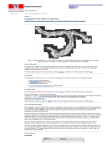
the user will select the brush to in the ImageJ tool bar and use this tool to paint the background color over any image imperfections (like the gray dots circled in blue in the Result of Mask window below). Image imperfections are areas where the background was
not masked out during the masking process. Once the user has completed the task they
will need to click ‘ok’ in the “Check Masking & Stack” window to proceed to the next
step.
21