1
INTERNATIONAL JOURNAL OF COMPUTERS AND COMMUNICATIONS
Issue 3, Volume 3, 2009
Registers to make the static Waveform Graph dynamic;
otherwise we would see a graph just after the While loop ends.
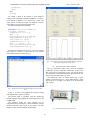
The chosen oscilloscope is the NI PXI-5412 (Fig. 8.). This
oscilloscope is traditional National Instruments equipment. It
uses the NI-SCOPE driver.
Fig. 8. NI PXI-5412 oscilloscope from National Instruments.
The Front Panel of the NI PXI-5412 oscilloscope command
made in LabVIEW is shown in Fig. 9. As we can see we have
the resource name, which shows the card number in the PXI
chassis. Two vertical adjust dials for each channel and a
horizontal adjust dial. We have two Waveform Graphs which
shows the signals at each channel.
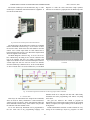
The Block Diagram is shown in Fig. 10. As we can see we
have a While loop. Its timing is set to 100 ms. Outside of the
loop is the initialize and close VIs, ending everything with
simple error handler. We have one horizontal adjust VI and to
vertical adjust VIs with two read VIs for the two channels
from the oscilloscope (channel 0 and 1). At the second channel
we have a Bessel filter. We used a Build Array VI and Shift
Fig. 9. The Front Panel of the NI PXI-5412 oscilloscope program made in
LabVIEW.
Fig. 10. The Block Diagram of the NI PXI-5412 oscilloscope program made in LabVIEW.
datasheet needs to be analyzed well and with a little binary
calculation and some programming trick almost everything
can be done.
The goal was achieved. We wanted to program an
instrument and we needed some functions that are not possible
without a computer, like signal sending to the oscilloscope or
saving from it.
Further enhancements would be to make a button for every
setting on the oscilloscope, maybe try program it in other
V. CONCLUSION
These days the instruments have simple SCPI commands,
where no need for binary calculation is. Some instrument’s
vendors provide even drivers, where some functions gather the
SCPI commands with the binary values and the user just calls
the functions and enter decimal values.
As we saw almost any instrument can be programmed as
the user wants and in any programming language. The
39