1
3.3
Preparation for scanning
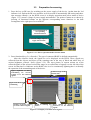
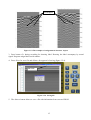
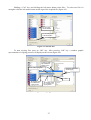
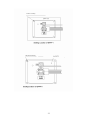
1. Press the key on BP case for switching on the power supply of the device. At that time the Led
indicator is to flash at the BP case and after several seconds of automatically SK testing and shorttime message «Ready», on the BUOI screen is to display operation mode select menu of device
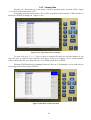
(figure 3.3.1) current voltage of power supply unit and time. The points of menu are to choose by
pressing of functional buttons on the opposite corresponding name functions in the dark
rectangulars in the right part of screen BUOI.
Current functions of
corresponding
functional buttons
Current voltage of power
supply unit and time
Figure 3.3.1. A device operation mode selection menu
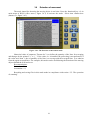
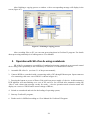
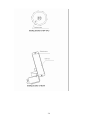
2. Press functional key «2» («Search»). The type of connected BAPP is defined automatically.
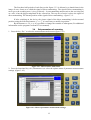
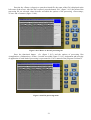
After the «Search» mode, the signals are to be displayed on the BUOI. These signals are
reflected from the objects and layers of the scanning zone in the way of black and white lines of
various brightness (colored lines) (figure 3.3.2). The wave picture of current written set of the
reflected signals of the selected record time range (as so-called lines of signal) is at the left side of the
screen. At that time Led indicator on the BAPP case is to be continuously lightning that is to identify
the operation of the transmitting unit of the device.
Signal amplitude of direct
transmitting for current
written set of the reflected
signals
Connected type of the
antenna unit
Signal of the direct
transmitting
Number of current written
set of the reflected signals
Depth of scanning in
meters
Wave picture of current
written set of the reflected
signals
Figure 3.3.2. Display of written down signals
11