1
8
en | Operation
SFT-INTSRV Integration Server
Print
Prints a document.
Print Preview
Displays the document on the screen as it would appear printed.
Print Setup
Selects a printer and printer connection.
Recently Opened
Lists the names of the four most recently used files. Selecting one of
Files List
these entries will open the selected file.
Exit
Exits the Integration Server.
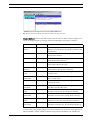
The Edit Menu offers the following commands:
Item
Description
Cut
Deletes data from the document and moves it to the clipboard
Copy
Copies data from the document to the clipboard
Paste
Pastes data from the clipboard into the document
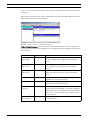
The Devices Menu offers the following commands:
Item
Description
Add
Add a new device
View
View configured devices
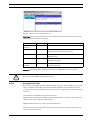
The Rules Menu offers the following commands:
Item
Description
Add
Add a new Rule
Edit
Edit the selected Rule
Remove
Remove the selected Rule
The Clause Menu offers the following commands:
Item
Description
Add
Add a new IF / THEN clause
Edit
Edit the selected clause
Remove
Remove the selected clause
The View Menu offers the following commands:
Item
Description
Toolbar
Shows or hides the toolbar
Status Bar
Shows or hides the status bar
The Window Menu offers the following commands:
Item
Description
Cascade
Arranges windows in an overlapped fashion
Tile
Arranges windows in non-overlapped tiles
Window 1, 2, ...
Goes to specified window
F01U065436 | 1.0 | 2007.03
User Manual
Bosch Security Systems, Inc.