1
“Linking Deserves a Look” from page 1
to Excel. Quantity fields can then be linked
directly to the takeoff from CM and AE.
Workbooks can also be used to build and
maintain the project’s Space Program,
values from which can be used to generate
floor, ceiling and wall areas linked to the
estimate.
Excel spreadsheets can also be used to
generate quantity models, projecting almost
any aspect of the project. It is possible to
create a template project, pre-linked to
specific cells in a model spreadsheet. The
template project can then be used to start a
new project. The model spreadsheet can be
copied to create a new project-specific
version. Finally, links to the project can be
switched to the project-specific spreadsheet
with a single menu command, allowing
model quantity generation specific to the
new project.
within a project and between projects. Links
are copied with the folder branch that
contains them. This makes it possible to set
up relationships within a set of folders
representing a building element or subelement and then to copy that element as
needed for new projects.
For example, it’s possible to use the roof
construction takeoff from one project to
build a “super assembly” based on roof
area. A super assembly is a folder containing
one or more line items and/or regular
assemblies constructed by the user or pulled
from a commercial price book such as the
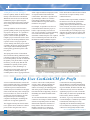
RS Means Assemblies Database. Figure 1
below shows the Item form for the roof deck
line item out of a super assembly of roof
construction items.
Each item in the super assembly is linked to
the total area of roof on the parent folder
using a factor estimated or generated,
perhaps, from a previous takeoff. In the case
of the roof deck, 80% of the roof area will
be covered by the 22 gauge metal deck. To
use the assembly on a second project, copy
and paste the folder and all its contents and
change its quantity to the new total area of
the roof.
See “Linking Deserves a Look” on page 5
The Spring 2003 release of CM and AE
delivered Parent Linking. With that release,
it became possible to set up a relationship
between the quantity on a task or folder and
the quantity of its parent folder. Using the
Item form, you can specify that the item
should draw its quantity from its parent
multiplied by a value (defaulting to 1).
This Summer release builds on the Parent
Linking and Excel Linking features by
extending them to allow copying links both
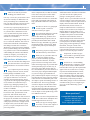
Figure 1 - A look at linking options in CostLink/AE’s task item form
○ ○ ○ ○ ○ ○ ○ ○ ○ ○ ○ ○ ○ ○ ○ ○ ○ ○ ○ ○ ○ ○ ○ ○ ○ ○ ○ ○ ○ ○ ○ ○ ○ ○ ○ ○ ○ ○ ○ ○ ○ ○ ○ ○ ○ ○ ○ ○ ○ ○ ○ ○ ○ ○ ○ ○ ○ ○ ○ ○ ○ ○ ○ ○ ○ ○ ○ ○ ○ ○
Bandza Uses CostLink/CM for Profit
As most construction business owners and
project managers fully know, estimating has
always been a critical component of the
construction process. Miscalculate the
estimate and you’re bound to see the ripple
effects of the inaccuracy later in the project.
Now, more than ever, as the recent down
economy has forced contractors to boost
their productivity in an increasingly
competitive marketplace, estimating has
taken on an even greater significance.
The sluggish economy has forced contractors to produce more estimates in a shorter
period of time using the same or fewer
2 BSD LinkLine Summer 2003
resources. The result is usually that the
accuracy suffers, making estimates less
competitive, thereby diminishing the
chances of winning a job and being profitable on the projects in hand. At the same
time that all of this is happening, clients are
demanding more detailed estimates than
ever before.
Construction has been using Building
Systems Design’s CostLink/CM estimating
software for several years now, and according to Joe Bandza, President and CEO, they
continue to not only win more and more
significant projects as a result of CostLink/
CM, but they are much more profitable due
to the accuracy in their estimates.
To overcome this dilemma, more and more
contractors are turning to reliable estimating
software to help them produce accurate,
detailed and competitive estimates in a
timely fashion. One such contractor is
Bandza Construction, a commercial
contractor in New Lenox, IL. Bandza
Joe tells us, “I give my customers the Direct
Cost Detail Report, a standard report within
CostLink/CM, which they love. They
repeatedly tell me that the flexibility in the
level of detail in my estimates gives them a
comfort level not typically found in other
See “CostLink/CM for Profit” on page 5