1
Section 1
Introduction
1-1
Introducing the 5 1/2 Digit Dual Display Bench Multimeters
NOTE
1. This operation manual contains information and warning that must be
followed to ensure user operation safety and to retain the meter safety
condition.
2. The term “5492” and “5491” will be used to refer to respective models
when descriptions for either model is applied.
3. The term “the meter” will be used to refer to both “5492” and “5491”
when descriptions are applied to both models.
Precaution!
TO ENSURE PERSONAL SAFETY AND TO AVOID DAMAGING THE
METER AND THE EQUIPMENT CONNECTED, READ “GETTING
STARTED” IN SECTION 2-2 BEFORE USING THE METERS.
The Dual Display Multimeter 5492 & 5491 (also referred to as “the meter” in
this manual) are 5 1/2 d igit multimeters with 120,000 count high resolution.
Both meters are designed for bench-top, field service, and system applications
with a high performance/price ratio. Complete specifications are provided in
Appendix A for 5492 and B for 5491 respectively.
With the RS-232 computer interface (standard), the meter is fully programmable
for use on the RS-232 interface.
With the IEEE-488 computer interface (optional) installed, the 5492 is fully
programmable for use on IEEE-488.1 interface bus (1987). The meter is also
designed in compliance with supplemental standard IEEE-488.2 (1987).
1
1-2 Features
The main features provided by the meter are:
!
A dual, Vacuum Fluorescent Display (VFD) that allows two properties of
input signal to be displayed at the same time. (e.g., DC voltage on one
display and AC voltage on the other).
!
Remote operation via RS-232 interface (standard) or IEEE-488 interface
(optional).
!
120,000, 40,000, and 4,000 counts for different measuring rate:
Slow Rate (120,000 counts) – 2 readings/sec;
Medium Rate (40,000 counts) – 5 readings/sec;
Fast Rate (4,000 counts) – 20 readings/sec.
!
1µV sensitivity in Vdc measurement.
!
True RMS Vac with 20Hz to 100kHz bandwidth for 5492, and 40Hz to
30kHz for 5491.
!
(Vac+Vdc) RMS and (Aac+Adc) RMS, calculated.
!
Selectable 2-wire and 4-wire resistance measurements.
!
Resistance measurements up to 120MΩ with 1mΩ resolution at slow reading
rate or up to 300MΩ with 10mΩ and 100mΩ resolution at medium and fast
reading rate respectively.
!
Wide dc and ac current measurement ranges: 12mA ~ 12A.
!
Frequency measurements greater than 1MHz with 0.01Hz best resolution.
!
dBm measurement with variable reference impedance from 2Ω to 8000Ω
and audio power measurement capability.
!
Zeroing mode (REL) to offset residual reading before taking a measurement.
!
Compare mode to determine if a measurement is within, above, or below a
designated range (Hi/Lo/Pass).
!
Dynamic recording mode to keep minimum and/or maximum readings of
measurements.
!
CAL mode to provide electronic closed-case calibration (no internal
adjustments).
2
1-3 Options and Accessories
At the moment, one option is available for 5492 only, which option can be
installed at the factory and a field installable retrofit kit option is also available:
!
IEEE-488 interface (Option GP5492) provides full programmability. There
are two types of programming commands: IEEE 488.2 Common Commands
and Standard Commands for Programmable Instruments (SCPI). The SCPI
commands used in this device is conformance with the SCPI Standard
Version 1993.0.
Standard accessories come with the meter are:
!
Power cord
!
Protective holsters (Front and Rear)
!
Operation Manual
!
TL 36*
Test leads
!
AC 01
Cap for TL 36
* Maximum Measurement Ratings: 1kVdc, 10A dc or ac rms continuous,
and 12A dc or ac rms for 30 seconds maximum.
Available optional accessories are listed as below:
!
TL 35*
Test leads
!
TH 02
Insulation piercing clip
!
AC 02
Lantern tip extension probe for TL 35
!
AC 03
Alligator clip
!
KC 01
4wire test cable set with Kelvin clippers
!
AK 5491 RS-232 PC Link software
!
GP5492 IEEE-488 GPIB Interface Upgrade (Only for 5492)
!
RK 01
Rack-mount kit (used for single meter)
* Maximum Measurement Ratings: 1kVdc, 10A dc or ac rms continuous,
and 12A dc or ac rms for 30 seconds maximum.
3
1-4 How to use this manual
This manual is designed to help the user to get a quick start. Though it is not
necessary to read the entire manual to operate the unit effectively, we recommend
the manual to be read thoroughly in order to use the meter to its full advantages.
First scan the Tables of contents to be familiar with the outline of the manual. Then
read “Getting Started” in Section 2-2. Refer to the appropriate section of the manual
as needed. The contents of each section are summarized below.
Section 1. Introduction
Introducing the general information of features, options, accessories, and operation
manual for the 5 1/2 digit Dual Display Multimeters.
Section 2. Getting Started
Introducing how to prepare the meter for operation and to start taking basic front
panel operations and measurements quickly.
Section 3. Operating the Meter from the Front Panel
Providing a complete description of each operation, which can be performed by
using the pushbuttons on the front panel. All related information for operations and
functions are grouped together.
Section 4. Measurement Application Examples
Describing how to use the meter in more advanced and sophisticated operations and
applications.
Section 5. Calibrating the Meter
Describing the basic information to calibrate the meter if necessary.
Section 6. RS-232 Remote Operation
Describing how to connect the meter to a terminal or a host computer and operate the
meter via RS-232 interface.
Section 7. GPIB Remote Operation (5492 Option)
Describing how to connect the meter to a terminal or a host computer and operate the
meter via GPIB interface.
Appendices
Appendix A: 5492 Specifications
Appendix B: 5491 Specifications
Appendix C: Maintenance
4
Section 2
Getting Started
2-1 Introduction
Section 2 describes the front panel operational keys, displays, input terminals
and rear panel of the meter, adjusting handle, explains general operating
features.
2-2 Getting Started
!
Unpacking and Inspecting the Meter
Carefully remove the meter from its shipping container and inspect it for
possible damage or missing items. If the meter is damaged or something is
missing, contact the place of purchase immediately. Save the container and
packing material in case user has to return the meter.
!
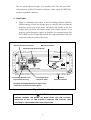
Front Panel
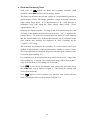
The front panel (shown in Figure 2-1) has three main elements: the input
terminals on the left, the primary/secondary displays, and the pushbuttons.
The pushbuttons are used to select major functions, ranging operations, and
function modifiers. These elements are described in detail in Section 3.
mA Fuse
Receptacle
Input
Terminals
Front Panel
Protective Holster
Function
Buttons
Primary
Display
Ranging
Buttons
Arithmetic
Buttons
Figure 2-1. Front Panel
!
Rear Panel
5
Power
Switch
Secondary
Display
nd
2 Display
Selection
Shift
Button
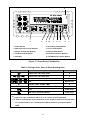
The rear panel (shown in Figure 2-2) contains a line fuse, the power-line
cord connector, an RS-232 interface connector, and a cutout for IEEE-488
interface (optional) connector.
!
Line Power
! Figure 2-2 illustrates the location of the Line Voltage Selector with Fuse
Holder housing. If user has already done so, plug the line cord into the
connector on the rear of the meter. The meter will operate at any line
voltage between 90Vac and 264Vac when “line voltage selector” is set
properly, and its frequency range is at 50/60Hz. For operation safety, DO
NOT APPLY a line voltage that exceeds the range specified to line cord
connector on the rear panel of the meter.
IEEE-488 I/F Connector *
Power-Line Cord Connector
RS-232 Connector
Earth Ground Terminal Screw
Line Voltage Selector with
Fuse Holder Housing
Line Voltage Fuse
Selection Table
Real Panel
Protective Holster
*Available with IEEE-488 Interface Option only.
Otherwise covered with Plastic Decal.
Figure 2-2. Rear Panel
CAUTION!
BEFORE TURNING THE METER ON, MAKE SURE THE LINE VOLTAGE
SELECTOR IS SET TO THE CORRECT POSITION FOR APPLIED LINE
VOLTAGE TO THE POWER-LINE CORD CONNECTOR.
6
! The “line voltage selector” is settable for 100Vac, 120Vac, 220Vac, and
240Vac line voltages.
! The correct fuse ratings: 250mA fuse for 100Vac or 120Vac is selected,
and 125mA fuse for 220Vac or 240Vac is selected.
!
Case, Panels and Holsters
To avoid electric shock or injury, do not operate the meter without panels or
case in place.
The meter is provided with special designed anti-slippery protective holsters
on the front and rear panel sides (shown in Figure 2-1 and 2-2).
The holsters provide a protection to both front and rear panels of the meter as
well as its corners. User may stack up one meter on the top of the other
without concerning the slide off of the units (shown in Picture 2-1).
The holsters can be easily removed when install the rack-mounted ears to the
meter in order to mount the meter into a 19-inch standard rack. Refer to
Section 2-7 for Rack Mounting procedures.
Picture 2-1. Stack up the Meters with Holsters
7
!
Grounding the Meter
The meter is grounded through power cord. To avoid electric shock or injury,
grounding wire in the power line cord must be connected.
!
Operating in Explosive Atmospheres
The meter does not provide explosion protection for explosive gasses or
arcing components. Do not operate the meter in such circumstances.
!
Adjusting Handle
For bench-top use, the handle can be adjusted to provide three viewing
angles. For viewing positions, pull the ends out to a hard stop (about 1/4 inch
on each side) and rotate it to one of four stop positions (shown in Figure 2-3)
To remove the handle, adjust it to the vertical stop position and pull the ends
all the way out.
1. Viewing Position 1
4. Viewing Position 2
2. Carrying Position
5. Viewing Position 3
3. Remove Handle Position
Figure 2-3. Adjusting Handle
8
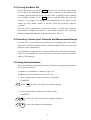
2-3 Turning the Meter ON
To turn the meter on, press the Power button to “IN” position located on the
lower right of the front panel. When the meter is turned on, the primary and
secondary displays light for about 2 seconds while an internal self-test running
by its digital circuitry. If the Hold button is pressed while the power-up
sequence is in progress, all segments and annunciators of the entire display
remain on until another button is pressed. Then the power-up sequence
continues.
After the meter completing its power-up sequence, it resumes the power-up
measurement configuration stored in non-volatile memory. The power-up
default configuration status set at factory is shown in Table 3-2.
2-4 Selecting Current Input Terminals and Measurement Range
If current (dc or ac) is being measured in the Auto-ranging mode, with a signal
input on the 1200mA terminal (5492) or 120mA terminal (5491), the meter will
select the range automatically.
If a signal input is applied to the 12A input terminal, the meter will not select the
range to 12A automatically. User will need to select the current measurement
range to 12A manually.
2-5 Using the Pushbuttons
The meter functions and operations can be selected by pressing the pushbuttons
on the front panel select.
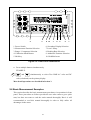
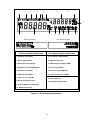
A summary of pushbuttons is shown in Figure 2-4.
Pushbuttons can be used in three ways. User can:
! Press a single button to select a function or operation.
EXAMPLE:
(Press)
to select AC volts for the primary display.
! Press a combination of buttons, one after the other.
EXAMPLE:
to select AC volts for the primary display, and then
to select the frequency measurement.
9
4
2
3
8 10
7
9
6
5
1
1. Power Switch
2. Measurement Function Selection
6. Secondary Display Selection
7. Local / Setup
3. Range / Comparator Selection
4. Calibration Mode Button
5. Shift key
8. Reading Rate Selection
9. Arithmetic Function Selection
10. Hold/Reference
Figure 2-4. Front Panel Pushbuttons
! Press multiple buttons simultaneously.
EXAMPLE:
and
simultaneously to select True RMS AC volts and DC
volts (calculated) on the primary display.
More detail operations are described in Section 3.
2-6 Basic Measurement Examples
This section describes the basic measurement procedures via operations in front
panel. These procedures as follows provide the user who wants to get a quick
start, but does not want to read the entire manual thoroughly. But it is still
recommended to read this manual thoroughly in order to fully utilize all
advantages in the meter.
10
!
Voltage, Resistance or Frequency Measurements
Press the desired function button and connect the test leads (TL 36 or TL 35
as described in Section 1-3) as shown in Figure 2-5 to measure voltage,
resistance, or frequency. The meter will select the appropriate range in the
auto-range mode, and an annunciator on the display will indicate
measurement units.
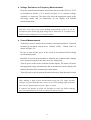
NOTE
Excessive error may occur when making measurements with 1 to 10 µV
resolutions after measuring high voltage up to 1000 volts dc. It requires two
minutes before making low-level measurements.
!
Current Measurements
To measure current, connect the test leads to mA input terminal or 12A input
terminal for measured current above 1200mA (5492) / 120mA (5491) as
shown in Figure 2-6.
Be sure to turn off the power in the circuit to be measured before taking
current measurement.
Break the circuit on the groundside to minimize the common mode voltage)
to be measured, and place the meter in series at that point.
Turn on power to the circuit, and then read the display. The meter will select
the appropriate range automatically, and an annunciator on the display will
indicate the units of the measurement value shown.
Turn off power to the circuit and disconnect the meter from the tested circuit.
NOTE
After making a high current measurement using the 12A input, thermal
voltages are generated that may create errors when making high-resolution
low-level dc measurements of volts, amps, or ohms.
It requires ten minutes to allow the thermals to settle out before making
low-level measurements in order to obtain the best accuracy.
11
Figure 2-5. Voltage, Resistance or Frequency Measurements
Figure 2-6. Current or Frequency Measurements
12
!
Diode and Continuity Tests
Each press of
toggles the diode and continuity functions. Both
functions cannot be selected for the secondary display.
The diode test measures the forward voltage of a semiconductor junction at
approximately 0.5mA. The beeper generates a single beep tone when the
input voltage drops below +0.7V (approximately 1.4kΩ) and generates a
continuous beep tone when the input voltage drops below +50mV
(approximately 100Ω).
Readings are displayed in the 1.2V range at the slow measurement rate, and
4V range at the medium and fast measurement rates. “OL” is displayed for
voltage above 1.2V at the slow measurement rate and 2.5V at the medium
and fast measurement rates. If the diode/continuity test is performed at the
slow reading rate, readings are displayed in 10µV resolution on the
1.19999V (1.2V) range.
The continuity test measures the resistance of a tested circuit with 2-wire
method at approximately 0.5mA and determines whether a circuit is intact.
The beeper generates a continuous beep tone when the input resistance value
is less than approximately 10Ω.
For continuity test, the measurement range will be fixed at 120Ω range if the
slow reading rate is selected. The measurement range will be fixed at 400Ω
range if the medium or fast reading rate is selected.
Press
to select diode test function, then connect the test leads across
the diode under test as shown in Figure 2-7 (Reversing the polarity will
reverse-bias the diode).
Press
again to select continuity test function, then connect the test
leads or across the tested circuit as shown in Figure 2-8.
13
WARNING!
To avoid damaging to the meter, do not apply a voltage
exceeding 500 V peak between the input terminals.
Figure 2-7. Diode/Continuity Test
WARNING!
To avoid damaging to the meter, do not apply a voltage
exceeding 500 V peak between the input terminals.
Figure 2-8. 2-Wire Ω/Continuity Test
14
2-7 Rack Mounting
User can mount the meter into a standard 19-inch rack using RK 01 (for single
meter) Rack Mount Kit. The front and rear protective holsters can be removed
when mount the meter into a rack.
To install RK 01 rack mount kit, refer to following procedures and Figure 2-9 or
the instructions provided with it:
1. Adjusting the handle of the meter to its upward vertical stop position (refer
to Figure 2-3) and pull the ends all the way out.
2. Removing two protective holsters out of the front panel and rear panel of the
meter.
3. Installing the rack mount ears onto the left and right hand side of the meter
frame by using four screws provided with RK 01.
4. Paste two blind plates on the handle hole.
5. Mount the meter with RK 01 into the standard 19” rack.
Figure 2-9. Installing the Rack Mount Kit
15
(This page is subject to be blank)
16
Section 3
Front Panel Operation
3-1 Introduction
This section provides a complete description of each operation that can be
performed by using the pushbuttons on the front panel.
All related information for operations and functions are grouped together.
3-2 Front Panel Operations
The following operations can be performed from the front panel:
! Select a measurement function (Vdc, Vac, Adc, Aac, resistance, frequency,
and diode/continuity test) for the primary and secondary display.
! Take a measurement and display a reading.
! Select the manual or auto-range mode (AUTO)
! Manually select a measurement range for the primary display.
! Select function modifier that cause the meter to display relative readings
(REL), minimum or maximum values (MIN MAX) or decibels (dBm and
dB), or to enter the Data Hold mode (HOLD) to hold a reading on the
primary display.
! Change the measurement rate (SLOW, MEDIUM, FAST)
! Set the dB reference impedance (REFΩ).
! Take a measurement and compare (COMP) it against a tolerance range (Hi,
Lo, or Pass).
! Use the ”editor” to select from option list, to enter a relative constant base, or
to enter a HI-LO range for the compare (COMP) mode.
! Configure the computer interface (RS-232 or IEEE-488).
! Take an audio power reading.
! Send measurement directly to a printer or terminal through the RS-232
interface (RS-232 print only mode)
These and other front panel operations are described in the remainder of Section
3.
17
3-3 Primary and Secondary Displays
The meter has a 5 1/2 digit, Vacuum-Fluorescent dual display. This display
shows measurement readings, annunciator, and messages. The annunciator
indicates measurement units and the meter’s operating configuration.
The dual display allows you to see two properties (e.g. Vac and frequency) of the
input signal you are measuring. The display contains two major parts, primary
display and secondary display (See figure 3-1).
The primary display contains of larger digits and annunciators and is located on
the left side of the dual display. Readings using the relative (REL), minimum
maximum (MIN MAX), touch hold (HOLD), or decibels (dBm) modifier can be
shown on the primary display only.
The secondary display contains of a set of smaller digits on the right side of the
dual display. To press
then followed by a function button to turn the
then followed by
secondary display on and press
to turn the
secondary display off.
If the secondary display has been turned on and selected a measurement function
for the secondary display, the reading on the primary display will not be affected.
NOTE
If user select
for the primary display, only a diode test voltage will be
shown on the secondary display; continuity is restricted to the primary
display only.
Neither function modifiers REL, dBm, HOLD, nor MINMAX can be selected
in the secondary display.
18
1
3
4
5
6
7
8
11
12
17
2
13
10
9
Primary Display
14
15
16
18
Secondary Display
Primary Display indications:
Secondary Display indications:
nd
1. Reading rate (S M F)
11. 2
Numeric data display
2. Auto range (AUTO)
12. Measurement unit
3. Data Hold mode (HOLD)
13. 2ND function enabling (2ND)
4. Dynamic recording (MIN MAX)
14. Auto range (AUTO)
5. Relative mode (REL)
15. Remote state (REMOTE)
6. dBm indicator (dBm)
16. Compare function (COMP)
7. 2wire / 4 wire Ω (4 2W)
17. Shift mode (S)
8. Diode/Continuity mode
18. Calibration mode (CAL)
9. Primary Numeric data display
10. Measurement unit
Figure 3-1 Dual Display Illustrations
19
3-4 Input Terminals
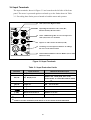
The input terminals, shown in Figure 3-2 are located on the left side of the front
panel. The meter is protected against overloads up to the limits shown in Table
3-1. Exceeding these limits poses a hazard to both the meter and operator.
!
Ohm (4W) Sense-High Terminal
!
Input-High Terminal for Volts, Ohms, Hz,
Diode/Continuity Measurements
!
12mA~1200mA Range DC/AC Current Input and
Ohm (4W) Sense-Low Terminal
!
Input-Low and Common Terminal (COM)
!
12A Range Current Input Terminal for 12A Range
DC/AC Current Measurement
!
12mA/120mA/1200mA mA Fuse & Holder (2A for 5492;
250mA for 5491)
Figure 3-2 Input Terminals
Table 3-1 Input Protection Limits
Function
Vdc
Input Terminal
Maximum Allowable Input
V Ω Hz (Hi) to Lo
1000V dc
7
Vac, Hz
V Ω Hz (Hi) to Lo
mA, Hz
mA to Lo
750V ac rms, 1100V peak, 2x10 V-Hz
6
normal mode, or 1x10 V-Hz common mode
1200mA
(2)
(1)
dc or ac rms
12A, Hz
12A to Lo
12A
Ω (2W)
V Ω Hz to Lo
500V dc or ac rms
V Ω Hz to Lo
500V dc or ac rms
Ω (4W)
Sense Hi to Sense Lo
250V dc or ac rms
All functions
Any terminal to earth
1000V dc or peak ac
dc or ac rms
(1)
Up to 1200mA for 5492; up to 120mA only for 5491
(2)
10A dc or ac rms continuous, and 12A dc or ac rms for 30 seconds maximum
20
3.5 Initialization of Measurement Conditions
! Power up default configuration Status:
When turning the meter on, it assumes its power-up configuration. The
power-up configuration set at the factory is shown in Table 3-2.
As configuration data for IEEE-488 address, RS-232 baud rate, data bit, stop
bit, parity, and echo are stored in the non-volatile memory, they are not
changed when power is cycled off and on until the configurations are
changed by the user.
Table 3-2 Default configuration Status
Parameters
Default Settings
Function
DCV
Range
Auto Range
Hold
OFF
Reading Rate
Slow Mode (120,000 Counts)
Arithmetic Function
OFF
Hi: 199999 (199999E+0)
Comparator
Constant
Lo: 000000 (000000E+0)
REFΩ
Ω (Reference Impedance)
600 Ω
Rel # (Relative Base)
000000E+0
Secondary Display mode
OFF
CAL mode
OFF
3-6 Selecting A Measurement Function
Press a function button shown in Figure 3-3, to select a measurement function.
and
or
and
To select ac + dc total true RMS readings, press
, simultaneously.
When user selects a function, annunciator turns on to indicate the function
selected. If the secondary display has been selected and the 2ND function
annunciator remains on when a function button is pressed, the secondary display
will display the reading taken from the new measurement function selected.
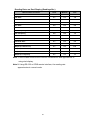
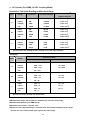
The summary of ranges and scale values are shown in Table 3-3 and Table 3-4
for slow rate and medium/fast rate respectively.
21
4
2
3
8 10
7
9
6
5
1
1. Power Switch
6. Secondary Display Button
2. Measurement Function Buttons
7. Local / Setup Button
3. Range / Comparator Buttons
8. Reading Rate Button
4. Calibration Mode Button
9. Arithmetic Function Buttons
5. Shift Key
10. Hold/Reference Imped. Button
Figure 3-3 Front Panel Pushbuttons
Table 3-3 Range Scale Value in Slow Reading Rate
Function
,
+
Range Scale
120mV, 1.2V, 12V, 120V, 1000V
•
120mV, 1.2V, 12V, 120V, 750V
•
,
,
+
12mA, 120mA, 1200mA
,
,
+
12A
Hz
2WΩ
Ω, 4WΩ
Ω
.
(3)
Auto Ranging
(1)
(2)
•
Manual only
1200Hz, 12kHz, 120kHz, 1MHz
•
120, 1.2k, 12k, 120k, 1.2M, 12M, 120M Ω
•
1.2V
Fixed range
2W / 120 Ω (Continuity Mode)
Fixed range
(1)
1200mA for 5492 only.
(2)
10A dc or ac rms continuous; 12A dc or ac rms for 30 seconds maximum.
(3)
In order to eliminate the noise interference, which might be induced to the test leads,
it is recommended to use a shielded test cable for measuring resistance above
120KΩ
Ω.
22
Table 3-4 Range Scale Value in Medium/Fast Reading Rate
Function
,
,
,
Range Scale
+
,
,
•
400mV, 4V, 40V, 400V, 750V
•
12A
+
Hz
2WΩ
Ω, 4WΩ
Ω
400mV, 4V, 40V, 400V, 1000V
40mA, 120mA, 1200mA
+
(3)
.
Auto Ranging
(1)
(2)
•
Manual only
1200Hz, 12kHz, 120kHz, 1MHz
•
400, 4k, 40k, 400k, 4M, 40M, 300M Ω
•
2.5V
Fixed range
2WΩ
Ω / 120 Ω (Continuity Mode)
Fixed range
(1)
1200mA for 5492 only.
(2)
10A dc or ac rms continuous; 12A dc or ac rms for 30 seconds maximum.
(3)
In order to eliminate the noise interference, which might be induced to the test leads,
it is recommended to use a shielded test cable for measuring resistance above
120KΩ
Ω.
More operations of selecting a measurement function are described below:
!
to select DC voltage measurement
!
to select AC voltage measurement
!
to select DC current measurement
!
to select AC current measurement
!
to select frequency measurement
!
to select Diode or Continuity measurements by toggling the key
!
to toggle in (and out) of the 2W/4W resistance measurements mode
!
then
to select dBm calculation
!
(
and
) simultaneously to select DC+AC RMS volts calculation
!
(
and
) simultaneously to select DC+AC RMS amps calculation
23
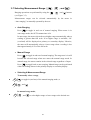
3-7 Selecting Measurement Range (
Ranging operations are performed by using the
,
, and
,
, and
)
buttons
(see Figure 3-3).
Measurement ranges can be selected automatically by the meter in
“Auto-ranging” or manually operated by the user.
! Auto-Ranging
to toggle in and out of manual ranging. When meter is in
Press
auto-range mode, the AUTO annunciator is lit.
In auto-range, the meter selects the next higher range automatically when a
reading is greater than full scale. If no higher range is available, ‘OL’
(overload) will be displayed on primary or secondary display. Likewise,
the meter will automatically selects a lower range when a reading is less
than approximately 9.5% of the full scale.
! Manual Range
to toggle in and out of manual ranging. The range user is in will
Press
become the selected range when user enters the manual range mode. In
manual range, the meter remains in the selected range regardless of input.
Press
to toggle back to auto-ranging. Manual range can be performed
either on readings shown in the primary display or secondary display.
! Selecting A Measurement Range
To manually select a range,
!
to toggle in (and out) of the manual ranging mode, or
, and
In manual range mode,
!
, and
to select higher range or lower range to the desired one.
24
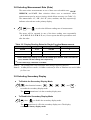
3-8 Selecting Measurement Rate (Rate)
The meter takes measurements at one of three user-selectable rates: SLOW,
MEDIUM, and FAST. Rate selection allows user to maximize either
measurement speed or noise rejection, which affects accuracy (see Table 3-5).
The annunciators “S”, “M”, and “F” (slow, medium, and fast, respectively)
indicates selected rate on the primary display.
!
then
to select the different reading rate of measurement.
The meter will be operated in one of the three reading rates sequentially
(S # M # F # S # M # F, etc.) if user repeats the above procedures once
after the other.
Table 3-5. Display Reading Rates for Single Function Measurements
(1)
Display Counts
(1,2)
Reading Rate
Digits
Readings per Second
SLOW
5 1/2
119,999
2
MEDIUM
4 1/2
39,999
5
FAST
3 1/2
3,999
20
In Vdc 1000V range, display counts will be limited up to 1200.00, 1200.0 and 1200 for
slow, medium and fast reading rate respectively;
(2)
In Vac 750V range, 1000Vrms is readable
Note: 1. The reading rate is not selectable when using Frequency function.
Note: 2. At dBm function enable, 0.01dBm resolution for Slow or Medium rate and 0.1dBm
for Fast rate.
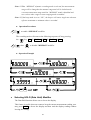
3-9 Selecting Secondary Display
!
To Enable the Secondary Display Mode
then function buttons (
,
,
,
, and
to enable the secondary display mode.
The 2nd annunciator is in the secondary display area.
!
To Disable the Secondary Display Mode
then
to disable the secondary display mode.
The 2nd annunciator is off in the secondary display area. The display
remains in Primary display mode
25
)
!
Combination of Dual Display Settings
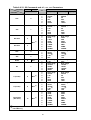
Table 3-6 provides the available combination of inputs for the primary display
and secondary display in the dual display mode.
Table 3-6. Descriptions for Combination of Dual Display
Secondary
Display
Primary
Vdc
Vac
Adc
Aac
Hz
•
•
•
•
•
•
•
•
Display
Vdc
•
(1)
Vac
•
Adc
•
•
•
•
• *2
Aac
•
•
•
• (1)
• *2
Vac + Vdc
•
• (1)
•
•
•
Aac + Adc
•
•
•
• (1)
• (2)
Hz
•
•
• (2)
• (2)
• (1)
•
•
•
•
•
•
•
•
•
•
•
•
•
•
•
Ω
(3)
dBm
(1)
The ranges of the secondary display are set by the primary display.
(2)
The Frequency reading is corresponding to the current input signals; other readings
are corresponding to the voltage input signals.
(3)
It is recommended to measure the resistance up to 1M Ω in dual display mode.
Note: In dual display mode, keystroke response time is approximately 0.6 ~ 1 second. User
may need to select and press down a key until the meter responding to the Keystroke.
26
3-10 Entering Setup Mode
User may select computer interface, set RS-232 interface (standard) or GPIB
interface (option), and beeper mode on Setup Mode. To ensure the remote
interface will operate appropriately, user may need to configure the remote
interface parameters by following the procedures as shown below:
then
to enter the setup mode to configure the remote interface
parameters.
or
or
to select the each tier menu items.
to select the parameters of the menu item.
to enter second tier menu or to store the selected parameter. The
selected parameter is flashed in primary display.
to quit the tier menu. To quit from the setup mode and this will save
all parameter settings.
Table 3-7 describes the outline of the setup menu item. Some menu
items will be not displayed without GPIB interface meter (option).
Table 3-7. Descriptions for Outline of Setup Menu Item
First Tier Menu
Second Tier Menu
1. Remote Mode Selection (1)
1. Baud Rate
2. Parity
3. Data Bit
2. RS-232 Interface Parameters
4. Stop Bit
5. ECHO
6. Printer-Only
3. GPIB Interface Parameters
(1)
1. Address (1)
2. Talk (1)
4. Beeper Mode Selection
(1)
The items will be displayed when GPIB option is installed.
27
Table 3-8 indicates the factory settings and user selectable
communication parameters by using RS-232 interface (standard) and
GPIB interface (option).
Table 3-8. Communication Parameters
Menu Item
Factory Setting
Selectable Parameters
Remote
RS-232
Baud Rate
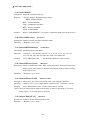
9600
Parity
None
None, Odd or Even
Data Bit
8
7 or 8
Stop Bit
1
1 or 2
ECHO
OFF
ON or OFF
Printer-Only
OFF
ON or OFF
Address
8
0 to 30
Talk
OFF
ON or OFF
ON
ON or OFF
Beeper
(1)
(1)
RS-232 or GPIB
9600, 4800, 2400, 1200, 600,
and 300
The Beeper mode is not a communication related parameter but to simplify
the meter operation.
3-11 Selecting Local Operation Mode
to return the operation control priority from remote mode (computer
controlled) to local mode (user controlled).
28
3-12 Operating Arithmetic Functions
!
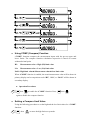
Using dBm Modifier
The dBm measurement is used for decibel conversion of power per 1mW
consumption into a 600Ω load and can be applied to Vdc and Vac
measurement functions only. Voltage measurement is converted to dBm by
using the following formula:
dBm = 10x log10 [1000 x (measurement value)2 /reference impedance]
then
to toggle in (and out) dBm modifier mode when measuring
Vdc or Vac function with default reference impedance 600Ω.
The meter will displays the dBm modifier on the primary display and
displays the reference impedance on the secondary display.
User may then use
and
to rotate the selection of different
impedance as desired when the selection mode is enabled, the reference
impedance selection is shown on the secondary display area.
29
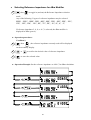
Selecting Reference Impedance for dBm Modifier
!
then
to toggle in (and out) the Reference Impedance selection
mode.
Any of the following 21 types of reference impedance may be selected:
8000Ω, 1200Ω, 1000Ω, 900Ω, 800Ω, 600Ω, 500Ω, 300Ω, 250Ω, 150Ω,
135Ω, 125Ω, 124Ω, 110Ω, 93Ω, 75Ω, 50Ω, 16Ω, 8Ω, 4Ω, 2Ω
If reference impedance 2, 4, 8, or 16Ω is selected, the dBm modifier is
displayed in Watts (power).
!
Operation procedures:
Condition 1:
then
, the reference impedance currently used will be displayed
on the secondary display.
or
to scroll to the desired value of reference impedance.
to store the selected value.
!
Operation Example: Set the reference impedance to 1000Ω for dBm calculation.
30
Condition 2:
then
or
to enter dBm calculation mode.
to scroll to the desired impedance value shown as the following
operation example.
• Operation Example:
!
Using MINMAX Modifier for Dynamic Recording
“MINMAX” modifier enables the meter to store the minimum and the
maximum input signals measured since the “MINMAX” modifier was
selected. The definitions of “MIN” and “MAX” are defined as follows:
MIN: Minimum value of calculation results for measured signal
MAX: Maximum value of calculation results
If “MAX” modifier is selected, the display indicates the latest maximum reading
until next measurement reading exceeds the previous recorded reading.
If “MIN” modifier is selected, the display indicates the latest minimum reading until
next measurement reading drops below the previous recorded reading.
If “MINMAX” mode is selected, the display indicates the actual value of input
signal.
31
Note: 1. When “MINMAX” dynamic recording mode is selected, the measurement
range will be changed to the manual range and will be locked on the
current measurement range until the “MINMAX” mode is disabled and
user selects other ranges or auto-ranging mode is enabled.
Note: 2. If the beep mode is set to “ON”, the beeper will emit a single tone when an
effective maximum or minimum value is recorded.
!
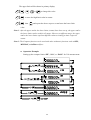
Operation Procedures
to enable “MINMAX” modifier.
The recording mode will rotate as the following sequences if keep pressing
key: Max # MinMax # Min # MinMax # Max
the
then
!
!
to disable “MINMAX” modifier.
Operation Example
Selecting HOLD (Data Hold) Modifier
The Data Hold function allows user to freeze the display.
This feature is useful when user wants to keep the current measurement reading, user
may press HOLD to freeze the display and then read the display reading without
loosing the reading.
32
!
Operation Procedures
to enable Data Hold mode, and the annunciator HOLD will be shown
on the primary display.
again to disable Data Hold mode.
Note: The Data Hold mode can be used for other arithmetic functions such as dBm,
REL and Min / Max.
!
Selecting REL (Relative) Modifier
When the “REL” modifier is selected, the reading on the primary display is the
value difference between Rel# (relative base) and the current measurement value.
The definitions of “REL” modifier is defined as follows:
Displayed reading = Measurement value – Rel#
Note: The relative function can be selected for primary display only.
!
Setting Rel# (Relative Base) for REL Modifier
to enable the “REL” modifier and the primary display reading will be
stored as a relative base. The primary display will then be zeroed and REL
annunciator will be lit on the primary display. The secondary display will not
be affected.
When “REL” modifier is selected,
then
to toggle in (and out) the relative base (REL#) selection.
Annunciator REL is lit on the primary display then using (
and
,
,
) to change the relative base value for “REL” modifier
calculation.
again to disable “REL” modifier.
!
Operation Example: To enable “REL” modifier for Vdc measurement.
33
,
!
Using COMP (Compare) Function
“COMP” function compares the measurement inputs with the pre-set upper and
lower limits. The compare function calculation expression is based on counts
without decimal point.
HI:
Measurement value > High (HI) limit value
LO:
Measurement value < Low (LO) limit value
PASS: High limit value ≥ Measurement value ≥ Low limit value
When “COMP” function is enabled, the actual measurement value will be shown in
primary display and a comparison result “HI”, “LO”, or “PASS” will be shown in
secondary display.
!
Operation Procedures
then
, to enable the “COMP” function. Press
then
again to disable the compare function.
!
Setting a Compare Limit Value
Using the following procedure to set the high and the low limit values for “COMP”
function:
then
to enter the high limit set-up mode.
34
The upper limit will be shown in primary display.
,
,
or
to change this value.
to store the high limit value in counts.
then
and repeat the above steps to set and store the lower limit
value.
Note: 1. After the upper and/or the lower limits (counts) have been set up, the upper and/or
the lower limits can be used for all ranges. However, at different range, the upper
and/or the lower limits represent different values according to their respective
counts.
Note: 2. The Compare function can be used with other arithmetic functions such as REL,
MINMAX, and dBm modifiers.
!
Operation Example:
Setting up the compare limits “HI”, “LO”, or “PASS” for Vdc measurement.
35
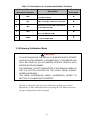
3-13 Combinations of Arithmetic Functions
The meter allows the user to use multiple arithmetic functions (dBm, MINMAX,
REL, HOLD, and COMP) simultaneously. The result of one arithmetic function can
be computed again as shown in the following operation procedure flowchart.
Example: Using the following procedures to set the upper and the lower limit values
for “COMP” function.
When using the multiple arithmetic functions, any types of modifier calculation can
be combined together as the operations shown above. For example, if
is
selected while dBm modifier is enabled, the result of the dBm calculation (1)
becomes a relative base (2) for new measurements. The sequences and the results of
the combined arithmetic functions are shown in Table 3-9 step by step when all types
of arithmetic functions are activated sequentially as shown in above example.
Note: Arithmetic functions can be operated for primary display only.
36
Table 3-9. Descriptions for Combined Arithmetic Functions
Arithmetic Function
Operation Sequence
1
dBm
2
REL
3
Min
4
Max
5
COMP
Description
Result
Generated
The measurement value is calculated
to a dBm modifier
dBm result (1
1) is taken as a REL base
Min value of relative dB is recorded as
a new REL base (2
2)
Max value of relative dB is recorded
as a new REL base (2
2)
A COMP is performed to based on the
results of 3 and 4
1
2
3
4
5
3-14 Entering Calibration Mode
CAUTION!
TO AVOID DAMAGING THE DEFAULT CALIBRATION DATA STORED
IN NON-VOLATILE MEMORY, A CALIBRATION TO THE METER CAN
ONLY BE DONE BY AN AUTHORIZED SERVICE CENTER WITH
APPROPRIATE EQUIPMENT.
THE WARRANTY IS NOT GUARANTEED IF THE SEALED LABEL ON
THE CAL BUTTON LOCATED ON THE FRONT PANEL DISPLAY
SCREEN IS BROKEN.
FOR MORE INFORMATION ABOUT CALIBRATION, REFER TO
SECTION 5 “CALIBRATING THE METER”.
The meter is designed with closed-case calibration capability (no internal
adjustment). To enter calibration mode by pressing the CAL button located on
the upper right position of the front panel.
37
(This page is subject to be blank)
38
Section 4
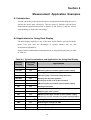
Measurement Application Examples
4-1 Introduction
Section 4 describes some advanced features and applications that help the user to
operate the meter more effectively. The user must be familiar with the basic
measurement operations described in Section 2 and Section 3 and has a basic
understanding of electronics knowledge.
4-2 Applications for Using Dual Display
The dual display capability is one of the most useful features provided with the
meter. User may take the advantages to greatly enhance the test and
measurement capabilities.
Some common combinations and applications of using dual display are provided
in Table 4-1.
Table 4-1. Typical Combinations and Applications for Using Dual Display
Primary
Display
Secondary
Display
Vdc
Vac
• Testing DC to AC or AC to DC converter circuit
Vac+Vdc
Vdc
• Measuring DC level and AC ripple of power supply
Vdc
Adc
• Testing power supply load regulation
Vdc
Aac
• Checking loop current and voltage drop level
Aac+Adc
Vdc
• Testing line and load regulation
Vac
Adc
• Testing AC to DC or DC to AC converters
Aac+Adc
Vac
• Measuring DC level and AC ripple of power supply
Vac
Aac
• Testing transformer
Vac
Hz
• Measuring AC frequency response of amplifier circuit
Aac
Hz
• Adjusting AC motor control
Adc
Aac
• Measuring AC ripple and DC current of power supply
Aac+Adc
Adc
• Measuring current dissipation for power supply analysis
dBm
Reference Ω
dBm
Vdc
• Indicating DC voltage and dBm
dBm
Vac
• Indicating AC voltage and dBm
dBm
Hz
• Checking frequency response
Applications
• Setting dB reference impedance and show dBm
39
4-2-1 Dual Display Operation Examples
This section will describe some practical operations of using dual display
features.
Measuring DC voltage and AC ripple on a rectification circuit.
!
To display DC voltage in primary display, and AC voltage in secondary display
or vise versus while testing a rectifier circuit, user may check the DC voltage
supplied and its AC ripples by taking a single measurement.
1. Connect the meter to the unit under test as shown below:
2.
to select DC voltage measurement function for primary display.
3.
,
or
to select auto-ranging or manual range for
primary display.
to turn on “ 2ND ” annunciator in secondary display.
4.
5.
to select AC voltage measurement function for secondary display.
6.
,
or
to select auto-ranging or manual range for
secondary display.
Note: 1. Press
then
Note: 2 Press
to select the suitable range, if the DCV + AC ripple is over the
may turn off secondary display.
scale of current range.
Note: 3. Regarding secondary display function setting, please refer to Section 3-10.
40
!
Measuring AC and DC current on a rectification circuit.
To display AC current in primary display and DC current in secondary display
or vise versus while testing a rectifier circuit, user may check the DC current
component and its AC ripples by taking a single measurement.
1.
Connect the meter to the unit under test as shown below:
WARNING!
1. Select a correct input terminal according to the input range to be used.
2. To avoid damaging the meter do not apply more than 12A to “12A” input terminal.
2.
to select AC current measurement function for primary display.
3.
,
or
to select auto-ranging or manual range for
primary display.
4.
to turn on “ 2ND ” annunciator in secondary display.
5.
to select DC current measurement function for secondary
display.
6.
,
or
to select auto-ranging or manual range for
secondary display.
Note: 1. Press
then
may turn off secondary display.
Note: 2. Regarding secondary display function setting, please refer to Section 3-10.
41
!
Measuring AC voltage and frequency on an AC circuit.
To display AC voltage in primary display and the frequency in secondary
display or vise versus while measuring an AC signal, user may check AC
voltage and its frequency of an AC Power Supply or circuit by taking a single
measurement.
1.
Connect the meter to the unit under test as shown below:
2.
to select AC voltage measurement function for primary display.
3.
,
or
to select auto-ranging or manual range for
primary display.
4.
to turn on “ 2ND ” annunciator in secondary display.
5.
to select Frequency (Hz) measurement function for secondary
display.
6.
,
or
to select auto-ranging or manual range for
secondary display.
Note: 1. Press
then
may turn off secondary display.
Note: 2. Regarding secondary display function setting, please refer to Section 3-10.
42
!
Measuring DC voltage and DC current on a transistor circuit or load.
To display DC voltage in primary display and the frequency in secondary
display or vise versus while testing a transistor amplifier circuit, user may
check its Hfe or calculate its DC load consumption by using dual display.
1.
Connect the meter to the unit under test as shown below:
WARNING!
1. Select a correct input terminal according to the input range to be used.
2. To avoid damaging the meter do not apply more than 12A to “12A” input terminal.
2.
to select AC voltage measurement function for primary display.
3.
,
or
to select auto-ranging or manual range for
primary display.
4.
to turn on “ 2ND ” annunciator in secondary display.
5.
to select Frequency (Hz) measurement function for secondary
display.
6.
,
or
to select auto-ranging or manual range for
secondary display.
Note: 1. Press
then
may turn off secondary display.
Note: 2. Regarding secondary display function setting, please refer to Section 3-10.
43
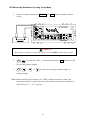
4-3 Measuring Resistance by using 2-wire Mode
1. Connect a resistor under test to V(Ω(Hz and
Lo
input terminals as shown
below:
WARNING!
Do not apply a voltage exceeding 500 V peak between V(Ω((Hz and Lo input terminals.
2.
to select the 2-wire Ω measurement function, 2 W annunciator will
be on in the primary display.
3.
,
or
to select auto-ranging or manual range for
primary display.
Note: When measuring low resistance, use “REL” modifier function to reduce the
measurement error created by the test leads resistance and contact resistance in
the test loop (0.1Ω ~ 0.5Ω typical).
44
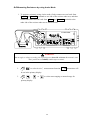
4-4 Measuring Resistance by using 4-wire Mode
1. To measure resistance using 4-wire mode, firstly connect two test leads from
V(Ω(Hz and Sense-Hi terminals to one side of the resistor under test, and then
connect the other two test leads from Lo and Sense-Lo terminals to the
other side of the resistor under test as shown below:
WARNING!
Do not apply a voltage exceeding 250 V peak between Sense Hi and Sense Lo terminals, and
500 V peak between V(Ω((Hz and Lo input terminals.
2.
to select 4-wire Ω measurement function, 4
W annunciator will
be on in the primary display.
3.
,
or
to select auto-ranging or manual range for
primary display.
45
4-5 Measuring True RMS AC+DC
The meter can measure the true rms value of ac voltages and currents.
When
and
or
and
are pressed simultaneously, the
meter will measure the dc and ac signals alternatively then calculate and display the
ac+dc rms value by using the following formula:
(ac+dc) RMS =
dc 2 + ac 2
Note: When voltage (ac+dc) measurement function is selected, the Vdc input impedance is paralleled
with an ac-coupled 1.1MΩ ac divider.
!
Measurement example:
To take a true rms voltage ac+dc measurement on an ac signal, assuming the input
ac is 10Vrms 1kHz sine wave ac signal and with a dc offset voltage +5 volts, the
meter will read and display the results approximately as:
5 2 + 10 2
11.1803 volts
46
Section 5
Calibrating the Meter
5-1 Introduction
CAUTION!
TO AVOID DAMAGING THE DEFAULT CALIBRATION DATA STORED IN A
NON-VOLATILE MEMORY, A CALIBRATION TO THE METER CAN ONLY BE
DONE BY AN AUTHORIZED SERVICE CENTER AND QUALIFIED PERSONNEL
WITH APPROPRIATE EQUIPMENT.
THE WARRANTY WILL BE EXPIRED IF THE SEALED LABEL ON THE CAL
BUTTON OF THE FRONT PANEL IS BROKEN.
FORE DETAIL INFORMATION ABOUT CALIBRATION PROCEDURES, PLEASE
CONTACT FACTORY OR AUTHORIZED DISTRIBUTOR.
It is recommended to recalibrate and verify the meter at least once a year to
ensure it meets the original designed performance and specifications.
The meter is designed with closed-case calibration capability (no internal
adjustment). To enter calibration mode by pressing the CAL button located in the
hole on the upper right position of the front panel display screen.
The meter can be calibrated and verified by keystrokes via the front panel or
through RS-232 interface (or optional IEEE-488) command with appropriate
equipment and qualified personnel only.
5-2 Environmental Condition
Calibration or verification test should be performed under laboratory condition
with an ambient temperature of 19-26 °C and a relative humidity of below 75%.
5-3 Warm up
Allow up to at least 60 minutes warm-up time before performing calibration or a
verification test to the meter. After exposure or storage in a high humidity
(condensing) environment, 2 hours warm-up time is essentially required.
47
5-4 Recommended Test Equipment
The test equipment requirements listed in Table 5-1 or equivalents are required to
perform the calibration and performance verification test procedures. Alternative
equipment may be used as long as the accuracy is at least as good as those listed.
Table 5-1 Standard Equipment Requirements
Standard
Source
Operating
Range
Accuracy
Required
Recommended
Equipment
DC Voltage
Calibrator
Range, 0 to 1000VDC
≤ ± 0.002%
Fluke 5520A or
equivalent
AC Voltage
Calibrator
Range, 0 to 750V, 1kHz
≤ ±- 0.03%
Fluke 5520A or
equivalent
DC Current
Calibrator
10mA to 100mA
≤ ± 0.01%
1A to 10A
≤ ± 0.03%
AC Current
Calibrator
10mA to 1000mA, 1kHz
≤ ± 0.1%
1A to 10A, 1kHz
≤ ± 0.2 %
100Ω
Ω, 360Ω
Ω, 1kΩ
Ω, 3.6k,
10kΩ
Ω, 36kΩ
Ω, 100kΩ
Ω,
360kΩ
Ω, 1MΩ
Ω, 3.6MΩ
Ω
≤ ± 0.01%
10MΩ
Ω, 20MΩ
Ω,
≤ ± 0.05%
100MΩ
Ω, 200MΩ
Ω
≤ ± 0.5%
1V/1000Hz
≤ ± 0.001%
Resistance
Calibrator
Audio Level
Generator
48
Fluke 5520A or
equivalent
Fluke 5520A or
equivalent
Fluke 5520A or
equivalent
Fluke 5520A or
equivalent
Fluke 5520A or
equivalent
Section 6
RS-232 Remote Operation
6-1 Introduction
Section 6 describes how to operate the meter via standard RS-232 interface. It
also explains the detail information of all RS-232 interface command sets used
in the meter. The remote control operation enables the user either to manually
operate the meter via a terminal or executes a host computer program
automatically.
6-2 RS-232 Interface Overview
The port serial contains of D-type 9-pin male connector on rear panel of the
meter is used to communicate the meter with a host computer, or terminal via
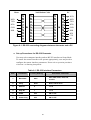
RS-232 standard interface. Figure 6-1 shows the RS-232 connecting diagram
between the meter and a host computer.
RS-232 interface is a serial binary data interchange, which operates from 300 to
9600 baud rate and the distance between any two RS-232 interface can be
extended up to 50 feet. RS-232 port of the meter is designed in full duplex,
which makes the meter more reliable and efficient in data taking.
6-3 RS-232 Interface Parameters Set up
In order to operate the meter via a host computer or terminal, the parameters in RS-232
interface within the meter has to match the parameters in the serial interface provided
by the host or terminal.
The following procedures will guide the user to set up RS-232 interface parameters
within the meter to comply RS-232 interface with the host. The default settings of the
meter at factory are 9600-baud rate, non-parity, 8 data bits, and 1 stop bit (9600, n, 8,
1).
Table 6-1 indicates the factory settings and user selectable communication parameters
by using RS-232 interface.
49
Meter
PC
Null Modem Cable
1
1
1
1
DCD
RXD
2
2
2
2
RXD
TXD
3
3
3
3
TXD
DTR
4
4
4
4
DTR
GND
5
5
5
5
GND
DSR
6
6
6
6
DSR
7
7
7
7
RTS
8
8
8
8
CTS
9
9
9
9
RI
Figure 6-1. RS-232 connecting diagrams between the meter and a PC
!
Set up Procedures for RS-232 Parameter
User may select computer interface and set RS-232 interface on Setup Mode.
To ensure the remote interface will operate appropriately, user may need to
configure the remote interface parameters. Please refer to operation procedures
of Section 3-10 Entering Setup Mode.
Table 6-1. RS-232 Interface Parameters
Item
Parameter
Factory Setting
Selectable Parameter
1
Baud Rate
9600
2
Parity
None
None, Odd or Even
3
Data Bit
8
7 or 8
4
Stop Bit
1
1 or 2
5
ECHO
OFF
ON or OFF
6
Printer-Only
OFF
ON or OFF
9600, 4800, 2400, 1200, 600,
and 300
50
6-4 Using Commands
Note: All RS-232 commands must be entered in the upper case.
6-4-1 Types of Commands
The RS-232 commands are grouped in three types:
KEY commands, SET commands, and QUERY commands.
!
Key Commands
There are 16 pushbutton keys on the front panel of the meter. User may use the
Key commands <K1> to <K16> for directly simulating a single keystroke by
pressing on the front panel push button via RS-232 interface. User may also
use other Key commands <K17> to <K20> for simulating combination
keystroke functions (see complete Key commands description on Table 6-3).
For example, user may use the following command sets to select the meter at
Vdc 120V measurement range.
Step
Command
Equivalent Keystroke Response
1
<K1>
Select Vdc function
2
<K9>
Select one range up
3
<K9>
Select one more range up
4
<K9>
Select one more range up
5
<K9>
Select one more range up at 1000Vdc
6
<K10>
Select one range down to 120Vdc
This above operations will be more complicated and time consuming, but it
would be convenient for special applications and make a virtual instrument
application easier.
Please refer to Section 6-5-1 for detail information about Key Commands.
!
Set Commands
Unlike Key commends, Set command controls the meter operations through
a string of commands. For example, to set the meter at Vdc 120V range,
user may only need one command string <S104>:
<S> for setting, <1> for primary display,
<0> for Vdc function, <4> for 120V range.
Please refer to Section 6-5-2 for detail information about Set Commands.
51
!
Query Commands
The purpose of Query commands is used for requesting the meter to respond
its current status. An example of a query command <R1> is used for requesting
the meter to respond its primary display characters.
Please refer to Section 6-5-3 for detail information about Query Commands.
6-4-2 Command Syntax
!
Echo
With echo ON, the meter echoes (returns) all the characters whatever it
receives.
!
Terminator
A terminator is a character sent by a host, which identifies the end of a
command string. In RS-232 applications, a valid terminator consists of
two-byte data:
<CR> (Carriage Return) and <LF> (Line Feed)
!
Prompts
When a host sends a command string to the meter through RS-232 interface,
the meter executes the command and returns one of the prompts as shown on
Table 6-2.
Table 6-2. RS-232 Return Prompts
Prompts
>
Description
The meter is reset to power-up initialisation status.
=>
A command is executed and no errors are detected.
!>
A command error is detected.
?>
A parameter error is detected.
#>
The local key is pressed.
S>
The set up function is under executing.
@>
No numeric reading is available.
Return result
After the meter executes a query command the return of the result will be in the
following format:
!
<RESULT> + <CR> <LF> + <PROMPT> + <CR><LF>
52
If RS-232 of the meter is under print-only mode, the meter will print out the
measured data when the measurement cycle is completed. The format of printed
data will be shown as one of the following:
1. <Measurement Data> + <CR> <LF>
for only primary display mode is enabled, or
2. <Measurement Data #1>, <Measurement Data #2> + <CR> <LF>
for both primary display and secondary display mode are enabled
6-5 Instructions of Command Sets
6-5-1 Key Commands
Table 6-3. Descriptions for Key Commands
Command
Equivalent Keystroke on the front panel
K1
Press
Vdc
key
K2
Press
Adc
key
K3
Press
Vac
key
K4
Press
Aac
key
K5
Press
Ω
K6
Press Diode key
K7
Press
K8
Press AUTO key
K9
Press
key
K10
Press
key
K11
Press MinMax key
K12
Press
Hold
key
K14
Press
REL
key
K15
Press
Shift
key
K16
Press
2nd
key.
K17
Press
Vdc
and
Vac
keys simultaneously
K18
Press
Adc
and
Aac
keys simultaneously
K19
Press
Shift
key
Hz
key
then
keys on the front panel.
(Increasing the intensity of VFD display)
K20
Press
Shift
then
keys on the front panel.
(Decreasing the intensity of VFD display)
53
6-5-2 Set Commands
!
S1 command
The S1 command is used to set up the measurement functions, ranges, and reading rates
for the primary display in the meter.
The S1 command is followed by three parameters <f>, <r>, and <x> in order.
All characters for the <f>, <r>, and <x> parameters must be in the upper case.
For detail information of using the S1 command, see Table 6-4 and Table 6-6.
Table 6-4. Descriptions for S1 Command
Syntax
S1<f><r><x>
Description
In S1 command, <f>, <r>, and <x> parameters are used to set up the
primary display measurements:
<f> for specifying Measurement functions, <r> for specifying ranges,
and <x> for specifying reading rate.
<f> is a necessary parameter for specifying the measurement
functions. <f> parameter is defined by a numeric value from “0” to
“9” and character “A”.
<r> is an optional parameter for specifying measurement range. <r>
parameter is defined by a numeric value from “0” to “7”. If <r>
parameter is omitted (<x> parameter should be omitted, too.) The
meter will be set at auto-ranging.
<x> is an optional parameter for specifying a reading rate. It is defined
by a character “S”, “M”, or “F”, in which “S” is for slow rate, “M”
for medium rate, and “F” for fast rate
If <x> parameter is not specified, the meter will remain on its current
reading rate without change.
Table 6-6 shows all available S1 command parameters and available
combinations.
Example 1: “S104S”
(<f>, <r> and <x> are all specified)
Set primary display of the meter to DCV 120V with manual range
and at slow reading rate.
Example 2: “S142”
(<x> is omitted)
Set primary display to DCA 120mA with manual range, and the
reading rate will not be affected.
Example 3: “S17”
(Both <r> and <x> are omitted)
Set primary display to frequency with auto ranging and the reading
rate will not be affected.
54
Table 6-5. Descriptions for S2 Command
Command
S2<f><r><x>
Description
In S2 command, <f>, <r>, and <x> parameters are used to set up the
secondary display measurements:
<f> for specifying Measurement functions, <r> for specifying ranges,
and <x> for specifying reading rate.
<f> is a necessary parameter for specifying the measurement
functions. <f> parameter is defined by a numeric value from “0” to
“9” and character “A”.
Because the secondary display can only display DCV, ACV, DCA, ACA,
and Frequency (Hz) functions, therefore, the available parameters
are “0”, “1”, “4”, “5” and “7”.
<r> is an optional parameter for specifying measurement range. The
parameter value can be from “0” to “7”. If <r> parameter is omitted,
<x> parameter should be omitted, too. The meter is set to
auto-ranging and will stay at the current reading rate.
<x> is an optional parameter for specifying a reading rate. It is defined
by a character “S”, “M”, or “F”, in which “S” is for slow rate, “M”
for medium rate, and “F” for fast rate
If <x> parameter is not specified, the meter will remain on its current
reading rate without change.
Table 6-6 shows all available S2 command parameters and available
combinations.
Example 1: “S204S”
(<f>, <r> and <x> are all specified)
Set secondary display of the meter to DCV 120V with manual range
and at slow reading rate.
Example 2: “S242”
(<x> is omitted)
Set secondary display to DCA 120mA with manual range and the
reading rate will not be affected.
Example 3: “S27”
(Both <r> and <x> are omitted)
Set secondary display to frequency with auto-ranging and the
reading rate will not be affected.
55
Table 6-6 S1, S2 Commands and <f>, <r>, <x> Parameters
Parameter
S1
Vdc
Vac
S (Slow)
0
Auto range
400mV
4V
40V
400V
1000V
1
0
1
2
3
4
5
Auto range
120mV
1.2V
12V
120V
750V
Auto range
400mV
4V
40V
400V
750V
0
1
2
3
4
5
6
7
Auto range
120Ω
1.2kΩ
12kΩ
120kΩ
1.2MΩ
12MΩ
120MΩ
Auto range
400Ω
4kΩ
40kΩ
400kΩ
4MΩ
40MΩ
300MΩ
0
1
2
3
4
0
1
0
1
2
3
4
Auto range
12mA
120mA
(2)
1.2A
12A
Auto range
1.2V
Auto range
1200Hz
12kHz
120kHz
1MHz
Auto range
40mA
120mA
(2)
1.2A
12A
Auto range
2.5V
Auto range
1200Hz
12kHz
120kHz
1MHz
0
1
2
3
4
5
Auto range
120mV
1.2V
12V
120V
750V
Auto range
400mV
4V
40V
400V
750V
0
1
2
3
4
Auto range
12mA
120mA
(2)
1.2A
12A
Auto range
40mA
120mA
(2)
1.2A
12A
0
1
2
3
4
5
6
7
120Ω
120Ω
1.2kΩ
12kΩ
120kΩ
1.2MΩ
12MΩ
120MΩ
400Ω
400Ω
4kΩ
40kΩ
400kΩ
4MΩ
40MΩ
300MΩ
2
4
Aac
5
V (ac+dc)
A (ac+dc)
Continuity
(Ω/2-wire)
(1)
(2)
(1)
3
6
Hz
N/A
(1)
7
8
9
A
F (Fast)
Auto range
120mV
1.2V
12V
120V
1000V
Adc
Diode
M (Medium)
0
1
2
3
4
5
N/A
Ω/4-wire
<x> =
<r>
<f>
Function
Ω/2-wire
S2
N/A
N/A
N/A
(1)
(1)
(1)
Not Applicable
For 5492 only
56
Table 6-7. Descriptions for SH Command
Syntax
Description
SH<s><nnnnnn>
SH command is used to set high limit in counts for compare function.
<s> is a sign symbol for the high limit, can be set as “+” or “-“.
<nnnnnn> is a six-digit decimal number from “000000” to “199999”.
Example: “SH+102345”
Rate
Range
High limit to be
Slow
120.000 V
+102.345V
Medium
400.00V
+1023.45V
Fast *1
400.0V
+1023.4 V
Notes:
1.
The least setting digit is blank on the display of meter, but it still uses to compare function. To set
least setting digit to “0” for fast mode as necessary.
Table 6-8. Descriptions for SL Command
Syntax
Description
SL<s><nnnnnn>
SL command is used to set the low limit in counts for compare (COMP)
function.
<s> is a sign symbol “+” or “-“.
<nnnnnn> is a six-digit decimal number from “000000” to “199999”.
Example: “SL-098765”
Rate
Range
Low limit to be
Slow
120.000 V
- 98.765V
Medium
400.00V
- 987.65V
Fast *1
400.0V
- 987.6 V
Notes:
1. The least setting digit is blank on the display of meter, but it still uses to compare function. To set
least setting digit to “0” for fast mode as necessary.
57
Table 6-9. Descriptions for SR Command
Syntax
Description
SR<s><nnnnnn>
SR command is used to set the relative base for relative function.
<s> is a sign symbol “+” or “-“.
<nnnnnn> is a six-digit number from “000000” to “199999”.
Example: “SR+001000”
Rate
Range
Relative base modifier to be
Slow
120.000 V
+1.000V
Medium
400.00V
+10.00V
Fast *1
400.0V
+10.0 V
Notes:
The least setting digit is blank on the display of meter, but it still uses to relative base. To set least
setting digit to “0” for fast mode as necessary.
Table 6-10. Descriptions for SO Command
Syntax
Description
SO<nn>
SO<nn> command is used to select the reference impedance for dBm
calculation.
<nn> is a two-digit decimal numeric number from “00” to “20”,
representing 21 different types of reference impedance.
Example: Command string “SO15” to set reference impedance at 600Ω.
nn
Impedance
nn
Impedance
nn
Impedance
00
2Ω
07
110Ω
14
500Ω
01
4Ω
08
124Ω
15
600Ω
02
8Ω
09
125Ω
16
800Ω
03
16Ω
10
135Ω
17
900Ω
04
50Ω
11
150Ω
18
1000Ω
05
75Ω
12
250Ω
19
1200Ω
06
93Ω
13
300Ω
20
8000Ω
58
6-5-3 Query Commands
!
R0 command
R0 command is used for requesting the meter to return its current status.
The meter will then respond the following 10-digit character string to the host after
receiving the R0 command: <h1h2><g1g2><v><x><f1><r1><f1><r1>
For detail information of using R0 command, please refer to Table 6-11 and Table 6-12.
Table 6-11. Descriptions for R0 Command and Response
Syntax
R0
Response Description
R0 command is used to read the status of the meter.
The meter will respond the following character string:
<h1h2><g1g2><v><x><f1><r1><f2><r2>
Response
Description
<h1h2>
<h1h2> is a two-digit hex number; each digit contains 4-bit binary codes
(Bit 7-4 and Bit 3-0 respectively) to represent eight types of status
about the meter.
<h1> and <h2> representations are described as follows.
<h1> indicates the results of compare (COMP) function and whether the
meter is operating in a dual display mode;
<h2> represents the ON/OFF status for other four types of arithmetic
function.
Example: If <h1h2> contains a character string “A8”, convert it to an
8-bit binary format “10101000” that means the meter is in Dual
display mode, compare function is ON, and the result of compare is
Pass.
<h1h2>
<h1>
<h2>
Bit
Status
0
1
7
Compare mode
off
on
6
Relative mode
off
on
5
dB mode
off
on
4
dBm mode
off
on
3
Display Mode
Single
Dual
x
Hi
x
Pass
x
Lo
2
1
Compare Result
0
59
Table 6-11. Descriptions for R0 Command and Response (cont’d)
Response
Description
<g1g2>
<g1g2> is a two-digit hex number; each digit contains 4-bit binary codes
(Bit 7-4 and Bit 3-0) respectively to represent eight types of status
about the meter.
<g1> indicates the status for four types of meter operation;
<g2> indicates the ON/OFF status for other four types of meter operation,
Example: If <h1h2> contains a character string “18”, convert it to an 8-bit
binary code “00011000” that means the meter is under Auto-ranging
st
for Primary Display (1 Auto-Ranging) and the reading is on hold.
<g1g2>
<g1>
Bit
Status
0
1
7
CAL Mode
off
on
6
2nd Function
off
on
5
Shift Key
off
on
Hold Reading
off
on
off
on
off
on
4
3
2
<g2>
<v>
st
1 Auto-Ranging
nd
2
Auto-Ranging
1
MIN Recording
off
on
0
MAX Recording
off
on
<v> is a single numeric numbers “0”, “1”, “2”, or “3” used for representing
the intensity level of VFD display on the meter.
<x>
<v>
0
1
2
3
Intensity Level
50%
60%
75%
100%
<x> indicates the status of reading rate of the meter. This character may
contain one of three different characters “S,M, or F”, in which “S”
represents for slow rate, “M” for medium rate, and “F” for fast rate.
<f1><r1>
and
<f2><r2>
<f1> indicates the measurement function in primary display. It contains
numeric value from “0” to “9” and character “A”.
<r1> is primary display measurement range The value is from “1” to “7”.
Please refer to Table 6-11 for an available value.
<f2> and <r2> are similar to <f1> and <r1> but representing the secondary
display status instead. If the meter is operated under single display
mode, <f2> and <r2> will not be returned.
For detail information of interpreting the < f1><r1> and <f2><r2>, please refer
to Table 6-12.
60
Table 6-12 <f1><r1> and <f2><r2> Response for R0 Command
Function
<f1>=
Vdc
Vac
Ω/2-wire
<f2>=
0
400mV
4V
40V
400V
1000V
1
1
2
3
4
5
120mV
1.2V
12V
120V
750V
400mV
4V
40V
400V
750V
1
2
3
4
5
6
7
120Ω
1.2kΩ
12kΩ
120kΩ
1.2MΩ
12MΩ
120MΩ
400Ω
4kΩ
40kΩ
400kΩ
4MΩ
40MΩ
300MΩ
1
2
3
4
12mA
120mA
(2)
1.2A
12A
40mA
120mA
(2)
1.2A
12A
1
1.2V
2.5V
1
2
3
4
1200Hz
12kHz
120kHz
1MHz
1200Hz
12kHz
120kHz
1MHz
1
2
3
4
5
120mV
1.2V
12V
120V
750V
400mV
4V
40V
400V
750V
1
2
3
4
12mA
120mA
(2)
1.2A
12A
40mA
120mA
(2)
1.2A
12A
1
2
3
4
5
6
7
120Ω
1.2kΩ
12kΩ
120kΩ
1.2MΩ
12MΩ
120MΩ
400Ω
4kΩ
40kΩ
400kΩ
4MΩ
40MΩ
300MΩ
Adc
4
Aac
5
6
8
A (ac+dc)
(1)
N/A
(1)
7
V (ac+dc)
Continuity
(Ω/2-wire)
(1)
3
Hz
9
A
Not Applicable
Range
Med. Rate
120mV
1.2V
12V
120V
1000V
N/A
Diode
Sow Rate
1
2
3
4
5
2
Ω/4-wire
<r1> or <r2>=
N/A
N/A
N/A
(1)
(1)
(1)
(2)
For 5492 only
61
Fast Rate
!
R1 command
After executing R1 command, the meter will return the current readings in its primary
display.
For example, a returned character string “+110.234E+0” represents the primary display
reading is “+110.234” when the meter executes R1 command.
!
R2 command
After executing R2 command, the meter will return the current readings in its secondary
display.
For example, a returned character string “-3.0000E+0” representing the primary display
reading is “–3.0000” when the meter executes R2 command.
If the meter is operating under primary display mode, it will return a character “@>”.
!
RALL command
RALL command is a combination of R0, R1 and R2. The meter will return the meter
status, primary display readings, and secondary display readings in sequence.
For information regarding R0, R1, and R2, please see Table 6-11 and Table 6-12.
!
RST command
RST command can reset the meter to its power up initialization status without shutting
down the line power. It is useful to refresh the meter in warm-start.
!
RV command
RV command is used to read the firmware version and model type of the meter (5492 or
5491).
The syntax of returned character string is specified by <Vx.xx>, <m>. It contains two
parts of character string separated by a comma (,) in between.
<Vx.xx> represents the current firmware version, and
<m> represents the model name:
<m> =6 for 5492,
<m> =5 for 5491.
For example, a returned character string “V1.00, 5” represents 5491 installed with
firmware version “V.1.00”.
62
6-6 Remote Program Examples using RS-232 interface
!
Example Using Quick BASIC
DECLARE FUNCTION TKDATA! ()
DECLARE SUB TKECHO ()
'DEMO.BAS
- This program set the meter to record Vdc measurement on the primary display
'
- and Vac measurement on the secondary display.
'
- The results will also be printed on the computer screen.
'
- Runs on MS-DOS QBasic 1.1,Microsoft Quick BASIC 4.5
'Notice:
- When use this program, the RS-232 of the meter should be set the following
'
- parameters.
'
- 1. BAUD 9600
'
- 2. DATA 8 BIT
'
- 3. PRITY NONE
'
- 4. STOP 1BIT
'
- 5. ECHO OFF
'
- 6. PRINT OFF
'
- This program uses COM1 to communicate with the meter.
'
- Version 1.2 (Modified By CC Tung. May31, 2002)
OPEN "COM1:9600,N,8,1,CD,CS,DS" FOR RANDOM AS #1
'Open COM1 for communication. 9600 baud, no parity, 8 data bits, 1 stop bit, ignore Data Carrier Detect
(DCD),
'Clear To Send (CTS), and Data Set Ready (DSR) signals
CMD$ = "RST"
PRINT #1, CMD$
'Reset the meter.
'Send command to the meter.
TKECHO
TKECHO
'Waiting "=>" and checking if the command is executed successfully.
'Waiting "*>" to make sure the meter is in power on initial state.
CMD$ = "S101"
PRINT #1, CMD$
'Set primary display to Vdc function, auto-ranging mode.
'Send command to the meter.
TKECHO
'Waiting "=>" and checking if the command is executed successfully.
CMD$ = "S211"
PRINT #1, CMD$
'Set secondary display to Vac function, auto-ranging mode.
'Send command to the meter.
TKECHO
'Waiting "=>" and checking if the command is executed successfully.
SLEEP 3
'Wait for 3 sec.
CMD$ = "R1"
PRINT #1, CMD$
'Read primary display reading
'Send command to the meter.
PRINT TKDATA; "V,";
TKECHO
'Print the value on computer screen.
'Waiting "=>" and checking if the command is executed successfully.
CMD$ = "R2"
PRINT #1, CMD$
'Read secondary display reading
'Send command to the meter.
PRINT TKDATA; "V"
'Print the value on computer screen.
TKECHO
'Waiting "=>" and checking if the command is executed successfully.
CLOSE #1
'Release COM1.
END
'End of the program.
63
FUNCTION TKDATA
LINE INPUT #1, RD$
TKDATA = VAL(RD$)
'Read COM1.
'Convert a string to numeric value and return 'the
value to main program.
END FUNCTION
SUB TKECHO
LINE INPUT #1, PROMPT$
'Get a string from COM1. Check if
'PROMPT$=<LF>+"=>"
'Discard <LF>
PROMPT$ = RIGHT$(PROMPT$, 2)
IF PROMPT$ <> "=>" AND PROMPT$ <> "*>" THEN 'If not successful then ...
LOCATE 24, 1
'Set the printing position to Line 24, column 1
PRINT "COMMAND EXECUTE ERROR !"
'Print error message.
END IF
END SUB
64
!
Example Program Using Turbo C
#include <stdio.h>
#include <conio.h>
#define COM1 0x3f8
#define COM2 0x2f8
#define COM3 0x3e8
#define COM4 0x2e8
#define RS232 COM1
void init_rs232(void);
void send(char);
char read(void);
void send_buffer(char*);
void tkecho(char*);
char* tkdata(char*);
int scan_key(void);
int err;
void main(void)
{
char buffer[35];
clrscr();
init_rs232();
printf("Initial RS232....\n");
send_buffer("RST\015\n");
tkecho("=>\015\n");
tkecho("*>\015\n")
send_buffer("S101\015\n");
tkecho("=>\015\n");
send_buffer("S211\015\n")
tkecho("=>\015\n");
//Clear screen
//Initial RS232 interface
//Print "Initial RS232....”on screen
//Send “RST” to meter.
//'Waiting "=>" and checking if the command is executed successfully.
//Waiting "*>" to make sure the meter is in power on initial state.
//Send “S101” to meter.
//'Waiting "=>" and checking if the command is executed successfully.
//Send “S101” to meter..
//'Waiting "=>" and checking if the command is executed successfully.
sleep(3);
// Wait for 3 seconds.
send_buffer("R1\015\n");
//Send “R1” to meter. Read primary display reading.
printf("%s",tkdata(buffer));
tkecho("=>\015\n");
//Print primary display reading on computer screen.
//'Waiting "=>" and checking if the command is executed successfully.
send_buffer("R2\015\n");
//Send “R2” to meter. Read primary reading.
printf ("%s",tkdata(buffer));
//Print secondary display reading on computer screen.
tkecho("=>\015\n");
//'Waiting "=>" and checking if the command is executed successfully.
printf("Press any key to continue");
getch();
}
//Wait for a key.
65
void init_rs232(void)
{
outportb(RS232+3,0x80);
outportb(RS232+1,0x00);
outportb(RS232,0x0c);
outportb(RS232+3,0x03);
outportb(RS232+4,0x03);
outportb(RS232+1,0x00);
}
//Enable DLAB
//600bps-115200bps
//9600bps
//LCR (8N1)
//MCR
//IER
void send_buffer(char *buffer
{
unsigned int i;
for (i=0;i<=20;i++)
{
send(buffer[i]);
putchar(buffer[i]);
if (buffer[i]=='\n')
break;
}
}
//Send a string to RS-232
void tkecho(char *buffer)
{
unsigned int i=0;
while (1)
{
if(buffer[i]==read())
{
putchar(buffer[i]);
if (buffer[i]=='\n')
break;
i++;
}
}
}
//Wait for a specific string
char* tkdata(char* buffer)
{
unsigned int i=0;
//Get a string from RS232 and return the decimal point position.
while (1)
{
buffer[i]=read();
if (((i>0)&&(buffer[i]=='\n'))||(i>30))
break;
if((buffer[i]>33)&&(buffer[i]<126))
i++;
}
buffer[++i]=0;
return buffer;
}
void send(char p)
{
unsigned int retry=0;
66
err=1;
while(++retry<10000)
if(0x20&inportb(RS232+5))
{
outportb(RS232,p);
err=0;
break;
}
}
char read(void)
{
unsigned int retry=0;
err=1;
while(++retry<30000)
if(0x01&inportb(RS232+5))
{
err=0;
break;
}
return(inportb(RS232));
}
67
(This page is subject to be blank)
68
Section 7
GPIB Remote Operation (Option)
7-1 Introduction
This section describes how to operate the meter via GPIB interface. It also
explains the detail information of all IEEE 488.2 command sets and Standard
Commands for Programmable Instruments (SCPI) used in the meter. The
remote control operation enables the user either to manually operate the meter
via a terminal or executes a host computer program automatically.
7-2 Description of the GPIB
The GPIB is a bus structure that links the meter to desktop computers and others
GPIB controlled instruments to form an automated measurement system. GPIB
can connect up to 15 devices on one contiguous bus, star or linear bus network.
Total transmission path length is 2 meters times’ number of devices, whichever
is less, with a maximum of 3 meters separating any two devices. Asynchronous
8 bits parallel data transfer using a 3-wire handshake.
One megabyte per second (maximum) over limited distances; actual data rate
depends upon the capability of the slowest device involved in the transmission.
7-3 GPIB Interface Parameters Set up
With the optional GPIB (IEEE-488) interface installed, the meter is fully
programmable for used on the IEEE-488.1 interface bus (1978). The meter is also
designed to comply with the supplemental standard IEEE-488.2 (1987).
In order to operate the meter via a host computer or terminal, the parameters in GPIB
interface within the meter has to match the parameters in the bus interface provided by
the host or terminal.
The following procedures will guide the user to set up GPIB interface parameters
within the meter to comply GPIB interface with the host. The default settings of the
meter at factory are address 8 and talk off.
Table 7-1 indicates the GPIB interface factory settings and user selectable
communication parameters.
69
Table 7-1. GPIB Interface Parameters
Item
Parameter
Factory Setting
Selectable Parameter
1
Address
8
0 to 30
2
Talk
OFF
ON or OFF
7-4 Commands Summary
Note: All commands must be entered in the upper case.
7-4-1 Overview of Command Type and Formats
There are two types of the meter programming commands: IEEE 488.2 common
commands and Standard Commands for Programmable Instruments ( SCPI ). The
SCPI commands used in the meter are in conformance with the SCPI standard
Version 1993.0.
Common Command Format
The IEEE 488.2 standard defines the common commands as commands that perform
functions like reset, self-test and status byte query. Common commands always
come with the asterisk “*” character, and may include parameters. Some examples
of Common commands like: *IDN? , *RST , *CLS , *SRE?.
!
SCPI Command Format and Query Format
The SCPI commands control instrument functions. A subsystem command has a
hierarchical structure that usually consists of a top level (or root) keyword, one or
more lower level keywords, and parameters. The following example shows a
command and its associated query:
!
A. CONFigure:VOLTage:DC 0.12
; Set the primary display to the DC voltage
measurement function , and select the 120mV
range.
B. CONFigure:RANGe?
; Return the range of the primary display
measurement.
CONFigure is a root level keyword with the second level keyword,
VOLTage, and 0.12 is the command parameter. The query command ends with
a question mark “?”.
70
Note :
SCPI stems from IEEE488.1 and IEEE 488.2. Although the IEEE 488.2 standard
addressed some instrument measurements, it principally dealt with common commands and syntax
or data formats. Please refer to the IEEE488.2 and SCPI reference manual for more information.
7-4-2 Response Message Data Types
Response messages are data from the meter to a computer in response to a query. A
query is a command followed by a question mark. Table 7-2 contains explanations
of data types.
Table 7-2. Response Message Data Types
Data Type
<NR1>
Explanations
Examples
+100000, -10000,
123, -100
An integer
<NR2>
This numeric representation has an explicit radix +13.23455, -.00002,
point
3.45678
<NR3>
This representation has an explicit radix point and +1.2E+2, +0.1E+0,
an exponent.
-0.12E-3, 9E+9
<numeric value>
<NRf>
<Boolean>
<literal>
Accepts <NR1>, <NR2> and <NR3> data types.
Flexible numeric representation
(only positive integers).
A single ASCII-encoded byte, is return for the
settings query.
100, 255, 16
0 or 1,OFF or ON
ASCII-encoded bytes corresponding to the short SLOW, MID, IMM,
form of the literal used as the command parameter.
BUS, DC, AC
71
7-4-3 Status Reporting
The meter status registers conform to the SCPI and IEEE-488.2 standards.
!
Status Byte Register ( STB)
Bit7
Bit6
OPER RQS/ MSS
Bit5
Bit4
Bit3
Bit2
Bit1
Bit0
ESB
MAV
QUES
ERRQ
0
0
Bit 0 - 1 are not used.
Bit 2 ( ERRQ ) - This bit indicates whether or not the Error Queue is empty.
It’s set to 1 when the Error Queue is not empty.
Bit 3 ( QUES ) - Summarizes the Questionable Data/Signal Status Event
Register. It’s set to 1 when one or more enable Questionable
Event Register are set to TRUE.
Bit 4 ( MAV ) - Summarizes the Output Queue. It’s set to 1 when the Output
Queue is not empty.
Bit 5 (ESB ) - Summarizes the Standard Event Status Register ( ESR ).
It’s set to 1 when one or more enable ESR bits are 1.
Bit 6 ( RQS
MSS ) - Requesting service and Master summary status. When
RQS bit is set to 1, the meter asserts the SRQ control line on the
IEEE-488 interface. You can do a serial poll to read the Status Byte
Register. When *STB? is used to read the Status Byte Register, the
MSS bit indicates the Master summary status.
Bit 7 (OPER) - Summarizes the Operation Status Event Register. It’s set to 1,
when one or more enable Operation Status Event Register are set to
TRUE.
Note :
1. The Status Byte Register can be read with either a serial poll or the *
STB? query.
2. The register is cleared at power up.
72
!
Service Request Enable Register ( SRE )
The Service Request Enable Register that enables or disables (i.e., masks )
corresponding summary messages in the Status Byte Register. The SRE is cleared
at power up. Refer to “Status Byte Register” for the bit functions.
Use *SRE to write to this register and *SRE? to read this register.
!
Standard Event Status Register ( ESR)
Bit7
Bit6
Bit5
Bit4
Bit3
Bit2
Bit1
Bit0
PON
0
CME
EXE
DDE
QYE
0
OPC
Bit 0 (OPC) - Operation complete. This bit is generated in response to the *OPC
command and indicates that the interface is ready to accept another
message.
Bit 1 is not used. (Always set to 0 )
Bit 2 (QYE) - Query Error. Attempt has been made to read the Output Queue
when no output is present or pending. Or, both input and output
buffer are full.
Bit 3 (DDE) - Device-Dependent Error. Incorrect input during calibration, or
RS-232 input buffer overflow.
Bit 4 (EXE) - Execution Error. Parameter is wrong or unknown.
Bit 5 (CME) - Command Error. Command is wrong or unknown.
Bit 6 is not used. (Always set to 0)
Bit 7 (PON) - Power On. Power has been cycled off and on since the last time the
ESR was read.
Note: 1. The Standard Event Status Register can be read by the *ESR? query.
2. The register is cleared at power up or use *ESR? and *CLS commands.
73
!
Standard Event Status Enable Register ( ESE )
The Standard Event Status Enable Register is a mask register that allows the host
to enable or disable (mask) each bit in ESR. When a bit in the ESE is 1, the
corresponding bit in the ESR is enable. When any enabled bit in the ESR changes
from 0 to 1, the ESB summary bit (bit 5) of the STB register also goes to 1.
Use *ESE to write to this register and *ESE? to read this register.
!
Operation Event Register
The Operation Event Register assigns specified event to specific Operation Event
Status Register bits.
Operation Status Register:
Bit 9 to 15
Bit 8
Bit 7
Bit 6 to 5
Bit 4
Bit 3 to 0
0
2ND
Compare
0
Measuring
0
Bit 0 - 3 are not used.
Bit 4 (Measuring) is set as 1 when the meter is at the end of a measurement cycle.
Bit 5 - 6 are not used.
Bit 7 (Compare) is set as 1 when the meter is operating in the compare mode.
Bit 8 (2ND) is set as 1 when the meter is operating in the dual display mode.
Bit 9 -15 are not used.
Note: Use *CLS to clear event registers.
74
7-5 Instructions of Command Sets
7-5-1 IEEE 488.2 Common Commands
*CLS
Description : Clear the Standard Event Status Register, Operation Event Status Register,
Questionable Data Event Status Register and the Error Queue.
*ESE
<NRf>
Description : Set the Standard Event Status Enable Register.
Parameter : <NRf> (0 to 255).
Example
: *ESE 140; Enable bits 2 (QYE), 3 (DDE), and 7 (PON), and disable all the
other bits.
*ESE?
Description : Query the Standard Event Status Enable Register.
Response
: (Integer) Decimal equivalent of the register byte. Range is 0 to 255.
*ESR?
Description : Query the Standard Event Status Enable Register and clears the register.
Response
: (Integer) Decimal equivalent of the register byte.
Example
: *ESR? ; Return: ‘32’if bit 5 (CME) is set (1) and the rest of the bits are reset
(0).
*IDN?
Description : Query the Meter identification.
Response
: Return the following information : Model, and Firmware version.
*OPC
Description : Set the Operation Complete bit in the Standard Event Status Register
when all pending device operations are complete.
75
*OPC?
Description : This command pauses program execution until all operations are completed.
Response
: Return a ‘1’ after all pending operations are complete.
*RST
Description : Place the meter in its power-on-reset state. This command does not affect:
1. the Service Register Enable or the Standard Event Status Enable.
2. the Output Queue and interface parameter.
*SRE <NRf>
Description : Set the Service Request Enable Register bits.
Parameter : <NRf> ( 0 to 255 ). The value of bit 6 and unused bits are ignored when set
the register.
Example
: *SRE 56 ; Enable bits 3 (QUES), 4 (MAV), and 5 (ESB) in the Service
Request Enable register.
*SRE?
Description : Query the Service Request Enable Query Register.
Response
: (Integer) Decimal equivalent of the register byte. Return value is 0 to 252.
*STB?
Description : Query the Status Byte Register.
Response
: (Integer) Decimal equivalent of the register byte.
Example
: *STB? ; Return: ‘96’ if bit 4 (MAV) and 6 (MSS) are set (1) and the rest of
bits are reset (0).
*WAI
Description : Command required by IEEE 488.2 standard. Non-operational in
the meter.
76
7-5-2 SCPI Commands
This subsection describes the SCPI subsystem commands for the meter.
Table 7-3. Some SCPI Symbol Conventions
Text Symbol
[
]
Meaning
Option; can be omitted
|
Exclusive OR
<
>
Defined element
(
)
Comment
?
Question mark
:
SCPI command start
;
Combinations of set commands
• ABORT – This commend have not any action on the meter (SCPI approved).
• INITiate Subsystem :
INITiate[:IMMediate]
Description : This command is defined in the SCPI standard. It will initialize the
meter but don’t affect the settings in the setup menu.
INITiate[:IMMediate]:CONTinuous <Boolean>
Description : Set the meter at free run or data hold mode.
Parameter : <Boolean> ( 0n, 1; off, 0 )
Example
: INIT:CONT 0FF or INIT:CONT 0 ; Set the meter at data hold mode.
INITiate[:IMMediate]:CONTinuous?
Description : Query the meter at which operation mode.
Response
: 0 (data hold mode) or 1 (free run mode ).
• CONFigure Subsystem :
CONFigure[:SCALar]:DISPlay:RATE
< SLOW | MED | FAST >
Description : Set the measurement rate type.
Parameter : SLOW
- Select the slow measurement rate.
MED
- Select the medium measurement rate.
FAST
- Select the fast measurement rate.
CONFigure[:SCALar]:DISPlay:RATE?
Description : Return the measurement rate type.
77
CONFigure
[:SCALar]
:VOLTage
:DC
[<numeric value>]
[ [ ,@1] | ,@2 ]
:AC
[<numeric value>]
[ [ ,@1] | ,@2 ]
:ACDC
:DCAC
[<numeric value>]
[ ,@1]
[<numeric value>]
[ ,@1]
Description : Set the primary and secondary display to voltage measurement function for
the DCV, ACV or AC+DC mode. The <numeric value> parameter is used to
configure the measurement range.
[ [@1] | ,@2 ] has the same syntax as
SCPI <channel_list> syntax. Use @1 to select the primary display function,
and @2 to select the secondary display function.
Parameter : <numeric value>
; For volts range : 0.12, 0.4, 1.2, 4, 12, 40, 120, 400,
750, 1000 V.
[ [ ,@1] | ,@2 ]
Example
; For the primary display and secondary display setting.
: CONF:VOLT:DC
; Set the primary display to DC volts .
CONF:VOLT:AC ,@2
; Set the secondary display to AC volts .
CONF:VOLT:ACDC 0.12,@1
; Set the primary display to AC+DC
volts 120mV range .
CONFigure
[:SCALar]
:CURRent
:DC
[<numeric value>]
[ [ ,@1] | ,@2 ]
:AC
[<numeric value>]
:ACDC [<numeric value>]
:DCAC [<numeric value>]
[ [ ,@1] | ,@2 ]
[ ,@1]
[ ,@1]
Description : Set the primary and secondary display to current measurement function for
the DCA, ACA or AC+DC mode. The <numeric value> parameter is used to
configure the measurement range.
[ [@1] | ,@2 ] has the same syntax as
SCPI <channel_list> syntax. Use @1 to select the primary display function,
and @2 to select the secondary display function.
Parameter : <numeric value>
; For current range : 0.012, 0.04, 0.12, 1.2, 12 A.
[ [ ,@1] | ,@2 ]
Example
; For the primary and secondary display setting.
: CONF:CURR:DC
;Set the primary display to DC current.
CONF:CURR:AC 0.12,@2
;Set the
secondary display to AC current 120mA
range.
CONF:CURR:ACDC ,@1
current.
CONFigure[:SCALar]:DIOCtest
78
;Set the primary display to AC+DC
Description
: Set the primary display to diode with continuity test.
CONFigure[:SCALar]:FREQuency [<numeric value>]
[ [ ,@1] | ,@2 ]
Description : Set the primary and secondary display to frequency measurement function.
The <numeric value> parameter is used to configure the measurement range.
[ [@1] | ,@2 ] has the same syntax as SCPI <channel_list> syntax. Use @1 to
select the primary display function, and @2 to select the secondary display
function.
Parameter : <numeric value>
;For frequency range : 1200, 1.2E+4, 1.2E+5, 1E+6 Hz.
[ [ ,@1] | ,@2 ]
Example
;For the primary and secondary display setting.
: CONF:FREQ 1.2E+4 ;Set the primary display to frequency 12KHz range.
CONF:FREQ 1200
;Set the secondary display to frequency 1200Hz
range.
CONFigure[:SCALar]:RESistance
[:2W]
:4W
[<numeric value>]
[<numeric value>]
Description : Set the primary display to 2-wire or 4-wire resistance measurement function.
The <numeric value> parameter is used to configure the measurement range.
Parameter : <numeric value> ; For resistance range : 120, 400, 1200, 4000, 1.2E+4, 4E+4,
1.2E+5, 4E+5, 1.2E+6, 4E+6, 1.2E+7, 4E+7, 1.2E+8, 3E+8
Example
: CONF:RES 1.2E+4
; Set the primary display to resistance 12kΩ range.
CONFigure]
[:SCALar]
:FUNCtion?
[ [ ,@1] | ,@2 ]
Description : Return the measurement function. Use @1 to select the primary
display function, and @2 to select the secondary display function.
Response
: <literal> format ; Return the type string :
1. DCV
( DC voltage function )
2. ACV
( AC voltage function )
3. AC+DCV ( AC+DC volts coupling mode )
4. DCA
( DC current function )
5. ACA
( AC current function )
6. AC+DCA ( AC+DC volts coupling mode )
7. Hz
( Frequency function )
8. RES2W ( Resistance 2-wire function )
9. RES4W ( Resistance 4-wire function )
10. DIOC ( Diode with Continuity test )
11. NONE ( No function, only for secondary display )
79
CONFigure[:SCALar]:OFFDual
Description : Turn off the secondary display.
CONFigure[:SCALar]:OFFRecord
Description : Exit the dynamic recording mode ( MAX / MIN ).
CONFigure[:SCALar]:RANGe:AUTO
<Boolean>
[ [ ,@1] | ,@2 ]
Description : Enable or disable the auto range mode.
Parameter : <Boolean> ( 0n,1; off,0 )
CONFigure[:SCALar]:RANGe:AUTO?
[ [ ,@1] | ,@2 ]
Description : This queries return the auto range status.
Response
: 1 ( enable ) or 0 (disable ).
CONFigure[:SCALar]:RANGe:DIRection
< UP | DOWN >
[ [ ,@1] | ,@2 ]
Description : Change measurement range, increases it by one step.
Parameter : < UP >, increases it by one step ; < DOWN >, decreases it by one step.
CONFigure]
[:SCALar]
:RANGe? [ [ ,@1] | ,@2 ]
Description : Return the measurement range. Use @1 to select the primary display ,and
@2 to select the secondary display.
Response
Example
: Return the range value as Table 7-4.
: CONF:RANG?
CONF:RANG? ,@2
; Query the primary display measurement range.
; Query the secondary display measurement
range.
80
Table 7-4. Return values of measurement range
Function
DC Voltage
AC Voltage
DC/AC
Current
Resistance
Frequency
None for 2ND
display
Slow Rate
Return
Value
Medium / Fast
Rate
Return
Value
120mV
0.12
400mV
0.4
1.2V
1.2
4V
4
12V
12
40V
40
120V
120
400V
400
1000V
1000
1000V
1000
120mV
0.12
400mV
0.4
1.2V
1.2
4V
4
12V
12
40V
40
120V
120
400V
400
750V
750
750V
750
12mA
0.012
40mA
0.04
120mA
0.12
120mA
0.12
1200mA
1.2
1200mA
1.2
12A
12
12A
12
120
120
400
400
1.2K
1200
4K
4000
12K
1.2E+4
40K
4E+4
120K
1.2E+5
400K
4E+5
1.2M
1.2E+6
4M
4E+6
12M
1.2E+7
40M
4E+7
120M
1.2E+8
300M
3E+8
1200Hz
1200
1200Hz
1200
12KHz
1.2E+4
12KHz
1.2E+4
120KHz
1.2E+5
120KHz
1.2E+5
1MHz
1E+6
1MHz
1E+6
0
81
0
•CALCulate Subsystem :
CALCulate:MODE?
Description : Query the calculate mode type.
Response
: <literal> format ; Return the type string :
DBM - dBm calculate.
REC - record calculate
LIM - comparator calculate
REL - relative calculate
NOR - normal mode
Example
: Return “LIM,DBM,REC”, the status is comparator, dBm and record mode on.
CALCulate:DBM[:STAT]
<Boolean>
Description : Enable or disable the dBm calculation mode.
Parameter : <Boolean> ( 0n,1; off,0 )
CALCulate:DBM:IMPedance
<reference>
Description : Set dBm reference impedance.
Parameter : <reference> ; The allowed value are 2, 4, 8, 16, 50, 75, 93, 110, 124, 125,
135, 150, 250, 300, 500, 600, 800, 900, 1000, 1200, 8000 ohm.
Example
: CALC:DBM:IMP 1000
;Set the dBm impedance value to 1000Ω.
CALCulate:RELative[:STAT]
<Boolean>
Description : Enable or disable the relative (REL) calculation mode. When meter enters the
relative mode, auto-ranging is disabled and using the primary display reading
as the relative base.
Parameter : <Boolean> ( 0n,1; off,0 )
CALCulate:RELative:BASE
<numeric value>
Description : Meter enters the relative calculation mode. Auto-ranging is disabled.
Parameter : <numeric value> is a six-digit number ; Relative base: -199999 to +199999.
Example
: CALC:REL:BASE 123456 ; Set the relative base to 123456.
Notes: The least setting digit is blank on the display of meter for fast mode. To set least
setting digit to “0” for fast mode as necessary.
CALCulate:LIMit[:STAT]
<Boolean>
Description : Enable or disable the comparator mode.
Parameter : <Boolean> ( 0n,1; off,0 )
82
CALCulate
:LIMit
:UPPer
[:DATA]
<numeric value>
:LOWer
[:DATA]
<numeric value>
Description : Set the compare limits values ( upper and lower limit value).
Parameter : <numeric value> is a six-digit number; For value range : -199999 to +199999.
Example
: CALC:UPP 123456
; Set the upper limit value to 123456
CALC:LOW -123456
; Set the lower limit value to -123456
Notes: The least setting digit is blank on the display of meter for fast mode. To set least
setting digit to “0” for fast mode as necessary.
CALCulate:LIMit:FAIL?
Description : Return the compare result.
Response
: 1 (HI ) , 0 (PASS ). -1 (LO).
CALCulate
:RECord
:MAXimum
:MINimum
Description : Set the dynamic recording mode. The dynamic recording mode causes the
meter to store the minimum and maximum readings.
Example
: CALC:REC:MAX ; Set the meter to maximum recording mode.
CALC:REC:MIN
; Set the meter to minimum recording mode.
• READing Subsystem:
READ?
[ [ ,@1] | ,@2 ]
Description : Return the display value of output buffer after the next triggered measurement
is complete. Use @1 to select the primary display, and @2 to select the
secondary display.
Response
: Numeric data transferred as ASCII byte in <NR3> format.
Example
: READ?
; Return the value shown on the primary display. For example,
might output:
“ +12.3456E+0 ”
READ??
Description : Return both display values of output buffer after the next triggered
measurement is complete.
Response
: Numeric data transferred as ASCII byte in <NR3>,<NR3> format.
Example
: READ??
; For example , might output : “ +1.23456E+0,12.34566E+0 ”
83
• SYSTem Subsystem : ( SCPI approved ).
SYSTem:VERSion?
Description : Return the firmware version of the meter.
SYSTem:ERRor?
Description : Return the next message from the system error queue.
Response
: <string> format, Table 7-5 is a list of SCPI error message that might occur
during operation.
Table 7-5. SCPI Error Message
Number
0
Error String
Number
Error String
No error
-108
Parameter not allowed
-100
Command error
-109
Missing parameter
-102
Syntax error
-200
Execution error
-103
Invalid separator
-222
Data out of range
-104
Data type error
-224
Illegal parameter value
84
7-5-3 SCPI Command Summary
Command
Parameter
Std/New
Explanation
ABOUT
Std
Event, no query
CONFigure[:SCALar]
Std
Configure meter to perform specified
measurement.
New
Set the current measurement mode.
:CURRent
:AC
[<numeric value>]
[[,@1]|,@2]
New
[<numeric value>] [,@1]
New
[<numeric value>]
[[,@1]|,@2]
New
:ACDC
:DCAC
:DC
:DIOCtest
New
Set the primary display to diode with the
continuity test.
:DISPlay
New
Set and query the measurement rate type.
:RATE
:RATE?
<SLOW|MED|FAST>
:FREQuency
[<numeric value>]
[[,@1]|,@2]
New
Set the meter to frequency measuring.
:FUNCtion?
[[,@1]|,@2]
New
Query the measurement function.
:OFFDual
New
Turn off the 2ND display.
:OFFRecord
New
Turn off the dynamic recording mode.
:RANGe
Std
Set the measurement range.
:AUTO
:AUTO?
:DIRection
:RANGe?
<Boolean>[[,@1]|,@2]
[[,@1]|,@2]
<UP|DOWN>
[[,@1]|,@2]
[[,@1]|,@2]
:RESistance
New
New
New
New
New
New
Query the measurement range.
New
Set the resistance measurement mode.
[:2W]
[<numeric value>]
New
:4W
[<numeric value>]
New
:VOLTage
:AC
:ACDC
:DCAC
:DC
New
[<numeric value>]
[[,@1]|,@2]
New
[<numeric value>] [,@1]
New
[<numeric value>]
[[,@1]|,@2]
New
85
Set the voltage measurement mode.
Command
Parameter
Std/New
Explanation
CALCulate
Std
Set the calculation function.
:DBM
New
Set dBm reference impedance
:IMPedance
<reference>
New
[:STAT]
<Boolean>
New
:LIMit
Std
:FAIL?
:LOWer[:DATA]
[:STAT]
:UPPer[:DATA]
Set and query the comparator.
Std
<number value>
Std
<Boolean>
New
<number value>
Std
:RECord
New
:MAXimum
New
:MINimum
New
:RELative
New
:BASE
<number value>
New
[:STAT]
<Boolean>
New
:MODE?
Set the dynamic recording mode.
Set the relative base.
New
Query the calculation function.
Std
Reset meter without changing setup
Std
Set the meter at free run or data hold operation
mode.
New
Query the operation mode.
Std
Read the display value.
READ??
New
Read the both display values.
SYSTem
Std
Subsystem
:ERRor?
Std
Read the error message.
:VERSion?
Std
Return the firmware version.
INITiate[IMMediate]
:CONTinuous
<Boolean>
:CONTinuous?
READ?
Note:
[[,@1]|,@2]
“Std” commands means defined in SCPI standard and “New” commands are not defined.
86
7-6 Remote Program Examples using GPIB interface
!
Example Using Quick BASIC
'
GPIBEXAMPLE.BAS
'
' This sample program is for reference only. It can only be expected to
' function with a Digital Multimeter.
'
' This program reads 10 measurements from the meter and averages
' the sum.
'
' The status variables IBSTA%, IBERR%, and IBCNT% are defined in QBDECL.BAS.
' Each bit of IBSTA% and each value of IBERR% are defined in QBDECL.BAS as
' a mnemonic constant for easy recognition in application programs. In this
' example, these mnemonic definitions are logically ANDed with the variable
' IBSTA% to determine if a particular bit has been set. The mnemonic
' definitions are equated with the variable IBERR% to determine the error
' code.
'
' The subroutine GPIBERR is called when a NI-488 function fails. The
' error message is printed along with the status variables IBSTA%, IBERR%,
' and IBCNT%. The subroutine DVMERR is called when the serial poll response
' byte indicates the meter does not have valid data to send. The error
' message and the serial poll response byte are printed.
'
' The NI-488 function IBONL is called from the main body of the program or
' from the two subroutines, GPIBERR and DVMERR. When the second parameter
' of the function IBONL is zero, the software and hardware are disabled.
' Execution of this program is terminated after the call to the function
' IBONL to disable the software and hardware.
'
' The STOP command or END command will terminate this program.
'=========================================================================
' QBDECL.BAS contains constants, declarations, and subroutine prototypes.
REM $INCLUDE: 'qbdecl.bas'
' GPIBERR is an error subroutine that is called when a NI-488 function fails.
' DVMERR is an error subroutine that is called when the meter does not
' have valid data to send.
DECLARE SUB gpiberr (msg$)
DECLARE SUB dvmerr (msg$, spr%)
CLS
PRINT "Read 10 measurements from the meter..."
PRINT
'
'
'
'
'
Assign a unique identifier to the meter and store in the variable
DVM. IBDEV opens an available device and assigns it to access GPIB0
with a primary address of 1, a secondary address of 0, a timeout of
10 seconds, the END message enabled, and the EOS mode disabled.
If DVM is less than zero, call GPIBERR with an error message.
CALL ibdev(0, 1, 0, T10s, 1, 0, dvm%) IF (dvm% < 0) THEN CALL gpiberr("Ibdev Error")
' Clear the internal or device functions of the meter. If the error bit
' EERR is set in IBSTA%, call GPIBERR with an error message.
87
CALL ibclr(dvm%)
IF (ibsta% AND EERR) THEN CALL gpiberr("Ibclr Error")
' Reset the meter by issuing the reset (*RST) command. Instruct the
' meter to measure the volts alternating current (VAC) using auto-ranging (AUTO).
' If the error bit EERR is set in IBSTA%, call GPIBERR with an error message.
wrt$ = "*RST"
CALL ibwrt(dvm%, wrt$)
IF (ibsta% AND EERR) THEN CALL gpiberr("Ibwrt Error")
wrt$ = "CONF:VOLT:AC"
CALL ibwrt(dvm%, wrt$)
IF (ibsta% AND EERR) THEN CALL gpiberr("Ibwrt Error")
' Initialize the accumulator of the 10 measurements to zero.
sum = 0!
' Establish FOR loop to read the 10 measurements. The variable i% will
' serve as a counter for the FOR loop.
FOR i% = 1 TO 10
' Request the measurement by sending the instruction
' "READ?". If the error bit EERR is set in IBSTA%, call GPIBERR
' with an error message.
wrt$ = "READ?"
CALL ibwrt(dvm%, wrt$)
IF (ibsta% AND EERR) THEN CALL gpiberr("Ibwrt Error")
' Read the meter measurement. If the error bit EERR is set in
' IBSTA%, call GPIBERR with an error message.
rd$ = SPACE$(11)
CALL ibrd(dvm%, rd$)
IF (ibsta% AND EERR) THEN CALL gpiberr("Ibrd Error")
' Remove blank spaces in RD$ and assign resulting buffer to READING$.
' Print measurement returned by the meter.
reading$ = LEFT$(rd$, ibcnt%)
PRINT "reading: "; reading$
' Convert READING$ to its numeric value and add to the accumulator.
sum = sum + VAL(reading$)
NEXT i%
' Continue FOR loop until 10 measurements are read.
' Print the average of the 10 readings.
PRINT "The average of the 10 readings is: ", sum / 10
' Call the IBONL function to disable the hardware and software.
88
CALL ibonl(dvm%, 0)
END
'======================================================================
'
Subroutine DVMERR
‘
‘
' This subroutine will notify you that the meter returned an invalid
' serial poll response byte. The error message will be printed along with
' the serial poll response byte.
'
' The NI-488 function IBONL is called to disable the hardware and software.
'
' The STOP command will terminate this program.
'======================================================================
'
SUB dvmerr (msg$, spr%) STATIC
PRINT msg$
PRINT "Status Byte = &H"; HEX$(spr%)
' Call the IBONL function to disable the hardware and software.
CALL ibonl(dvm%, 0)
STOP
END SUB
'======================================================================
'
Subroutine GPIBERR
' This subroutine will notify you that a NI-488 function failed by printing
' an error message. The status variable IBSTA% will also be printed
' in hexadecimal along with the mnemonic meaning of the bit position.
' The status variable IBERR% will be printed in decimal along with the
' mnemonic meaning of the decimal value. The status variable IBCNT% will
' be printed in decimal.
'
' The NI-488 function IBONL is called to disable the hardware and software.
'
' The STOP command will terminate this program.
'======================================================================
'
SUB gpiberr (msg$) STATIC
PRINT msg$
PRINT "ibsta = &H"; HEX$(ibsta%); " <";
IF ibsta% AND EERR THEN PRINT " ERR";
IF ibsta% AND TIMO THEN PRINT " TIMO";
IF ibsta% AND EEND THEN PRINT " END";
IF ibsta% AND SRQI THEN PRINT " SRQI";
IF ibsta% AND RQS
THEN PRINT " RQS";
IF ibsta% AND SPOLL THEN PRINT " SPOLL";
IF ibsta% AND EEVENT THEN PRINT " EVENT";
IF ibsta% AND CMPL THEN PRINT " CMPL";
89
IF ibsta% AND LOK
THEN PRINT " LOK";
IF ibsta% AND RREM THEN PRINT " REM";
IF ibsta% AND CIC
THEN PRINT " CIC";
IF ibsta% AND AATN THEN PRINT " ATN";
IF ibsta% AND TACS THEN PRINT " TACS";
IF ibsta% AND LACS THEN PRINT " LACS";
IF ibsta% AND DTAS THEN PRINT " DTAS";
IF ibsta% AND DCAS THEN PRINT " DCAS";
PRINT " >"
PRINT "iberr = "; iberr%;
IF iberr% = EDVR THEN PRINT " EDVR <DOS Error>"
IF iberr% = ECIC THEN PRINT " ECIC <Not CIC>"
IF iberr% = ENOL THEN PRINT " ENOL <No Listener>"
IF iberr% = EADR THEN PRINT " EADR <Address error>"
IF iberr% = EARG THEN PRINT " EARG <Invalid argument>"
IF iberr% = ESAC THEN PRINT " ESAC <Not Sys Ctrlr>"
IF iberr% = EABO THEN PRINT " EABO <Op. aborted>"
IF iberr% = ENEB THEN PRINT " ENEB <No GPIB board>"
IF iberr% = EOIP THEN PRINT " EOIP <Async I/O in prg>"
IF iberr% = ECAP THEN PRINT " ECAP <No capability>"
IF iberr% = EFSO THEN PRINT " EFSO <File sys. error>"
IF iberr% = EBUS THEN PRINT " EBUS <Command error>"
IF iberr% = ESTB THEN PRINT " ESTB <Status byte lost>"
IF iberr% = ESRQ THEN PRINT " ESRQ <SRQ stuck on>"
IF iberr% = ETAB THEN PRINT " ETAB <Table Overflow>"
PRINT "ibcnt = "; ibcnt%
' Call the IBONL function to disable the hardware and software.
CALL ibonl(dvm%, 0)
STOP
END SUB
90
Appendix A
5492 Specifications
A-1 Introduction
Appendix A describes the complete specifications of the 5492 5 1/2 Digit Dual
Display Multimeter.
A-2 Technical Specifications
!
Specifications assumptions:
• One-year calibration cycle.
• Operating temperature at 18°C to 28°C (64.4°F to 82.4°F).
• Accuracy is expressed as: ± (% of reading + digits) after 30 minutes warm-up.
• Temperature coefficient: Add ± [0.15 x (the applicable accuracy)/°C] for 0°C to
18°C and 28°C to 50°C.
• Relative Humidity (RH) up to 80% for 0°C to 28°C (75% RH for 12MΩ and
above ranges of resistance measurement); up to 70% for 28°C to 35°C; up to
50% for 35°C to 50°C
• All specifications are specified under single display mode in operation only.
!
Display Counts and Reading Rates
Full Scale Display Counts
Slow
Medium
Fast
119,999
39,999
3,999
Reading Rates on Single Display (Readings/Sec)
Measurement Functions
Slow
Medium
Fast
DCV
2
5
20
DCA
2
5
20
Diode
2
5
20
ACV
2
4.2
20
ACA
2
4.2
20
2-wires Ω
2
4
17
4-wires Ω 4MΩ
Ω/1.2MΩ
Ω range and below
0.6
0.8
0.9
4-wires Ω 12MΩ
Ω range and above
1.4
1.7
1.9
Frequency
1.2
1.7
2.4
ACV+DCV
0.4
0.5
0.7
ACA+DCA
0.4
0.5
0.7
91
Reading Rates on Dual Display (Readings/Sec)
Measurement Functions
Slow
Medium
Fast
DCV / ACV
0.7
1.0
1.9
DCA / ACA
0.7
1.0
1.9
DCV / DCA
0.7
1.0
1.9
DCV / ACA
0.2
0.2
0.5
ACV / ACA
0.2
0.2
0.5
ACV / DCA
0.7
1.0
1.9
ACV / Frequency
0.5
0.7
1.1
ACA / Frequency
0.6
0.8
1.3
ACV+DCV / DCV
0.5
0.6
0.9
ACA+DCA / DCV
0.1
0.2
0.4
ACA+DCA / ACV
0.1
0.2
0.4
ACA+DCA / DCA
0.5
0.6
0.9
dBm(ACV) / Reference Ω
2.1
4.2
11.9
dBm(ACV) / ACV
0.7
1.0
1.7
dBm(ACV) / DCV
0.6
1.0
1.7
dBm(ACV) / Frequency
0.7
1.0
1.7
Note 1: Above table shows some common combinations and applications of
using dual display.
Note 2: Using RS-232 or GPIB remote interface, the reading rate
approximates to normal mode.
92
! DC Voltage
Resolution, Full Scale Reading and Accuracy
Rate
(1)
S
M
F
Range
Resolution
Full Scale
Accuracy
Reading
(1 year)
Typical Input
Impedance
(2)
10.0MΩ
Ω
120mV
1µ
µV
119.999
0.012% + 8
1.2V
10µ
µV
1.19999
0.012% + 5
10.0MΩ
Ω
12V
100µ
µV
11.9999
0.012% + 5
11.1MΩ
Ω
120V
1mV
119.999
0.012% + 5
10.1MΩ
Ω
0.012% + 5
10.0MΩ
Ω
(3)
1000V
10mV
1000.00
400mV
10µ
µV
399.99
0.012% + 5
10.0MΩ
Ω
4V
100µ
µV
3.9999
0.012% + 5
11.1MΩ
Ω
40V
1mV
39.999
0.012% + 5
10.1MΩ
Ω
400V
10mV
399.99
0.012% + 5
10.0MΩ
Ω
0.012% + 5
10.0MΩ
Ω
(3)
1000V
100mV
1000.0
400mV
100µ
µV
399.9
0.012% + 2
10.0MΩ
Ω
4V
1mV
3.999
0.012% + 2
11.1MΩ
Ω
40V
10mV
39.99
0.012% + 2
10.1MΩ
Ω
400V
100mV
399.9
0.012% + 2
10.0MΩ
Ω
1000V
1V
1000
0.012% + 2
10.0MΩ
Ω
(3)
(1)
Rate: S (Slow), M (Medium), and F (Fast).
(2)
Use relative (REL) modifier.
(3)
In Vdc 1000V range, 5% over-range (1050Vdc) is readable.
(4)
Input Impedance is in paralleled with capacitance <120pF.
(4)
• Maximum input voltage: 1000Vdc or peak ac on any range
• Response Time: Approximately 1.0 second when the displayed reading reaches 99.9% dc
value of the tested input signal at the same range.
Note: When voltage (ac+dc) measurement function is selected, the Vdc input impedance is
paralleled with an ac-coupled 1.1MΩ ac divider.
Noise Rejection Ratio
Rate
S/M/F
CMRR
(1)
NMRR
>90dB at dc, 50/60Hz ± 0.1%
(1kΩ
ΩUnbalanced)
(1)
CMRR is the Common Mode Reject Ratio
(2)
NMRR is the Normal Mode Rejection Ratio
93
(2)
>50dB at 50/60Hz ± 0.1%
!
AC Voltage (True RMS, AC Coupling Mode)
Resolution and Full Scale Reading
Range
Resolution
S
M&F
120mV
400mV
1µ
µV
10µ
µV
1.2V
4V
10µ
µV
12V
40V
120V
400V
750V
750V
(1)
S
Full Scale Reading
M
F
S
M
F
100µ
µV
119.999
399.99
399.9
100µ
µV
1mV
1.19999
3.9999
3.999
100µ
µV
1mV
10mV
11.9999
39.999
39.99
1mV
10mV
100mV
119.999
399.99
399.9
100mV
10mV
1V
750.00
(1)
750.0
(1)
750
(1)
In Vac 750V range, 5% over-range (787.5V rms) is readable
Accuracy
Rate
S
M
F
Range
Accuracy (1 year)
20 to 45 Hz
(1)
45 to 10k Hz
10 to 30 kHz
30 to 100 kHz
120.000mV
1% + 100
0.2% + 100
1.5% + 300
5% + 300
1.20000V
1% + 100
0.2% + 100
1% + 100
3% + 200
12.0000V
1% + 100
0.2% + 100
1% + 100
3% + 200
120.000V
1% + 100
0.2% + 100
1% + 100
3% + 200
0.2% + 100
1% + 100
3% + 200
(2)
750.00V
1% + 100
400.00mV
1% + 40
0.2% + 40
1.5% + 80
5% + 120
4.0000V
1% + 40
0.2% + 40
1% + 40
3% + 80
40.000V
1% + 40
0.2% + 40
1% + 40
3% + 80
0.2% + 40
1% + 40
3% + 80
0.2% + 40
1% + 40
3% + 80
400.00V
1% + 40
(2)
750.0V
1% + 40
(2)
400.0mV
1% + 5
0.2% + 5
1.5% + 10
5% + 15
4.000V
1% + 5
0.2% + 5
1% + 5
3% + 10
40.00V
1% + 5
400.0V
750V
0.2% + 5
1% + 5
3% + 10
1% + 5
(2)
0.2% + 5
1% + 5
3% + 10
1% + 5
(2)
0.2% + 5
1% + 5
3% + 10
(1)
Specified accuracy at input >5% of full scale
(2)
For input <200V rms
(3)
(3)
(3)
(3)
For input <500V rms
• Measurement method: True RMS
• Maximum Crest Factor: 3.0 at full scale
• Maximum input voltage: 750V rms, 1100V peak ac
2x10⁷ V-Hz product on any range, normal mode input
1x10⁶ V-Hz product on any range, common mode input
• Input Impedance: 1MΩ
Ω in parallel with capacitance <120pF
• Response Time: Approximately 1.5 seconds when the displayed reading reaches 99.9% ac
rms value of the tested input signal at the same range.
94
!
AC Voltage (True RMS, AC+DC Coupling Mode)
Resolution and Full Scale Reading
Range
(1)
Resolution
S
M&F
120mV
400mV
1µ
µV
10µ
µV
1.2V
4V
10µ
µV
12V
40V
120V
400V
750V
750V
S
Full Scale Reading
S
M
F
100µ
µV
119.999
399.99
399.9
100µ
µV
1mV
1.19999
3.9999
3.999
100µ
µV
1mV
10mV
11.9999
39.999
39.99
1mV
10mV
100mV
119.999
399.99
399.9
10mV
M
100mV
F
1V
750.00
(1)
Vdc and Vac are automatically set at the same range
(2)
In Vac 750V range, 5% over-range (787.5V rms) is readable
(2)
750.0
(2)
750
(2)
Accuracy
Rate
S
M
F
(1)
Range
Accuracy (1 year)
(1)
45 to 10k Hz
10 to 30 kHz
120.000mV
0.2% + 100
1.5% + 300
5% + 300
1.20000V
0.2% + 100
1% + 100
3% + 200
12.0000V
0.2% + 100
1% + 100
3% + 200
120.000V
0.2% + 100
1% + 100
3% + 200
750.00V
0.2% + 100
1% + 100
3% + 200
400.00mV
0.2% + 45
1.5% + 83
5% + 125
4.0000V
0.2% + 43
1% + 43
3% + 83
40.000V
0.2% + 43
1% + 43
3% + 83
400.00V
0.2% + 43
1% + 43
3% + 83
750.0V
0.2% + 43
1% + 43
3% + 83
400.0mV
0.2% + 7
1.5% + 12
5% + 18
4.000V
0.2% + 7
1% + 7
3% + 12
40.00V
0.2% + 7
1% + 7
3% + 12
400.0V
0.2% + 7
1% + 7
3% + 12
750V
0.2% + 7
1% + 7
3% + 12
Specified accuracy at input >5% of full scale
(2)
30 to 100 kHz
(2)
(2)
(2)
For input <500V rms
• Measurement method: True RMS AC+DC
• Maximum Crest Factor: 3.0 at full scale
• Maximum input voltage: 750V rms, 1100V peak ac
2x10⁷ V-Hz product on any range, normal mode input
1x10⁶ V-Hz product on any range, common mode input
• Input Impedance: 1MΩ
Ω in parallel with capacitance <120pF
• Response Time: Approximately 2.5 seconds when the displayed reading reaches 99.9%
(ac+dc) rms value of the tested input signal at the same range.
95
!
DC Current
Rate
S
M
F
Range
Resolution
Full Scale
Reading
Accuracy (1 year)
(2)
Burden Voltage
(1)
& Shunt Resistor
<0.15V / 10Ω
Ω
12mA
0.1µ
µA
11.9999
0.05% + 15
120mA
1µ
µA
119.999
0.05% + 5
<1.5V / 10Ω
Ω
1200mA
10µ
µA
1199.99
0.15% + 5
<0.3V / 0.1Ω
Ω
12A
100µ
µA
11.9999
0.2% + 5
<0.6V / 0.01Ω
Ω
40mA
1µ
µA
39.999
0.1% + 6
<0.5V / 10Ω
Ω
120mA
10µ
µA
119.99
0.1% + 3
<1.5V / 10Ω
Ω
1200mA
100µ
µA
1199.9
0.15% + 3
<0.3V / 0.1Ω
Ω
12A
1mA
11.999
0.2% + 3
<0.6V / 0.01Ω
Ω
40mA
10µ
µA
39.99
0.1% + 2
<0.5V / 10Ω
Ω
120mA
100µ
µA
119.9
0.1% + 2
<1.5V / 10Ω
Ω
1200mA
1mA
1199
0.15% + 2
<0.3V / 0.1Ω
Ω
12A
10mA
11.99
0.2% + 2
<0.6V / 0.01Ω
Ω
(1)
Typical at full scale reading and voltage across the input terminals
(2)
Use relative (REL) modifier
• Maximum Input and Overload Current Protection (for dc and ac current):
mA Input Terminal: 1200mA dc or ac rms and protected with 2A/250V, IEC-127 sheet 1 fast
blow fuse;
12A input terminal: 10A dc or ac rms continuous, or 12A dc or ac rms for 30 seconds
maximum and protected with 15A/500V, breaking capacity 10,000A fast blow fuse.
• Response Time: Approximately 1.0 second when the displayed reading reaches 99.9% dc
value of the tested input signal at the same range.
96
!
AC Current (True RMS, AC Coupling Mode)
Resolution, Full Scale Reading and Burden Voltage
Rate
S
M
F
(1)
Range
Resolution
Burden Voltage
Full Scale Reading
(1)
& Shunt Resistor
12mA
0.1µ
µA
11.9999
<0.15V / 10Ω
Ω
120mA
1µ
µA
119.999
<1.5V / 10Ω
Ω
1200mA
10µ
µA
1199.99
<0.3V / 0.1Ω
Ω
12A
100µ
µA
11.9999
<0.6V / 0.01Ω
Ω
40mA
1µ
µA
39.999
<0.5V / 10Ω
Ω
120mA
10µ
µA
119.99
<1.5V / 10Ω
Ω
1200mA
100µ
µA
1199.9
<0.3V / 0.1Ω
Ω
12A
1mA
11.999
<0.6V / 0.01Ω
Ω
40mA
10µ
µA
39.99
<0.5V / 10Ω
Ω
120mA
100µ
µA
119.9
<1.5V / 10Ω
Ω
1200mA
1mA
1199
<0.3V / 0.1Ω
Ω
12A
10mA
11.99
<0.6V / 0.01Ω
Ω
Typical at full scale reading and rms voltage across the input terminals
Accuracy
Rate
S
M
F
(1)
Range
Accuracy (1 year)
(1)
20 to 45 Hz
45 to 2k Hz
2 to 10 kHz
12mA
1.5% + 100
0.5% + 100
2% + 200
120mA
1.5% + 100
0.5% + 100
2% + 200
1200mA
1.5% + 100
0.5% + 100
2% + 200
12A
2% + 100 (<1.2A)
1% + 100
-
40mA
1.5% + 40
0.5% + 40
2% + 80
120mA
1.5% + 12
0.5% + 12
2% + 30
1200mA
1.5% + 12
0.5% + 12
2% + 30
12A
2% + 12 (<1.2A)
1% + 12
-
40mA
1.5% + 5
0.5% + 5
2% + 10
120mA
1.5% + 2
0.5% + 2
2% + 5
1200mA
1.5% + 2
0.5% + 2
2% + 5
12A
2% + 2 (<1.2A)
1% + 2
-
Specified accuracy at input >5% of full scale
• Measurement method: True RMS
• Maximum Crest Factor: 3.0 at full scale
• Response Time: Approximately 1.5 seconds when the displayed reading reaches 99.9% ac
rms value of the tested input signal at the same range.
97
!
AC Current (True RMS, AC+DC Coupling Mode)
Resolution, Full Scale Reading and Burden Voltage
Rate
S
M
F
(1)
Range
Resolution
Burden Voltage
Full Scale Reading
(1)
& Shunt Resistor
12mA
0.1µ
µA
11.9999
<0.15V / 10Ω
Ω
120mA
1µ
µA
119.999
<1.5V / 10Ω
Ω
1200mA
10µ
µA
1199.99
<0.3V / 0.1Ω
Ω
12A
100µ
µA
11.9999
<0.6V / 0.01Ω
Ω
40mA
1µ
µA
39.999
<0.5V / 10Ω
Ω
120mA
10µ
µA
119.99
<1.5V / 10Ω
Ω
1200mA
100µ
µA
1199.9
<0.3V / 0.1Ω
Ω
12A
1mA
11.999
<0.6V / 0.01Ω
Ω
40mA
10µ
µA
39.99
<0.5V / 10Ω
Ω
120mA
100µ
µA
119.9
<1.5V / 10Ω
Ω
1200mA
1mA
1199
<0.3V / 0.1Ω
Ω
12A
10mA
11.99
<0.6V / 0.01Ω
Ω
Typical at full scale reading and rms voltage across the input terminals
Accuracy
Rate
S
M
F
(1)
Range
Accuracy (1 year)
(1)
45 to 2k Hz
2 to 10 kHz
12mA
0.5% + 100
2% + 200
120mA
0.5% + 100
2% + 200
1200mA
0.5% + 100
2% + 200
12A
1% + 100
-
40mA
0.5% + 42
2% + 80
120mA
0.5% + 15
2% + 30
1200mA
0.5% + 15
2% + 30
12A
1% + 15
-
40mA
0.5% + 7
2% + 12
120mA
0.5% + 4
2% + 7
1200mA
0.5% + 4
2% + 7
12A
1% + 4
-
Specified accuracy at input >5% of full scale
• Measurement range: Vdc and Vac are automatically set at the same range
• Measurement method: True RMS AC+DC
• Maximum Crest Factor: 3.0 at full scale
• Response Time: Approximately 2.5 seconds when the displayed reading reaches 99.9%
(ac+dc) rms value of the tested input signal at the same range.
98
!
Resistance (2-wire Ω and 4-wire Ω)
Rate
S
M
F
(1)
Range
(1)
Resolution
Full Scale
Test
Reading
Current
Accuracy (1 year)
2-wire
4-wire
(2)
0.05% + 8
(2)
(2)
0.05% + 5
(2)
(2)
0.05% + 5
120Ω
Ω
1mΩ
Ω
119.999
0.5mA
0.1% + 8
1.2kΩ
Ω
10mΩ
Ω
1.19999
0.5mA
0.08% + 5
12kΩ
Ω
100mΩ
Ω
11.9999
100µ
µA
0.06% + 5
120kΩ
Ω
1Ω
Ω
119.999
10µ
µA
0.06% + 5
0.05% + 5
1.2MΩ
Ω
10Ω
Ω
1.19999
1µ
µA
0.06% + 5
0.05% + 5
12MΩ
Ω
100Ω
Ω
11.9999
100nA
0.3% + 5
0.3% + 5
120MΩ
Ω
1kΩ
Ω
119.999
10nA
3.0% + 8
3.0% + 8
400Ω
Ω
10mΩ
Ω
399.99
0.5mA
0.1% + 5
4kΩ
Ω
100mΩ
Ω
3.9999
100µ
µA
0.08% + 3
40kΩ
Ω
1Ω
Ω
39.999
50µ
µA
0.06% + 3
0.05% + 3
400kΩ
Ω
10Ω
Ω
399.99
5µ
µA
0.06% + 3
0.05% + 3
4MΩ
Ω
100Ω
Ω
3.9999
500nA
0.15% + 3
0.15% + 3
40MΩ
Ω
1KΩ
Ω
39.999
50nA
1.5% + 3
1.5% + 3
300MΩ
Ω
10kΩ
Ω
299.99
10nA
5.0% + 5
(2)
(2)
0.05% + 5
(2)
0.05% + 3
5.0% + 5
(2)
400Ω
Ω
100mΩ
Ω
399.9
0.5mA
0.1% + 2
4kΩ
Ω
1Ω
Ω
3.999
100µ
µA
0.08% + 2
0.05% + 2
40kΩ
Ω
10Ω
Ω
39.99
50µ
µA
0.06% + 2
0.05% + 2
400kΩ
Ω
100Ω
Ω
399.9
5µ
µA
0.06% + 2
0.05% + 2
4MΩ
Ω
1kΩ
Ω
3.999
500nA
0.15% + 2
0.15% + 2
40MΩ
Ω
10kΩ
Ω
39.99
50nA
1.5% + 2
1.5% + 2
300MΩ
Ω
100kΩ
Ω
299.9
10nA
5.0% + 2
5.0% + 2
0.05% + 2
In order to eliminate the noise interference, which might be induced to the test leads, it
is recommended to use a shielded test cable for measuring resistance above 120KΩ
Ω.
(2)
Use relative (REL) modifier.
• Open Circuit Voltage: < +5.0V dc
• Zeroing error: 0.05Ω
Ω or less (excluding test lead resistances) in each range when REL
modifier is used
• Response time: Approximately 1.5 seconds for 12MΩ
Ω and ranges below 12MΩ
Ω;
approximately 5 seconds for 40MΩ
Ω range; approximately 10 seconds for 120MΩ
Ω;
approximately 25 seconds for 300MΩ
Ω range.
• Maximum Input Protection: 500V dc or ac rms
99
!
Diode Test/Continuity
Rate
Maximum Reading
Resolution
S
1.19999V
10µ
µV
M
2.4999V
100µ
µV
F
2.499V
1mV
• Open Circuit Voltage: < +5.0V dc
• Test Current: Approximately 0.5mA dc
• Audible Tone: Continuous beep for continuity and single tone for normal forward-biased
diode or semiconductor junction
• Continuity level: Approximately below +50mVdc
• Maximum Input Protection: 500V dc or ac rms
!
Resistance/Continuity (2-wire)
(1)
Rate
Range
Resolution
Maximum Reading
Accuracy
S
120Ω
Ω
1mΩ
Ω
119.999
0.1% + 8
(1)
M
400Ω
Ω
10mΩ
Ω
399.99
0.1% + 5
(1)
F
400Ω
Ω
100mΩ
Ω
399.9
0.1% + 2
(1)
Use relative (REL) modifier
• Open Circuit Voltage: < +5.0V dc
• Test Current: Approximately 0.5mA dc
• Audible Tone: Continuous beep for reading is less than 10Ω
Ω
• Zeroing error: 0.05Ω
Ω or less (excluding test lead resistances) in each range when REL
modifier is used
• Maximum Input Protection: 500V dc or ac rms
100
!
Frequency
Resolution, Full Scale Reading and Accuracy
Range
Measurement
Resolution
Full Scale
Accuracy
(1)
(Hz)
Range (Hz)
(Hz)
Reading
(1 year)
1200
5 to1200
10m
1199.99
0.005 + 3
12k
10 to 12k
100m
11.9999
0.005 + 2
100 to 120k
1
119.999
0.005 + 2
1k to 1M
10
1.19999
0.005 + 2
120k
1M
(2)
Input Sensitivity
(Sine wave)
40mV rms
0.5V rms
(1)
Specified accuracy at input >5% of full scale
(2)
If tested frequency is greater than 1MHz, it will be displayed but no specified accuracy
is guaranteed.
• Measurement method: True RMS
• Maximum Crest Factor: 3.0 at full scale
• Maximum input voltage: 750V rms, 1100V peak ac
2x10⁷ V-Hz product on any range, normal mode input
1x10⁶ V-Hz product on any range, common mode input
• Input Impedance: 1MΩ
Ω in parallel with capacitance <120pF
• Response Time: Approximately 1.2 seconds when the displayed reading reaches 99.9%
frequency value of the tested input signal at the same range.
101
!
dBm (decibel calculation)
Reference Impedance (1)
2Ω
Ω
(2)
50Ω
Ω
135Ω
Ω
800Ω
Ω
4Ω
Ω
(2)
75Ω
Ω
150Ω
Ω
900Ω
Ω
8Ω
Ω
(2)
93Ω
Ω
250Ω
Ω
1000Ω
Ω
110Ω
Ω
300Ω
Ω
1200Ω
Ω
124Ω
Ω
500Ω
Ω
16Ω
Ω
(2)
125Ω
Ω
600Ω
Ω
8000Ω
Ω
(3)
(1)
Reference impedance is displayed on the secondary display
(2)
Reading displayed in watts (Audio Power)
(3)
Default reference impedance
Range and Accuracy
Rate
S
M&F
Voltage
Range
(1,2)
Input Voltage
dBm
(3)
Range
@ 600Ω
Ω Ref
Accuracy (dB)
20 to
45 to
10 to
45 Hz
10k Hz
100 kHz
120mV
6mV ~ 120mV
-42.20 ~ -16.20
1.0
0.2
1.0
1.2V
120mV ~ 1.2V
-16.20 ~ 3.80
0.8
0.1
0.8
12V
1.2V ~ 12V
3.80 ~ 23.80
0.8
0.1
0.8
120V
12V ~ 120V
23.80 ~ 43.80
0.8
0.1
0.8
1000V (dc)
120V ~ 1000V
43.80 ~ 62.22
750V (ac)
120V ~ 750V
43.80 ~ 59.72
400mV
20mV ~ 400mV
-31.76 ~ -5.74
1.0
0.2
1.0
4V
400mV ~ 4V
-5.74 ~ 14.26
0.8
0.1
0.8
40V
4V ~ 40V
14.26 ~ 34.26
0.8
0.1
0.8
400V
40V ~ 400V
34.26 ~ 54.26
0.8
0.1
0.8
1000V (dc)
400V ~ 1000V
54.26 ~ 62.22
750V (ac)
400V ~ 750V
54.26 ~ 59.72
(1)
Auto-ranging is used when dBm function is selected
(2)
In Vac 750V range, 5% over-range is readable
(3)
Reading displayed in dB when REL modifier is used
(4)
For input voltage at frequency between 45Hz to 1kHz
-
-
(4)
1.0
(4)
1.0
• 0dBm: 1 mW @ 600Ω
Ω Reference Impedance
• Resolution: 0.01dB at slow and medium rate; 0.1dB at fast rate for all ranges.
• CMRR: > 90dB for dc signal
• Response Time: Same as ac voltage and ac current measurements.
102
-
-
A-3 General Specifications
General Items
Specifications
Warm up time
At least 30 minutes
Temperature Coefficient
Add 0.15 x (the applicable accuracy)/°°C at 0°°C to 18°°C and
28°°C to 50°°C
Operating Temperature
0°°C to 50°°C (32°°F to 122°°F)
Storage Temperature
-20°°C to 60°°C
Altitude
Up to 2000 M
Pollution Degree
II
Over-voltage Category
CAT II-600V and CAT I-1000V
Relative Humidity
! Up to 80% for 0°°C to 28°°C (75% RH for 12MΩ
Ω and above
ranges of resistance measurement)
! Up to 70% for 28°°C to 35°°C
! Up to 50% for 35°°C to 50°°C
Common Mode Voltage
1000V dc or peak ac rms maximum between any input and
earth ground
Dimension
Approx. 255(w) x 105(h) x 305(d) mm (with holsters)
Weight
<3.0kgs
Line Voltage
100V / 120V / 220V / 240V ac ±10%, 50/60Hz, 16VA maximum
Interface
! RS-232 (DB-9, male connector)
! Baud rates: 9600, 4800, 2400, 1200, 600, 300
! Data length: 7 or 8 bits
! Parity: even / odd / none
! Stop bit: 1 or 2 bits
! Echo: on / off
! Print mode: on / off
Safety Requirement
Installation Category
Designed in compliance with EN61010-1 (IEC1010-1)
CAT-I 750VAC/1000VDC or CAT-II 600V,Pollution Degree 2
Environment
EMC Requirement
Designed in compliance with EN61326-1.
103
Appendix B
5491 Specifications
B-1 Introduction
Appendix B describes the complete specifications of the 5491 5 1/2 Digit Dual
Display Multimeter.
B-2 Technical Specifications
!
Specifications assumptions:
• One-year calibration cycle.
• Operating temperature at 18°C to 28°C (64.4°F to 82.4°F).
• Accuracy is expressed as: ± (% of reading + digits) after 30 minutes warm-up.
• Temperature coefficient: Add ± [0.15 x (the applicable accuracy)/°C] for 0°C to
18°C and 28°C to 50°C.
• Relative Humidity (RH) up to 80% for 0°C to 28°C (75% RH for 12MΩ and
above ranges of resistance measurement); up to 70% for 28°C to 35°C; up to
50% for 35°C to 50°C
• All specifications are specified under single display mode in operation only.
!
Display Counts and Reading Rates
Full Scale Display Counts
Slow
Medium
Fast
119,999
39,999
3,999
Reading Rates on Single Display (Readings/Sec)
Measurement Functions
Slow
Medium
Fast
DCV
2
5
20
DCA
2
5
20
Diode
2
5
20
ACV
2
4.2
20
ACA
2
4.2
20
2-wires Ω
2
4
17
4-wires Ω 4MΩ
Ω/1.2MΩ
Ω range and below
0.6
0.8
0.9
4-wires Ω 12MΩ
Ω range and above
1.4
1.7
1.9
Frequency
1.2
1.7
2.4
ACV+DCV
0.4
0.5
0.7
ACA+DCA
0.4
0.5
0.7
104
Reading Rates on Dual Display (Readings/Sec)
Measurement Functions
Slow
Medium
Fast
DCV / ACV
0.7
1.0
1.9
DCA / ACA
0.7
1.0
1.9
DCV / DCA
0.7
1.0
1.9
DCV / ACA
0.2
0.2
0.5
ACV / ACA
0.2
0.2
0.5
ACV / DCA
0.7
1.0
1.9
ACV / Frequency
0.5
0.7
1.1
ACA / Frequency
0.6
0.8
1.3
ACV+DCV / DCV
0.5
0.6
0.9
ACA+DCA / DCV
0.1
0.2
0.4
ACA+DCA / ACV
0.1
0.2
0.4
ACA+DCA / DCA
0.5
0.6
0.9
dBm(ACV) / Reference Ω
2.1
4.2
11.9
dBm(ACV) / ACV
0.7
1.0
1.7
dBm(ACV) / DCV
0.6
1.0
1.7
dBm(ACV) / Frequency
0.7
1.0
1.7
Note1: Above table shows some common combinations and applications of
using dual display.
Note2: Using RS-232 or GPIB remote interface, the reading rate
approximates to normal mode.
105
!
DC Voltage
Resolution, Full Scale Reading and Accuracy
Rate
(1)
S
M
F
Range
Resolution
Full Scale
Accuracy
Reading
(1 year)
Typical Input
Impedance
(2)
120mV
1µ
µV
119.999
0.02% + 8
1.2V
10µ
µV
1.19999
0.02% + 5
10.0MΩ
Ω
12V
100µ
µV
11.9999
0.02% + 5
11.1MΩ
Ω
120V
1mV
119.999
0.02% + 5
10.1MΩ
Ω
0.02% + 5
10.0MΩ
Ω
(3)
10.0MΩ
Ω
1000V
10mV
1000.00
400mV
10µ
µV
399.99
0.02% + 5
10.0MΩ
Ω
4V
100µ
µV
3.9999
0.02% + 5
11.1MΩ
Ω
40V
1mV
39.999
0.02% + 5
10.1MΩ
Ω
400V
10mV
399.99
0.02% + 5
10.0MΩ
Ω
1000V
100mV
1000.0
0.02% + 5
10.0MΩ
Ω
400mV
100µ
µV
399.9
0.02% + 2
10.0MΩ
Ω
4V
1mV
3.999
0.02% + 2
11.1MΩ
Ω
40V
10mV
39.99
0.02% + 2
10.1MΩ
Ω
400V
100mV
399.9
0.02% + 2
10.0MΩ
Ω
0.02% + 2
10.0MΩ
Ω
1V
1000V
1000
(3)
(3)
(1)
Rate: S (Slow), M (Medium), and F (Fast).
(2)
Use relative (REL) modifier.
(3)
In Vdc 1000V range, 5% over-range (1050Vdc) is readable.
(4)
Input Impedance is in paralleled with capacitance <120pF.
(4)
• Maximum input voltage: 1000Vdc or peak ac on any range
• Response Time: Approximately 1.0 second when the displayed reading reaches 99.9% dc
value of the tested input signal at the same range.
Note: When voltage (ac+dc) measurement function is selected, the Vdc input impedance is
paralleled with an ac-coupled 1.1MΩ ac divider.
Noise Rejection Ratio
Rate
S/M/F
CMRR
(1)
NMRR
>90dB at dc, 50/60Hz ± 0.1%
(1kΩ
ΩUnbalanced)
(1)
CMRR is the Common Mode Reject Ratio
(2)
NMRR is the Normal Mode Rejection Ratio
106
(2)
>50dB at 50/60Hz ± 0.1%
! AC Voltage (True RMS, AC Coupling Mode)
Resolution and Full Scale Reading
Range
Resolution
S
M&F
120mV
400mV
1µ
µV
10µ
µV
1.2V
4V
10µ
µV
12V
40V
120V
400V
750V
750V
(1)
S
Full Scale Reading
S
M
F
100µ
µV
119.999
399.99
399.9
100µ
µV
1mV
1.19999
3.9999
3.999
100µ
µV
1mV
10mV
11.9999
39.999
39.99
1mV
10mV
100mV
119.999
399.99
399.9
10mV
M
100mV
F
1V
750.00
(1)
750.0
(1)
750
(1)
In Vac 750V range, 5% over-range (787.5V rms) is readable
Accuracy
Rate
S
M
F
Range
Accuracy (1 year)
(1)
40 to 50 Hz
50 to 5k Hz
5 to 30 kHz
120.000mV
2% + 200
1.5% + 200
3% + 300
1.20000V
2% + 200
1.5% + 200
3% + 300
12.0000V
2% + 200
1.5% + 200
3% + 300
120.000V
2% + 200
1.5% + 200
3% + 300
750.00V
2% + 200
1.5% + 200
3% + 300
400.00mV
2% + 80
1.5% + 80
3% + 100
4.0000V
2% + 80
1.5% + 80
3% + 100
40.000V
2% + 80
1.5% + 80
3% + 100
400.00V
2% + 80
1.5% + 80
3% + 100
(2)
750.0V
2% + 80
1.5% + 80
3% + 100
(2)
400.0mV
2% + 10
1.5% + 10
3% + 12
4.000V
2% + 10
1.5% + 10
3% + 12
40.00V
2% + 10
1.5% + 10
3% + 12
400.0V
2% + 10
1.5% + 10
3% + 12
(2)
750V
2% + 10
1.5% + 10
3% + 12
(2)
(1)
Specified accuracy at input >5% of full scale
(2)
Specified accuracy for input voltage at frequency <20kHz
(2)
• Measurement method: True RMS
• Maximum Crest Factor: 3.0 at full scale
• Maximum input voltage: 750V rms, 1100V peak ac
2x10⁷ V-Hz product on any range, normal mode input
1x10⁶ V-Hz product on any range, common mode input
• Input Impedance: 1MΩ
Ω in parallel with capacitance <120pF
• Response Time: Approximately 1.5 seconds when the displayed reading reaches 99.9% ac
rms value of the tested input signal at the same range.
107
!
AC Voltage (True RMS, AC+DC Coupling Mode)
Resolution and Full Scale Reading
Range
(1)
Resolution
S
M&F
120mV
400mV
1µ
µV
10µ
µV
1.2V
4V
10µ
µV
12V
40V
120V
400V
750V
750V
S
Full Scale Reading
S
M
F
100µ
µV
119.999
399.99
399.9
100µ
µV
1mV
1.19999
3.9999
3.999
100µ
µV
1mV
10mV
11.9999
39.999
39.99
1mV
10mV
100mV
119.999
399.99
399.9
10mV
M
100mV
F
1V
750.00
(1)
Vdc and Vac are automatically set at the same range
(2)
In Vac 750V range, 5% over-range (787.5V rms) is readable
(2)
750.0
(2)
750
(2)
Accuracy
Rate
S
M
F
Range
Accuracy (1 year)
(1)
50 to 5 kHz
5 to 30 kHz
120.000mV
1.5% + 200
3% + 300
1.20000V
1.5% + 200
3% + 300
12.0000V
1.5% + 200
3% + 300
120.000V
1.5% + 200
3% + 300
750.00V
1.5% + 200
3% + 300
400.00mV
1.5% + 82
3% + 100
4.0000V
1.5% + 82
3% + 100
40.000V
1.5% + 82
3% + 100
400.00V
1.5% + 82
3% + 100
(2)
750.0V
1.5% + 82
3% + 100
(2)
400.0mV
1.5% + 12
3% + 15
4.000V
1.5% + 12
3% + 15
40.00V
1.5% + 12
3% + 15
400.0V
1.5% + 12
3% + 15
(2)
750V
1.5% + 12
3% + 15
(2)
(1)
Specified accuracy at input >5% of full scale
(2)
Specified accuracy for input voltage at frequency <20kHz
(2)
• Measurement method: True RMS AC+DC
• Maximum Crest Factor: 3.0 at full scale
• Maximum input voltage: 750V rms, 1100V peak ac
2x10⁷ V-Hz product on any range, normal mode input
1x10⁶ V-Hz product on any range, common mode input
• Input Impedance: 1MΩ
Ω in parallel with capacitance <120pF
• Response Time: Approximately 2.5 seconds when the displayed reading reaches 99.9%
(ac+dc) rms value of the tested input signal at the same range.
108
!
DC Current
Rate
S
M
F
Range
Resolution
Full Scale
Reading
Accuracy (1 year)
(2)
Burden Voltage
(1)
& Shunt Resistor
<0.15V / 10Ω
Ω
12mA
0.1µ
µA
11.9999
0.1% + 20
120mA
1µ
µA
119.999
0.1% + 8
<1.5V / 10Ω
Ω
12A
100µ
µA
11.9999
0.5% + 8
<0.6V / 0.01Ω
Ω
40mA
1µ
µA
39.999
0.2% + 8
<0.5V / 10Ω
Ω
120mA
10µ
µA
119.99
0.2% + 3
<1.5V / 10Ω
Ω
12A
1mA
11.999
0.5% + 3
<0.6V / 0.01Ω
Ω
40mA
10µ
µA
39.99
0.2% + 2
<0.5V / 10Ω
Ω
120mA
100µ
µA
119.9
0.2% + 2
<1.5V / 10Ω
Ω
12A
10mA
11.99
0.5% + 2
<0.6V / 0.01Ω
Ω
(1)
Typical at full scale reading and voltage across the input terminals
(2)
Use relative (REL) modifier
• Maximum Input and Overload Current Protection (for dc and ac current):
mA Input Terminal: 1200mA dc or ac rms and protected with 2A/250V, IEC-127 sheet 1 fast
blow fuse;
12A input terminal: 10A dc or ac rms continuous, or 12A dc or ac rms for 30 seconds
maximum and protected with 15A/500V, breaking capacity 10,000A fast blow fuse.
• Response Time: Approximately 1.0 second when the displayed reading reaches 99.9% dc
value of the tested input signal at the same range.
109
!
AC Current (True RMS, AC Coupling Mode)
Resolution, Full Scale Reading and Burden Voltage
Rate
S
M
F
(1)
Range
Resolution
Burden Voltage
Full Scale Reading
(1)
& Shunt Resistor
12mA
0.1µ
µA
11.9999
<0.15V / 10Ω
Ω
120mA
1µ
µA
119.999
<1.5V / 10Ω
Ω
12A
100µ
µA
11.9999
<0.6V / 0.01Ω
Ω
40mA
1µ
µA
39.999
<0.5V / 10Ω
Ω
120mA
10µ
µA
119.99
<1.5V / 10Ω
Ω
12A
1mA
11.999
<0.6V / 0.01Ω
Ω
40mA
10µ
µA
39.99
<0.5V / 10Ω
Ω
120mA
100µ
µA
119.9
<1.5V / 10Ω
Ω
12A
10mA
11.99
<0.6V / 0.01Ω
Ω
Typical at full scale reading and rms voltage across the input terminals
Accuracy
Rate
S
M
F
(1)
Range
Accuracy (1 year)
(1)
40 to 50 Hz
50 to 2k Hz
2 to 5 kHz
12mA
2.5% + 200
1.5% + 200
3% + 200
120mA
2.5% + 200
1.5% + 200
3% + 200
12A
3% + 300
3% + 200
-
40mA
2.5% + 80
1.5% + 80
3% + 80
120mA
2.5% + 30
1.5% + 30
3% + 30
12A
3% + 30
3% + 30
-
40mA
2.5% + 10
1.5% + 10
3% + 10
120mA
2.5% + 5
1.5% + 5
3% + 5
12A
3% + 5
3% + 5
-
Specified accuracy at input >5% of full scale
• Measurement method: True RMS
• Maximum Crest Factor: 3.0 at full scale
• Response Time: Approximately 1.5 seconds when the displayed reading reaches 99.9% ac
rms value of the tested input signal at the same range.
110
!
AC Current (True RMS, AC+DC Coupling Mode)
Resolution, Full Scale Reading and Burden Voltage
Rate
S
M
F
(1)
Range
Resolution
Burden Voltage
Full Scale Reading
(1)
& Shunt Resistor
12mA
0.1µ
µA
11.9999
<0.15V / 10Ω
Ω
120mA
1µ
µA
119.999
<1.5V / 10Ω
Ω
12A
100µ
µA
11.9999
<0.6V / 0.01Ω
Ω
40mA
1µ
µA
39.999
<0.5V / 10Ω
Ω
120mA
10µ
µA
119.99
<1.5V / 10Ω
Ω
12A
1mA
11.999
<0.6V / 0.01Ω
Ω
40mA
10µ
µA
39.99
<0.5V / 10Ω
Ω
120mA
100µ
µA
119.9
<1.5V / 10Ω
Ω
12A
10mA
11.99
<0.6V / 0.01Ω
Ω
Typical at full scale reading and rms voltage across the input terminals
Accuracy
Rate
S
M
F
(1)
Range
Accuracy (1 year)
(1)
50 to 2k Hz
2 to 5 kHz
12mA
1.5% + 200
3% + 200
120mA
1.5% + 200
3% + 200
12A
3% + 200
-
40mA
1.5% + 82
3% + 82
120mA
1.5% + 32
3% + 32
12A
3% + 32
-
40mA
1.5% + 12
3% + 12
120mA
1.5% + 7
3% + 7
12A
3% + 7
-
Specified accuracy at input >5% of full scale
• Measurement range: Vdc and Vac are automatically set at the same range
• Measurement method: True RMS AC+DC
• Maximum Crest Factor: 3.0 at full scale
• Response Time: Approximately 2.5 seconds when the displayed reading reaches 99.9%
(ac+dc) rms value of the tested input signal at the same range.
111
!
Resistance (2-wire Ω and 4-wire Ω)
Rate
S
M
F
(1)
Range
(1)
Resolution
Full Scale
Test
Reading
Current
Accuracy (1 year)
2-wire
4-wire
120Ω
Ω
1mΩ
Ω
119.999
0.5mA
0.15% + 8
(2)
0.1% + 8
(2)
1.2kΩ
Ω
10mΩ
Ω
1.19999
0.5mA
0.12% + 5
(2)
0.1% + 5
(2)
12kΩ
Ω
100mΩ
Ω
11.9999
100µ
µA
0.12% + 5
(2)
0.1% + 5
120kΩ
Ω
1Ω
Ω
119.999
10µ
µA
0.12% + 5
0.15% + 5
1.2MΩ
Ω
10Ω
Ω
1.19999
1µ
µA
0.12% + 5
0.1% + 5
12MΩ
Ω
100Ω
Ω
11.9999
100nA
0.5% + 5
0.5% + 5
120MΩ
Ω
1kΩ
Ω
119.999
10nA
3.5% + 8
3.5% + 8
400Ω
Ω
10mΩ
Ω
399.99
0.5mA
0.15% + 5
(2)
0.1% + 5
4kΩ
Ω
100mΩ
Ω
3.9999
100µ
µA
0.12% + 3
(2)
0.1% + 3
40kΩ
Ω
1Ω
Ω
39.999
50µ
µA
0.12% + 3
0.1% + 3
400kΩ
Ω
10Ω
Ω
399.99
5µ
µA
0.12% + 3
0.1% + 3
4MΩ
Ω
100Ω
Ω
3.9999
500nA
0.2% + 3
0.2% + 3
40MΩ
Ω
1kΩ
Ω
39.999
50nA
1.5% + 3
1.5% + 3
300MΩ
Ω
10kΩ
Ω
299.99
10nA
5.0% + 5
(2)
5.0% + 5
(2)
400Ω
Ω
100mΩ
Ω
399.9
0.5mA
0.15% + 2
4kΩ
Ω
1Ω
Ω
3.999
100µ
µA
0.12% + 2
0.1% + 2
40kΩ
Ω
10Ω
Ω
39.99
50µ
µA
0.12% + 2
0.1% + 2
400kΩ
Ω
100Ω
Ω
399.9
5µ
µA
0.12% + 2
0.1% + 2
4MΩ
Ω
1kΩ
Ω
3.999
500nA
0.2% + 2
0.2% + 2
40MΩ
Ω
10kΩ
Ω
39.99
50nA
1.5% + 2
1.5% + 2
300MΩ
Ω
100kΩ
Ω
299.9
10nA
5.0% + 2
5.0% + 2
0.1% + 2
In order to eliminate the noise interference, which might be induced to the test leads, it
is recommended to use a shielded test cable for measuring resistance above 120KΩ
Ω.
(2)
Use relative (REL) modifier.
• Open Circuit Voltage: < +5.0V dc
• Zeroing error: 0.05Ω
Ω or less (excluding test lead resistances) in each range when REL
modifier is used
• Response time: Approximately 1.5 seconds for 12MΩ
Ω and ranges below 12MΩ
Ω;
approximately 5 seconds for 40MΩ
Ω range; approximately 10 seconds for 120MΩ
Ω;
approximately 25 seconds for 300MΩ
Ω range.
• Maximum Input Protection: 500V dc or ac rms
112
!
Diode Test/Continuity
Rate
Maximum Reading
Resolution
S
1.19999V
10µ
µV
M
2.4999V
100µ
µV
F
2.499V
1mV
• Open Circuit Voltage: < +5.0V dc
• Test Current: Approximately 0.5mA dc
• Audible Tone: Continuous beep for continuity and single tone for normal forward-biased
diode or semiconductor junction
• Continuity level: Approximately below +50mV dc
• Maximum Input Protection: 500V dc or ac rms
!
Resistance/Continuity (2-wire)
(1)
Rate
Range
Resolution
Maximum Reading
Accuracy
S
120Ω
Ω
1mΩ
Ω
119.999
0.15% + 8
(1)
M
400Ω
Ω
10mΩ
Ω
399.99
0.15% + 5
(1)
F
400Ω
Ω
100mΩ
Ω
399.9
0.15% + 2
(1)
Use relative (REL) modifier
• Open Circuit Voltage: < +5.0V dc
• Test Current: Approximately 0.5mA
• Audible Tone: Continuous beep for reading is less than 10Ω
Ω
• Zeroing error: 0.05Ω
Ω or less (excluding test lead resistances) in each range when REL
modifier is used
• Maximum Input Protection: 500V dc or ac rms
113
!
Frequency
Resolution, Full Scale Reading and Accuracy
Range
Measurement
Resolution
Full Scale
Accuracy
(Hz)
Range (Hz)
(Hz)
Reading
(1 year)
1200
5 to1200
10m
1199.99
0.01 + 5
12k
10 to 12k
100m
11.9999
0.01 + 3
120k
100 to 120k
1
119.999
0.01 + 3
(1)
Input Sensitivity
(Sine wave)
50mV rms
(1)
Specified accuracy at input >5% of full scale
(2)
If tested frequency is greater than 1MHz, it will be displayed but no specified accuracy
is guaranteed.
• Measurement method: True RMS
• Maximum Crest Factor: 3.0 at full scale
• Maximum input voltage: 750V rms, 1100V peak ac
2x10⁷ V-Hz product on any range, normal mode input
1x10⁶ V-Hz product on any range, common mode input
• Input Impedance: 1MΩ
Ω in parallel with capacitance <120pF
• Response Time: Approximately 1.2 seconds when the displayed reading reaches 99.9%
frequency value of the tested input signal at the same range.
114
!
dBm (decibel calculation)
Reference Impedance (1)
2Ω
Ω
(2)
50Ω
Ω
135Ω
Ω
800Ω
Ω
4Ω
Ω
(2)
75Ω
Ω
150Ω
Ω
900Ω
Ω
8Ω
Ω
(2)
93Ω
Ω
250Ω
Ω
1000Ω
Ω
110Ω
Ω
300Ω
Ω
1200Ω
Ω
124Ω
Ω
500Ω
Ω
16Ω
Ω
(2)
125Ω
Ω
600Ω
Ω
8000Ω
Ω
(3)
(1)
Reference impedance is displayed on the secondary display
(2)
Reading displayed in watts (Audio Power)
(3)
Default reference impedance
Range and Accuracy
Rate
S
M&F
Voltage
Range
(1,2)
Input Voltage
dBm
(3)
Range
@ 600Ω
Ω Ref
Accuracy (dB)
40 to
50 to
5 to
50 Hz
5k Hz
30 kHz
120mV
6mV ~ 120mV
-42.20 ~ -16.20
1.0
1.0
1.0
1.2V
120mV ~ 1.2V
-16.20 ~ 3.80
0.8
0.6
0.8
12V
1.2V ~ 12V
3.80 ~ 23.80
0.8
0.6
0.8
120V
12V ~ 120V
23.80 ~ 43.80
0.8
0.6
0.8
1000V (dc)
120V ~ 1000V
43.80 ~ 62.22
750V (ac)
120V ~ 750V
43.80 ~ 59.72
400mV
20mV ~ 400mV
-31.76 ~ -5.74
1.0
1.0
1.0
4V
400mV ~ 4V
-5.74 ~ 14.26
0.8
0.6
0.8
40V
4V ~ 40V
14.26 ~ 34.26
0.8
0.6
0.8
400V
40V ~ 400V
34.26 ~ 54.26
0.8
0.6
0.8
1000V (dc)
400V ~ 1000V
54.26 ~ 62.22
750V (ac)
400V ~ 750V
54.26 ~ 59.72
(1)
Auto-ranging is used when dBm function is selected
(2)
In Vac 750V range, 5% over-range is readable
(3)
Reading displayed in dB when REL modifier is used
(4)
For input voltage at frequency between 45Hz to 1kHz
-
-
1.0
1.0
(4)
(4)
• 0dBm: 1 mW @ 600Ω
Ω Reference Impedance.
• Resolution: 0.01dB at slow and medium rate; 0.1dB at fast rate for all ranges.
• CMRR: > 90dB for dc signal
• Response Time: Same as ac voltage and ac current measurements.
115
-
-
B-3 General Specifications
General Items
Specifications
Warm up time
At least 30 minutes
Temperature Coefficient
Add 0.15 x (the applicable accuracy)/°°C at 0°°C to 18°°C and
28°°C to 50°°C
Operating Temperature
0°°C to 50°°C (32°°F to 122°°F)
Storage Temperature
-20°°C to 60°°C
Altitude
Up to 2000 M
Pollution Degree
II
Over-voltage Category
CAT II-600V and CAT I-1000V
Relative Humidity
! Up to 80% for 0°°C to 28°°C (75% RH for 12MΩ
Ω and above
ranges of resistance measurement)
! Up to 70% for 28°°C to 35°°C
! Up to 50% for 35°°C to 50°°C
Common Mode Voltage
1000V dc or peak ac rms maximum between any input and
earth ground
Dimension
Approx. 255(w) x 105(h) x 305(d) mm (with holsters)
Weight
<3.0kgs
Line Voltage
100V / 120V / 220V / 240V ac ±10%, 50/60Hz, 16VA maximum
Interface
RS-232 (DB-9, male connector)
! Baud rates: 9600, 4800, 2400, 1200, 600, 300
! Data length: 7 or 8 bits
! Parity: even / odd / none
! Stop bit: 1 or 2 bits
! Echo: on / off
! Print mode: on / off
Safety Requirement
Installation Category
Designed in compliance with EN61010-1 (IEC1010-1)
CAT-I 750VAC/1000VDC or CAT-II 600V,Pollution Degree 2
Environment
EMC Requirement
Designed in compliance with EN61326-1.
116
Appendix C
Maintenance
C-1 Introduction
Appendix C describes the basic maintenance procedures to the 5 1/2 Digit Dual
Display Multimeter.
WARNING!
To avoid electrical shock or damaging the meter, never get water inside the case.
C-2 Cleaning the Meter
Before cleaning the meters, make sure the power is switched in OFF position
and the power cord is disconnected from the AC outlet. To clean the meter, wipe
the dirty parts with gauze or soft cloth soaked with diluted neutral detergent. Do
not get too wet to prevent the detergent from penetrating into inside parts and
causing damages. After cleaning, leave the instrument until it dries completely.
C-3 Configure the Line Voltage
Caution!
Before setting the line voltage selector, the main power should be turned off and
remove Power cord from the meter. This meter operates on a 100V, 120V, 220V
or 240V AC, 50/60Hz line voltage source.
Extract the fuse drawer from the AC socket with the aid of a screwdriver to
move the fuse holder with the voltage selector from the fuse holder.
Pull out the fuse link from the fuse holder with the voltage selector. Replace a
new fuse with a rated voltage in accordance with specific required line voltage.
Select the voltage according to users Local line voltage.
If the line voltage used is 230V, be sure to switch the line voltage selection to
240V.
117
C-4 Accessories and Replacement Parts
Standard Accessories (supplied):
Model
Description
Power Cord
TL 36
Test Leads (Red and Black)
AC 01
Cap for TL 36 (2pcs)
481-408-9-001
Operation manual
198-304-9-001
Fuse, 2A/250V Fast Blow 6 x 31mm (For 5492 only)
198-305-9-001
Fuse, 250mA/250V Fast Blow 6 x 31mm (For 5491 only)
Optional Accessories:
Model
AK 5491
Description
RS232 cable
PC Link software.
TL 35
Test leads (Red and Black)
AC 02
Lantern tip extension probe for TL 35
KC 01
4 Wires test cable set with Kelvin clips
AC 03
Alligator clip, Red
Alligator clip, Black
RK 01
Rack mount kit for single meter
TH 02
Insulation piercing clip
198-306-9-001
Fuse 15A/500V Fast Blow 10.3 x 38.1mm
118